Pocket Casts - Podcast App
- 19.95K
- 4.8
- Installs
- 1.00M
- Price
- Free

Screenshots

Analysis by Reviewed
I usually tell friends to judge a podcast app by what happens after they subscribe to a few shows: can they find the right episode, keep listening where they left off, and recover when a routine gets interrupted? Pocket Casts is aimed at that everyday listening job. It is a free News & Magazines app from Automattic, Inc, with optional in-app purchases ranging from $3.99 to $99.99 per item. It has a 3.6 average from around 87,000 ratings, and more than a million installs. For me, the appeal is less about discovering a magic new show and more about shaping a listening library around how I actually use podcasts.
Where listening can get stuck
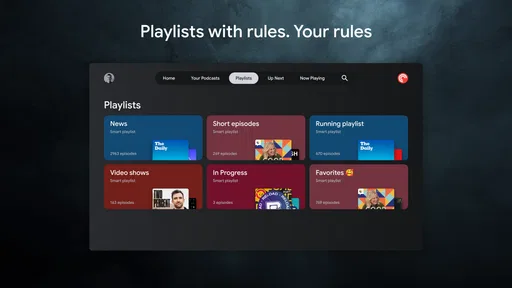
The first hurdle in any podcast player is usually not pressing play; it is deciding what to do with a growing queue. A new episode can be easy to miss among older ones, and a long subscription list can make browsing feel like sorting through a drawer. Pocket Casts gives listeners tools such as custom filters, which can help separate episodes by release date, play status, or download status. I would make a small number of filters for real habits—such as unplayed episodes or shows I save for a commute—rather than building a complicated system that becomes another chore.
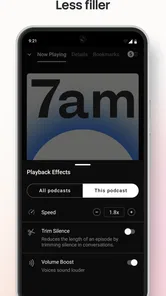
Playback controls can also take a moment to tune. If a show has long pauses, Trim Silence may make it easier to stay engaged; if voices sound quiet, Volume Boost may help. I would try these selectively, because faster or boosted playback will not suit every speaker or recording. When an episode sounds odd, switching those options off briefly is a useful way to tell whether the processing is helping or getting in the way.
Check the basics before changing everything
When listening does not behave as expected, I find it more useful to check one thing at a time than to reset my whole setup. First, confirm that I am looking at the intended show or filter; then check whether the episode is already marked played or waiting in a different part of the library. That simple sequence can resolve the apparent mystery of a missing episode without losing a useful listening arrangement.
Before relying on an episode during a commute, I would verify its download status while I still have a connection. A subscription does not automatically mean every episode is already available offline, so choosing the specific shows and episodes I need is a sensible habit. I would also leave room for a few longer episodes if my travel plans are uncertain; an overfilled backlog is not helpful if I cannot quickly find the one I actually want.
Playback settings are worth checking in context rather than setting once and forgetting. A brisk news discussion may remain clear at a faster speed, while a dense interview or a host with a relaxed delivery can become tiring. The same goes for Trim Silence and Volume Boost: they are tools to test on the particular show, not universal improvements. I would change one control, listen for a short stretch, and keep it only if it makes that episode easier to follow.
Seamless Experience
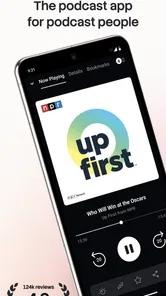
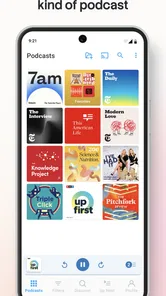
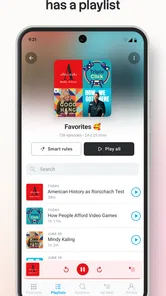
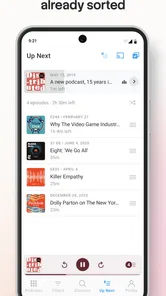
Right from the get-go, Pocket Casts offers a seamless experience. I was blown away by how intuitive the interface is. It's designed with the user in mind, making it super easy to navigate between different podcasts, playlists, and settings. The app's layout is clean, with a modern aesthetic that doesn't overwhelm.
More From Our News Desk

Weather by Xiaomi Review: Clear at a Glance, Less Clear Up Close

X Under Pressure: Can It Recover When Posting Goes Wrong?

Clash of Clans Is Won Between the Battles

Android Auto Makes the Case for Quieter Car Software

MobiOffice: Transforming Mobile Productivity with Seamless Integration

EA SPORTS FC™ Mobile Soccer: Redefining Mobile Sports Gaming
Features that Wow
Now, let's talk features. The app boasts some serious functionality. One of my favorite features is the "Trim Silence" option. It smartly cuts out any dead air in podcasts, saving you time and letting you focus on the juicy content. Plus, the "Volume Boost" feature is a lifesaver for those moments when the audio quality isn't up to par.
Another killer feature is the app’s ability to create custom filters. You can organize your podcasts based on different criteria like release date, play status, or even download status. It's like having your personalized podcast library right at your fingertips.
A setup that suits real routines
I would start by subscribing to a few shows I already know I finish, then adjust playback speed and use filters only after I see what piles up. That keeps setup manageable and makes it easier to spot which options genuinely save time. Automatic downloads can be useful for a regular commute or workout, but they work best when I choose which shows matter most; otherwise, a backlog can become harder to manage than the listening itself.
A realistic routine might be to check new episodes over breakfast, save one or two for a train ride, and use a filter to return to anything left unfinished later. If I listen before bed, the sleep timer offers a simple stopping point without needing to remember to pause manually. Pocket Casts is especially appealing to listeners who have several recurring shows and want more control than a basic play queue provides. If I only listen to one podcast now and then, a simpler player may be enough.
There is a practical benefit to separating listening by situation. I might keep a short news show in mind for a quick walk and reserve longer interviews for a stretch of uninterrupted travel. Filters based on play or download status can help me make that choice without needing to remember episode names. I would avoid making a separate filter for every mood, though: the system is most useful when each view answers a real question, such as “What can I listen to offline?” or “What have I not finished?”
That approach also makes the app easier to maintain. If I stop listening to a show, I can remove it from the routine instead of repeatedly filtering around episodes I no longer want. And if I enjoy a program only occasionally, I can leave it in the library without treating every release as homework. For me, a podcast queue should reduce decision fatigue, not turn listening into another inbox to clear.
Cross-Device Syncing
For those of us who switch between devices, the cross-device syncing feature is a game-changer. Whether you're on your phone or your tablet, Pocket Casts keeps your listening history, subscriptions, and preferences in check. No more manual updates or lost episodes!
Moreover, the app supports both Android and iOS, so you don't have to worry about compatibility issues. It's all about convenience, and Pocket Casts nails it.
When a handoff or download goes wrong
If a show or episode seems missing, I would first check that I am viewing the right filter and that the episode has not already been marked as played. For an offline trip, I would confirm the episodes I want are downloaded before leaving rather than assuming every new release is ready. If a listening position does not look current on another device, I would check the connection and give syncing a moment before replaying or changing progress on both devices; making several changes at once can make it harder to know which position is correct.
There is a useful distinction between a player problem and a source problem. If one episode fails while other shows play normally, the issue may be limited to that episode or its availability, rather than the whole app. Trying another episode and returning to the troublesome one later is a sensible first check. For a poor-sounding recording, playback enhancement can help, but it cannot turn a badly recorded voice into clean studio audio.
If playback stops during a handoff, I would avoid immediately jumping backward or forward on both devices. I would settle on the device I am using, check the connection, and give the listening position a chance to catch up before making another change. If the next episode plays normally but one specific item continues to fail, that points toward an episode-level issue rather than a reason to rebuild the whole library. This is a calmer way to troubleshoot because it preserves the progress and organization I already rely on.
It is also worth remembering that podcast availability depends on the individual show and episode. A player can organize and play what is available to it, but it cannot repair a source recording or make an unavailable episode appear. When only one program is affected, checking another show gives me a quick comparison. When several unrelated shows behave the same way, checking the connection and the app’s current state is a more sensible first move than changing every playback preference.
Customization Galore
If you're big on personalization, you're in for a treat. The app offers a plethora of options to tweak your listening experience. From changing themes to adjusting playback speed, it’s all customizable. You can even set up automatic downloads for your favorite shows!
And did I mention the sleep timer? It’s perfect for those who like to drift off to their favorite podcast. Set it, forget it, and enjoy a good night's sleep without worrying about your device playing through the night.
The sleep timer is especially useful when I want audio as part of a bedtime routine but do not want an episode continuing long after I have drifted off. I would still choose a stopping point that suits the show: a short timer is fine for winding down, while a longer conversation may be better left for another listening session. The feature makes the habit easier to manage, but it does not replace deciding whether I want background audio at all.
One trade-off with personalization is that every adjustment creates another choice to maintain. I would change the theme or speed when it improves comfort, not simply because the option exists. A good test is whether I notice the benefit during an ordinary week. If I keep forgetting a filter or do not use a playback adjustment after trying it, removing that extra layer can make the app feel simpler without giving up its core strengths.
Who will get the most from it
Compared with a basic podcast player, Pocket Casts puts more emphasis on organizing and tuning playback, which is valuable if you rotate among many shows or listen in different situations. A podcast service built around recommendations may be a better fit if finding unfamiliar programs is your main goal; this app’s strengths are more apparent once you have subscriptions to manage. Its Teen content rating is also worth noting for families choosing apps, even though the rating alone does not describe the topics of individual shows.
The purchase range means the app is free to start, but I would check the current in-app options before paying for anything and decide whether the feature or plan solves a real need. If you prefer a no-frills player, or do not want to spend time adjusting filters and playback, there is little reason to use every available control. The interface feels approachable, but the larger toolkit rewards a bit of experimentation.
For someone deciding between this and the podcast app already on their phone, I would ask what is frustrating them now. If the main problem is keeping a large set of subscriptions organized, Pocket Casts’ filters and playback adjustments are a meaningful reason to try it. If the current app already handles a small collection comfortably, switching may not improve much. And if browsing for new programs matters more than controlling episodes I already follow, a service with a stronger discovery focus may be the better starting point.
I also think it suits listeners who move between different kinds of audio habits: a news update in the morning, a long-form conversation on a walk, and a saved episode for a journey without reliable connectivity. It is less compelling for someone who expects a podcast player to choose what to hear next with minimal input. The app gives me useful ways to arrange and adjust listening, but the payoff depends on having shows I want to follow and being willing to shape the library around them.
Families should treat the Teen rating as a broad guide to app suitability, not as a description of every podcast available through it. Individual shows can cover very different subjects, so I would choose subscriptions with the intended listener in mind. That distinction matters more than the player’s organizational features when deciding whether the content itself is appropriate.
As a News & Magazines app developed by Automattic, Inc, it has been around since March 6, 2011. Its overall reception is mixed, with a 3.6 average across roughly 87,000 ratings and around 19,000 written reviews. I see that as a reason to approach it with realistic expectations: its strengths are practical organization and adjustable listening, while the best experience depends on whether those tools fit your routine. The app is free to begin using, and its Teen rating is relevant when choosing it for a younger listener.
In conclusion, Pocket Casts is not just another podcast player; it's a powerhouse of features that cater to both casual listeners and podcast aficionados alike. The combination of a user-friendly interface, robust features, and customization options make it a must-have app for anyone who loves podcasts. Whether you’re commuting, working out, or just chilling at home, Pocket Casts enhances the way you listen to your favorite shows. Trust me, once you try it, you’ll wonder how you ever lived without it!
Pocket Casts - Podcast App Frequently Asked Questions
Does Pocket Casts let me choose how fast podcasts play?
Yes. Pocket Casts includes playback speed control, which lets you adjust how quickly an episode plays to suit your listening habits. It also offers volume boost, a useful option when you want voices to come through more clearly. These playback tools can make the experience more comfortable across different shows, whether you prefer a quicker pace or simply want to fine-tune the sound.
Can I download Pocket Casts for free, and are there optional purchases?
Pocket Casts is free to download, so you can try its podcast player without paying upfront. The app also offers in-app purchases, with available items ranging from $3.99 to $99.99. That means it is worth checking the purchase options in the app before buying anything and considering whether the free experience meets your needs.
Is Pocket Casts easy to get started with if I’m new to podcasts?
Pocket Casts is a podcast player designed to help listeners find and play shows, so it can be a straightforward starting point if you are new to podcasts. You can explore programs that match your interests and build a library as you discover shows. The app is free to download, and it is intended for a Teen audience.
Is Pocket Casts available for both Android and iOS devices?
Yes, Pocket Casts is available on both Android and iOS platforms. Users can download it from the Google Play Store for Android devices and the Apple App Store for iOS devices. This cross-platform availability ensures that users can enjoy their favorite podcasts regardless of their device.
Does Pocket Casts offer offline listening?
Absolutely! Pocket Casts provides users with the ability to download episodes for offline listening. This feature is particularly useful for those who wish to enjoy their podcasts while traveling or when they have limited internet connectivity. Users can easily manage downloads to optimize storage space on their devices.
Pros
- User-friendly interface
- Extensive podcast library
- Offline listening feature
- Cross-platform sync
- Customizable playback options
Cons
- Limited free version
- Ads in free version
- Occasional bugs
- No video podcast support
- Subscription required for full features












