Current - Mobile Banking
- 47.82K
- 4.4
- Installs
- 5.00M
- Price
- Free

Screenshots
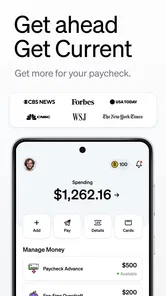
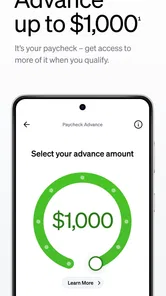
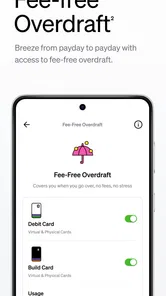
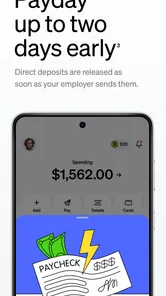

Analysis by Reviewed
I judge a finance app less by how many tools it puts on a screen than by whether I can answer a practical question without slowing down: did a payment go through, what money is available, and can I keep a little aside for a goal? Current: The Future of Banking is built around that phone-first routine, bringing account activity, spending tools, and savings goals together. Its convenience is most apparent when I have a dependable connection, so I would treat connectivity as part of the way I use it rather than an afterthought.
Where network access changes the routine
Banking on a phone is most useful when information is current: checking whether a purchase has appeared, noticing money arrive, or confirming what is available before paying. Current’s real-time notifications are intended to keep those moments visible. I find that kind of prompt more useful than opening an app repeatedly to check for changes, especially when I’m trying to keep everyday spending in view.
That convenience also makes connectivity part of the experience. If a signal is weak or the network is unavailable, I would not plan around an assumption that account details or alerts will refresh immediately. My practical habit would be to check important information before leaving a dependable connection, rather than relying on a last-second balance check at a checkout or while travelling.
That habit matters most when a decision has a consequence. If I am about to make a discretionary purchase, I can wait until the app has refreshed rather than treating an old screen as a live balance. For a bill or another time-sensitive payment, I would make the check earlier, while I have a stable connection and enough time to understand what I am seeing. The point is not to avoid mobile banking; it is to avoid asking a phone to provide certainty at the exact moment its network is least dependable.
Quick checks while moving through the day
Current is a finance app from developer Current. It is free, rated for Everyone, and runs on Android 8.0 or later. Its 7.43.0 version sits in a category where people often want quick answers rather than a long desktop-style session, and the app’s straightforward setup and interface suit that mobile-first expectation.
A realistic use is checking a notification after lunch, then reviewing the transaction later when you have time to think about the rest of the day’s spending. The app’s savings pods can support a separate goal alongside everyday money, which may help someone who tends to spend whatever looks available. I’d use a clear label for each goal and choose an amount that still leaves room for routine bills; a savings target is useful only if it doesn’t make normal cash flow confusing.
On a busy day, I would use the alert as a prompt to review rather than as a complete record of my finances. For example, after buying lunch, a transaction notification can draw my attention to the purchase; later, a calmer check-in is a better time to consider how it fits with the week’s spending. That small separation between noticing an event and making a money decision is useful for anyone who tends to react to every alert immediately.
More From Our News Desk

 Bolt: Request a Ride
Bolt and the Shift from One-Tap Rides to More Legible Trips
Bolt shows how ride-hailing is shifting from a one-tap taxi request toward a more legible, choice-driven trip, while leaving the hardest questions of price and reliability unresolved.

 Farm Land - Farming life game
Farm Land Review: A Small Island Farm with a Satisfying Loop
A bright, breezy island farm turns a few quick chores into a satisfying cycle of planting, harvesting, expanding, and deciding what to build next.

 Android Auto
’s Community Takes Shape in the Passenger Seat
Its most valuable network is not a public feed but a shared set of routes, voice habits, app integrations, and advice that make driving less isolating—and sometimes more complicated.

 My Talking Angela
 Makes the Virtual Pet Feel Personal
A polished pet-raising game built on small rituals, playful customization, and a character who gives everyday screen time a surprisingly personal rhythm.

 Google Translate
 Review: A Pocket Tool for the Small Frictions of Travel
From menus and signs to quick conversations, Google Translate earns its place by cutting the little delays that make unfamiliar language feel like a barrier.

 Shazam: Find Music & Concerts
Shazam’s Best Trick Is Turning a Song Into a Night Out
A few seconds of recognition can settle an argument, rescue a half-remembered chorus, and point toward a live show. Shazam’s real trick is what happens after the match.
Latest News



The app has a 4.5 average from around 173,000 ratings, and it has been installed over 5 million times. That level of adoption suggests many people are willing to try it, but popularity does not settle whether its features match your needs. Current is a better fit for someone who likes managing money on a phone than for someone who wants all their financial decisions handled through a traditional branch relationship.
A phone-centered way to manage everyday money
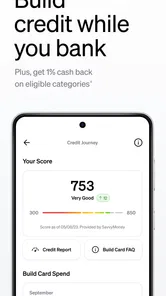
From the moment I downloaded the Current app, I was impressed by its user-friendly interface. Setting up an account was a breeze, and within minutes, I was exploring all the features it had to offer. The app is designed to make banking as seamless as possible, and it definitely delivers on that promise.
One of the standout features of Current is its ability to provide real-time notifications. Whether it's a paycheck hitting your account or a debit transaction, you'll be instantly updated. This feature is particularly useful for those who like to keep a close eye on their spending.
For people comparing it with a usual bank app, the key distinction is emphasis. A conventional banking app may be enough if the main task is occasional account access; Current’s appeal is stronger if you want activity prompts and goal-based saving to be part of regular phone check-ins. I would not switch solely because a finance app looks modern. I would first ask whether alerts and savings pods solve a real habit problem for me, such as losing track of small purchases or repeatedly dipping into money meant for a goal.
Making savings goals work alongside spending
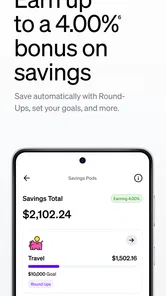
Current isn't just about basic banking; it’s packed with innovative features that set it apart from traditional banks. The app offers a savings pod feature, which allows you to set aside money for specific goals. It’s like having a digital piggy bank that helps you save for that dream vacation or emergency fund.
Another impressive feature is the ability to earn points on purchases. These points can be redeemed for various rewards, adding an element of fun to your daily spending. Plus, the app offers overdraft protection up to $100 with no hidden fees, which is a huge relief for those unexpected expenses.
For a practical routine, I’d treat the savings pod as a deliberate boundary, not as a substitute for a spending plan: set aside goal money, then review the remaining balance before recurring expenses come due. Purchase points can make routine spending feel rewarding, but I would not buy something just to collect them. The useful comparison is with a conventional bank app: Current puts mobile tools and alerts front and center, while someone who values in-person help or prefers to keep banking away from a phone may be happier with a different option.
A useful way to test a savings pod is to begin with a modest goal that has a clear purpose and a time horizon you understand. Give it a name that tells you what the money is for, then check whether setting money aside leaves your everyday balance comfortable around regular bills. If the separation makes your finances harder to read, adjust the habit rather than adding more goals. The feature is most valuable when it clarifies priorities, not when it creates extra bookkeeping.
Points are best treated as a small extra attached to spending I already intended to do. I would not let rewards change where I shop or encourage an unplanned purchase; that can turn a simple incentive into a distraction from the budget. Likewise, overdraft protection can be a useful buffer for an unexpected expense, but I would not treat access to it as a reason to keep less money available for predictable costs. A safety net is more helpful when it remains a backup.
When another banking setup may suit you better
Current will make the most sense to someone who likes a quick phone check, wants to notice account activity, and benefits from separating a goal from ordinary spending. It may be especially useful for a person building a savings habit who does not need branch visits to feel comfortable managing money. A household member who prefers paper records, face-to-face help, or a computer-centered workflow may find a familiar bank and its service model more reassuring.
I would also think carefully before making any finance app the only way I keep track of time-sensitive money. If I have an important payment coming up, I would check it in advance, leave enough time to respond to a problem, and keep my own clear record of what I intended to do. That is sensible with any phone-based banking routine, but particularly so when the task depends on an up-to-date connection and an alert arriving when expected.
Security, support, and sensible expectations
When it comes to banking, security is paramount, and Current takes this seriously. The app uses state-of-the-art encryption and security measures to protect your financial information. I felt confident knowing that my data was in safe hands.
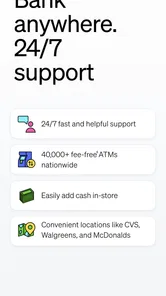
Additionally, the customer support team at Current is top-notch. They are available 24/7 to assist with any queries or concerns, which is incredibly reassuring. Whether it's a technical issue or a general question about your account, help is just a message away.
Even with support available, I would keep a simple recovery routine: if a screen does not load, first check the connection and try again when service is steadier; if the issue concerns a transaction or access to the account, contact support rather than repeatedly attempting actions that could add confusion. For a data-conscious user, it also makes sense to use notifications selectively and open the app when there is a specific task, instead of treating every alert as a reason to browse. That keeps the phone experience focused while still making meaningful account activity easier to notice.
If an alert seems delayed or a screen looks incomplete, I would avoid making a second payment just to be safe until I can check the transaction status. Repeating an action without knowing whether the first one went through can create more uncertainty than waiting for a reliable refresh. If the question remains unresolved, support is a more sensible next step than guessing. This is a small but practical distinction between using notifications to stay aware and relying on them as proof that every financial action has finished.
For lighter data use, I would keep alerts that help me spot important activity and skip notifications that do not change what I need to do. I would also avoid opening the app repeatedly out of habit when there is no specific question to answer. That approach reduces needless checking and makes each visit more purposeful, while still leaving the app available for a deliberate review when the connection is steady.
Current was released on May 5, 2017, and its appeal is clearest for people who want a phone-based way to follow spending, set aside money for goals, and receive activity prompts. I would look elsewhere if dependable offline access, branch-based service, or a less mobile-centered routine is essential to you. For everyone else, my connectivity verdict is simple: it can make routine money checks feel more immediate, but it works best when you have a stable connection and use its tools with a little planning.
Overall, Current: The Future of Banking lives up to its name by offering a modern, streamlined banking experience that caters to the needs of today's users. With its intuitive interface, innovative features, and strong security measures, it’s clear why this app is gaining popularity. If you’re looking for a banking solution that fits into your fast-paced lifestyle, Current might just be the answer.
My recommendation is to approach it as a convenient daily companion, not as a replacement for thoughtful money decisions. If you are comfortable handling finances on a phone and will use the savings and activity tools consistently, it is worth considering. If dependable access without a connection or in-person guidance is central to your banking routine, a different setup is likely the better fit. In either case, planning checks around a reliable connection makes the experience more useful and less stressful.
Current - Mobile Banking Frequently Asked Questions
Is Current: The Future of Banking available for iPhone as well as Android?
Current: The Future of Banking is a finance app, and you should check the app store on your device to confirm availability and compatibility before downloading. For Android users, the app requires version 8.0 or later. Checking your device’s operating system first can help you avoid installation problems and decide whether the app is suitable for the phone or tablet you plan to use.
Who develops Current: The Future of Banking, and what does the app focus on?
Current: The Future of Banking is developed by Current and focuses on managing everyday money through an app. Its store summary, “Save, spend & get paid faster²,” highlights the main idea: bringing spending, saving, and receiving money together. It may be useful for people who prefer app-based money management, including parents interested in managing teen accounts through family-oriented features.
What is Current: The Future of Banking, and who might find it useful?
Current: The Future of Banking is a finance app developed by Current, with tools for spending, saving, and receiving money. Its store summary is “Save, spend & get paid faster²,” and its short description is simply “Current.” It may suit people who want to manage everyday money through an app, while its family-oriented features may also interest parents managing teen accounts.
What operating system does Current: The Future of Banking require?
Current: The Future of Banking requires Android 8.0 or later. Before downloading, check the Android version on your device to make sure it meets that minimum; an older operating system may prevent installation or use. The app is free, so you can install it without paying a download price, subject to any applicable terms for particular services or transactions.
What features does Current: The Future of Banking offer?
Current: The Future of Banking offers a wide range of features designed to enhance your banking experience. These include real-time spending notifications, savings pods for easy budgeting, no overdraft fees, and early direct deposit access. The app also offers parental controls for teen accounts, making it a versatile tool for both adults and families.
Pros
- User-friendly interface for seamless navigation
- Instant notifications for all transactions
- Advanced security features to protect data
- Supports multiple currencies and accounts,24/7 customer support for assistance
Cons
- Limited features in the free version
- Occasional bugs affecting performance
- Requires stable internet connection
- High fees for international transfers
- Complex registration process