Cross DJ - Music Mixer App
- 4.50K
- 4.1
- Installs
- 10.00M
- Price
- Free

Screenshots
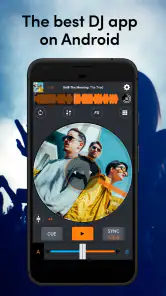
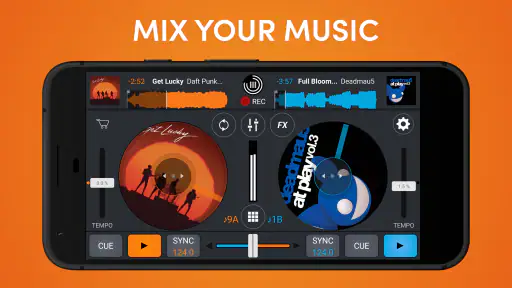
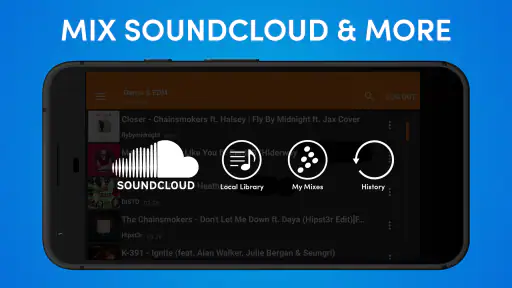
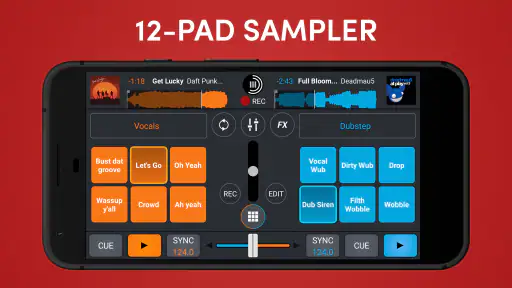
Analysis by Reviewed
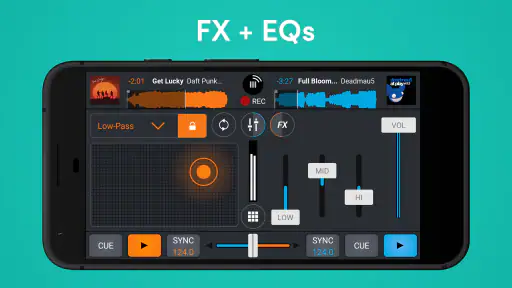
I approached Cross DJ as a practical mobile mixing tool rather than a replacement for a full desktop setup. It belongs to the Music & Audio category, comes from MIXVIBES, and is free to start using. The basic appeal is easy to understand: you can work with two tracks, adjust their timing, scratch, and prepare a quick mix without carrying a laptop or controller. After spending time with it, I found that its value depends less on flashy effects and more on whether you enjoy making small, hands-on decisions while listening.
The app is aimed at people who want to experiment with DJ techniques on a phone or tablet. That includes beginners learning what a crossfader does, casual listeners making a transition for a party, and more experienced users who need a compact practice tool. It is not the best fit for somebody expecting the depth, physical control, or library management of a computer-based DJ system. Still, it is more useful than a simple music player because it puts the transition itself in your hands.
How Cross DJ feels in everyday use
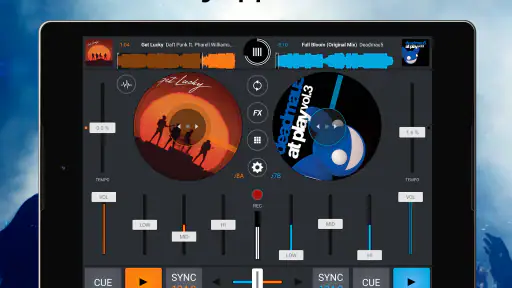
The first thing I noticed is that the experience is built around immediate interaction. Instead of treating a song as something you merely play, the app encourages you to watch the two decks, listen for timing, and move between them deliberately. That makes it approachable, but it also means the screen becomes part of the performance. You need enough attention to avoid accidental taps, especially when you are trying to change several controls during a transition.
For a newcomer, the two-deck approach is a sensible starting point. You can focus on one track that is playing and another that is being prepared, then gradually learn how volume, timing, and the crossfader affect the result. I recommend beginning with songs that have clear, steady rhythms. Tracks with very different tempos or irregular arrangements make the learning curve feel steeper because the problem is not always the app; sometimes the music itself is difficult to blend.
The app’s free entry point is important here. You can explore whether mobile DJing suits you before committing to specialist hardware or a more expensive software setup. There are in-app purchases ranging from $0.99 to $229.99 per item, so I would check the purchase screen carefully before unlocking anything. The wide range suggests that optional additions may be aimed at different levels of use, and a casual user should avoid assuming that every advanced possibility is necessary.
Its public reception is generally positive, with a 4.1 average from roughly 182 thousand ratings and more than 10 million installs. Those figures do not tell me that every device will behave identically, but they do show that the app has reached a substantial audience. The 4.5 thousand written reviews also give it a visible history as an established mobile DJ option rather than a brand-new experiment.
Speed expectations on a phone
In normal use, I would expect the main controls to feel more immediate when the device is reasonably modern and the project is simple. Loading music, switching attention between decks, and making a basic transition are the kinds of actions this format is designed to handle. The experience feels quickest when I prepare the next track before I need it, rather than waiting until the current song is already reaching its transition point.
More From Our News Desk

Weather by Xiaomi Review: Clear at a Glance, Less Clear Up Close

X Under Pressure: Can It Recover When Posting Goes Wrong?

Clash of Clans Is Won Between the Battles

Android Auto Makes the Case for Quieter Car Software

MobiOffice: Transforming Mobile Productivity with Seamless Integration

EA SPORTS FC™ Mobile Soccer: Redefining Mobile Sports Gaming
That preparation habit makes a noticeable difference to confidence. I like to load both tracks first, listen to the opening sections, and decide where the handoff should happen. This is not just a musical tip; it also reduces the number of urgent actions happening at once. If you are learning, it gives you room to correct a mistake without the pressure of a song ending unexpectedly.
Touch controls can never provide exactly the same physical feedback as knobs and platters. A finger covers part of the interface, and a small movement may be less precise than turning a dedicated control. For that reason, perceived speed is connected to accuracy. A fast response is not especially helpful if you have to repeat a gesture because the first one landed slightly away from the intended control.
I would also avoid judging the app solely by how quickly it opens. A DJ tool is successful when it stays understandable during a transition. Clear visual separation between the two sides, predictable control behavior, and enough time to prepare matter more to me than a dramatic launch animation or a long list of effects.
What happens during heavier mixing sessions
Simple two-track practice is one thing; a longer session with repeated loading, scratching, effects, and frequent adjustments puts more pressure on both the person and the device. I found that the human factor becomes important quickly. Touch mixing requires concentration, and a crowded screen or hurried finger movement can create more trouble than the audio workload itself.
My practical advice is to keep a session organized. Choose a small group of tracks before beginning, make sure the next song is ready, and avoid changing several unrelated settings in the middle of a transition. This workflow is especially helpful on a phone, where the display is smaller and accidental touches are easier to make. It also makes it easier to identify whether a poor result came from timing, volume balance, or an effect that was used too aggressively.
Scratching is fun for short creative moments, but I would not treat it as a substitute for a physical turntable experience. On glass, the gesture is visually direct but lacks the tactile resistance that helps a performer judge movement. I see it as a useful way to add a personal accent or practice rhythm, not as the main reason to choose the app.
Longer sessions also expose the trade-off between convenience and control. A phone is always close by, but it is sharing attention with notifications, calls, battery demands, and the possibility of the operating system interrupting you. If the mix matters, I would use a device dedicated to playback or at least enable a distraction-free setup before starting. That is good practice for any mobile audio app, but it matters more when timing is central.
Reliability and recovering from mistakes
What I value most in a mobile mixing app is not the promise of perfection; it is the ability to recover calmly when I make a bad move. Cross DJ works best when I treat every transition as something I can rehearse. If the tracks drift apart or the blend becomes muddy, I can bring the crossfader back toward the stronger track, lower the incoming volume, and try again at a more suitable point.
That recovery mindset is one of the app’s strongest educational qualities. A normal music player hides the mechanics of a transition, while this app lets you hear the consequences of each decision. I learned more by deliberately making small mistakes than by trying to create a flawless mix immediately. Beginners should use that freedom: start with short practice sessions, repeat the same transition, and change only one control at a time.
For reliability, I would prepare rather than improvise around a weak connection or a busy device. Keep the app updated to its current version, 4.1.1, and avoid beginning an important mix while the phone is performing other demanding tasks. I would also test the exact tracks and workflow before using the app at a gathering. A private practice session is the right place to discover whether a particular song arrangement, audio source, or device setup suits you.
The app has been available since March 13, 2014, which gives it a long presence in this category. That history is reassuring when compared with an untested newcomer, although longevity should not be confused with guaranteed behavior on every device. Mobile operating systems change, hardware varies, and audio work is sensitive to conditions that do not affect ordinary apps as much.
Recovery also depends on how much control you expect. If you need a fully rehearsed performance with precise external control, a desktop DJ application or hardware controller is the safer choice. If your goal is to practice transitions, make a casual mix, or explore the basics without a large setup, the app gives you enough room to learn from errors instead of hiding them.
Device limits that affect the experience
Cross DJ supports devices running Android 7.0 or later, and its Everyone content rating makes it broadly accessible. Those facts make the entry barrier fairly low, but they do not mean every compatible phone will feel equally comfortable. The minimum operating system is only a compatibility floor. Screen size, touch accuracy, available storage, audio hardware, and general age of the device can all shape the experience.
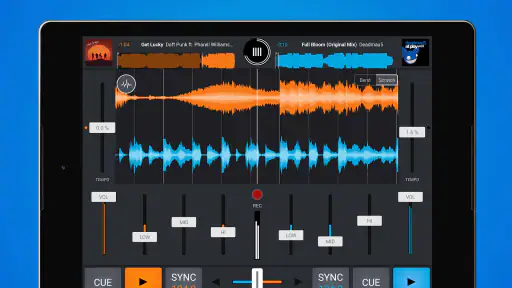
I would choose a larger screen whenever possible. A tablet gives the decks and controls more breathing room, making it easier to see what I am adjusting and reducing the chance of tapping the wrong area. A phone is more portable and perfectly suitable for learning, but its compact layout asks for more precision. If you plan to mix while walking around a room, a phone wins for convenience; if you plan to practice seriously, a tablet or larger display is easier on the eyes and fingers.
Resource demands are also worth considering without pretending that one performance profile fits all hardware. Basic mixing should be a lighter task than a long session involving repeated track changes and several simultaneous adjustments. Older devices may feel less comfortable under sustained use, especially if they are already warm or short on free space. I would close unnecessary apps, keep the device charged, and avoid testing a new workflow for the first time in front of guests.
Audio output is another practical constraint. Phone speakers are useful for checking an idea, but they are not a reliable way to judge bass balance or subtle blending in a noisy room. Headphones are much more valuable because they let you preview what is coming next while the main output continues. That preview workflow is one of the clearest reasons to use proper headphones instead of relying only on the built-in speaker.
People who need professional routing, a carefully managed music library, detailed automation, or dependable physical controls should look toward a desktop alternative. Cross DJ is better understood as a portable practice and performance aid. Its advantage is that it removes equipment from the equation; its limitation is that the same simplicity removes some of the precision and depth professionals may require.
Three workflows that make it more useful
The first workflow I recommend is a “one variable” exercise. Load two compatible songs, keep the volume steady, and practice only the crossfader. Once that feels natural, repeat the exercise while adjusting the incoming level. This separates timing and balance from effects, which prevents beginners from using effects to disguise an unstable transition.
The second is a headphone-led preparation routine. While one track plays, preview the next and identify a section with a similar rhythmic feel. Bring it in quietly, listen for whether the beats support each other, and be ready to retreat if the combination sounds crowded. This is more reliable than choosing songs only because their melodies seem compatible; rhythm and arrangement usually decide whether the handoff feels smooth.
The third is a recovery drill. Intentionally move the incoming track too far forward or backward, notice how the clash sounds, and practice returning to the outgoing track without panicking. That exercise teaches you to use the crossfader and volume as safety controls. It also makes the app more than a toy because you are building a repeatable response to a common live mistake.
A fourth useful habit is to record your own listening notes outside the performance moment. After a session, write down which pairings worked and where the transition became uncomfortable. The app can provide the hands-on mixing environment, but your improvement comes from remembering what happened. This is particularly helpful when the same small collection of songs is used repeatedly.
Who should use it, and who should skip it
I would recommend Cross DJ to a curious beginner who wants to understand the mechanics of mixing before buying equipment. It is also a good companion for someone who already knows the basics and wants a portable way to sketch an idea. A friend preparing music for a small informal gathering could use it to rehearse transitions in advance, then decide whether the phone setup is sufficient for the actual event.
It is less suitable for a performer who depends on tactile precision, complex preparation, or a carefully engineered live rig. A dedicated controller gives clearer physical feedback, while desktop software generally offers more workspace and a more comfortable way to manage a large set. If your priority is simply listening to music with no interest in manipulating it, a standard player will be less demanding and more convenient.
The purchase model deserves a measured approach. Because the app is free, I would begin with the basic experience and only consider an optional purchase after identifying a specific limitation in my own workflow. Spending money before knowing whether I enjoy touch-based mixing is unnecessary. The possible per-item range reaches $229.99, so checking exactly what an upgrade changes is essential for keeping the app aligned with your budget.
Its age rating of Everyone makes it suitable for a broad audience, but suitability is not the same as simplicity. Young or completely new users may still need time to understand why two songs can sound unpleasant together, and a visually busy mixing interface can be confusing at first. I would introduce it through short, guided experiments rather than handing it over with the expectation that the controls will explain themselves.
My performance verdict
My overall impression is that Cross DJ succeeds when I use it as a focused, portable mixing workspace. It offers a practical path from passive listening to active experimentation, and the two-deck format gives beginners a clear place to start. The strongest benefit is not that it turns a phone into professional hardware; it is that it lets me practice musical timing and recovery with very little preparation.
Its limitations are equally clear. Touch controls cannot fully replace knobs, platters, or a larger desktop layout. Device age, screen size, audio output, and distractions can affect the experience, while longer sessions demand more preparation than the short store summary might suggest. I would not choose it for a high-stakes professional performance without testing the complete setup carefully.
Still, for a free Music & Audio app with a broad Android compatibility range, an established history, and a large user base, it is an appealing starting point. MIXVIBES has made something that is approachable without reducing mixing to a single automatic button. My recommendation is simple: use it to learn, rehearse, and create quick mobile mixes, but choose dedicated DJ software when precision, scale, and physical control matter more than portability.
In daily life, that makes it a useful “practice anywhere” companion. I can explore a transition during a quiet evening, prepare a short set before meeting friends, or use headphones to understand why a pairing works before sharing it. If that sounds like the kind of hands-on listening you want, Cross DJ is worth trying. If you only want effortless playback, or already need a professional performance environment, another option will probably suit you better.
Cross DJ - Music Mixer App Frequently Asked Questions
Can I download Cross DJ on an iPhone or iPad?
Cross DJ is a mobile DJ app, and its availability and compatibility can differ between Android and iOS. Before downloading on an iPhone or iPad, check the app’s current App Store page for device and operating system requirements, as well as the features offered in that edition. This helps ensure the version you install suits your device and the kind of mixing you want to do.
How much space should I allow for Cross DJ and my music?
Plan for room not only for the app but also for the tracks you intend to use. Music files can take up considerably more storage than the mixer itself, especially if you keep a large collection on your device. Leaving some free space can also help your device manage its library smoothly. Check available storage before installing and consider removing tracks you no longer need.
Can I use Cross DJ without an internet connection?
Cross DJ is intended for working with music on a mobile device, so locally stored tracks are the most practical choice when you want to mix away from a connection. Whether a particular song is available offline depends on how it was obtained and stored. Music protected by a streaming subscription may have restrictions, so download or import compatible files to your device before relying on them for a set.
Does Cross DJ work well on a tablet as well as a phone?
Cross DJ is designed as a mobile DJ application, and a tablet can provide more screen space for viewing decks and controls. The experience still depends on the specific device: responsiveness, audio behavior, and comfort with the interface can vary. If you plan to perform with it, try the controls on your device first and consider whether its screen layout feels manageable for the way you mix.
Can I share mixes made with Cross DJ?
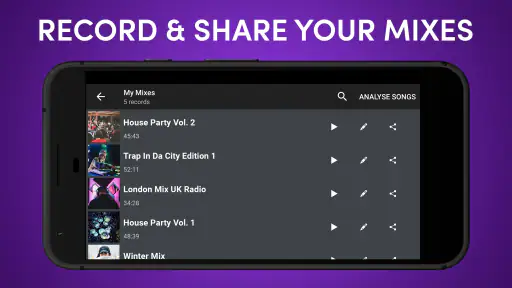
Cross DJ’s short store description highlights mixing, scratching, and sharing on the go. Sharing can be useful when you want to pass a mix along, but remember that music rights and the rules of any platform you use still apply. The sharing experience may also depend on the app edition and your device’s available options, so check how the feature works before planning a public release.
Pros
- Accurate beatmatching helps tracks blend smoothly.
- Supports external audio files for more flexible mixing.
- Waveform views make cue points and transitions easy to spot.
- Responsive controls feel natural on both phones and tablets.
- Useful effects add variety without overwhelming beginners.
Cons
- Some advanced features require an in-app purchase.
- The interface can feel crowded on smaller phone screens.
- Long mixing sessions may drain the battery quickly.
- Audio quality depends heavily on the device and headphones.
- Beginners may need time to learn the full control layout.
- Category
- Music & Audio
- Version
- 4.1.1












