Credit Sesame: Grow your score
- 32.07K
- 4.7
- Installs
- 5.00M
- Price
- Free

Screenshots





Analysis by Reviewed
For me, the most useful way to think about Credit Sesame is as a place to check in on your credit, not a button that can instantly improve it. A score is only one part of a financial picture, and the value here comes from seeing changes and considering what might be behind them. Credit Sesame is a finance app from Credit Sesame, Inc.; I’d recommend it to someone who wants a regular, understandable snapshot rather than a complicated collection of credit tools.
When a connection matters
Because the app is built around credit information, alerts and account views, I’d expect to use it when I can get online, especially when checking a new notification or reviewing an account detail. That makes it less like a notebook for recording expenses and more like a connected dashboard: its usefulness depends on being able to reach current information. I would not plan a time-sensitive financial decision around a screen I opened earlier; I’d check again when connected before acting.
A practical habit is to open the app during a calm moment, review what has changed, and make a note of questions to resolve elsewhere. If an alert appears while I’m out, I can treat it as a prompt to investigate rather than proof that something is wrong. That distinction helps prevent a quick phone notification from turning into a rushed decision.
Connectivity also affects how I’d handle an interrupted check. If information does not load or I lose my connection, I’d wait and try again rather than assume that a partial screen reflects the latest account view. For anything that could affect an application or a response to an unfamiliar change, I’d confirm the details when I can review them properly.
A fit for quick checks, not every money task
The mobile layout is useful for brief check-ins between errands or before a call with a lender. For example, if I’m comparing loan options, I can look at my credit picture first, then take time to read the lender’s actual terms. The app can help me arrive better prepared, but it cannot replace reviewing the interest rate, fees, repayment schedule and eligibility rules that apply to a specific offer.
It is also worth separating monitoring from action. Seeing a factor associated with a score does not automatically tell me which financial move is best for my circumstances. I’d use the app to identify a question—such as whether a reported account looks familiar—then verify details through the relevant creditor or reporting channel before making a major choice.
That makes it most useful as a companion to a specific task, not the task itself. Before a lender call, I might use it to organize what I want to ask; after the call, I’d rely on the lender’s terms and documents for the decision. If I’m simply trying to work out where the household budget went, a budgeting tool is a more direct fit.
More From Our News Desk

 Bolt: Request a Ride
Bolt and the Shift from One-Tap Rides to More Legible Trips
Bolt shows how ride-hailing is shifting from a one-tap taxi request toward a more legible, choice-driven trip, while leaving the hardest questions of price and reliability unresolved.

 Farm Land - Farming life game
Farm Land Review: A Small Island Farm with a Satisfying Loop
A bright, breezy island farm turns a few quick chores into a satisfying cycle of planting, harvesting, expanding, and deciding what to build next.

 Android Auto
’s Community Takes Shape in the Passenger Seat
Its most valuable network is not a public feed but a shared set of routes, voice habits, app integrations, and advice that make driving less isolating—and sometimes more complicated.

 My Talking Angela
 Makes the Virtual Pet Feel Personal
A polished pet-raising game built on small rituals, playful customization, and a character who gives everyday screen time a surprisingly personal rhythm.

 Google Translate
 Review: A Pocket Tool for the Small Frictions of Travel
From menus and signs to quick conversations, Google Translate earns its place by cutting the little delays that make unfamiliar language feel like a barrier.

 Shazam: Find Music & Concerts
Shazam’s Best Trick Is Turning a Song Into a Night Out
A few seconds of recognition can settle an argument, rescue a half-remembered chorus, and point toward a live show. Shazam’s real trick is what happens after the match.
Latest News



Everyday use and sensible boundaries
Picture checking your phone after a notification arrives during a busy workday. Rather than trying to solve everything on the spot, I’d note what changed, confirm I’m looking at the right account, and return to it when I have time to review the details. That small pause is useful: credit information can be personal, and a short alert is a starting point, not a full explanation.
Since this is a finance app, I’d also be deliberate about where I sign in and who can see my screen. I prefer a private moment for account details, and I avoid making sensitive decisions while distracted or on a connection I don’t trust. Those are good habits for any credit service, not a special setting or guarantee from the app.
For instance, if I see a change while waiting for a bus, I can make a mental note to look again at home rather than investigate while people are nearby or I’m rushing. That small choice helps me give the details proper attention. It also keeps a notification from dictating when I make a financial decision.
Who will get the most from it
I see the strongest fit for someone building credit awareness, preparing for a future application, or trying to notice changes without digging through several separate sources every time. Someone who already tracks credit closely through other services may find another dashboard redundant. And if what you really need is a full household budget, debt payoff planner or direct help disputing an error, I’d choose a tool or service designed specifically for that job instead of expecting one credit app to cover everything.
I’d also be comfortable recommending it to a person who wants an accessible first step but is willing to follow up outside the app. It is less suited to someone expecting a personal adviser to explain every decision, or anyone who would rather keep credit checks off a phone. In those cases, using a direct reporting channel or asking a qualified professional may be more reassuring.
Ever found yourself scratching your head over your credit score? Well, let me introduce you to Credit Sesame, an app that promises to make understanding and improving your credit score a breeze. I recently dove into this app, and here's my take on it.
Getting Started with Credit Sesame
The first thing you'll notice about Credit Sesame is how easy it is to get started. You just download the app from your app store, punch in some basic info, and voila! You're in. No hoops, no hurdles, just straightforward setup. And trust me, this is a big plus when you’re eager to know where you stand financially.
Before setting up any finance app, I’d take a moment to make sure I’m downloading the right product and comfortable entering personal details on my device. Then I’d set a realistic expectation for the first check: a starting snapshot is useful, but it is not a promise that a score will move immediately. The best reason to install it is to build a habit of reviewing information and following up thoughtfully.
Features that Stand Out
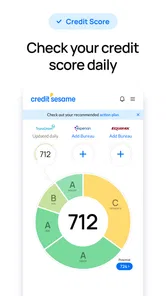
Now, let's talk features. This app isn't just about showing you a number. It offers a whole toolbox to help you grow your score. From personalized tips on how to improve your credit to alerts about changes in your credit report, it’s like having a financial advisor in your pocket.
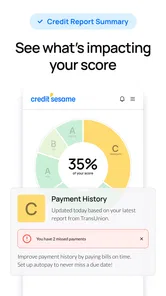
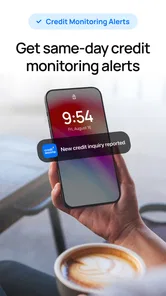
One feature I particularly loved was the credit monitoring. It’s updated monthly, and the app sends you notifications for any significant changes. This means you’re never in the dark about your financial health. Plus, the app offers insights into factors affecting your score, which is super handy for anyone looking to make informed financial decisions.
My practical tip is to connect a suggestion to a real question before acting on it. If an insight points me toward a factor, I’d check whether it matches my situation and then look for the details that explain what action, if any, makes sense. This avoids turning general guidance into an automatic rule for a personal financial choice.
User Experience
What really sets Credit Sesame apart is its user-friendly interface. You don’t need to be a finance guru to navigate through it. The design is clean, intuitive, and everything is right where you’d expect it to be. Understanding your credit score has never been so straightforward.
And if you’re like me, always on the go, you’ll appreciate how seamless the app is on mobile. It’s fast, responsive, and doesn’t eat up your phone’s battery life. Plus, the app’s layout is designed to give you a quick glance at your financial status, which is perfect for those busy days.
For a phone-based routine, I’d keep checks brief and intentional: open the app to answer one question, then leave deeper comparisons for a quieter moment. That makes the overview convenient without encouraging me to make an important decision from a quick glance. If I need to compare documents or understand a complicated change, a larger screen and more time may suit the task better.
Final Thoughts
In a world where financial literacy is more important than ever, Credit Sesame offers a valuable resource for anyone looking to take control of their credit score. Whether you’re trying to buy a house, apply for a loan, or just keep tabs on your financial health, this app has got your back.
Sure, there are other apps out there, but Credit Sesame combines ease of use with powerful insights, making it a standout choice. So if you're ready to take charge of your financial future, give this app a try. It might just be the tool you need to grow your score and gain peace of mind.
I’d describe the main trade-off as convenience versus completeness. The app brings credit-focused information into a mobile view, while a lender, reporting channel, or budgeting service handles a different part of the picture. I wouldn’t expect one app to settle a dispute, explain a lender’s decision, or plan every household expense. Used for awareness and as a prompt for the next sensible check, it has a clearer role.
What to expect before installing
The app is free to download and is rated for everyone, although some in-app purchases are available, priced from $1.99 to $59.99 per item. I’d check any purchase details carefully before confirming; the free entry point does not mean every optional offering costs nothing. Its current version is 7.21.1, and it requires iOS or Android 10 or later, so compatibility is worth checking before you plan to make it part of a routine.
Its 4.7 average across around 196,000 ratings, with more than 5 million installs, suggests that many people have made it part of their credit-checking habits. That doesn’t tell me whether it will suit a particular person, though. I’d judge it by whether its alerts and explanations help me take a useful next step, rather than by the score shown on the store page.
Credit Sesame was released on June 28, 2012, and the 32,000 reviews give prospective users another broad sign that it has an established audience. I would still make the decision based on my own needs: whether I want a credit-focused dashboard, whether I’m comfortable using one on my phone, and whether I’ll actually follow up on what I see.
Making alerts more useful
One non-obvious way to get value from a monitoring app is to avoid treating every notification as an emergency. I’d use an alert as a cue to compare the relevant information with what I already know, then follow up through the appropriate source if something seems unfamiliar. This keeps a concise mobile prompt in its proper role: a signal to check, not a complete investigation or a substitute for resolving a reporting issue.
For someone preparing for a major application, the better workflow is to check well before submitting, leave time to understand any unexpected change, and review the lender’s own requirements separately. That is more useful than opening an app moments before applying and assuming one score settles the question. Credit Sesame can help me stay oriented, while the lender makes its own decision using its own criteria.
If a check is interrupted, I’d treat it as unfinished rather than draw a conclusion from whatever information did appear. When I can reconnect, I’d return to the relevant account view and verify the change before contacting anyone or changing plans. That recovery habit is simple, but it matters when a quick mobile glance is the first clue to something that deserves closer attention.
Choosing it alongside other tools
Compared with checking a credit report through separate channels, a single app can make routine monitoring feel less fragmented. Compared with a budgeting app, however, its focus is narrower: it is for credit awareness rather than a complete view of daily spending. I would use it alongside a budget or lender account if those are the tasks I need, not replace them. The trade-off is convenience in one area without expecting it to become an all-purpose financial organizer.
Credit Sesame launched on June 28, 2012, and has a content rating of Everyone. I think it makes the most sense for adults who want accessible credit guidance and are comfortable checking sensitive financial information on a phone. If you prefer not to connect personal finance activity to an app, or you need hands-on help untangling a complex credit issue, a direct conversation with the relevant institution or a qualified adviser may be a better starting point.
On data-conscious use, I’d keep the same discipline I use with other financial services: choose a private setting, protect access to my phone, and read the details of any optional purchase before agreeing. I would not assume that a score view replaces the records held by the organizations involved. When a detail matters, I’d compare it with the appropriate source and keep my decision grounded in the underlying information.
My connectivity verdict is straightforward: this is most useful when I have a dependable moment to check a current view, interpret an alert, and decide what to verify next. I would not rely on an old screen or a notification alone for a consequential choice. For someone who wants credit awareness in a convenient mobile format and understands those boundaries, I think Credit Sesame is worth considering; for budgeting, dispute resolution, or hands-on advice, I’d choose a more specialized route.
Credit Sesame: Grow your score Frequently Asked Questions
Can I download Credit Sesame: Grow your score for free?
Yes. Credit Sesame is free to download, and you can begin with its free features for tracking your credit and receiving related insights. The app also offers in-app purchases, so review any paid options carefully before choosing them. Its free starting point makes it possible to explore the basic credit-management experience before deciding whether additional offerings are right for you.
Who develops Credit Sesame, and what devices can run it?
Credit Sesame: Grow your score is a finance app developed by Credit Sesame, Inc. It is available for Android and iOS devices that meet the minimum operating-system requirement. Before downloading, check your device’s software version and make sure you are selecting the official app. The app is rated for Everyone, making its stated age rating suitable for a broad audience.
Can I use Credit Sesame if I am new to managing credit?
Yes. Credit Sesame is designed to help users keep an eye on their credit and understand ways to work toward a stronger score. Its score-tracking, alerts, and personalized tips can make it easier to follow changes and consider your next steps, whether you are just starting to learn about credit or already have experience managing it.
What is Credit Sesame and how does it work?
Credit Sesame is a financial management app that helps users track and improve their credit score. It offers free access to your credit score, personalized tips for improvement, and recommendations for financial products. Users can also monitor their credit report, receive alerts for changes, and simulate how financial decisions could impact their score, making it a comprehensive tool for credit management.
Is Credit Sesame free to use?
Yes, Credit Sesame offers a free version that includes access to your credit score, credit monitoring, and personalized financial insights. The app is free to download, though in-app purchases are available for users who want to explore paid options. This allows users to start with the free features and decide whether any additional offerings suit their needs.
Pros
- Free credit score tracking.
- Comprehensive financial tools.
- User-friendly interface.
- Personalized recommendations.
- Secure data encryption.
Cons
- Limited free features.
- Ads in the free version.
- Occasional app crashes.
- Slow customer support.
- Limited international support.