Copper: Earn Cash Rewards
- 4.19K
- 4.0
- Installs
- 1.00M
- Price
- Free

Screenshots

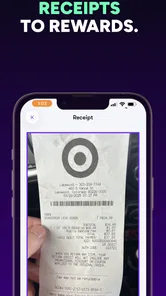

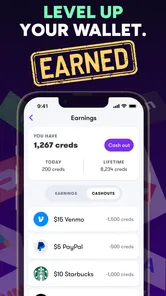

Analysis by Reviewed
I judge a rewards app by whether it fits naturally into something I already do, not by the promise of turning spare time into a wage. Copper: Play & Earn Cash Money is a free finance app from Next Financial that offers several ways to earn, including playing games, answering surveys, and scanning receipts. That mix gives it more than one possible use, but it also means your experience depends on which activities suit your routine.
Where people can get stuck
The main appeal is easy to understand; the practical questions come after opening the app. What activity should you try first, and how much effort does it take to reach a reward? I’d treat games, surveys, and receipt scanning as separate options rather than assuming each will be equally convenient. A survey may not fit a short break, while a receipt is only useful when you already have one to scan. Keeping that distinction in mind helps avoid expecting every visit to produce the same result.
A useful habit is to check the task instructions before committing time. For a game, make sure you understand what counts toward its reward; for a survey, read the prompts carefully; for a receipt, follow the scanning guidance in the app. If an activity feels unclear, pausing to review its directions is better than repeating work and hoping it will register.
Setup checks and a sensible routine
The app is rated for Everyone, and it has a 3.5 average from around 17,000 ratings. I’d still approach any app involving rewards with ordinary care: use accurate information when a task asks for it, and take a moment to understand what you’re agreeing to before sharing details. Copper is on version 4.52.0 and requires operating system 11 or newer, so checking compatibility is a sensible first step if installation or updates are a problem.
For a low-friction routine, I’d open Copper when I have a specific window of spare time rather than keep checking it throughout the day. For example, while waiting for a ride, I might look for a short game or survey; after shopping, I could see whether receipt scanning fits the errand I already completed. That approach keeps the app in the “small extra” category and avoids letting reward tasks take over time meant for something else.
Getting Started with Copper
First things first, getting started with Copper: Play & Earn Cash Money is as easy as pie. You can download it from both Android and iOS platforms, which is a win for everyone. Once you’ve got it installed, you’re greeted with a clean, user-friendly interface. No confusing menus or overwhelming options—just straight to the point. It’s designed for people like me who prefer to jump right into the action without a fuss.
The Gaming Experience
Now, onto the fun part—the games! Copper offers a variety of games tailored for different tastes. Whether you’re into strategy, puzzles, or arcade-style games, there’s something here to tickle your fancy. I spent a good chunk of my weekend testing out different games, and honestly, I was hooked. The graphics are surprisingly crisp, and the gameplay is smooth, making the experience enjoyable and not to mention, addictive.
More From Our News Desk

 Bolt: Request a Ride
Bolt and the Shift from One-Tap Rides to More Legible Trips
Bolt shows how ride-hailing is shifting from a one-tap taxi request toward a more legible, choice-driven trip, while leaving the hardest questions of price and reliability unresolved.

 Farm Land - Farming life game
Farm Land Review: A Small Island Farm with a Satisfying Loop
A bright, breezy island farm turns a few quick chores into a satisfying cycle of planting, harvesting, expanding, and deciding what to build next.

 Android Auto
’s Community Takes Shape in the Passenger Seat
Its most valuable network is not a public feed but a shared set of routes, voice habits, app integrations, and advice that make driving less isolating—and sometimes more complicated.

 My Talking Angela
 Makes the Virtual Pet Feel Personal
A polished pet-raising game built on small rituals, playful customization, and a character who gives everyday screen time a surprisingly personal rhythm.

 Google Translate
 Review: A Pocket Tool for the Small Frictions of Travel
From menus and signs to quick conversations, Google Translate earns its place by cutting the little delays that make unfamiliar language feel like a barrier.

 Shazam: Find Music & Concerts
Shazam’s Best Trick Is Turning a Song Into a Night Out
A few seconds of recognition can settle an argument, rescue a half-remembered chorus, and point toward a live show. Shazam’s real trick is what happens after the match.
Latest News



How the Earning Works
Here’s where Copper stands out. As you play, you earn points which can be converted into real cash. The app provides clear instructions on how you accumulate points and how they translate to dollars. It’s not a get-rich-quick scheme, but it’s a neat way to earn some pocket money while having fun. The key is consistency—keep playing, and those points add up faster than you’d think!
Community and Social Interaction
One of the cool features is the social aspect of Copper. You can connect with friends, compete on leaderboards, and even join tournaments. It adds a layer of competition that makes playing even more exciting. Plus, who doesn’t love a bit of friendly rivalry?
The practical trade-off is attention: a game that keeps you playing longer can make the reward feel less worthwhile if you only wanted a quick distraction. I’d decide on a stopping point before starting, then compare the time spent with the reward shown in the app. That makes it easier to enjoy the game without treating every spare minute as a chance to earn.
How it compares with other ways to earn
Compared with a survey-only rewards app, Copper gives you alternatives when you don’t feel like answering questions. Compared with a cashback tool, it also asks for more active participation: you need to play, respond, or scan rather than simply rely on a qualifying purchase. That variety is useful if you like switching tasks, but it is less appealing if you want a passive option or a predictable return for a set amount of time.
I’d recommend trying one activity at a time and noting what feels worthwhile to you. If a game is enjoyable even without the reward, it may be a good fit; if you’re using Copper strictly to earn, be more selective and stop when the task no longer seems worth your attention. The app has over a million installs, but that alone doesn’t tell you how well its activities match your own habits.
When a task does not seem to count
If progress appears to stall, I’d first check that I followed the activity’s instructions and that the app is up to date. Then I’d close and reopen it, confirm the phone still meets the operating-system requirement, and check the task again before repeating anything. A slow or interrupted connection can also affect what loads, so retrying when the connection is steady is a reasonable general step. I would avoid doing the same task repeatedly until I understand whether the first attempt registered.
Sometimes the issue is not the app itself. A receipt may be hard to read, a survey may not suit your answers, or a game may require more time than you expected. Those are different problems, and switching to another activity can be more sensible than troubleshooting the whole app. If the same issue continues after basic checks, use the support option available in the app rather than guessing at a workaround.
Who should give it a try
Copper is best suited to someone who enjoys casual games and is happy to treat surveys or receipt scanning as occasional alternatives. It may also work for a person who wants a small, structured activity during downtime, provided earning is a bonus rather than a financial plan. I’d skip it if you need dependable income, dislike reward tasks, or prefer a simple cashback experience with little interaction.
To wrap it all up, Copper is more than just a gaming app; it’s a fun, engaging way to earn money on the side. Whether you’re killing time on your commute or relaxing at home, it’s worth giving a shot. Just remember, while it’s a fun way to earn a little extra, it’s still meant to be a game—so play responsibly!
My practical verdict
With a 3.5 average and roughly 3,500 reviews, Copper is worth a cautious try if its mix of games, surveys, and receipt scanning matches how you already spend spare time. I’d start with a single activity, read its requirements, and decide for myself whether the time feels worthwhile before making it part of a routine. That keeps expectations grounded: the best reason to use it is that the activity is enjoyable or convenient, with any reward as an extra.
Choosing the right first task
When I try a rewards app, I prefer a small test that answers a practical question: does this activity fit my day without adding hassle? Copper’s three routes have different starting points. Games suit an unplanned break when I’m comfortable spending attention; surveys are better when I can focus on questions without rushing; receipt scanning makes most sense after a purchase I would have made anyway. Picking according to the moment is more useful than opening the app and accepting whichever task appears first.
There is also a useful distinction between trying an activity and building a habit around it. I’d sample each option only when it naturally fits, then keep the one that feels least disruptive. If scanning a receipt means remembering an extra step after shopping, I’d decide whether that small routine is realistic for me before relying on it. A task that sounds easy but is repeatedly forgotten is not a good fit, even if its reward looks appealing.
A realistic day with the app
Imagine I have a few minutes while waiting for a friend, then a grocery receipt later that evening. I could use the waiting time to inspect a game or survey and save receipt scanning for when I can lay the paper flat and check the result. If the first activity needs longer concentration than I have, I can leave it for another time instead of squeezing it into a rushed break. The point is to let the app follow the day I already have, rather than reorganize the day around earning.
This approach also helps answer a common question: should I use every earning option? I wouldn’t. The mix is a choice, not a checklist. Someone who dislikes surveys can simply focus on games or receipts when those are convenient; someone who rarely plays mobile games may prefer to ignore that route. The value of having alternatives is flexibility, not a requirement to spend time on all of them.
Keeping rewards in perspective
The app’s reward framing can make it tempting to think of activity as a steady exchange of time for money. I’d be careful with that assumption. A task’s appeal depends on its requirements and on how much I enjoy doing it; the same game can feel like a pleasant diversion one day and a poor use of time the next. I’d judge each opportunity on its own terms instead of assuming that a longer session automatically makes the experience worthwhile.
For that reason, I’d avoid using Copper to cover bills or plan a budget. It is better approached as an optional perk attached to leisure or errands, not as work with dependable hours. If I need reliable income, I would look for a conventional job or another dependable source instead. If I simply want an occasional activity that may produce a reward, the expectations are much more realistic.
Small habits that reduce friction
A few simple habits can make the experience easier without assuming anything special about how the app works. I’d keep the phone’s operating system compatible and the app current, use a steady connection when loading a task, and read the instructions before starting. For receipt scanning, good lighting and a clear, flat receipt can make it easier to follow whatever capture guidance the app presents. For surveys, I’d answer carefully and consistently rather than rushing through just to finish.
I’d also keep a mental note of what I have already tried. If a task seems not to register, repeating it immediately can waste time or create confusion about which attempt counted. A better sequence is to review the task conditions, reopen the app, and check progress before deciding what to do next. If the issue remains, contacting the in-app support route is more sensible than trying unofficial fixes or sharing personal information elsewhere.
Who may prefer another option
Copper is not an ideal match for everyone. A person who wants a passive cashback experience may find the active tasks less convenient, while someone who dislikes mobile games or answering questions may see little reason to return. It is also a poor choice for anyone who expects a fixed return for a fixed amount of effort. In those cases, a straightforward budgeting tool, a cashback service, or simply skipping rewards apps may be a better fit, depending on the goal.
On the other hand, I can see the appeal for someone who already plays casual games and likes having a few different ways to use idle time. Next Financial’s app is free, and its broad mix means a single preference does not have to define every visit. Its Everyone age rating makes it broadly accessible, though I’d still encourage younger users to involve a parent or guardian when a task asks for personal details or account decisions.
What to expect before installing
Copper was released on November 9, 2019, and its current version is 4.52.0. Those details are useful mainly as a reminder to check compatibility: the app requires operating system 11 or newer. If it will not install or update, I’d first check the device version and available storage, then retry through the official app store. If the phone is already compatible and the problem continues, restarting the device and checking the connection are reasonable basic steps.
The app is free to install, but I would still approach reward tasks thoughtfully. “Free” does not mean every activity is effortless: surveys take attention, games take time, and receipts require a purchase and a readable image. Before beginning, I’d ask whether I would do that activity anyway. If the answer is no, I’d weigh the reward shown in the app against the time and information requested, and skip it if the trade-off feels wrong.
My practical verdict
With a 3.5 average and roughly 3,500 reviews, Copper is worth a cautious try if its mix of games, surveys, and receipt scanning matches how you already spend spare time. I’d start with a single activity, read its requirements, and decide for myself whether the time feels worthwhile before making it part of a routine. That keeps expectations grounded: the best reason to use it is that the activity is enjoyable or convenient, with any reward as an extra.
My final recommendation is to install it only if you’re comfortable treating it as a small, optional rewards app rather than a source of dependable money. Give one activity a fair, unhurried try; keep the ones that genuinely suit your routine; and move on when the effort stops feeling worthwhile. That is the most practical way I’d use Copper—and the clearest way to decide whether it belongs on your phone.
Copper: Earn Cash Rewards Frequently Asked Questions
Can I use Copper on an Android device or an iPhone?
Copper: Play & Earn Cash Money is available for Android and iOS users. Before downloading, check that your device’s operating system meets the app’s minimum requirement, since an older version may prevent installation or proper use. Copper is free to download, so you can try the app without paying an upfront purchase price.
What kinds of rewards does Copper offer?
Copper’s stated earning options include games, surveys, and receipt scanning, with rewards described as real money and gift cards. The available activities and rewards may shape whether the app suits your routine: some users may prefer playing games, while others may find surveys or scanning receipts more convenient. Review the reward choices shown in the app before spending time on an activity.
What activities can I try in Copper: Play & Earn Cash Money?
Copper offers several ways to earn rewards, including playing games, completing surveys, and scanning receipts. This gives you options if you prefer answering questions or have receipts to scan rather than spending your time on games. The experience centers on completing these activities in the app and earning rewards, so it may suit people who want to try different approaches.
Who develops Copper: Play & Earn Cash Money, and is it suitable for all ages?
Copper: Play & Earn Cash Money is a finance app developed by Next Financial. It is rated Everyone, making it suitable for a broad audience from an age-rating perspective. The app has an average rating of 3.5 from around 17,000 ratings, so it is worth considering other users’ experiences alongside the app’s earning features when deciding whether it fits your needs.
What is Copper: Play & Earn Cash Money?
Copper: Play & Earn Cash Money is a mobile application designed for users who enjoy gaming and want to earn real cash rewards. By participating in various games and challenges, users can accumulate points which can be redeemed for cash. The app offers a fun and engaging way to make some extra money while playing games on your smartphone.
Pros
- Engaging gameplay with real cash rewards.
- User-friendly interface and easy navigation.
- Frequent updates with new challenges.
- Secure payment system for withdrawals.
- Interactive community for sharing tips.
Cons
- Limited to certain regions only.
- Requires stable internet connection.
- Some tasks are repetitive over time.
- Cash out threshold is relatively high.
- Advertisements can be intrusive at times.