Control Center Simple
- 3.95K
- 4.6
- Installs
- 50.00M
- Price
- Free

Screenshots

Analysis by Reviewed
Have you ever found yourself fumbling through your phone trying to adjust the brightness or volume while on a call or watching a video? If yes, then you might want to check out Control Center Simple. This app is like having a handy shortcut manager right at your fingertips. Let me walk you through my experience with it.
What Exactly is Control Center Simple?
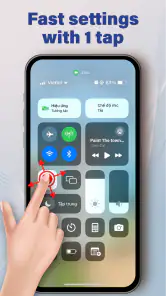
At its core, Control Center Simple is designed to give you quick access to essential settings and apps. You know how on some phones you have to swipe down a million times to find the right toggle? Yeah, none of that hassle here. This app neatly organizes all your important controls in one easy-to-reach place.
Features That Make Life Easier
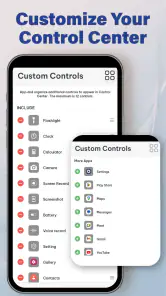
First off, the customization options are pretty sweet. You can add, remove, or rearrange toggles to suit your style. Want the flashlight front and center? Done. Need to quickly toggle your Wi-Fi or Bluetooth? Just a swipe and a tap. The app's minimalist design ensures you’re never overwhelmed, and it runs smoothly without any noticeable lag.
Another cool feature is the app shortcuts. You can jump straight into your favorite apps without having to navigate to your home screen. Whether you’re trying to catch that special moment with a quick camera access or need to respond to a message in a hurry, this app's got your back.
Usability and User Experience
I’ve used plenty of apps that promise the moon and stars but deliver clunky interfaces. Thankfully, Control Center Simple isn’t one of them. The interface is intuitive, and even if you’re not the most tech-savvy person, you’ll find your way around pretty easily. Setting it up was a breeze, and the app guides you through the process without making it feel like a chore.
Plus, it doesn’t bombard you with ads, which is a huge relief. I mean, who wants to deal with pop-ups while trying to lower the volume during a meeting? The developers seem to have struck a good balance between functionality and user-friendliness.
Conclusion: A Must-Have for Efficiency Lovers
Overall, I’d say Control Center Simple is worth checking out if you’re looking to streamline your phone usage. It’s like having a personal assistant that helps you manage your phone’s settings swiftly and efficiently. Whether you’re a busy bee who needs quick access to tools or just someone who loves a clean, organized interface, this app is a game-changer.
More From Our News Desk

Weather by Xiaomi Review: Clear at a Glance, Less Clear Up Close

X Under Pressure: Can It Recover When Posting Goes Wrong?

Clash of Clans Is Won Between the Battles

Android Auto Makes the Case for Quieter Car Software

MobiOffice: Transforming Mobile Productivity with Seamless Integration

EA SPORTS FC™ Mobile Soccer: Redefining Mobile Sports Gaming
So, if you’re tired of the endless scrolling and searching through settings, give this app a whirl. It might just become your new favorite thing. Happy swiping!
Control Center Simple Frequently Asked Questions
What is Control Center Simple and what does it do?
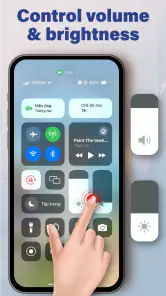
Control Center Simple is a versatile app designed to enhance user experience by providing quick access to essential functions and settings on your device. It allows you to easily toggle Wi-Fi, Bluetooth, adjust brightness, and control media playback all from a single, convenient interface, thereby simplifying device management.
Is Control Center Simple available for both Android and iOS devices?
Yes, Control Center Simple is available for both Android and iOS platforms. The app is designed to seamlessly integrate with devices across these operating systems, ensuring a consistent and user-friendly experience. Users can download it from Google Play Store for Android or the Apple App Store for iOS.
How does Control Center Simple enhance my device's accessibility?
Control Center Simple enhances accessibility by providing a centralized hub where users can quickly access and manage device settings. This feature is particularly useful for users who need to make frequent adjustments or access specific functions like flashlight and camera in an efficient manner, thereby saving time and effort.
Does using Control Center Simple affect my device's battery life?
Control Center Simple is designed to be efficient and minimally invasive, ensuring it does not significantly impact your device's battery life. It operates smoothly in the background, and its quick-access features can actually help conserve battery by reducing the time spent navigating through multiple settings.
Can I customize the settings accessible through Control Center Simple?
Yes, Control Center Simple allows for a high degree of customization, enabling users to tailor the control panel to meet their specific needs. Users can add or remove shortcuts for various settings and functions, ensuring the most frequently used tools are always within easy reach, enhancing overall usability.
Pros
- Intuitive user interface
- Customizable shortcuts
- Quick access to settings
- Smooth performance
- Battery-friendly
Cons
- Limited widget support
- Ads in free version
- Occasional crashes
- No dark mode
- Requires Android 5.0+
- Category
- Personalization
- Version
- 1.1.4











