ConnectNetwork by GTL
- 4.86K
- 3.3
- Installs
- 1.00M
- Price
- Free

Screenshots
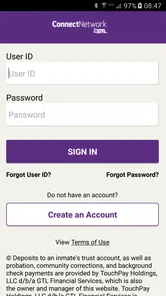
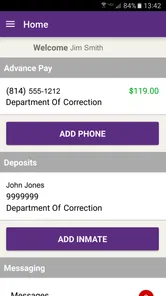
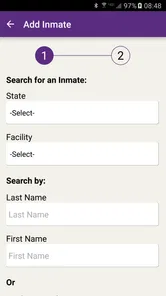
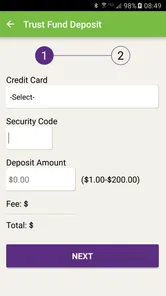
Analysis by Reviewed
Before I rely on ConnectNetwork by GTL, I’d start with one practical question: can the person I want to reach use the service at their facility? That check shapes the rest of the experience. This isn’t a general-purpose chat or banking app; it brings together ways to communicate with and financially support incarcerated loved ones, within the options available in their particular setting.
Check the facility before setting up a routine
Staying in touch from outside is not as simple as choosing any messaging app. Communication options depend on the correctional facility, so I’d first check whether the person I want to reach and their facility can use the services I need. That small check matters: it helps avoid setting up an account or preparing a message only to discover that a particular channel is not available for that situation.
I’d also decide what I’m trying to do before opening the app. A quick note, a video conversation, and adding money are different tasks, and keeping them separate makes it easier to review the recipient and the details before taking action. For anyone supporting a loved one over time, that pause is useful; it reduces the chance of mixing up a communication task with a financial one.
A useful first step is to ask the person you’re supporting which kind of contact is most helpful, then check that against what the facility makes available. If you’re helping from a distance, this avoids building your plan around a feature that may not fit their situation. It also makes it easier to decide whether you need the app regularly or only for a particular task.
Staying Connected Made Easy
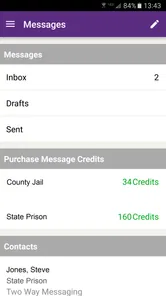
The first thing that caught my attention about ConnectNetwork by GTL is its user-friendly interface. The app is designed to make communication with incarcerated individuals as seamless as possible. With just a few taps, you can easily send messages, photos, and even money. It's all integrated in a way that feels intuitive and straightforward.
Move from a message to a meaningful exchange
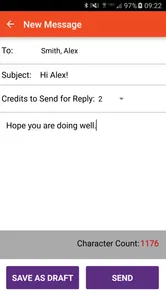
One of the standout features is the messaging service. Gone are the days of waiting endlessly for snail mail. With this app, you can send messages directly, which are typically delivered faster than traditional mail. This immediacy is a breath of fresh air for anyone who's been dealing with the slow pace of traditional communication methods.
A practical routine is to write a message when you have a quiet moment, then reread it before sending. Messages to someone in a facility are not quite like casual chats with a friend: there can be a review or delivery process, and the person receiving it may not be able to reply at the same time. I’d treat the app as a way to make contact more convenient, not as a promise of instant, uninterrupted conversation.
More From Our News Desk

 Bolt: Request a Ride
Bolt and the Shift from One-Tap Rides to More Legible Trips
Bolt shows how ride-hailing is shifting from a one-tap taxi request toward a more legible, choice-driven trip, while leaving the hardest questions of price and reliability unresolved.

 Farm Land - Farming life game
Farm Land Review: A Small Island Farm with a Satisfying Loop
A bright, breezy island farm turns a few quick chores into a satisfying cycle of planting, harvesting, expanding, and deciding what to build next.

 Android Auto
’s Community Takes Shape in the Passenger Seat
Its most valuable network is not a public feed but a shared set of routes, voice habits, app integrations, and advice that make driving less isolating—and sometimes more complicated.

 My Talking Angela
 Makes the Virtual Pet Feel Personal
A polished pet-raising game built on small rituals, playful customization, and a character who gives everyday screen time a surprisingly personal rhythm.

 Google Translate
 Review: A Pocket Tool for the Small Frictions of Travel
From menus and signs to quick conversations, Google Translate earns its place by cutting the little delays that make unfamiliar language feel like a barrier.

 Shazam: Find Music & Concerts
Shazam’s Best Trick Is Turning a Song Into a Night Out
A few seconds of recognition can settle an argument, rescue a half-remembered chorus, and point toward a live show. Shazam’s real trick is what happens after the match.
Latest News



For an everyday example, imagine getting a short break at work and wanting to let a family member know about a change in plans. I’d draft a clear note, check the recipient, and send it once rather than follow up repeatedly because I haven’t heard back right away. That approach respects the possibility of a delay and leaves me with a cleaner record of what I actually sent.
Photos can make a message feel more personal, but I’d choose them deliberately and keep the message understandable without assuming the image alone will explain what I mean. If the moment is important, I’d add a brief note that gives context. This is a small practical distinction from ordinary social messaging, where a quick image exchange can happen in a fast back-and-forth.
Plan video contact around both people
Additionally, the app supports video calls, which is a huge plus. Seeing your loved one’s face, even through a screen, can make a world of difference. It's like having a piece of normalcy in an otherwise challenging situation.
For a family juggling work, school, and care responsibilities, a video call can make it easier to share a meaningful moment without coordinating travel. I’d still plan around the other person’s availability and the facility’s arrangements rather than assuming I could call whenever I wanted. That distinction is important: this is a connection tool within a structured setting, not a replacement for an ordinary phone or video-chat service.
Video is most useful when there’s something that benefits from seeing each other: a family milestone, a reassuring conversation, or simply a chance to feel more present. For a quick logistical update, a message may be easier to fit into a busy day. I’d choose the channel based on the purpose rather than treating video as automatically better.
It also helps to have a simple fallback in mind. If a planned video conversation cannot happen as expected, a message can keep the connection from depending on one specific moment. That doesn’t remove the facility’s constraints, but it can make a family’s communication routine less brittle.
Handle deposits with a separate check
Another nifty feature is the ability to manage finances. You can easily deposit funds into an inmate's account directly through the app. This process is secure and efficient, saving you the hassle of dealing with more cumbersome methods. Plus, you can keep track of all your transactions within the app, which adds a layer of transparency and control over your financial interactions.
When I’m sending money, I’d slow down and verify the person and account purpose before confirming anything. The most helpful habit is to keep the transaction record for your own household budget and compare it with what you intended to send. The app brings communication and deposits together, but that convenience also means it’s worth taking care not to tap through a financial step as casually as sending a short note.
This is where it differs from general finance apps: a banking app is built around broad personal money management, while this one is focused on maintaining contact and supporting someone in a correctional setting. If your only goal is to track bills, transfer money between your own accounts, or manage a household budget, a regular banking or budgeting app is the more appropriate choice.
A helpful trade-off to keep in mind is that one place for messages and deposits makes the routine easier to organize, but it does not make those actions interchangeable. I’d finish a deposit deliberately, check the transaction record, and only then move on to messaging. If several relatives contribute, agreeing in advance who is handling a particular deposit can reduce accidental duplication and make shared budgeting clearer.
If you’re wondering whether the app replaces a bank account, I wouldn’t treat it that way. Its financial role is tied to supporting someone in a correctional setting, while everyday banking tools are better suited to managing your own accounts and expenses. For someone who needs both kinds of service, the practical setup is to use each for its intended job rather than trying to make one stand in for the other.
Use alerts as prompts, not as the whole record
What I also love about the app is its notification system. It keeps you updated on any changes or alerts that might affect your communication or transactions. This means you're always in the loop and can respond promptly to any situation that arises.
I’d use notifications as prompts to check what has changed, not as a substitute for reviewing the details inside the app. For instance, if an alert concerns a message or transaction, opening the relevant section and checking the status gives a clearer picture than relying on a brief phone notification. If you share family responsibilities, agreeing who will handle messages and deposits can also prevent duplicated efforts or confusion.
That division of responsibility is especially useful when more than one person is helping. One relative might handle a deposit while another keeps up with messages; a quick family agreement about who does what makes the app easier to use as part of a larger support routine. I’d avoid assuming that everyone has seen the same alert or knows whether an action has already been completed.
Know whether it fits your situation
This is most useful for people who regularly need to communicate with someone in a participating correctional facility and want messaging, video calls, and financial support in one place. A relative who lives far away, or a friend balancing visits with a busy schedule, may value having those tasks organized through a single service. The app is less compelling if you only need ordinary social messaging, or if the facility and the person you’re trying to reach cannot use the relevant services.
ConnectNetwork is free to download, is rated for Everyone, and is developed by GTL ES. It has an average rating of 3.6 from around 12,000 ratings, with over a million installs. It first appeared in 2015, and version 4.3.0 requires Android 8.0 or later. Those figures suggest a widely used service, but they don’t guarantee that every part of the experience will suit every family; I’d judge it by whether its available options match the facility and the way you need to stay in touch.
The rating gives me reason to approach it with realistic expectations rather than assume every user will have a smooth experience. The app has a clear, specialized purpose, and that matters more than whether it can replace the communication tools I use elsewhere. If your situation matches its intended role, it may be useful; if you want a flexible messenger for friends or a broad personal finance hub, a familiar general-purpose alternative will fit better.
It is a finance-category app in the sense that it supports deposits, but its value is really in combining that task with communication for families affected by incarceration. That focus is a strength for the right user and a limitation for everyone else. I’d skip it if there is no relevant facility connection or if my only need is ordinary messaging, social video calls, or day-to-day money management.
The app is free to download, but I’d still review any transaction details before confirming a deposit and make sure the available options meet my needs. Free access to the app should not be confused with a promise that every connected service or financial action has no cost; I’d check the terms shown for the action I’m taking before proceeding.
Expect a structured process, not instant chat
The app cannot remove the constraints around communication in a correctional setting. A message may not behave like a personal text, and a video call depends on the arrangements available to both people. If something seems delayed, I’d check the status and the facility’s process before sending the same message repeatedly. Repeating an action can make it harder to tell which attempt is current.
There is also a real trade-off in having several kinds of contact in one app: it is convenient, but it can create uncertainty if you expect one feature to work exactly like another. I’d keep a simple personal note of what I sent or paid for when a matter is important, and use the in-app record to check the transaction rather than relying on memory. That’s a low-effort way to stay organized without treating the app as a full finance manager.
If a message or call is time-sensitive, I wouldn’t assume the app can guarantee an immediate response. I’d allow room for the facility’s process and choose a channel that suits the urgency. For important practical matters, a short, clear message is easier to understand than a long note that mixes several questions; keeping topics distinct can also make any eventual reply easier to follow.
Someone deciding whether to install it may also ask if it works for every incarcerated person. The sensible answer is to check the specific facility and the services available for the person you have in mind before depending on it. The app’s usefulness is tied to that match, so confirming it early is more valuable than downloading first and assuming all communication options will be present.
For Android users, the current version is 4.3.0 and the minimum operating system is Android 8.0. That gives you a straightforward compatibility check before you build the app into a routine. The age rating is Everyone, though the more important decision for most adults is whether the supported facility services line up with their reason for using it.
A focused tool for a specific kind of connection
All in all, ConnectNetwork by GTL has proven to be an invaluable tool for maintaining connections with loved ones in correctional facilities. It simplifies what can often be a complicated process, and it does so with a level of efficiency and reliability that I genuinely appreciate. If you're in a situation where staying connected is challenging, this app is definitely worth a try. It's got a few quirks here and there, but the benefits far outweigh any minor hiccups. Give it a whirl, and you might find it to be the lifeline you need.
My recommendation is conditional but straightforward: start by confirming that the facility supports the kind of contact you need, then use the app for the tasks it is designed to bring together. Keep messages clear, plan video conversations around the available arrangements, and pause over deposits before confirming them. If those steps fit your family’s circumstances, this can be a practical companion; if you need ordinary chat or general banking, a standard alternative is the better tool.
ConnectNetwork by GTL Frequently Asked Questions
What devices and operating systems can I use with ConnectNetwork by GTL?
ConnectNetwork by GTL is available for Android and iOS, and the app requires Android 8.0 or later. It is a finance app intended to help users stay connected with incarcerated loved ones. Before downloading, check that your device meets the operating-system requirement and that you can access the app store for your platform.
Is ConnectNetwork by GTL free to download, and what is its age rating?
The app is free to download and is rated Everyone. Keep in mind that a free download does not mean every service inside the app is free to use. Phone calls, video visits, and messaging may involve charges, so review the relevant service details before making a payment or adding funds.
What is ConnectNetwork by GTL and what does it offer?
ConnectNetwork by GTL is an app designed to facilitate communication and transactions between inmates and their families or friends. It offers a range of services including phone account management, messaging, and the ability to schedule video visits. The app aims to streamline interactions by providing a user-friendly platform for managing communication with incarcerated individuals.
How do I set up an account on ConnectNetwork by GTL?
To set up an account on ConnectNetwork by GTL, download the app from the Google Play Store or Apple App Store. Once installed, open the app and follow the registration process, which involves providing personal information, creating a secure password, and linking payment methods if you plan to use services like phone calls or video conferencing. Ensure your details are accurate to avoid any issues with account verification.
What are the costs associated with using ConnectNetwork by GTL?
The costs associated with ConnectNetwork by GTL vary depending on the services used. While downloading the app is free, services such as phone calls, video visits, and messaging may incur charges. Fees depend on the facility and the type of communication. Check the app for specific pricing related to your needs and be aware of any additional transaction fees.
Pros
- User-friendly interface.
- Secure messaging system.
- Easy account management.
- Access to various facilities.
- Convenient payment options.
Cons
- Limited customer support.
- Occasional app crashes.
- Restricted to specific facilities.
- Complex navigation for new users.
- High transaction fees.