Clever: Brain Training Games
- 683.00
- 4.3
- Installs
- 1.00M
- Price
- Free

Screenshots
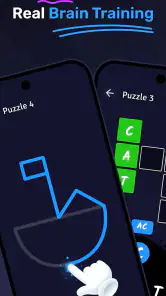

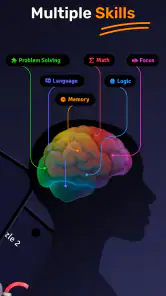
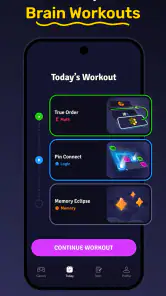
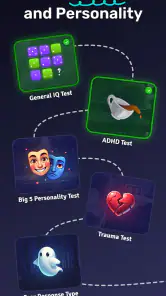
Analysis by Reviewed
I approached Clever: Brain Training Games as a daily mental exercise rather than a replacement for a class, a puzzle book, or a formal IQ assessment. That distinction matters. The app is aimed at adults and seniors who want short brain games covering areas such as memory, attention, reasoning, and general problem-solving. In my experience, its main appeal is the low barrier to starting: you can open it when you have a few spare minutes, choose a challenge, and get straight into an activity without preparing anything.
It is a free education app from DPM Apps, available for users aged Everyone, with optional purchases ranging from $0.99 to $39.99 per item. The app has built a sizeable audience, with more than a million installs and an average rating of 4.3 from around 4.8K ratings. Those figures suggest that it has found a practical place in many people’s routines, although they should not be mistaken for proof that every exercise will suit every user.
How to decide whether this brain-training app fits you
The first question I would ask is what you want from a brain game. If your goal is a quick, structured way to keep your mind active, this app makes sense. If you are looking for a serious cognitive evaluation, a complete learning course, or a substitute for professional advice, I would choose something else. The app can make mental practice more approachable, but it cannot turn a casual session into a clinical result.
I also found that the best way to judge it is by routine rather than by a single session. Brain games can feel entertaining immediately, but their usefulness depends on whether you return to them and whether the activities remain challenging without becoming frustrating. I would give the app a few sessions before deciding. The first impression may be shaped by whether the opening exercises happen to match your strengths.
Another useful decision criterion is tolerance for repetition. Apps in this category often rely on familiar patterns: remembering items, spotting differences, solving sequences, or reacting to changing prompts. That familiarity can make the exercises easy to understand, but it can also reduce the challenge once you learn the format. I would recommend Clever to someone who values convenience and variety more than deep instruction or an endlessly fresh puzzle system.
The app runs on Android with a minimum operating system requirement of version 9, and its current version is 1.52.5. That makes it a reasonable option for many existing Android phones, but anyone using an older device should check compatibility before planning a routine around it. I would also keep the free and paid experience in mind from the beginning. You can start without paying, while optional purchases may become relevant if you want more of what the app places behind its paid choices.
What the daily experience feels like
My preferred way to use it is in a small, deliberate window rather than during a long sitting. A few minutes after breakfast, during a quiet break, or before putting the phone away at night is enough to make the app feel like a habit instead of another demanding task. I would avoid rushing through exercises while distracted, because the result then reflects your surroundings and mood as much as your ability.
A realistic example is someone who spends a lot of time waiting: perhaps a commuter has a short pause before an appointment, or a senior wants a simple activity while having coffee. Instead of opening a social feed and losing track of time, that person can use a brain exercise with a clear beginning and end. The value here is not that the app transforms memory overnight. It is that it gives idle time a more focused shape.
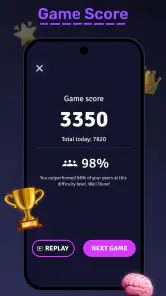
I found it helpful to treat mistakes as information about the type of challenge I had chosen, not as a verdict on intelligence. That mindset is especially important when the app presents an IQ-style test. A score can be interesting as a snapshot of how you performed in that moment, but sleep, concentration, familiarity with the task, and even screen comfort can influence the result. I would not use one session to label myself or compare myself seriously with another person.
The strongest habit is to use the exercises as prompts for regular attention, not as a medical or academic measurement. That is the fairest way to get value from this kind of app and avoid expecting more certainty than a casual mobile activity can provide.
Where Clever is more convenient than common alternatives
Compared with printed puzzle books, this app removes the need for a pen, an eraser, and a place to spread out. That makes it easier to use in short gaps during the day. A book can offer a calmer, more screen-free experience and may be better for someone who enjoys writing answers by hand, but it is less flexible when you only have a few minutes or do not want to carry anything extra.
Compared with general puzzle apps, Clever’s education positioning gives the experience a clearer mental-training purpose. A standalone crossword, number puzzle, or logic game may be deeper in one specific area, while this app is more useful for someone who wants to move between different kinds of mental tasks. The trade-off is that a specialist puzzle app may offer more depth for an enthusiast who already knows exactly what they enjoy.
It also sits between casual entertainment and formal testing. A pure game can be more exciting and may have stronger presentation, competition, or narrative motivation. A professional assessment can be more appropriate when the result has real consequences. Clever is better suited to the middle ground: structured practice that still feels light enough for everyday use.
One less obvious advantage is that its broad purpose can help users discover which kinds of exercises hold their attention. Someone may begin thinking they want memory practice and find that reasoning tasks are more enjoyable, or notice that quick-response activities create unnecessary pressure. That discovery can guide future choices, including the decision to move to a dedicated app or an offline activity.
For older adults, the appeal is partly simplicity of access. There is no need to learn a complex game world or manage a long story. Still, comfort depends on the individual phone, display, and familiarity with mobile controls. I would introduce it gradually to a family member, demonstrate one activity, and let that person decide whether the pace and presentation feel comfortable. Encouragement works better than turning the score into a competition.
The limitations that affect the decision
The biggest limitation is the gap between the phrase “brain training” and what a user may hope it means. Completing exercises can be mentally engaging, but that does not automatically prove broad improvements in everyday intelligence or memory. I would use the app because the activities are enjoyable and give me a reason to focus, not because I expect a guaranteed change in unrelated skills.
The IQ-test angle also needs careful handling. A mobile test can be a fun challenge, but I would not treat its result as equivalent to an assessment conducted under controlled conditions. If you need an evaluation for school, work, health, or personal concern, speak with an appropriately qualified professional instead of relying on an app score.
Another point is the free-to-paid transition. The app costs nothing to begin, which is useful for testing whether the style suits you. Optional items can cost from $0.99 to $39.99, so I would look closely at each purchase prompt and decide in advance what I am comfortable spending. The practical cost of switching from a free trial mindset to regular paid use is not just money; it is also the possibility of building a routine around content you later decide is not essential.
I would also skip this app if you want a single, highly specialized activity. A dedicated memory course, a serious language-learning program, or a traditional puzzle collection may provide a clearer progression in that one area. Clever is designed for breadth and accessibility, so its flexibility can feel less satisfying to someone who wants a narrow training plan with detailed instruction.
Smart ways to get more from the exercises
My first practical tip is to separate practice from testing. Use ordinary sessions to explore the activities, then approach an IQ-style challenge only when you are rested and free from interruptions. This avoids turning every opening of the app into a judgment about your performance and gives the test a more consistent context.
Second, keep a simple mental note of how each category feels rather than chasing a high result every time. If memory tasks feel comfortable but timed reasoning feels stressful, that is useful feedback about your preferences. It can help you choose sessions that are challenging without making the routine unpleasant. I would alternate familiar exercises with less comfortable ones instead of repeating only the easiest category.
Third, use the app as a transition activity. A short session before reading, studying, or doing paperwork can help mark the move away from passive scrolling. I would not claim that it guarantees better concentration afterward, but the deliberate pause can be valuable. The important part is stopping when the session is finished rather than allowing the phone to pull you into unrelated distractions.
For seniors or anyone with visual or motor difficulties, I would test the app in a calm setting first. Larger display settings, good lighting, and a steady grip can make a bigger difference than the choice of exercise. If a task feels confusing because of the interface rather than the mental challenge, that is a sign to slow down or choose a different tool rather than assume the user lacks ability.
Finally, decide what success means before you start. It might be completing a short session several times a week, finding an enjoyable alternative to passive scrolling, or identifying which puzzle styles you prefer. A clear personal goal makes the app easier to evaluate and reduces the temptation to judge it only by scores.
Who should choose it, and who should move on
I would recommend Clever to adults and seniors who want accessible mental games, enjoy switching between different types of challenges, and prefer using a phone instead of carrying a puzzle book. It is also a sensible first step for someone curious about IQ-style activities but not ready to commit to a specialized testing product. The free entry point makes it easier to try before deciding whether the format belongs in a daily routine.
I would be more cautious about recommending it to users who dislike timed or score-based activities, become anxious when an app presents an IQ result, or want a structured educational curriculum. Those users may feel better with untimed puzzles, a book, or an app built around one clearly defined subject. Likewise, anyone concerned about a real change in memory or thinking should seek professional guidance rather than treating game performance as evidence.
The developer, DPM Apps, has positioned this product in a useful middle category, but that middle ground is also its compromise. It is less specialized than a dedicated training tool and less purely entertaining than a conventional game. Whether that is a strength depends on your priorities. I see it as a benefit when I want variety, and a weakness when I want a detailed explanation of why an answer is correct or a carefully staged learning path.
My recommendation after weighing the trade-offs
After using it as a casual training companion, I would recommend giving Clever a try if you want a free way to add focused mental activity to ordinary downtime. Start with short sessions, judge the exercises by how engaging and manageable they feel, and keep the IQ-test result in perspective. The app is most convincing when it is treated as a practical routine builder rather than a promise of measurable transformation.
The decision becomes less favorable if you need professional assessment, deep specialization, a completely screen-free option, or a guaranteed ad-free and fully unlocked experience without considering optional purchases. In those cases, a different category of alternative may serve you better. The cost of switching is small at the beginning because you can test the free version, but I would still avoid buying extras until you know which activities you actually return to.
For my purposes, the balance is positive: the app is approachable, broad enough to prevent immediate boredom, and suitable for a quick session when I want something more intentional than scrolling. I would install it for a low-pressure experiment, not as a measure of personal worth or a substitute for expert advice. If that expectation matches yours, Clever: Brain Training Games is a reasonable education app to keep on an Android phone, especially for adults and seniors looking for an uncomplicated way to make spare minutes more mentally active.
Pros
- Short daily sessions make it easy to fit into a busy routine.
- Wide variety of puzzles helps keep the training experience fresh.
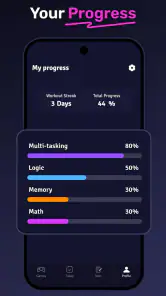
- Progress tracking makes it simple to monitor personal improvement.
- Adjustable difficulty can provide a suitable challenge for different skill levels.
- Works well for casual play during commutes or short breaks.
Cons
- Some advanced content may require a subscription or extra purchases.
- Repeated puzzles can make long-term play feel less varied.
- Performance scores may encourage unnecessary pressure or comparison.
- Certain exercises may favor speed over thoughtful problem-solving.
- Some features may require an internet connection to function fully.

- Category
- Education
- Version
- 1.52.5











