Cleo AI: Cash Advance & Money
- 41.46K
- 4.6
- Installs
- 5.00M
- Price
- Free

Screenshots



Analysis by Reviewed
Before opening Cleo AI: Cash advance & Credit, it helps to know what kind of money tool you’re choosing: a finance app that combines spending awareness with options related to saving, credit and cash advances. I’d treat it as a place to get a clearer view of day-to-day money, not as a substitute for a bank or a guaranteed solution to a shortfall. That distinction makes the first visit more useful and keeps expectations grounded.
The app is made by Cleo AI, is free to install, and is rated Teen. It has a 4.4 average from around 107,000 ratings, with more than a million installs. Those figures suggest a well-used product, but popularity doesn’t tell you whether its approach fits your finances. The best reason to try it is that you want budgeting and credit-related tools in one app and are willing to spend a little time learning how it presents your spending.
What to expect from the experience
Rather than expecting an elaborate spreadsheet, I’d approach Cleo as a conversational, AI-led way to engage with personal finance. Its appeal is the combination: budget management, saving, credit-building support and tax filing sit within the same broader money-management experience. That can be convenient if you prefer one starting point over several separate apps, though it also means you should pay attention to which tool you’re using and what decision it is meant to support.
For comparison, a bank’s own app is often the more direct choice for checking balances and moving money, while a dedicated budgeting tool may suit someone who wants detailed categories and hands-on planning. Cleo’s potential advantage is bringing money habits and credit-oriented support into a more approachable format. The trade-off is that a chatty interface may not satisfy people who want full control over every budget line or prefer a simple account dashboard.
Meet Cleo: Your Financial Buddy
First things first, let's talk about what Cleo AI is all about. It's essentially an AI-driven app that offers cash advances and credit, but it's so much more than that. It's designed to help you manage your money better, offering insights into your spending habits and, most importantly, giving you a little extra cash when you're in a bind. Think of it as the friend who won’t judge you for splurging on that extra cup of coffee but will gently remind you of your budget goals.
Getting Started
Setting up Cleo is a breeze. You just download it, link your bank account, and you're good to go. The app's interface is super user-friendly, which is a big win in my book. I'm not the most tech-savvy person, but navigating Cleo was as easy as pie. Plus, it’s available on both Android and iOS, so no one gets left out.
For a first-time user, I’d make the first session about understanding the picture rather than trying to change everything at once. Once you’ve connected your account, look through the spending view and pick one category that genuinely surprises you. A small, specific question—such as whether weekday food purchases are taking more of your budget than expected—is easier to act on than a vague goal to “spend less.” If linking financial accounts makes you uncomfortable, pause and review the connection steps and the app’s terms before proceeding; convenience is not worth ignoring your own comfort with account access.
More From Our News Desk

 Bolt: Request a Ride
Bolt and the Shift from One-Tap Rides to More Legible Trips
Bolt shows how ride-hailing is shifting from a one-tap taxi request toward a more legible, choice-driven trip, while leaving the hardest questions of price and reliability unresolved.

 Farm Land - Farming life game
Farm Land Review: A Small Island Farm with a Satisfying Loop
A bright, breezy island farm turns a few quick chores into a satisfying cycle of planting, harvesting, expanding, and deciding what to build next.

 Android Auto
’s Community Takes Shape in the Passenger Seat
Its most valuable network is not a public feed but a shared set of routes, voice habits, app integrations, and advice that make driving less isolating—and sometimes more complicated.

 My Talking Angela
 Makes the Virtual Pet Feel Personal
A polished pet-raising game built on small rituals, playful customization, and a character who gives everyday screen time a surprisingly personal rhythm.

 Google Translate
 Review: A Pocket Tool for the Small Frictions of Travel
From menus and signs to quick conversations, Google Translate earns its place by cutting the little delays that make unfamiliar language feel like a barrier.

 Shazam: Find Music & Concerts
Shazam’s Best Trick Is Turning a Song Into a Night Out
A few seconds of recognition can settle an argument, rescue a half-remembered chorus, and point toward a live show. Shazam’s real trick is what happens after the match.
Latest News



Making the first useful move
A good first result doesn’t have to be a dramatic saving or a credit milestone. I’d call it a success if you leave the first session with one clear observation and a next action you can actually keep. For example, notice a spending pattern that tends to appear between grocery trips, then decide whether a quick check before the next shop would help. That turns the app from something you browse once into a small routine tied to a real decision.
If your income varies, avoid setting a target based only on a particularly good week. Look across a typical stretch of spending and leave room for bills that arrive less often. This is a useful distinction for anyone paid irregularly: the amount left in an account today is not necessarily spare money. Cleo can help you notice activity, but you still need to account for upcoming obligations that may not be obvious in a day-to-day view.
Cash Advances: A Lifesaver
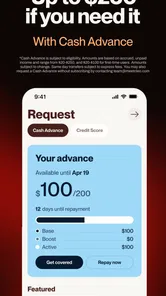
Now, let's get to the juicy part – cash advances. We've all been there, waiting for payday while the bills keep piling up. With Cleo, you can get a cash advance of up to $100 instantly. No credit checks, no hassle. It’s a lifesaver when you need a quick fix. The best part? Cleo doesn’t charge interest, just a small fee, which is pretty reasonable considering the convenience it offers.
I’d still treat an advance as a bridge, not extra income. Imagine a necessary expense lands a few days before payday: first check whether the amount and any fee make sense for your budget, then consider how repayment will affect the next stretch of bills. If using an advance would leave you short again, it may only move the pressure forward. For an occasional timing gap, quick access can be useful; for a recurring gap, reviewing the budget or contacting a bill provider about timing may be the steadier first move.
How to weigh an advance against other options
When a bill is due before income arrives, I’d compare the advance with the actual alternatives rather than judging it only by speed. If a bill provider can shift a due date without creating a worse problem, that may cost less than borrowing. If the expense can safely wait, delaying it may be preferable. The advance is most defensible when the need is specific, the repayment timing is clear, and the fee is worth avoiding a more serious consequence.
One practical habit is to decide the repayment plan before requesting anything: write down which upcoming money will cover it and what that leaves for essentials. That simple check can reveal whether the advance solves a short mismatch or just consumes money you already need for the next week. I wouldn’t use convenience as a reason to borrow for nonessential spending, and I wouldn’t assume that one successful request means the option will suit every later situation.
Budgeting and Insights
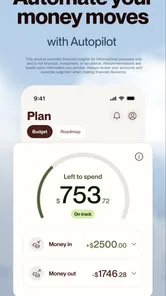
But Cleo isn’t just about giving you money; it’s about helping you manage it better. The app provides insights into your spending habits, categorizing your expenses so you can see where your money is going. It's like having a personal finance coach, nudging you towards better financial decisions. Plus, the AI is pretty smart. The more you use it, the better it gets at understanding your habits and offering tailored advice.
One practical way to use those insights is to check them after a normal week, not just when you’re already worried about money. That gives you a less emotional baseline for choosing a realistic savings target. Categories are helpful prompts, not a verdict: if a purchase is sorted in a way that doesn’t match how you think about it, use your own judgement before changing your plan. I also wouldn’t assume that an automated suggestion understands irregular costs, such as an annual bill, as well as you do. Keep those obligations in mind when deciding what is genuinely available to save.
Reading the picture without overreacting
A spending category is most useful as a question, not a command. If one area looks high, first ask whether it reflects an unusual event, a recurring habit, or a classification that doesn’t match your own records. A one-off purchase can distort your impression of a normal week, while small repeated purchases are easy to dismiss individually. Checking the pattern across more than one ordinary week helps you avoid making a strict budget change in response to a temporary blip.
For a concrete routine, I’d review the app after payday and again before a planned larger purchase. The first check helps you remember what the incoming money needs to cover; the second gives you a chance to reconsider the purchase in light of actual spending. This is more useful than checking constantly and reacting to every transaction. If you prefer a detailed plan with manual categories, limits and forecasts, a spreadsheet or a dedicated budgeting tool may give you more control than a conversational money app.
Choosing the right role for the app
Cleo is most appealing if you want a nudge to look at spending and prefer credit and budgeting topics to feel less intimidating. It may be a poor fit if you avoid connecting accounts, need a strict manual budget, or want a cash advance to function as a dependable monthly income source. Someone with complicated finances may be better served by a detailed budgeting system and direct conversations with a financial professional, while someone who only needs to check a balance may be perfectly fine with a bank app.
A useful next step after spotting one spending pattern is to choose a single change you can maintain—perhaps setting aside a modest amount after payday or reviewing a category before a planned purchase. Keep the goal small enough that you can tell whether it works. If the app’s credit-building or tax-related tools are part of your reason for installing it, explore those sections separately and read the conditions shown there before making a decision; features in the same app can have different purposes and requirements.
Credit and tax tools deserve their own check
It’s tempting to see the credit and tax-related areas as automatic extensions of budgeting, but I’d assess each on its own terms. Before relying on a credit feature, be clear about what action it asks you to take and how it fits your broader plans. For tax filing, gather the relevant information first and read through the steps carefully rather than starting in a hurry because the option is available in the same app. Convenience is helpful, but it doesn’t replace understanding the task you’re completing.
This is also where personal preference matters. If you already have a trusted method for preparing taxes or monitoring credit, there may be little reason to move those jobs just to keep everything in one place. On the other hand, someone who finds these subjects intimidating may appreciate having a place to explore them alongside everyday money habits. I’d use the app to make the topic easier to approach, while still checking the details before acting.
My Personal Take
Using Cleo has genuinely been a game-changer for me. It's not just the cash advances, but the comprehensive financial insights that have helped me stay on top of my game. The app’s AI-driven approach feels like chatting with a friend who knows a lot about finance, which is both comforting and practical.
My main caution is not to let a friendly tone turn a financial choice into an automatic yes. Check the details of any option that involves money, make sure the timing works for your budget, and use the insights as prompts rather than unquestionable advice. The app’s current version is 3.20.0, and it has been available since February 21, 2019; I’d still judge it by how well its current tools fit your needs, rather than by how long it has been around.
Who is likely to get the most from it?
I’d point a first-time user toward Cleo if they want a low-pressure way to start paying attention to spending and would value budgeting, savings and credit topics under one roof. It can also suit someone who wants a second perspective before making everyday choices, such as whether a discretionary purchase fits after bills are accounted for. Its approachable style may make financial check-ins feel less like homework, especially if a blank spreadsheet has never been motivating.
I’d steer away if you need exact, hands-on control over every category, don’t want to connect a financial account, or are looking for recurring cash to cover a regular income shortfall. In those cases, a bank’s own tools, a manual budget, or help from a qualified adviser may be a better starting point. The Teen content rating is worth noting for families too: younger users should consider whether the app’s money features and account setup are appropriate for them, rather than treating the rating as a recommendation to use it without discussion.
A sensible next step after setup
After you’ve looked through the spending picture, choose one small experiment for the next pay cycle. You might set aside a modest amount before discretionary spending, or pause to check a category before buying something nonessential. Keep the change narrow enough that you can tell whether it helped, and adjust it if it makes an essential bill harder to cover. This gives you a practical way to judge whether Cleo’s prompts translate into habits that work for you.
My overall view is that financial awareness is the strongest reason to try it, while borrowing should remain a carefully considered backup rather than the main attraction. Cleo’s combination of approachable budgeting and other money-related tools is convenient, but it does not remove the need to check fees, timing and personal circumstances. If that balance sounds right, it’s a reasonable app to explore; if you want a precise budget or a guaranteed cash solution, I’d choose a tool built around that specific need instead.
In conclusion, if you're looking for a reliable app to help manage your finances and provide a little extra cash when you need it, Cleo AI: Cash advance & Credit is definitely worth considering. It’s user-friendly, insightful, and, most importantly, there when you need it the most. So why not give it a shot? You might just find it’s the financial pal you’ve been looking for.
Cleo AI: Cash Advance & Money Frequently Asked Questions
Can I use Cleo AI to build, track, and improve my credit?
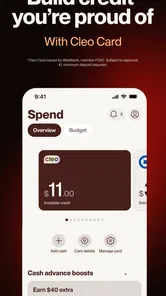
Yes. Cleo AI includes features focused on building, tracking, and improving credit, alongside its budgeting and savings tools. It may suit users who want to keep everyday money management and credit-related features in one app. What you can access can depend on your account and eligibility, so review the options available to you in the app before relying on a particular credit feature.
Does Cleo AI help with budgeting and saving?
Cleo AI is designed to help users manage a budget and save money, as well as keep track of spending and work toward savings goals. These tools can be useful if you want a clearer view of your everyday finances in one place. The app also offers features related to credit and cash advances, so you can explore its available tools and decide which ones fit your needs.
Is Cleo AI suitable for teenagers, and what should younger users know before downloading it?
Cleo AI is a finance app rated for Teen audiences, so it may be suitable for younger users who want to learn about budgeting and saving. Its tools are still related to managing real money, however, and features such as cash advances or credit support may involve eligibility requirements. A parent or guardian can help a younger user understand those features and decide whether the app is appropriate.
What devices can I use Cleo AI on?
Cleo AI is available for mobile devices running Android or iOS, with the listed minimum operating-system requirement being version 10. Before downloading, check that your phone or tablet meets that requirement and has enough space for the app. Keeping your device’s operating system updated can also help with compatibility and security when using a finance app.
What is Cleo AI and how does it help manage finances?
Cleo AI is a financial management app that offers tools for budgeting, saving, and financial insights. It helps users track their spending, set savings goals, and even provides cash advances. The AI-driven chatbot offers personalized financial advice, making it easier for users to manage their money effectively. The app also promotes features for tracking and improving credit, so its appeal goes beyond everyday spending.
Pros
- User-friendly interface for easy navigation.
- Offers personalized financial insights.
- Supports a wide range of banks.
- Quick and easy cash advances.
- Helps to build credit score.
Cons
- Limited features in free version.
- Cash advance fees may apply.
- Requires access to bank data.
- Notifications can be overwhelming.
- Not available in all countries.