ClassDojo
- 81.48K
- 4.8
- Installs
- 10.00M
- Price
- Free

Screenshots


Analysis by Reviewed
In my experience, a classroom app earns its place not through a flashy first week but by making the everyday handoff between school and home less awkward. ClassDojo is built around that shared routine: teachers can recognize classroom behavior, families can keep up with school life, and students get a visible sense of participation. It is an education app from ClassDojo, and its appeal is clearest when everyone involved is willing to use the same channel consistently.
Why the first week feels easy
Have you ever wished that managing a classroom could be as simple as a few taps on your phone? Well, let me introduce you to ClassDojo. This app is like having a digital assistant that not only helps teachers but also engages students and keeps parents in the loop. As someone who has tested countless educational apps, I must say, ClassDojo stands out with its unique approach to classroom management.
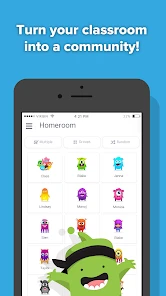
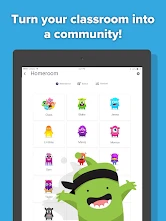
First off, setting up ClassDojo is a breeze. Whether you're a tech-savvy teacher or someone who clutches at the mere thought of technology, the app walks you through every step. Once you have it up and running, you can create a class, add students, and even invite parents to join. The interface is user-friendly, with colorful icons and a layout that makes navigation a walk in the park.
Feedback that can become a classroom habit
One of my favorite features is the ability to give students instant feedback. Imagine being able to award points for participation or teamwork right on the spot. It’s like giving kids a virtual pat on the back, which we all know can be a huge motivator. You can also customize the types of feedback you give, which makes it even more personal and effective.
The practical benefit is not simply that feedback is quick; it can make expectations easier to discuss. A teacher might use a consistent label for teamwork, then refer to that shared language when a group activity gets difficult. I would keep the categories focused and explain what each one means, rather than awarding points for every small action. Otherwise, the system can turn into background noise instead of useful encouragement.
Keeping family communication in one place
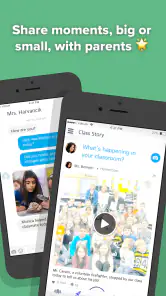
Another feature worth mentioning is the messaging capability. Teachers can easily communicate with parents, share updates, and send reminders. No more lost newsletters or missed announcements. Plus, there’s a privacy setting that allows messages to be sent without revealing personal contact information. This is a game-changer for maintaining professional boundaries.
For a realistic school-day example, a teacher could send a short reminder about what students should bring tomorrow, then share a classroom moment later for families who want a glimpse of the day. That is more convenient than scattering routine notes across paper handouts and separate messages. I would still agree on sensible communication expectations with families: a convenient inbox can make people assume replies should arrive immediately, even when a teacher is busy teaching.
You May Like

Clash of Clans Is Won Between the Battles

Android Auto Makes the Case for Quieter Car Software

MobiOffice: Transforming Mobile Productivity with Seamless Integration

EA SPORTS FC™ Mobile Soccer: Redefining Mobile Sports Gaming

How Microsoft OneDrive Became a Mobile Productivity Giant

How Google Translate Breaks Language Barriers Effortlessly
What lasts after the novelty wears off
Students’ interest, and the trade-off behind it
Let’s not forget the fun aspect of ClassDojo. The app features adorable monster avatars that students can customize. This might sound trivial, but trust me, it’s a hit with the kids. They love seeing their avatars evolve as they earn more points. It adds a layer of gamification that makes learning fun and engaging.
The playful presentation can help younger pupils pay attention to feedback, but it is not a substitute for explaining why a behavior matters. I would treat points and avatars as prompts for conversation, not as the whole reward system. For older students, or children who dislike public comparison, a quieter approach to recognition may feel more comfortable; a teacher should consider the class culture before making points the center of motivation.
What families can actually follow
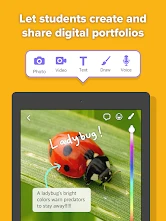
Parental involvement is crucial in a child’s education, and ClassDojo excels in this area. Parents can see their child’s progress and get a glimpse into their classroom activities. There’s even a feature for uploading photos and videos, so parents can actually see what’s happening in the classroom. It’s like having a window into your child’s school day.
That window is most useful when families use it to ask specific questions at home: what was happening in a photo, what a child enjoyed, or what they want to try again. It can make a school conversation easier to start, but a stream of updates is not the same as a full account of a child’s learning. I would use the shared view as a bridge to conversation rather than a scorecard for judging progress.
Where it fits among classroom tools
Compared with the usual alternatives, such as paper notices, a general messaging app, or a separate behavior tracker, this approach brings classroom recognition and family updates into one school-oriented space. That combination is its strongest reason to choose it. If a school already has a communication system that every family uses reliably, adding another app may create duplication rather than clarity. And if the main need is formal lesson delivery or assignment management, a dedicated learning platform may be a better fit than a tool centered on classroom connection.
It is also worth deciding who will maintain the routine. Teachers get more value when feedback labels stay clear and messages are timely; families get more value when they check in regularly rather than expecting every classroom moment to appear. A small, repeatable rhythm—brief updates when there is something useful to share, and feedback tied to agreed classroom expectations—seems more sustainable than trying to document everything.
Making the routine work for different families
The app is most useful when a classroom has a clear reason for using it and families know what they are expected to do. A teacher might use it mainly for short reminders and selected classroom snapshots, while keeping detailed academic discussions for a planned conversation. That division helps prevent messages from becoming a substitute for a meeting when a child needs more thoughtful support.
Families do not all want the same level of contact. Some may appreciate a quick look at the day; others may prefer a concise message only when there is something they need to act on. I would not treat frequent posting as proof that communication is better. A predictable, relevant note can be more valuable than a steady stream that is difficult to keep up with.
There is also a useful distinction between checking in and monitoring. A parent can use a shared update to ask a child about a group activity, for instance, without expecting the app to document every lesson or explain every outcome. If the child has a concern, a direct conversation with the teacher is still more appropriate than trying to infer the full story from a point or photo.
Small choices that reduce friction
One practical tip is to agree on a limited set of feedback labels before the routine becomes busy. When students hear the same words used consistently, they have a better chance of understanding what the teacher is recognizing. If labels are added or changed often, the point system can become harder to interpret and less useful as a prompt for reflection.
Teachers can also decide in advance which updates deserve a notification and which can wait. A reminder about what to bring tomorrow has an immediate purpose; a routine classroom moment may be interesting without needing an urgent response. This distinction helps families keep the app available without feeling that every alert requires attention at once.
For a child who is sensitive to comparison, the teacher can emphasize personal effort and specific feedback rather than turning points into a public contest. That is not a special trick so much as a choice about how to use recognition. The same feature that makes classroom expectations visible can feel discouraging if students interpret it as a ranking, so the explanation and classroom tone matter as much as the score itself.
Costs, compatibility, and the long-term decision
The app is free to download, with optional in-app purchases ranging from under a dollar to just under two hundred dollars per item. It is rated for everyone, has a 4.8 average from around 1.2 million ratings, and has been installed over 10 million times. Its current version is 8.7.0, and it requires Android 8.0 or later. Those details make it easy to assess the basic fit, but I would still check the purchase screen carefully before buying anything, especially if a child will be using the device.
The main maintenance burden is social rather than technical: teachers and families need a shared understanding of what the app is for, how often it will be used, and what kind of response is reasonable. If only one side checks it, the connection loses much of its value. Notification fatigue is another real risk when every minor classroom event becomes an alert, so selective updates are more helpful than constant ones.
For a teacher deciding whether to introduce it, I would start with one classroom purpose rather than promising that it will solve every communication problem. For example, use it to reinforce a few shared behavior expectations and send occasional practical notes. Once families understand that rhythm, it is easier to judge whether the channel is helping or simply adding another task to the school day.
Families should also consider whether they can make room for another school channel. If messages already arrive through a school portal, email, and paper notices, the value depends on whether the teacher and school use this app consistently enough to replace some of that clutter. If it merely duplicates existing announcements, checking one more inbox may not be worth the effort.
ClassDojo is a strong choice for teachers who want a simple way to reinforce classroom expectations and keep families connected, particularly when parents are eager to see everyday school activity. I would be more cautious if a class needs a formal academic workflow, if families already rely on a different school-wide channel, or if points would distract from the kind of learning environment the teacher wants. Its lasting value comes from a modest, consistent routine—not from novelty alone. If that routine suits your classroom, it can earn a regular place on your phone; if not, a simpler communication method may serve you better.
ClassDojo Frequently Asked Questions
Does my child’s teacher need to use ClassDojo for our family to benefit from it?
ClassDojo is designed to connect teachers, kids, and families, so its usefulness for a family is greatest when the child’s teacher or classroom uses it. Teachers can share messages, photos, and videos with parents, and families can follow classroom updates. If you are considering downloading it, checking with the teacher first can help you understand how it will fit into your child’s classroom communication.
Can parents communicate with teachers through ClassDojo?
Yes. ClassDojo is an educational communication app that brings teachers, students, and parents together. Teachers can share messages, photos, and videos with parents to keep them informed about classroom activities, and the app is intended to support communication between families and the classroom. Parents can use it to stay involved in their child’s school experience, particularly when the teacher uses ClassDojo for updates.
Do teachers need to pay to use ClassDojo, and are there optional purchases?
ClassDojo is free for teachers, students, and parents, and its basic features are available at no cost. Optional in-app purchases are also available at different price points, including features such as ClassDojo Plus for added functionality and customization. Families and teachers can begin with the free experience and decide whether any optional paid features are relevant to them.
What devices and operating systems can run ClassDojo?
ClassDojo is available for Android and iOS devices, and its current version is 8.7.0. The minimum supported Android operating system is version 8.0, so it is worth checking your device’s software before installing. ClassDojo is an education app designed to connect teachers, kids, and families, making it useful for people who want classroom communication on a mobile device.
What is ClassDojo and how does it work?
ClassDojo is an educational communication app that connects teachers, students, and parents to enhance classroom engagement. Teachers can share messages, photos, and videos with parents to keep them informed about classroom activities. The app also allows teachers to reward students for positive behavior, fostering a supportive and interactive learning environment.
Pros
- User-friendly interface for teachers and students.
- Encourages positive behavior with rewards.
- Easily tracks student progress and feedback.
- Facilitates parent-teacher communication.
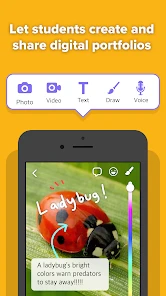
- Supports multimedia sharing for lessons.
Cons
- Limited features in the free version.
- Requires internet for full functionality.
- Privacy concerns with student data.
- Some features can be distracting.
- Not suitable for older students.

- Category
- Education
- Version
- 8.7.0