Dojo Islands
- 8.00
- 3.8
- Installs
- 10.00K
- Price
- Free

Screenshots




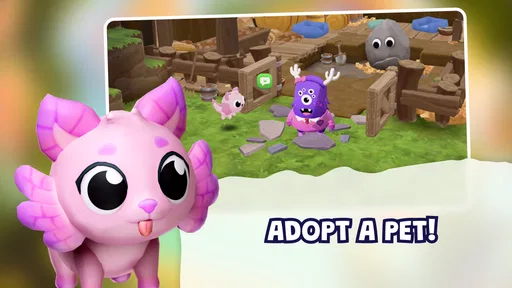
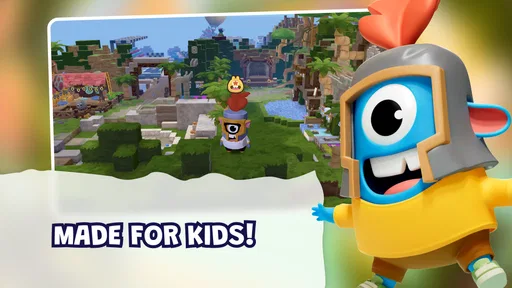


Analysis by Reviewed
Dojo Islands is the kind of educational game I would consider when a child wants something more open-ended than a short quiz but still needs a clearly kid-focused digital space. I spent time looking at it as a shared-device experience, because that is where its idea becomes most interesting: children can create, build, and play in a virtual world rather than simply answer questions one after another. That makes it feel closer to a creative playroom than a traditional learning app.
The game is developed by ClassDojo and is free to install, with optional in-app purchases ranging from $3.99 to $59.99 per item. It is listed for Everyone, which makes it approachable for a broad family audience, although an age label alone should not replace a parent’s judgment. The current version is 1.8.0 and it runs on Android 7.0 or later. I would describe it as an educational game built around creative participation, not as a formal lesson platform.
How Dojo Islands fits into shared household play
The most natural use case is a child using a family tablet during a quiet part of the day. Instead of opening a game designed only for quick competition, they can spend time shaping a virtual environment and deciding what to do inside it. That freedom is the main attraction, especially for children who enjoy decorating, constructing, exploring, or inventing their own activities.
On a shared device, I would treat it as a turn-based creative activity rather than something every family member uses simultaneously. One child can make changes, then show a sibling or parent what they built. That simple handoff matters because the game’s appeal is visual and personal: the result of a session can become something to discuss, improve, or explain.
A realistic evening routine might look like this: a child plays for a short period after homework, then gives the tablet to a sibling who wants to continue their own activity. Before switching, I would encourage the child to show what they changed and close the game properly. That habit is useful because a shared device can blur whose progress, choices, or purchases are currently on screen.
I would not assume that one installation automatically creates a clean experience for several children. Shared hardware often means shared access to the same device environment, and the practical boundary between users depends on how the household manages accounts and switching. If two children have very different ages or expectations, I would supervise the first few sessions rather than leaving them to work out the arrangement themselves.
The game is likely to be most satisfying for children who want to make choices instead of being pushed through a fixed sequence. A child who prefers clear rules, rapid rewards, or a definite finish line may find a creative virtual world less immediately engaging. In that case, a focused spelling, mathematics, or language app could be a better match.
More From Our News Desk

Weather by Xiaomi Review: Clear at a Glance, Less Clear Up Close

X Under Pressure: Can It Recover When Posting Goes Wrong?

Clash of Clans Is Won Between the Battles

Android Auto Makes the Case for Quieter Car Software

MobiOffice: Transforming Mobile Productivity with Seamless Integration

EA SPORTS FC™ Mobile Soccer: Redefining Mobile Sports Gaming
What to decide before handing over the device
Before a child begins, I would check which account is active on the device and whether the app store can approve purchases without an adult present. The free entry point is convenient, but the presence of paid items means “free to install” should not be treated as “impossible to spend money.” I would make the payment boundary clear in plain language, especially with younger children.
I would also agree on a simple session rule. For example, the child can create and explore, but must ask before buying anything or changing a setting they do not understand. This is not a claim about a specific parental-control feature; it is a household routine that reduces confusion when several people use the same tablet.
Another useful boundary is ownership. If siblings share one device, decide whether the world is a shared project or whether each child gets separate turns. Calling it a shared island can encourage cooperation, but it can also create arguments if one child changes another child’s work. Giving each person a clear turn, or agreeing that changes must be discussed first, makes the creative freedom more enjoyable.
I would keep the first session short enough to observe how the child responds. The important question is not only whether they enjoy it, but whether they understand what they are doing, can stop without a major argument, and can explain the difference between play activity and optional spending. Those observations tell a parent more than the Everyone label by itself.
For a child using an older family phone or tablet, compatibility is worth checking before planning around the game. Android 7.0 is the minimum operating system listed, so devices below that requirement are not suitable. On a device that meets the requirement, available storage, battery condition, and general performance can still affect the experience, particularly if the tablet is already crowded with other apps.
Coordination works better than constant supervision
One strength of a creative game is that it gives adults an opportunity to ask about the child’s decisions without turning play into a test. I would ask what they built, why they chose it, and what they want to change next. Those questions make the activity more social and may reveal whether the child is experimenting, following a sibling’s idea, or simply tapping through without much engagement.
For siblings, a shared project can become a gentle exercise in negotiation. One child might focus on building while another prefers exploring or arranging the environment. Rather than deciding that one style is correct, I would give them separate responsibilities. The child who likes structure can plan what should happen next, while the more imaginative child can suggest visual or playful changes.
There is a trade-off here. Open-ended play encourages ownership, but it can be harder to supervise than a worksheet with visible right and wrong answers. A parent may not know immediately whether a child is making meaningful choices or just repeating an action. I would therefore use occasional check-ins, not continuous hovering: look at the screen, ask the child to describe the goal, and let them continue if the activity remains appropriate.
If a child is using the game as a break between school tasks, I would avoid presenting it as a reward that must be earned through perfect performance. Its educational category does not mean every minute inside it is equivalent to studying. In my view, it works better as creative downtime with learning potential than as a replacement for a teacher, textbook, or structured practice program.
Families should also coordinate around device time. Because the world is designed for creating and playing, a child may want to keep refining the same idea instead of stopping at a natural endpoint. A timer or agreed stopping point can help, but I would give a warning before ending the session. Abruptly taking away a creative project is more likely to cause frustration than stopping after a clearly announced final action.
When the device moves between family members, I would make a quick visual check before the next person starts. Confirm who is playing, whether the previous session is finished, and whether anything on screen relates to a purchase or account decision. This takes only a moment and is more practical than trying to reconstruct what happened after a disagreement.
Age, trust, and the meaning of a child-friendly label
The Everyone content rating makes Dojo Islands a reasonable candidate for families looking for broadly accessible play, but it does not tell me that every child will use it in the same way. A preschool-age child may need an adult nearby to understand navigation and choices, while an older child may want more independence and become frustrated if every action is supervised.
I would introduce the game according to the child’s maturity rather than relying only on the rating. Younger players benefit from a guided first session in which an adult explains what the different areas are for and how to leave the game. Older children can usually take more responsibility, but I would still explain the purchase rule and the expectations for shared-device use.
The word “safe” in the game’s positioning should be read as an intention, not as a reason to abandon normal digital judgment. I would still keep account credentials private, avoid letting children make payment decisions alone, and talk about what information should never be shared. These are sensible habits for any connected child-oriented app, even when the experience itself feels welcoming.
I would also pay attention to social expectations. A child may interpret a virtual world as a place where friends or siblings are always available, while the household may see it as a solo activity. Before promising that someone else can join or respond, I would make sure the child understands what kind of interaction is actually taking place on the device. Clear expectations prevent disappointment and unnecessary pressure.
The install base is over 10 thousand, and the average rating is 3.7 from 72 ratings, with 8 written reviews. I would read that as a modest early signal rather than a definitive verdict. It suggests that the game has attracted interest, but the relatively small amount of public feedback means I would judge it through a child’s actual response, device behavior, and fit with the household routine.
Where it stands beside familiar educational alternatives
Compared with a flashcard app, Dojo Islands offers less direct repetition and fewer obvious study targets. A flashcard tool is better when a child needs to memorize vocabulary, number facts, or definitions in a measurable way. This game is better when the goal is to encourage imaginative engagement, choice-making, and a sense of ownership around play.
Compared with a traditional educational game built around levels and correct answers, its creative format may feel less predictable. That can be a benefit for children who dislike being marked wrong, but a weakness for parents who want clear evidence of progress. I would not choose it as the only digital learning tool if a child needs targeted support in a particular school subject.
It also occupies a different space from a general sandbox game. The educational framing and child-oriented setting make it easier to present as an age-conscious family activity, while a broad sandbox may offer deeper systems or more complexity. The trade-off is that a general game can demand more active filtering and supervision, whereas this title is designed to keep the experience closer to a protected creative environment.
For a household already using ClassDojo in another context, the developer name may make the game feel familiar, but I would still evaluate it on its own behavior. A recognizable developer does not guarantee that every family will enjoy the same product. What matters here is whether the child finds the building and play loop meaningful enough to return to without needing constant prompting.
One practical tip is to pair the game with conversation rather than worksheets. Ask the child to describe a design choice, tell a story about the place they made, or plan what they want to adjust next time. That approach uses the game’s open format more effectively than asking whether they “learned” a specific fact after every session.
Who should choose it, and who should look elsewhere
I would recommend Dojo Islands to families wanting a free starting point for creative, child-focused digital play, particularly when a child enjoys making things and showing them to others. It is also a sensible option for a shared tablet if adults are willing to establish clear rules around turns, account use, and purchases.
I would be more cautious if the household needs separate, tightly controlled experiences for several children. A shared device can make boundaries awkward, and the game’s creative nature may lead to disagreements over who changed what. In that situation, a more structured app with clearly separated profiles or lesson paths may be easier to manage, provided it suits the children’s ages.
I would also skip it as the primary choice for a child who needs intensive academic practice. The game may support curiosity and creative thinking, but it should not be mistaken for a complete curriculum. A focused mathematics, reading, or language app will usually be more useful when a parent has a specific learning objective and wants visible practice results.
The paid items deserve a final practical note. I would install it only after deciding who controls purchases and what the child should do when an optional item appears. The range from $3.99 to $59.99 per item is wide enough that a casual tap should never be treated as harmless. Even without making the purchase process part of the child’s play, adults should know where their own store controls and account protections are located.
My household verdict
After considering it as a family game rather than a conventional lesson tool, I see Dojo Islands as a promising creative option with a clear place in a child’s digital routine. Its biggest appeal is the invitation to build and play in a world that feels more personal than a sequence of exercises. That makes it easier for a child to bring imagination into the experience and easier for a parent to start a conversation about what they made.
Its limitations are equally important. Open-ended play does not provide the same structure as subject-specific practice, and shared-device use requires deliberate household rules. The free installation is useful, but optional purchases mean adults should set payment boundaries before a child explores independently. The Everyone rating supports broad accessibility, yet supervision should still match the child’s maturity and the family’s expectations.
My recommendation is to try it with a planned first session: use a compatible device, confirm the active account, explain turns and purchases, and then ask the child to show what they created. If they enjoy designing and can move between play and stopping time without constant conflict, the game may earn a regular place in the household. If they need measurable school practice or become frustrated by open-ended choices, another educational app will probably serve them better.
In short, Dojo Islands works best as a shared conversation starter and creative play space, not as a replacement for teaching. I would recommend it to families who value imagination, cooperation, and a child-friendly setting, while keeping the boundaries visible and the expectations realistic.
Dojo Islands Frequently Asked Questions
What does the Everyone age rating mean for Dojo Islands?
Dojo Islands is rated Everyone, which makes it suitable for a broad audience, including children. Parents may still want to review the game together with younger players and use device-level purchase controls, since the game offers optional in-app purchases. Its educational category and focus on a virtual world children create, build, and play together may appeal to families looking for a game with a creative, shared setting.
Who makes Dojo Islands, and what kind of game is it?
Dojo Islands is a game from ClassDojo in the educational category. Its central idea is a safe virtual world that kids can create, build, and play together, giving children a shared space for imaginative play. If you are considering it for your family, this creative, cooperative premise is a useful point of difference from games focused mainly on competition or combat.
What is Dojo Islands?
Dojo Islands is a mobile game built around martial-arts-inspired challenges, exploration, and competitive activities. Players can usually expect to develop their character, complete tasks, collect rewards, and improve their skills through different game modes. Its island setting gives the experience a casual adventure feel, while the dojo theme adds training and progression elements that make the game more engaging over time.
Is Dojo Islands free to download and play?
Dojo Islands can generally be downloaded and played without an upfront purchase, although the exact availability may depend on whether you use Android or iOS. Like many free mobile games, it may include optional in-app purchases for cosmetic items, upgrades, currency, or other bonuses. Before downloading, check the store listing for current pricing, supported devices, and any purchase-related information.
Does Dojo Islands require an internet connection?
An internet connection may be necessary for important parts of Dojo Islands, particularly account synchronization, online competitions, multiplayer features, advertisements, events, and downloading updated content. Some basic activities might work when offline, but the complete experience is likely to require Wi-Fi or mobile data. If you plan to play while traveling, test the game beforehand rather than assuming every feature works offline.
Pros
- Relaxing island setting makes casual play feel enjoyable.
- Simple controls are easy for new players to understand.
- Short sessions work well for quick gaming breaks.
- Exploration offers a pleasant sense of discovery.
- The colorful presentation is appealing on mobile screens.
Cons
- Progress may feel slow for players seeking constant action.
- Some areas can become repetitive after extended play.
- Requires a compatible device with enough free storage.
- Limited challenge may disappoint experienced gamers.
- Optional purchases could affect the overall progression pace.












