Citi Mobile®
- 429.05K
- 4.8
- Installs
- 10.00M
- Price
- Free

Screenshots

Analysis by Reviewed
I find Citi Mobile® most useful when I want to deal with a specific banking task without turning it into a trip or a long session at a computer. A phone can make a balance check, bill payment, or card-related decision easier to fit into an ordinary day. That convenience has limits, though: the best experience depends on having a Citi account, a suitable phone, and a setting where I can pay attention to what I’m confirming.
Choosing the right task for a phone
Before opening a banking app, I find it helpful to know what I’m trying to do. A quick account check is well suited to a phone; reviewing a lengthy statement line by line is not. If I’m comparing several transactions or need to keep paperwork beside me, I’d rather use a larger screen. This is not a weakness unique to Citi’s app so much as a practical trade-off of mobile banking, but it matters when choosing the right tool for the moment.
For a recurring bill, I would use the app when I already have the payee and amount clear, then pause before confirming to make sure I have selected the right details. If I’m unsure whether a payment has gone through after a connection interruption, I would check the account activity before trying again. Repeating a payment in a hurry can create more trouble than taking a moment to verify its status.
Who benefits most from the mobile format
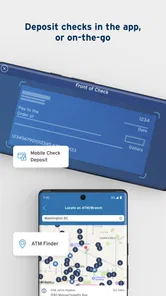
The app makes the most sense for someone who already banks with Citi and wants routine account access away from a desk. It can also suit a person who receives a paper check occasionally and prefers trying a camera-based deposit rather than arranging a visit. That workflow is most practical when the check and phone can be placed steadily and there is enough light to review the image before submission.
Someone managing finances across several banks may want a budgeting service designed to bring different providers together, while a Citi customer focused on account servicing may prefer to start here. I would not choose this app as a substitute for broader financial planning if my main goal were to compare spending across unrelated institutions. The bank’s own app and a dedicated budgeting tool answer different questions, so some people may find that using each for its respective purpose is more sensible than expecting one to do both.
Small habits that reduce avoidable mistakes
I’d treat the app as a convenient place to act, not as a reason to rush. Before a transfer, checking both the recipient and amount is a simple safeguard; before locking a card, I’d make sure I am acting on the right card. For deposits, reviewing the captured image before sending it helps catch an unclear photo while I still have the check in hand. These are ordinary habits, but they become especially useful when a task is being done between errands.
Notifications are most useful when they prompt an action I actually want to take. If every alert interrupts work or makes it harder to focus, I’d review the phone’s notification controls and keep only the types that help me stay on top of account activity. People who prefer fewer interruptions can still open the app when they choose; notifications should support a routine rather than dictate it.
More From Our News Desk

 Bolt: Request a Ride
Bolt and the Shift from One-Tap Rides to More Legible Trips
Bolt shows how ride-hailing is shifting from a one-tap taxi request toward a more legible, choice-driven trip, while leaving the hardest questions of price and reliability unresolved.

 Farm Land - Farming life game
Farm Land Review: A Small Island Farm with a Satisfying Loop
A bright, breezy island farm turns a few quick chores into a satisfying cycle of planting, harvesting, expanding, and deciding what to build next.

 Android Auto
’s Community Takes Shape in the Passenger Seat
Its most valuable network is not a public feed but a shared set of routes, voice habits, app integrations, and advice that make driving less isolating—and sometimes more complicated.

 My Talking Angela
 Makes the Virtual Pet Feel Personal
A polished pet-raising game built on small rituals, playful customization, and a character who gives everyday screen time a surprisingly personal rhythm.

 Google Translate
 Review: A Pocket Tool for the Small Frictions of Travel
From menus and signs to quick conversations, Google Translate earns its place by cutting the little delays that make unfamiliar language feel like a barrier.

 Shazam: Find Music & Concerts
Shazam’s Best Trick Is Turning a Song Into a Night Out
A few seconds of recognition can settle an argument, rescue a half-remembered chorus, and point toward a live show. Shazam’s real trick is what happens after the match.
Latest News



Readability and navigation in daily use
The Citi Mobile® app is a free finance app from Citibank N.A. Its 4.8 average across around 1.3 million ratings suggests that many users value it, though popularity alone cannot tell you whether it fits your needs. The app has been available since September 22, 2011, and version 9.90.0 requires Android 10 or later. It is rated for Everyone and has more than 10 million installs.
For me, the key question is whether a banking app makes common tasks easy to find when I’m in a hurry. A dashboard that gathers account details can reduce the work of switching between screens, but anyone who prefers a larger display may still find a phone less comfortable for reviewing long statements or carefully comparing transactions. I’d use the app for quick checks and routine actions, then choose a browser or another larger-screen option when I need to examine a lot of detail.
Getting Started: Easy Peasy
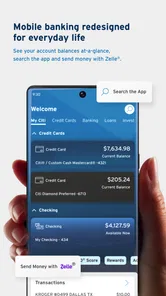
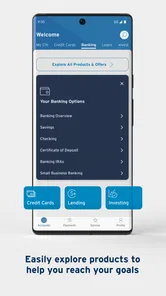
First things first, downloading and setting up the app was a breeze. Available on both Android and iOS, you can find it in the app store without any hassle. Once installed, the interface is sleek and intuitive. No more fumbling through endless menus. Instead, you get a neat dashboard that lets you see all your bank accounts at a glance.
Motor and sensory considerations
Banking on a phone can be helpful when reaching a branch or handling paper is difficult, but small touch targets and precise camera framing can make some tasks harder for people with limited dexterity or tremor. For check deposit, I’d settle the phone and check on a stable surface, use good even light, and take a moment to review the image before submitting it. That simple routine is less frustrating than trying to do everything one-handed while walking or standing in a queue.
Notifications can help someone who benefits from timely reminders, but frequent alerts may be distracting or stressful. I’d keep only the notices that support a real habit, such as reviewing account activity, and adjust notification settings on the phone if they become too much. Anyone who relies on spoken feedback, magnification, or larger text should test their usual device settings with the app before depending on it for an urgent transaction; comfort can vary with the phone and the task.
Features that Stand Out
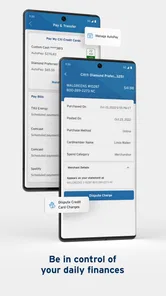
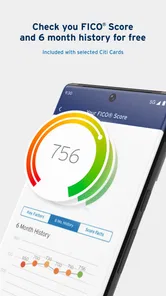
What really caught my attention is the plethora of features this app offers. From checking your account balance to transferring funds, paying bills, and even tracking your credit score, it’s all there. One of my favorite features is the ability to deposit checks using the phone’s camera. It’s as simple as snapping a photo – no need to head to the bank. Talk about convenience!
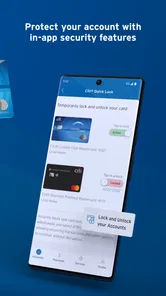
Moreover, the app offers robust security measures. With its biometric login options, I feel more secure than ever. There’s also a nifty feature that allows you to lock your card instantly if it goes missing. Peace of mind is just a tap away.
Situational access and sensible trade-offs
A realistic use for me is checking a balance between errands, then paying a bill while I still have the details in front of me. A card lock is useful if I notice a card has gone missing, while mobile check deposit can spare a trip when I receive a paper check. I would still avoid starting a sensitive task on unreliable public Wi-Fi or in a distracting setting; if a connection drops or I’m interrupted, I’d wait until I can confirm what has and hasn’t gone through.
Compared with a standalone budgeting app, a bank’s own app is the more direct place to manage accounts and make payments. A budgeting tool may be a better fit for someone who wants a broader view across financial providers or more deliberate spending analysis. Likewise, if I need a long, careful review of documents, a desktop browser is more comfortable than a phone. The useful choice depends on whether the immediate goal is banking or planning.
User Experience: Smooth and Fast
Let’s talk about the user experience. The app runs smoothly without any lag. Whether I'm making a quick transfer or checking my statement, everything happens in real-time. The app also sends timely notifications, which are incredibly helpful for staying on top of your finances. No more late fees sneaking up on you!
Another aspect worth mentioning is customer support. Whenever I had queries, the in-app chat support was prompt and efficient. It's like having a personal banker at my fingertips.
Remaining barriers and who should consider it
Even a well-organized app cannot remove every obstacle. A phone may be hard to use for someone who finds small screens tiring, and camera-based tasks can be challenging when lighting, steadiness, or vision is an issue. A user who does not have a Citi relationship, or who mainly wants cross-bank budgeting rather than account servicing, should look at a different option. I would also keep a non-app route in mind for moments when the phone is unavailable or an important task needs more support.
If you share a device, take extra care to sign out when appropriate and avoid leaving account information visible to someone nearby. For a payment or transfer, I’d pause to check the recipient and amount before confirming; speed is useful, but a deliberate last look is a better habit than relying on convenience alone. Those small choices make mobile banking more dependable in everyday settings.
Inclusive verdict
In my opinion, Citi Mobile® is a must-have app for anyone with a Citibank account. It's convenient, secure, and packed with features that make banking simpler and more accessible. Whether you’re tech-savvy or a bit of a novice, this app caters to all.
So, if you’re looking for a reliable banking app that does it all, give Citi Mobile® a try. It might just be the financial assistant you've been waiting for!
Citi Mobile® Frequently Asked Questions
Is Citi Mobile® available in my country, and can I use it without a Citi account?
Citi Mobile® is designed for managing Citi accounts, so having an eligible Citi relationship is central to using the app’s banking features. Availability and the services offered can depend on where you live and the Citi products available in your region. Before downloading, check that Citi serves your location and that your account is supported; the app is not a general-purpose banking service for accounts at other institutions.
Do I need an internet connection to use Citi Mobile®?
Citi Mobile® is a mobile banking app for accessing and managing accounts, so you should plan to have an internet connection when using it. A connection lets the app communicate with Citi and display account information or process actions. If you are travelling or have limited connectivity, access may be affected; avoid relying on the app for account tasks until you can connect securely.
Who develops Citi Mobile®, and what kind of app is it?
Citi Mobile® is a finance app developed by Citibank N.A. It is intended for people who want to manage their Citi accounts through a mobile device, with the app’s summary describing access to accounts virtually anytime, anywhere. The app is free to download, and its content rating is Everyone, so it is presented as suitable for a broad audience.
What devices and operating systems can run Citi Mobile®?
Citi Mobile® is available for mobile devices running Android or iOS, and the current version is 9.90.0. Before downloading, check that your device’s operating system meets the app’s minimum requirement of version 10. Keeping your device and app updated can also help you use the current experience and available features.
What features does the Citi Mobile® app offer to its users?
The Citi Mobile® app provides a range of features designed to make banking easier and more accessible. Users can check their account balances, view recent transactions, pay bills, transfer money between accounts, and even deposit checks using their mobile device. For security, the app offers fingerprint login and facial recognition, ensuring that your financial information is well-protected.
Pros
- User-friendly interface
- Fast and secure transactions
- Comprehensive account management,24/7 customer support
- Customizable alerts
Cons
- Limited international features
- Occasional login issues
- Complex navigation for new users
- Limited budgeting tools
- Frequent app updates required