Cashew—Expense Budget Tracker
- 671.00
- 4.7
- Installs
- 500.00K
- Price
- Free

Screenshots



Analysis by Reviewed
I like expense trackers that make me want to record a purchase immediately instead of promising a perfect financial system I will abandon after a week. Cashew—Expense Budget Tracker takes that practical route. It is a finance app from Dapper App Developer, and its central job is simple: help me record spending, organize it, and keep an eye on a budget without turning everyday money management into a chore.
After using it as a personal spending companion, I found its strongest quality to be the way it encourages a repeatable routine. I can open it after buying lunch, add the amount while the transaction is still fresh, and later look back at the pattern rather than relying on memory. That sounds basic, but the difference between a useful tracker and an ignored one is usually the number of small obstacles between spending money and logging it.
The app is free to start, with optional in-app purchases ranging from $1.49 to $19.99 per item. It is rated for Everyone, supports Android 7.0 and later, and the current version is 6.6.11. Its public reception is encouraging: a 4.7 average from around 27 thousand ratings, with more than 500 thousand installs. Those figures do not replace personal testing, but they do suggest that Cashew has found an audience among people who want a focused expense tool rather than a full banking replacement.
How I built a dependable daily workflow
My first recommendation is not to begin by creating a complicated budget. I would start with the smallest useful loop: record an expense, assign it to a sensible category, and check the result at the end of the day. Cashew becomes much more informative once several ordinary purchases are in it, so the early goal should be consistency rather than perfect organization.
A realistic example is a weekday commute. I might pay for transport, pick up coffee, buy lunch, and make a small grocery purchase on the way home. Instead of trying to reconstruct all of that on the weekend, I would enter each item close to the moment it happens. The benefit is not merely accuracy. The act of entering the purchase makes me notice how often small, forgettable expenses appear beside the larger planned ones.
I found it helpful to keep category names broad at first. Food, transport, household spending, subscriptions, and personal purchases are usually enough to reveal a pattern. If I create separate categories for every shop or type of snack, the tracker starts demanding more attention than the spending deserves. Cashew works better when categories answer a useful question, such as “Where did my flexible money go?” rather than preserving every tiny detail.
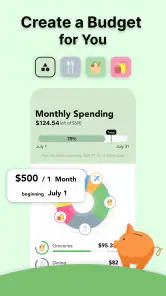
The next step is to compare actual spending with the budget I intended to follow. I would not treat the budget as a judgment on every purchase. It is more useful as an early warning. If the food category is already unusually high halfway through the month, I can adjust upcoming choices while the information is still actionable. Looking at the total only after the month ends turns the app into an archive; checking it during the month makes it a decision tool.
One habit made the biggest difference for me: I separated essential recurring costs from flexible daily spending. Rent, utilities, and regular commitments can make a monthly total look intimidating, but they do not offer the same room for adjustment as meals out or impulse shopping. Keeping that distinction clear helps me avoid the common mistake of responding to a fixed bill by cutting a category that was not actually responsible for the problem.
Cashew is also useful for people who do not want to track every financial account in one place. I can use it as a lightweight record of discretionary spending and still keep banking activity in my bank’s own app. That division is practical for anyone who wants spending awareness without handing an expense tracker the role of a complete financial dashboard.
The settings I would review before relying on it
Once the basic workflow feels comfortable, I would spend a few minutes reviewing the app’s available setup rather than accepting every default. The most important choices are the ones that affect how quickly I can recognize a transaction later: currency, categories, budget periods, and the way recurring or familiar expenses are represented. A tracker is only as clear as the structure behind its entries.
I would make the category list reflect my actual life, not an imaginary accounting textbook. If I regularly spend on public transport, medication, pet care, or freelance supplies, those deserve a place that is easy to find. At the same time, I would resist making a category for every individual merchant. Merchant-based labels can feel precise, but they often make monthly review harder because related purchases become scattered.
Another useful setup decision is choosing a budget that matches the way I get paid and spend. A monthly budget is intuitive for many households, but someone managing irregular income may need to think in shorter checkpoints. In that situation, I would use Cashew to monitor the next stretch of spending instead of pretending that a single monthly number gives a complete picture.
It is worth deciding how to treat transfers and reimbursements before entering a lot of history. Money moved between my own accounts is not the same as spending, and a friend paying me back should not quietly make my income look larger than it is. Even when an app makes entry easy, the quality of the reports depends on applying the same rule every time. I would write down my personal rule in plain language and follow it consistently.
For shared households, I would also agree on who records what. If two people enter the same grocery purchase, the budget becomes misleading. If neither person records it because each assumes the other will, the result is just as bad. Cashew can support a shared habit, but it cannot decide whether a household uses one person’s entries, a shared device, or a separate arrangement. The best setup is the one that removes ambiguity before it appears.
Because the app is free with optional purchases, I would explore the core workflow first and only consider paid items if they solve a problem I actually have. That is a better approach than buying extras simply because a budget app feels more serious when every option is enabled. The free starting point makes it easy to test whether I will maintain the habit at all.
Shortcuts and repeatable patterns that save effort
The fastest users are not necessarily entering more information. They are reducing the number of decisions made during each entry. I would keep a small set of familiar categories near the top of my mental list, use consistent descriptions, and avoid editing old transactions unless the correction changes the meaning of the report. A quick, consistent record is more valuable than a detailed entry that I postpone.
For repeat purchases, I would use the app’s available repeatable-entry tools where they fit my routine, while still checking the amount when a bill can change. A recurring charge may look stable for several months and then change because of usage, a plan adjustment, or a one-time fee. Automation or repetition is helpful only when I treat it as a prompt to review, not as permission to stop looking.
I also like a two-pass method. During the day, I enter the basic facts quickly: amount, category, and a short note if the purchase needs context. Once or twice a week, I review the list and correct anything unclear. This avoids the two extremes of abandoning details entirely or turning every coffee purchase into a miniature bookkeeping session.
Another effective pattern is to use the budget as a weekly conversation with myself. I ask three questions: which category is moving faster than expected, which expense was genuinely necessary, and what can I change before the next review? This turns Cashew from a record of guilt into a feedback loop. The point is not to eliminate every enjoyable purchase; it is to make trade-offs visible while I can still choose between them.
For irregular expenses, I would create a small planning buffer rather than forcing every month to look identical. Annual renewals, gifts, repairs, and travel can distort a normal month. If I only react when one of those costs arrives, the budget appears to fail suddenly. If I recognize them as occasional obligations in advance, the same spending becomes easier to interpret and less likely to derail the rest of the plan.
A particularly useful trick is reviewing categories by behavior instead of by emotional importance. A large purchase may be memorable and easy to control because I notice it immediately. Several small purchases can be more revealing because they disappear into the day. I would use Cashew to find the repeated low-friction spending that I genuinely want to change, rather than focusing only on the biggest individual transaction.
Where a focused tracker reaches its limits
Cashew is not the right choice for everyone. If I want investment analysis, detailed account aggregation, tax preparation, debt optimization, or a complete household financial portal, I would look for a more specialized service. An expense tracker can show where money went, but that is different from giving a full picture of net worth, portfolio performance, or long-term financial planning.
I would also skip it if I know I will not enter transactions manually and I expect every purchase to appear automatically without effort. The app’s value depends on the quality of the information I maintain. Someone who dislikes manual tracking may prefer a bank-centered tool with automatic transaction imports, even if that option offers less control over categories or personal organization.
Manual entry brings another trade-off: it gives me a chance to understand each purchase, but it also creates opportunities for omissions and duplicates. A cash expense is easy to forget. A card payment can be recorded twice if I enter it once at purchase and again when checking the bank account. My solution is to choose one moment for recording and use account statements only for reconciliation, not as a second independent entry process.
Budget categories can also create false confidence. If I place an unexpected medical cost, a necessary repair, or a large annual payment in an ordinary flexible category, the report may imply that I simply overspent on leisure. I would treat categories as a model of my decisions, not as objective truth. When something unusual happens, a clear note is often more useful than forcing it into a misleading label.
The app may feel too lightweight for users who need a shared financial command center. A couple can still use it successfully, but only if they agree on a recording routine and review the same information. Without that agreement, the problem is not the budget screen; it is inconsistent input. In that case, a collaborative finance product may be a better fit.
There is also a psychological limit. Seeing every purchase can become stressful for someone who already worries about money. I would not recommend opening Cashew repeatedly throughout the day to check whether I am “allowed” to spend. A calmer schedule—quick entries when needed and a planned weekly review—usually produces better decisions than constant monitoring.
Who gets the most from Cashew
I think the app suits people who want a clear first step into budgeting, especially students, young professionals, families simplifying their routine, and anyone who has tried spreadsheets but stopped maintaining them. It is also a good match for users who want control over what they record instead of connecting every financial account to a service.
It works particularly well when the financial question is concrete: “How much can I still spend on dining this month?” or “Why does my available money disappear before payday?” Those questions can be answered with a modest set of categories and a steady entry habit. The app does not need to become a complete financial archive to be useful.
I would be more cautious for business owners with complicated reimbursements, multiple currencies, invoice requirements, or detailed tax categories. A personal expense tracker can help someone understand spending, but it should not be mistaken for professional accounting software. The same applies to anyone managing investments or several people’s finances across many accounts.
Compared with a spreadsheet, Cashew feels more approachable for daily entries and less flexible for custom analysis. A spreadsheet can model almost anything if I am willing to build and maintain it. Compared with a banking app, Cashew can offer a more deliberate view of spending, while the bank remains better for balances, transfers, and official transaction history. Compared with a full budgeting platform, Cashew is likely to appeal to someone who values a narrower, less intimidating workflow over an all-in-one system.
My verdict after making the habit sustainable
What I appreciate most is not a dramatic feature; it is the way Cashew supports a manageable money routine. I can begin with quick expense entries, refine categories only when the reports need them, and use budget checks to make decisions before the month gets away from me. That gradual approach is more realistic than building an elaborate financial system on the first day.
The app’s free entry point makes trying that routine low-risk, while optional purchases leave room for users who want more from the experience. I would still judge any upgrade by whether it removes a real obstacle in my workflow. Paying does not fix an inconsistent habit, and no setting can make an inaccurate category structure useful.
My practical recommendation is to use Cashew for a short trial period with one clear goal, such as controlling takeaway spending or building a view of household essentials. Enter purchases promptly, keep categories broad, review once a week, and adjust only what the review teaches you. If that process feels helpful, expand it. If manual entry already feels burdensome, a more automated alternative will probably serve you better.
For me, Cashew—Expense Budget Tracker succeeds as a focused companion for people who want to see their spending without turning personal finance into a second job. It is not a replacement for banking, accounting, or long-term financial planning, but it can make everyday choices easier to understand. With a few sensible settings and a repeatable habit, I would recommend it to a friend who wants a practical, low-pressure way to start paying attention to where money goes.
Pros
- Clean interface makes daily expense tracking quick and easy.
- Flexible categories help organize spending across different needs.
- Budget alerts can encourage better control of overspending.
- Supports recurring expenses for bills and regular payments.
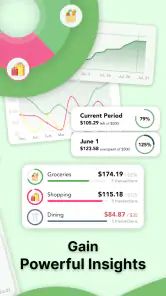
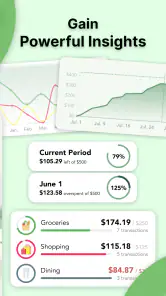
- Useful charts provide a clear view of spending patterns.
Cons
- Some advanced features may require a premium subscription.
- Manual entry can feel tedious for users with many transactions.
- Limited bank integration may reduce automatic expense importing.
- Detailed budgeting may take time to configure properly.
- Syncing data across devices may depend on account setup.

- Category
- Finance
- Version
- 6.6.11











