Cashback & ATM near me Cashtic
- 177.00
- 3.5
- Installs
- 100.00K
- Price
- Free

Screenshots
Analysis by Reviewed
I approached Cashback & ATM near me Cashtic as a practical finance app rather than a full banking replacement. Its purpose is straightforward: help me find nearby places connected with cashback, ATMs, and peer-to-peer cash. That focus makes it potentially useful when I am already out and need to solve a cash-access problem quickly, but it also means the quality of the experience depends heavily on how clearly I can read, search, compare, and act on the information shown.
The app is free to install, with optional in-app purchases ranging from $0.99 to $9.99 per item. Cashtic LLC is the developer, and the app has been available since October 15, 2020. It is rated for Everyone and runs on Android 7.0 or later, so it is aimed at a broad audience rather than a narrow group of finance enthusiasts. Its current version is 9.0.75, and its audience has grown beyond 100 thousand installs, with an average rating of 3.5 from more than 800 ratings.
How clearly Cashtic supports different users
Readability and navigation when I need an answer quickly
The most important test for this kind of tool is not whether it looks impressive during a relaxed session. It is whether I can understand it while standing outside a store, walking through an unfamiliar area, or trying to locate cash before a business closes. Cashtic’s narrow purpose is helpful here because I am not opening it to manage a complete budget, transfer a salary, or study spending charts. I am opening it to look for a nearby option.
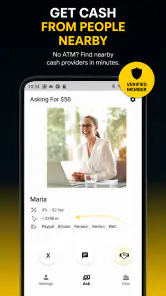
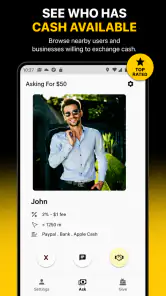
That focused role can make the app easier to approach than a traditional banking application filled with account balances, cards, statements, security notices, and promotional panels. Someone who is less comfortable with financial technology may find a location-based cash tool less intimidating than a mobile banking dashboard. The store description points toward cashback stores, ATMs, and peer-to-peer cash, so I would expect the main task to begin with choosing or locating the type of service I need.
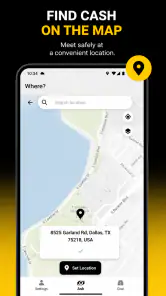
For readability, I would use the app with the phone held at a comfortable distance and avoid making decisions from a glance at a crowded map. Map interfaces can compress important details into small labels, especially when several places are close together. My practical approach would be to search first, then open one result at a time and check the details before travelling. That is safer than assuming the closest visible marker is automatically the best choice.
A useful habit is to decide what I need before launching Cashtic. If I need physical cash, I would look for an ATM or cashback location. If I am trying to arrange a person-to-person exchange, I would treat that as a different task and pay closer attention to the description and any conditions. Separating those goals reduces the chance of selecting a convenient-looking result that does not actually fit the situation.
The app’s audience size suggests that it has found a real use case, but the 3.5 average also tells me to keep expectations measured. I would not treat every result as equally dependable without checking it. A finance-location app is only as useful as the clarity and relevance of the options displayed at the moment I need them. That is especially important for people who find dense screens, ambiguous labels, or rapid navigation difficult.
Motor and sensory considerations in everyday use
Cashtic can be useful for someone who prefers not to visit several places looking for cash, because finding an option in advance may reduce unnecessary movement. A person with limited stamina, someone carrying shopping, or a user travelling with a child could benefit from narrowing the search before leaving a safe or familiar place. In that sense, the app’s purpose may support independence even without being a dedicated accessibility product.
There are also practical motor considerations. A map often requires tapping small markers, dragging the view, and selecting the correct item from nearby choices. Those actions can be frustrating for users with tremors, reduced precision, or difficulty maintaining a steady touch. I would recommend zooming in before selecting a location and using deliberate taps rather than repeatedly touching the screen. If the app offers a list-style way to inspect results, I would favour that over trying to hit a tiny map pin, although I would verify which view is most comfortable on the specific device.
For users with visual sensitivities, a map with multiple markers may become busy. I would avoid relying on colour alone to distinguish categories, because colour differences can be easy to miss in bright sunlight, low light, or for people with colour-vision differences. Reading the full text associated with a result is a better practice than interpreting a marker by appearance. A larger system font may improve legibility, but enlarged text can also cause labels to wrap or occupy more space, so I would check the screen before setting out.
People who are deaf or hard of hearing should not need audio to understand the basic purpose of a location search, which is a positive aspect of this type of task. Conversely, users who depend on spoken feedback should test how comfortably their device’s screen reader handles the map, buttons, and result information. I would not assume that every visual control has been labelled in a way that works perfectly with assistive technology. The sensible approach is to try a short search at home before relying on it in an unfamiliar place.
Older phones can also affect the experience. The minimum operating-system requirement is Android 7.0, which keeps the app available to people who do not replace devices frequently. However, compatibility is not the same as comfort. A smaller display, slower response, or limited battery can make map interaction harder. If my phone were older, I would search before leaving and keep an alternative plan rather than depending on a last-minute lookup.
Situational access: when the app is most useful
One realistic scenario is arriving in a new neighbourhood after a card payment fails or finding that a small business accepts cash only. I could open Cashtic, search for a nearby ATM or cashback option, and compare the result with the distance I am willing to walk. The app may save time by giving me a starting point instead of asking me to ask several strangers or inspect unrelated map results.
Another situation is planning an errand for someone who cannot easily travel between multiple locations. I could check possible cash-access points before the trip, note which one appears most practical, and avoid sending that person on an unnecessary detour. This is where the app has value beyond convenience: advance checking can reduce physical effort and uncertainty.
It may also help travellers who do not know the area. A familiar bank’s own ATM finder is excellent when I already know which network I want, but it is less useful when I am comparing different kinds of cash access. Cashtic’s broader focus may be more convenient for an exploratory search. On the other hand, a bank app is usually the better choice when I need account-specific information, fee warnings tied to my card, or confirmation that a particular machine belongs to my network.
I would use the app differently depending on urgency. For a planned trip, I would inspect the location while I still have time to verify the route and consider a backup. For an immediate need, I would search close to my current position, read the result carefully, and avoid assuming that a listing guarantees availability. A location can be busy, temporarily inaccessible, or unsuitable for my exact cash requirement even when it appears nearby.
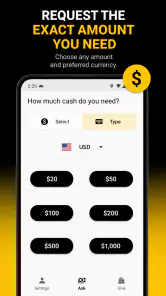
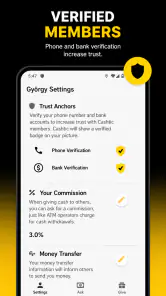
The peer-to-peer aspect deserves extra caution. If I am looking for cash from another person rather than a conventional ATM or retailer, I would consider personal safety, meeting in a public place, and the exact terms of the exchange. I would never share sensitive banking credentials simply because a listing or message suggests doing so. Cashtic can help me find an option, but it should not replace my judgement about who I am dealing with or whether the arrangement is appropriate.
Where Cashtic still creates friction
The biggest limitation is that location discovery is not the same as guaranteed access. A nearby result may not tell me everything I need before I arrive, and the practical value of the app can drop if information is unclear or outdated. That is why I would treat each result as a lead to verify, not as a promise. For a time-sensitive withdrawal, I would keep a second option in mind.
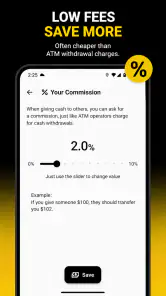
There is also a difference between finding an ATM and understanding the total cost of using it. The app may help me locate a machine, but I would still read the on-screen fee disclosures and my bank’s terms before confirming a transaction. If avoiding fees is my main goal, my bank’s official finder or a network-specific tool may be the better first choice because it is more closely connected to my account and card conditions.
Users who need highly predictable accessibility may find the map interaction less comfortable than a simple text directory. Someone with low vision, limited dexterity, or difficulty processing busy screens may prefer to ask a trusted person to check the location, use a familiar banking app, or call a business directly. That is not a criticism of the app’s purpose; it is a reminder that a location map is not automatically the most inclusive interface for every task.
Privacy is another point I would consider before using any location-based finance tool. I would grant only the access needed for the search and avoid leaving location sharing active longer than necessary if my phone allows that choice. I would also avoid entering personal financial details into an unfamiliar prompt. The safest workflow is to use Cashtic for discovery, then complete any financial transaction through the ATM, retailer, bank, or trusted payment method involved.
The optional purchases may also affect how I judge the app. Since the basic download is free but individual purchases can cost between $0.99 and $9.99, I would check what a purchase unlocks before paying and decide whether the extra convenience is genuinely useful to me. A person who only needs occasional location searches may prefer to stay with the free experience, while a frequent user might consider an upgrade if it clearly saves time. I would not pay simply because a screen presents an offer during an urgent search.
Compared with a general maps app, Cashtic has the advantage of being centred on cash-related destinations rather than making me search through broad business categories. Compared with a bank’s ATM locator, it may be more flexible when I want to compare ATMs, cashback stores, and peer-to-peer options in one place. Neither comparison makes it universally superior. General maps may provide richer route information, while a bank app may offer more relevant fee and network details. My choice would depend on whether I need broad discovery or account-specific certainty.
My inclusive verdict after using it as a practical finance tool
I see Cashtic as a useful companion for people who want a focused way to look for nearby cash options, especially when they are outside their usual area. Its free entry point, Everyone rating, and support for Android 7.0 or later make it approachable for a wide range of users. The developer, Cashtic LLC, has kept the concept easy to understand: locate a place that may help with cash, then decide whether it suits the situation.
My strongest recommendation is to use it as part of a prepared workflow rather than as the only source of truth. Search before travelling, inspect results individually, consider accessibility and distance, and keep a backup location. If I were helping someone with limited mobility, I would do the search in advance and confirm the route and destination details with them. If I were helping someone with visual or motor difficulties, I would test the interface on their device first instead of assuming the map would be comfortable.
I would recommend it to people who regularly need to find unfamiliar ATMs or cashback locations and do not want to begin with a full banking app. I would be more cautious about recommending it to someone who needs guaranteed fee information, account-linked services, or a highly accessible text-first experience. In those cases, a bank’s official tool, a trusted map service, or personal assistance may be a better fit.
My final view is that Cashtic is most valuable as a discovery tool, not a substitute for financial judgement. It can reduce the stress of finding a cash option, but I still need to verify the destination, understand possible charges, protect my personal information, and choose a route that works for my abilities and circumstances. Used that way, it offers a practical layer of help without asking me to treat a nearby listing as a guarantee.
Pros
- Quickly locates nearby ATMs using your current location.
- Cashback offers can help reduce the cost of everyday purchases.
- Simple interface makes browsing available deals straightforward.
- Useful for comparing nearby cash withdrawal options while traveling.
- Location-based results can save time when you need cash urgently.
Cons
- Offer availability may vary significantly by location and retailer.
- Some cashback rewards may require minimum purchase amounts or conditions.
- Location access is needed for the most useful nearby ATM features.
- ATM information may become outdated if locations or opening hours change.
- Rewards may take time to track or appear in your account.

- Category
- Finance
- Version
- 9.0.75











