Call Details of Any Number
- 5.00
- 3.6
- Installs
- 1.00M
- Price
- Free

Screenshots


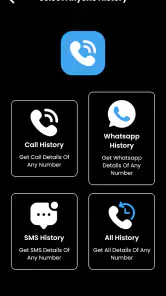

Analysis by Reviewed
I’d approach Call Details of Any Number with a clear idea of what I need from it: help understanding call records, not a shortcut to private information about other people. Its name and broad promise can sound more far-reaching than a sensible user should assume. Before relying on it, I’d check what the app actually displays on my own device and treat any result cautiously. Call records are sensitive, so I would never use a tool like this to investigate someone without their knowledge or permission.
What it can realistically help with
For everyday use, the most reasonable starting point is your own communication history. If I’m trying to remember when I spoke with a client, or compare a call with a note on a calendar, a call-log utility can be useful when the phone’s built-in history feels awkward to review. The practical test is simple: can I find the relevant entry, understand what information is shown, and verify it against my phone’s own records? If not, I wouldn’t make an important decision based on it.
A useful habit is to check one familiar call first rather than searching for an unfamiliar number immediately. That gives you a basic sense of whether the app’s display matches what you already know. I’d also avoid treating a displayed location, time, or duration as proof of where another person was or what they were doing. Call records can provide context, but they are not a complete account of a conversation or someone’s movements.
Where it fits among call-history tools
Most phones already include a recent-calls screen, which is the simplest alternative and usually the best place to begin. It is close at hand and avoids installing another app just to check a familiar call. A dedicated utility may feel more convenient if you regularly review records or prefer a separate way to browse them, but it only earns that extra space on your phone if it makes a real task easier.
That distinction matters for business use. Someone tracking calls for billing should compare entries with invoices, work notes, or an approved company phone system rather than assuming an app’s report is an official record. For occasional personal checks, the built-in call history may be enough; for formal accounting or compliance, a dedicated service designed for that purpose is the safer choice.
Questions I would settle before relying on it
Can it show details for any person around the world? I would not take the name or its sweeping promise as evidence that it can access another person’s private call records. In normal use, access to call history is tied to the device and account involved, and a claim about somebody else’s records deserves skepticism. I’d use it only for information I’m entitled to view.
Would I install it for a one-off lookup? Probably not before checking the phone’s existing call screen. Would I keep it if I routinely need to review my own records? Possibly, but only after testing it with known calls and deciding that its workflow is clearer than the built-in option. Those checks answer the most important practical question: whether it helps with a real task on your phone, rather than merely sounding useful.
More From Our News Desk

Weather by Xiaomi Review: Clear at a Glance, Less Clear Up Close

X Under Pressure: Can It Recover When Posting Goes Wrong?

Clash of Clans Is Won Between the Battles

Android Auto Makes the Case for Quieter Car Software

MobiOffice: Transforming Mobile Productivity with Seamless Integration

EA SPORTS FC™ Mobile Soccer: Redefining Mobile Sports Gaming
If you've ever been curious about the details behind a phone call, then Call Details of Any Number might just be the app you've been looking for. As someone who’s spent a fair amount of time trying to track call histories for various reasons, I found this app to be a practical tool. It's like having a personal detective in your pocket, always ready to fetch those call details when you need them most.
Unveiling the Features
So, what does Call Details of Any Number actually offer? First off, it lets you access detailed reports of your call logs, which is pretty neat if you're trying to keep tabs on your communication habits. The app doesn’t just stop at listing calls, though. It provides comprehensive information such as the duration of each call, the exact time, and even the location of where the call was made or received. This is particularly useful for business folks who need to track their communication for billing purposes.
User-Friendly Interface
One of the things that struck me about this app is its user-friendly interface. Navigating through the app is a breeze, thanks to its intuitive design. Even if you’re not tech-savvy, you’ll find it easy to locate the information you need without any hassle. The developers did a commendable job in ensuring that users can find their way around the app without a steep learning curve.
Moreover, the app is quite light on resources, so it doesn't hog your phone's memory or battery life. That's a relief because, let's face it, nobody wants an app that slows down their device. I was able to run it smoothly alongside my other apps without any noticeable lag.
Privacy and Security
In today's world, privacy is a big deal, and rightly so. Fortunately, this app takes privacy seriously. It ensures that all your call details are kept confidential and secure. You don’t have to worry about your data being sold off to third parties. I personally appreciated the encryption features that add an extra layer of security to my personal information.
Another aspect worth mentioning is the app's ability to backup call details. This means even if you switch phones, your call logs are safe and can be easily restored. It's small features like these that can make a big difference in user experience.
Ending Thoughts
Overall, Call Details of Any Number is a handy app for anyone who needs to keep a close eye on their call logs. Whether for personal reasons or professional ones, having detailed call information at your fingertips is incredibly useful. While it may not be an app you'll use every day, when the need arises, you'll be glad to have it installed on your device.
So, if you find yourself needing to delve into your call history more often than not, give this app a shot. It might just become one of those essential tools you didn’t know you needed until you tried it. Happy calling!
What to expect from this release
Call Details is a free utility in the libraries-and-demo area, made by SUN LIGHT TECHNOLOGY. It has a 3.6 average from around 1,200 ratings, with more than a million installs. It is rated for everyone, first appeared on January 24, 2023, and its current version is 1.3. That gives a useful snapshot of its present identity, but a version number alone doesn’t tell me what changed between releases, so I wouldn’t infer a feature history from it.
If you already use it, the sensible approach is to judge the current version by the task you need today rather than assume that a recent-looking version number means a particular improvement. If you are considering installing it, check that your phone runs Android 7.0 or later and compare the app’s actual screens with your built-in call history before moving any routine work over.
A realistic routine, and where it can fall short
Imagine I receive a call during a busy afternoon, then need to recall its timing while preparing a personal expense note later. I’d first open my normal call history, then use a separate call-details app only if it makes reviewing the relevant entry clearer. I would record the information I need in my own notes and keep the app out of decisions that require an authoritative phone-company record. This small workflow avoids turning a convenience tool into a source of truth it may not be.
That is also why I’d be cautious about location details and backup claims. A location attached to a call entry should not be read as precise proof of a caller’s whereabouts, and a backup should not be treated as safe until you know where it is stored and how restoration works. Before relying on either, test with information you can verify and avoid putting sensitive call records somewhere you would not want them exposed.
Who should choose it—and who should pass
I can see it suiting someone who wants a dedicated place to inspect their own call history and is comfortable checking results against the phone’s native log. It is less compelling for a person who only checks recent calls occasionally, since the built-in tool may already do the job with fewer steps. I’d also steer away from it for anyone hoping to retrieve another person’s WhatsApp or call records: a title or promotional promise is not permission, and private communications should stay private.
For work, the better choice depends on the stakes. A freelancer making informal notes may find a call-log view convenient, while a team that needs dependable billing records should use its approved business-phone process and reconcile entries there. The key trade-off is convenience versus confidence: the more a record affects money, employment, or a dispute, the less I’d rely on a general-purpose utility alone.
Choosing a sensible test before making it part of your routine
I’d make the first session a small comparison rather than a deep dive. Pick a recent call whose time and duration you can already check in your phone’s standard log, then see whether the app presents that entry in a way that is easier to understand. This is a low-risk way to learn the layout and notice whether the details are useful to you. It also avoids starting with a sensitive or unfamiliar number, where a mismatch could be difficult to interpret.
If you use call records to keep track of appointments or follow-ups, a simple routine can prevent confusion: check the entry, confirm it against the native history, and put only the relevant reminder in your calendar or notes. That keeps the app from becoming a permanent archive of more personal information than you need. I would not copy every displayed detail into a shared work document unless that information is genuinely required and the document is appropriate for it.
What the headline should not lead you to expect
The wording around calls and WhatsApp can prompt a natural question: does installing this let me look up anyone’s private communications? I would not plan around that expectation. A person’s call or messaging history is not a public directory, and a third-party app should not be treated as a legitimate way to obtain it. If your goal is to contact someone, use the details they have chosen to share; if you need records for a business reason, use an authorized account or service.
Another practical question is whether a displayed record settles a disagreement. I would say no. A call entry can help you remember that an interaction took place, but it cannot establish what was said, who had the phone at that moment, or the circumstances around the call. For an important dispute, keep appropriate records and use the relevant provider or organization’s formal process rather than presenting an app screen as conclusive evidence.
How I would judge its value over time
For me, the deciding point is not how many details appear on a screen but whether the app saves effort without making me less careful. If I repeatedly open it to find the same kind of information and can verify the results, a separate viewer may earn its place. If I still have to return to the phone’s native log for every check, then the extra step has not solved much. That is a more useful measure than keeping an app simply because it sounds like it might be handy someday.
I would also revisit the decision whenever my needs change. Someone who starts with casual personal checks may later need records for work, but that shift raises the standard for accuracy, handling, and retention. At that point I would move to an approved business process rather than assume a general call-history tool is still suitable. For sensitive records, convenience is worthwhile only when it comes with a clear reason to trust the workflow.
My recommendation
My view is that Call Details is worth considering only for a narrow, legitimate purpose: reviewing your own call activity in a way you find easier than the phone’s standard history. Its free price makes trying it straightforward, but I’d still be selective about what access I grant and what information I trust it with. If it does not make a familiar task noticeably clearer, uninstalling it and staying with the built-in option is a perfectly reasonable outcome.
Call Details of Any Number Frequently Asked Questions
Who develops Call Details of Any Number, and what kind of app is it?
Call Details of Any Number is a Libraries & Demo app developed by SUN LIGHT TECHNOLOGY. Its short description is “Call Details,” while its summary promotes call and WhatsApp details for people around the world. Before downloading, it is worth distinguishing that promotional description from a promise about what the app can access: use it only with appropriate permission and respect other people’s privacy.
What Android version do I need to run Call Details of Any Number?
The app’s minimum Android requirement is version 7.0, so check your device’s software version before downloading. If your phone runs an older version, it may not be compatible. Call Details of Any Number is currently version 1.3, and keeping your device and apps up to date can help with compatibility and security.
What features does the Call Details of Any Number app offer?
The Call Details of Any Number app provides comprehensive insights into call logs, allowing users to access detailed information about incoming and outgoing calls. It includes features such as caller information, call duration, time stamps, and more. The app aims to help users manage and analyze their call history effectively. It also offers privacy protection to ensure user data is secure.
Is Call Details of Any Number app safe to use?
Yes, the Call Details of Any Number app is designed with user privacy and security in mind. It employs advanced encryption methods to protect your call data and personal information. Moreover, it does not store any call logs on external servers, ensuring that all data remains on your device. Users can use this app confidently, knowing their privacy is prioritized.
Does the app require an internet connection to function?
The Call Details of Any Number app does not require a constant internet connection for its basic functions, as it primarily works offline to analyze and display call logs stored on your device. However, an internet connection might be necessary for certain features like updates or customer support. This design ensures minimal data usage and enhanced privacy.
Pros
- Provides detailed call logs easily.
- Simple and intuitive user interface.
- Fast search feature for call logs.
- Supports multiple phone number formats.
- Works offline once installed.
Cons
- Ads can be intrusive at times.
- Limited features in the free version.
- May require permissions some find invasive.
- Not available on all devices.
- Occasional crashes reported by users.
- Category
- Libraries & Demo
- Version
- 1.3