Calculator: Simple Calculator
- 1.85K
- 4.1
- Installs
- 10.00M
- Price
- Free

Screenshots
Analysis by Reviewed
When several people share a phone or tablet, a calculator is one of the few tools everyone can use without setting up separate accounts or learning a new routine. I find Calculator: Simple Calculator useful for that kind of quick, passing task: checking a receipt, splitting a small total, or working out how much is left in a household budget. Its familiar approach suits everyday sums better than a feature-packed layout when all you need is an answer. I would consider it for a shared household device, while keeping in mind that its usefulness depends on whether each person wants only basic arithmetic.
A shared phone at the kitchen table
Picture a household checking a grocery receipt at the kitchen table. One person can add a few prices, another can use the memory function to hold a running total, and someone else can pick up the phone afterward for a separate calculation. That is a practical fit for a shared device because the basic calculator does not require people to learn a specialist workflow before using it.
Memory is especially helpful when a calculation has several stages: I can keep a subtotal available, work through another figure, then recall the stored amount instead of writing it down or starting over. The trade-off is that memory needs attention on a shared device. Before handing the phone to someone else, I would clear or replace any stored value so the next person does not mistake an old number for part of their own calculation.
Keeping household calculations separate
There is no account-based handoff to manage for ordinary arithmetic, which keeps a quick calculation uncomplicated. But this also means the app should not be treated as a way to separate one household member’s work from another’s. I would avoid leaving a multi-step sum or a memory value in place when passing the device along, and I would check the displayed result before using it in a bill split or budget decision.
For a shared-device routine, it helps to agree on a simple reset habit: finish the calculation, note any result that matters, then clear the screen before passing the phone on. That is not a special household feature; it is just a practical way to avoid confusion when people take turns. If a total needs to be checked later, put the amounts and result in a shared note or ledger instead of relying on the calculator to preserve a usable record.
Children, access, and trust
For children, the basic layout can be a sensible place to practise addition or multiplication with an adult nearby. The app is rated Everyone, but that is an age/content classification, not a promise of teaching tools or family supervision. If you want guided lessons, protected profiles, or shared expense tracking, a dedicated learning or budgeting option is a better match.
For an adult helping a child, I would use the app as a place to test an answer after working through the problem together, rather than expecting it to explain the steps. The same distinction matters for other household members: a calculator can return a result, but it does not tell you whether the inputs were correct or whether everyone agrees on how to divide a cost. That makes a quick visual check and a shared explanation more valuable than simply passing the phone around.
More From Our News Desk

Weather by Xiaomi Review: Clear at a Glance, Less Clear Up Close

X Under Pressure: Can It Recover When Posting Goes Wrong?

Clash of Clans Is Won Between the Battles

Android Auto Makes the Case for Quieter Car Software

MobiOffice: Transforming Mobile Productivity with Seamless Integration

EA SPORTS FC™ Mobile Soccer: Redefining Mobile Sports Gaming
Design and Usability
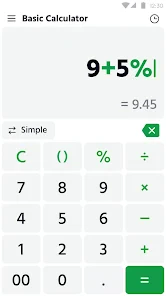
Let's get straight to it—the Calculator: Simple Calculator app is all about simplicity. The interface is clean, straightforward, and intuitive, making it accessible to everyone from tech-savvy users to those who just want to crunch some numbers. The buttons are large and easy to read, ensuring that you won't accidentally hit the wrong key when you're in the middle of an important calculation.
What the simple layout is good at
What I really appreciate about this app is its focus on core functionality. It covers all the basic operations—addition, subtraction, multiplication, and division—without any extra bells and whistles that other apps might add in an attempt to stand out. This makes it perfect for users who just need a calculator without the distractions.
Moreover, the app includes a memory function, which I find incredibly handy for keeping track of running totals or recalling previous calculations. This might seem like a small feature, but trust me, it's a lifesaver when you need to double-check your work.
Useful habits for multi-step sums
One non-obvious way to get more value from a basic calculator is to use memory only for a subtotal that you will need again, rather than treating it as a place to store every intermediate result. For example, when totaling purchases from two bags, I would keep the first bag’s subtotal in memory, add the second bag’s items separately, then combine the figures. That makes it easier to catch a mistake than entering one long string of numbers and trying to find the point where it went wrong.
For a bill split, I would first calculate the full amount, then divide it by the number of people, and check that the result multiplied back by that number returns the original total. This quick reverse check is useful when rounding is involved. If the split needs different shares, tax adjustments, or a written explanation, I would use a spreadsheet or expense-sharing tool instead; the simplicity here is helpful until the calculation becomes a record-keeping task.
Choosing the right calculator for the task
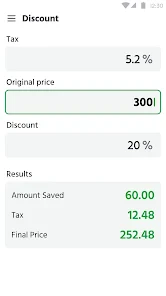
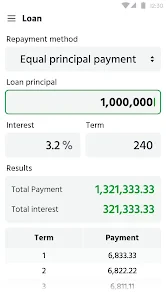
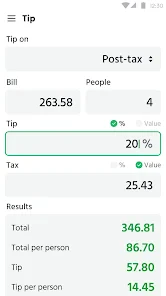
Against the calculator already included on many phones, the main reason to choose this one is its deliberately uncomplicated feel; it is not the right choice because it promises advanced analysis. For a tip, a discount, or a percentage change, a dedicated percentage tool can reduce mental steps, while scientific work, unit conversions, currency checks, and loan planning call for tools built around those tasks. I would use this app for quick arithmetic and switch when the calculation needs specialist inputs or a clearer record of how the answer was reached.
A useful habit for shared use is to break a longer sum into named parts on paper or in a note, then enter and verify each part rather than trusting an unlabeled result. That small step matters when several people contribute amounts or when a household total has to be checked later. It also highlights the app’s boundary: it calculates, but it is not a household ledger or a collaborative record.
Compared with a full-featured calculator, this one asks less of the user but also does less for them. That trade-off is worthwhile when the job is adding a few prices or checking change, because extra modes can make a quick task feel slower. It becomes less attractive when you need to switch between units, currencies, or financial assumptions, where purpose-built screens can make the inputs and result easier to interpret. I would keep the choice tied to the task rather than assume one calculator has to cover every situation.
Speed and everyday reliability
The performance of the app is top-notch. It loads quickly and operates smoothly, with no lag or crashes that I've experienced so far. This reliability is crucial, especially when you're in a hurry and need to make calculations on the fly. The app is lightweight, so it won't take up much space on your device, nor will it drain your battery excessively.
It is free, has a 4.1 average from around 81,000 ratings, and has been installed over 10 million times. Version 1.3.4 supports Android 6.0 and later. Those details make it accessible to many Android users, though they do not change the practical question: do you want a plain arithmetic tool, or one that also handles specialist calculations? The former is where this app makes the most sense.
Efficient Tools is the developer, and the app is in the tools category. It was released on September 15, 2023, and carries an Everyone age rating. I would treat those details as useful context rather than a reason on their own to install it: the deciding point is whether you want straightforward arithmetic on your device. The rating and broad use suggest it is familiar to many users, but the right fit still depends on your own calculator habits.
Who will find it handy—and who may not
I would recommend it to someone who wants readable buttons, familiar operations, and a memory function without a crowded screen. It is also a reasonable choice for a household phone used for casual sums, provided people treat each calculation as their own and check the display before relying on the result. If you routinely need formulas, conversion rates, loan breakdowns, or a saved history for reconciling shared expenses, I would pick a more capable calculator or a dedicated finance tool instead.
It is also a sensible option for someone who rarely uses a calculator and wants a familiar way to check everyday arithmetic without navigating a set of specialist modes. On the other hand, people who depend on a visible calculation history may find a plain calculator inconvenient, especially if they often need to retrace a result after switching tasks. A phone’s built-in calculator may already be enough if it meets those needs, so I would not install another app just for the sake of having one.
A practical household verdict
In a world where apps are becoming increasingly complex, the Calculator: Simple Calculator is a breath of fresh air. Its straightforward design and reliable performance make it a must-have tool for anyone who needs a dependable calculator at their fingertips. While it may not offer advanced scientific functions, it excels at what it sets out to do: provide a simple and effective way to handle everyday calculations. If you're looking for a calculator app that gets the job done without any hassle, this is definitely worth checking out.
For a household, my recommendation comes with a clear boundary: use it for the quick sum, not as the place where a shared decision is stored. It can help check a grocery total, compare two prices, or divide a straightforward cost, while a note or budgeting app is better when several people need to review the same figures later. That distinction keeps the calculator’s simplicity useful rather than asking it to manage coordination it was not designed for.
Overall, I would keep it in mind for a shared Android device when people mainly need familiar arithmetic and can take responsibility for clearing the screen or memory between turns. Anyone looking for a calculator that teaches, tracks household spending, or handles specialist calculations should choose a more focused tool. For quick sums without much setup, though, this app makes a practical, low-friction choice.
Calculator: Simple Calculator Frequently Asked Questions
Is Calculator: Simple Calculator available for iPhone or iPad?
Calculator: Simple Calculator is presented as an Android app, so this review covers its Android availability. If you use an iPhone or iPad, check the relevant app store for an edition specifically compatible with your device before downloading. For Android users, the key step is confirming that the phone or tablet runs a supported version of the operating system.
Is Calculator: Simple Calculator suitable for children and family use?
The app is rated for Everyone, making it suitable for a broad audience, including families looking for a straightforward calculation tool. Its everyday calculator functions can be useful for routine arithmetic, while its additional calculation categories may help with common practical tasks. As with any app, parents can decide whether its features and interface are appropriate for a child’s needs.
Does Calculator: Simple Calculator include tools for tips, loans, units, and currency?
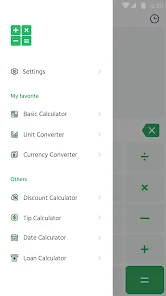
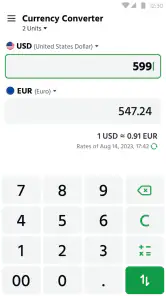
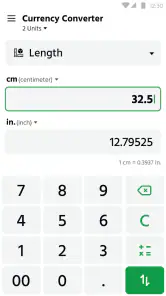
Yes. Calculator: Simple Calculator is described as an all-in-one calculator for percentage, tip, loan, unit, and currency calculations, alongside its basic calculator function. This makes it potentially useful for everyday situations such as working out a tip or handling a unit conversion. If you need a specialized financial or currency tool, consider whether the app’s available calculations suit your particular requirements.
Can I use Calculator: Simple Calculator for school, work, or everyday calculations?
The app is designed for everyday arithmetic, including addition, subtraction, multiplication, and division, and it also offers percentage calculations. Its broader description includes tip, loan, unit, and currency calculations, which can help with practical tasks at home, school, or work. It is best viewed as a convenient general-purpose calculator rather than a replacement for specialized tools when a task requires advanced functions.
Is Calculator: Simple Calculator easy to use for someone who wants a straightforward calculator?
The app is described as having a simple interface and a basic arithmetic calculator, so it is aimed at people who want quick access to common calculations. Along with the usual arithmetic operations, it includes percentage functionality and a memory feature for holding results. The additional calculation categories offer more options without changing its focus on convenient, everyday use.
Pros
- User-friendly interface; easy to navigate.
- Fast calculations with no lag.
- Supports basic math operations efficiently.
- Lightweight app
- doesn't consume much storage.
- No intrusive ads to disrupt use.
Cons
- Limited to basic functionalities only.
- No scientific calculator features.
- No customization options available.
- Lacks graphing capabilities.
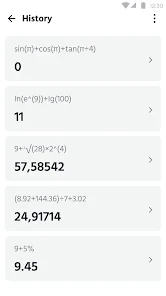
- No history of previous calculations.
- Category
- Tools
- Version
- 1.3.4









