Video Player - AnyPlay
- 425.00
- 4.3
- Installs
- 5.00M
- Price
- Free

Screenshots

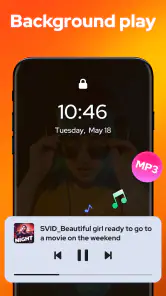
Analysis by Reviewed
When I need to watch a clip someone has sent me without first sorting out its format, I want a player that gets out of the way. Video Player - AnyPlay is aimed at that everyday job: it combines video playback with file browsing, so I can move from finding a video to watching it without treating those as separate tasks. It is a free media app from Efficient Tools, and its focus is practical viewing rather than creating or editing footage.
A useful place to start when files are scattered
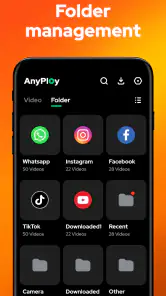
The file-manager side is worth considering before playback even begins. If you keep videos in several folders, a player that can browse files can save the small but familiar hassle of opening a separate manager, locating a clip, and then choosing an app to play it. I’d use AnyPlay for a downloaded film, a work recording, or a collection of clips copied onto a phone. It is less compelling if your media already lives neatly inside a streaming service and you rarely open local files.
One practical habit is to keep a few important videos in a clearly named folder rather than relying on a long, mixed camera roll. That makes a combined player and file browser more useful, especially when you need to find a particular recording quickly. The trade-off is that browsing files is still a hands-on workflow; it is not the same as a streaming app that automatically organizes a library around shows, recommendations, and watch lists.
A User-Friendly Interface
First things first, when you fire up Video Player - AnyPlay, the interface welcomes you with open arms. It's super intuitive, and even if you're not particularly tech-savvy, you'll find your way around in no time. The clean layout ensures that all your videos are accessible without any unnecessary clutter. Just a few taps and boom—you’re knee-deep into your favorite content.
Formats, subtitles, and the viewing setup
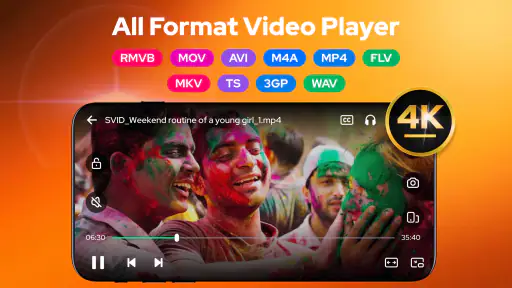
AnyPlay is described as supporting a range of formats, including 4K and HD playback and subtitle support. That breadth is handy when a video came from a source other than a familiar streaming platform. In practice, I’d treat format support as a reason to try the app with a problem file, not as a guarantee that every file will behave identically: playback can depend on the file itself and the device.
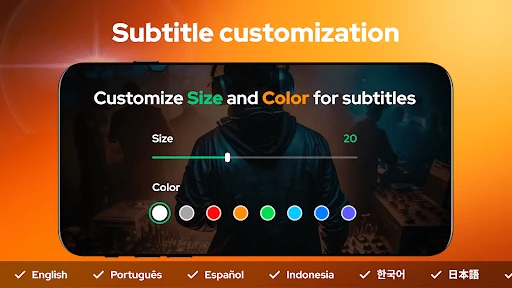
Subtitles matter most when I’m watching a foreign-language film, viewing quietly in a shared room, or trying to follow dialogue in a noisy place. Before settling in, I’d check that the subtitle file is available and associated with the video; that small bit of preparation can prevent a mid-film interruption. A dedicated media library may offer richer organization, but a straightforward player is often the faster choice when the immediate goal is simply to get a particular video playing.
Making playback comfortable
For a realistic everyday example, imagine I’m commuting and want to watch a downloaded episode during a break. A local-file player avoids depending on a streaming catalog for that clip, while subtitle support can make quiet viewing easier. I’d choose the file before leaving, confirm it plays, and then use headphones in a suitable setting. That simple check is more useful than discovering a compatibility issue after I’ve already settled down to watch.
More From Our News Desk

Weather by Xiaomi Review: Clear at a Glance, Less Clear Up Close

X Under Pressure: Can It Recover When Posting Goes Wrong?

Clash of Clans Is Won Between the Battles

Android Auto Makes the Case for Quieter Car Software

MobiOffice: Transforming Mobile Productivity with Seamless Integration

EA SPORTS FC™ Mobile Soccer: Redefining Mobile Sports Gaming
The key question is whether you want a player for files you already have or a service that supplies content. AnyPlay belongs in the first group. It can be a sensible companion for personal recordings, saved videos, and media shared between devices, but it does not replace a subscription service’s licensed catalog or its recommendations. If you mainly watch through streaming apps, adding another player may not improve your routine.
Who will get the most from it
I’d consider it for someone who regularly opens video files, wants a single place to browse and play them, or needs a general-purpose option for HD and 4K media. It is also approachable for casual viewers who do not want to learn a complex media-library system. On the other hand, people who edit footage, add effects, trim clips, or prepare videos for publication should choose an editor: playback and file management are not substitutes for a creative production workflow.
There is also a useful device check before making it your default. The Android release requires version 6.0 or later, and the app is rated for Everyone. It is currently at version 1.5.0, with a 4.3 average from around 33,000 ratings and over 5 million installs. Those figures suggest it has found a broad audience, but they do not tell me whether a specific file or device will suit my needs, so I’d test my usual video types early.
Features that Stand Out
The app supports a plethora of formats which means you're not going to run into those annoying "unsupported format" messages. Whether it's MP4, AVI, or MKV, AnyPlay handles it all with ease. But that’s not all! The app also boasts a subtitle downloader feature, perfect for those foreign films or series you’ve been dying to watch.
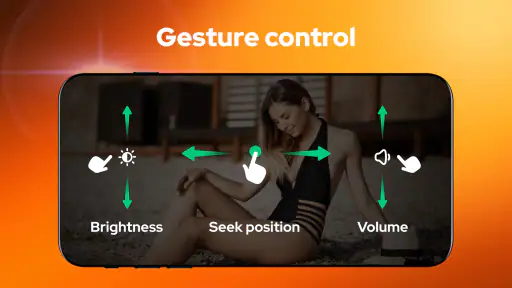
Another nifty feature is the gesture controls. Swiping left or right adjusts the playback speed, while up or down controls the volume and brightness. It’s these little touches that make the viewing experience smooth and enjoyable.
Customization Galore
Customization is where AnyPlay shines. You can tweak just about everything to your liking. From changing the theme to setting up playlists, it’s all about making the app work for you. Plus, the app remembers your playback preferences, so each time you return, it’s like picking up right where you left off.
For longer viewing sessions, I’d set up a playlist for the videos I actually plan to watch rather than treating it as a permanent archive. That keeps a one-off clip from getting lost among unrelated files. Remembered preferences can make returning to a video feel smoother, though anyone who shares a device should check that the chosen settings and viewing position still make sense for the next person.
Performance and Compatibility
Performance-wise, this app is a beast. Videos load swiftly, and there’s hardly any buffering, even with high-definition content. Moreover, it’s compatible with both Android and iOS, so no one’s left out in the cold. It’s refreshing to have an app that doesn’t discriminate based on your device preference.
One aspect I appreciate is the seamless integration with cloud services. You can easily stream your videos from Google Drive or Dropbox without having to download them first. This feature is a real game-changer for those who are always on the move.
Cloud playback can be convenient when a file is already stored online, but it is not automatically the best choice for every trip. If connectivity is unreliable or the video is large, keeping a local copy is the safer plan. I’d also test a cloud video before relying on it for a time-sensitive viewing session, since the experience depends on access to the file and a usable connection.
Where it fits among other video apps
Compared with a phone’s built-in player, AnyPlay’s appeal is the combination of file browsing, format flexibility, and playback tools in one app. Compared with a full media-library app, it may suit people who want to open individual files without spending time organizing a collection. The right choice depends on the habit: a streaming service is easier for browsing a catalog, an editor is essential for changing footage, and a file-focused player makes more sense when you already have the video.
Choosing it for a real creative workflow
Although this is not a tool for making or editing a video, I can see it helping at the review stage of a small creative job. If I have several takes of a presentation or a set of reference clips, I can use file browsing to locate them and playback to check what is actually usable. I would still do the trimming, color work, captions, and final export in an editor; AnyPlay’s role is closer to a convenient viewing station than a production suite.
That distinction is useful when deciding what to install. A creator who needs to inspect footage on a phone, check a subtitle track, or show a prepared clip to someone may appreciate having a player that also reaches files. Someone who needs to assemble a timeline, revise a draft, or hand off a finished deliverable should start with editing software instead. The app can support a creative process around the edges, but it does not turn watching into making.
A few practical checks before settling in
When I receive a video for a meeting or class, I’d first open it well before I need to show it. I’d confirm that the file plays, check that any subtitles appear as expected, and test the volume and brightness gestures so I’m not fumbling in front of other people. This quick rehearsal is especially worthwhile for a large or unfamiliar file, where a short test can reveal a mismatch before the viewing moment matters.
If a video refuses to play smoothly, I would not immediately assume the app is at fault. The file’s encoding and the phone’s capabilities can both affect playback, so trying another known-good clip helps narrow down the cause. For an important presentation, I’d also keep the original file in its folder and have a second playback option available; a general-purpose player is convenient, but no single app should be the only plan for a deadline.
What the file-manager approach changes
Keeping playback close to file browsing has a quiet advantage: it encourages me to think about where a video lives, not just which app can open it. A folder named for a project, trip, or course can make later viewing simpler and reduce the chance of picking the wrong version. I would use clear names for drafts and finals, because a player can help me find a file but cannot decide which copy is the approved one.
There is a trade-off here for people who collect a lot of media. A dedicated library may be better when you want artwork, carefully maintained metadata, or a large catalog arranged for browsing. AnyPlay’s more direct file-first approach makes sense when I know what I want to watch and want fewer steps between locating it and pressing play. It is a workflow preference, not an automatic upgrade for every viewer.
Final Thoughts
In a nutshell, AnyPlay is a stellar choice for anyone in need of a reliable, feature-packed video player. It’s evident that the developers put a lot of thought into making sure the app is user-friendly and versatile. Whether you’re a casual viewer or a serious cinephile, this app caters to all your video-watching needs. So, go ahead and give it a whirl—you won’t be disappointed!
My recommendation is more specific: try it if your routine involves local videos, varied formats, subtitles, or quick file browsing. Skip it if you need editing and publishing tools, or if nearly all your viewing happens inside streaming services. For a free player, its broad media focus is appealing; I’d still test a familiar file and subtitle setup first, then decide whether its workflow feels easier than the player already on your device.
Who should make room for it
I’d put it on the shortlist for someone who receives videos through messages or shared folders, keeps personal recordings on a phone, or watches saved material while away from reliable service. The combination of browsing and playback is most valuable when those are frequent chores. If you mostly tap a streaming app and let it choose the next episode, AnyPlay is unlikely to change much; the benefit appears when the video is already yours and finding it is part of the task.
For a creator, student, or small team, it can be a practical companion for checking a draft on the same device used to carry the files. I would not rely on it to approve fine editing details such as exact cuts or color accuracy, since that work belongs in the editor and on the intended viewing setup. But as a quick way to inspect whether a clip opens, whether dialogue is understandable, and whether a subtitle file is paired properly, a player can remove friction from the handoff.
Making the handoff less fragile
When I share a finished video, I would keep the file and any separate subtitle file together in a clearly named folder, then test the exact copy I plan to send. That simple routine helps avoid a common mix-up: checking one version locally and delivering another. AnyPlay can be useful for that last viewing pass, but it does not package, compress, or publish a deliverable; I would use the appropriate editing or sharing tools for those steps.
For a meeting-room handoff, I’d also consider the viewing conditions. A phone screen is fine for checking whether a clip starts and the audio is present, but it is not a substitute for checking the final setup if the video will be shown on a larger display. The practical value here is quick confidence about the file itself, not a guarantee that every screen, speaker, or connection will reproduce it identically.
Final recommendation for everyday viewing
As a free app in the video player category, AnyPlay has a clear job: help me reach video files and watch them, including media that calls for subtitles or higher-resolution playback. Efficient Tools has built its appeal around that useful overlap between file access and viewing, rather than around an editing timeline or a streaming catalog. I’d start with one or two files I already know, then decide whether the browsing flow and playback controls fit my habits.
My final advice is to choose it for convenience, not on the assumption that one app can handle every stage from footage creation to publication. It can make viewing and checking existing videos easier; a dedicated editor remains the better choice for revisions, and a streaming service remains simpler for discovering licensed shows. If that division matches what you need, this is a sensible, approachable player to try on a compatible Android device.
Video Player - AnyPlay Frequently Asked Questions
Can I use Video Player - AnyPlay to watch 4K or HD videos?
Yes. Video Player - AnyPlay is described as a 4K and HD media player, making it a suitable option if you watch high-resolution videos on your device. Playback quality can also depend on the video file and your device, so a demanding file may not play equally smoothly on every phone or tablet.
Is Video Player - AnyPlay intended for beginners, or do I need experience with video-player apps?
Video Player - AnyPlay is presented as a video player with file-management features, so its basic purpose is straightforward: browse media on your device and open videos to watch them. If you are comfortable finding files on a phone or tablet, you should be able to understand the app’s general role without needing specialist video-player experience.
Can Video Player - AnyPlay organize local videos as well as play them?
Yes. Video Player - AnyPlay is described as both a video player and a file manager, so it can help you browse and manage media files on your device as well as open them for playback. That combination is useful if you want one app for finding videos in your library and watching them, rather than switching between a file browser and a separate player.
What devices and operating systems can run Video Player - AnyPlay?
Video Player - AnyPlay is an app in the Video Players & Editors category, developed by Efficient Tools. It is available for Android, with support for devices running Android 6.0 or later. Check the app’s compatibility information on your device before downloading, particularly if you are using an older phone or tablet.
What video formats does Video Player - AnyPlay support?
Video Player - AnyPlay supports a wide range of video formats including MP4, AVI, MKV, FLV, and MOV, among others. This extensive compatibility ensures that users can play nearly any video without needing to convert files into a different format. This versatility makes it a convenient choice for users who have a diverse media library.
Pros
- Supports multiple video formats
- User-friendly interface
- High-quality video playback
- Fast loading times
- Customizable playback settings
Cons
- Contains ads in free version
- Limited features without premium
- May drain battery quickly
- Occasional crashes reported
- No offline playback option
- Category
- Video Players & Editors
- Version
- 1.5.0













