Button Mapper: Remap your keys
- 1.59K
- 3.6
- Installs
- 5.00M
- Price
- Free

Screenshots
Analysis by Reviewed
I like the idea behind Button Mapper: Remap your keys: instead of reaching through menus every time I need a familiar action, I can make a physical button do something more useful. It’s a personalization app from flar2, and its appeal is practical rather than flashy. The first question I’d ask is not how many things I can assign, but which button I press often enough for a remap to become a dependable habit.
A useful baseline before remapping
I’d start with one change, use it for a few days, and see whether it actually saves effort. A volume key might be a natural choice for an action I want to reach without looking, while a less-used button can take a shortcut I only need occasionally. Keeping the first setup simple also makes it easier to notice if a remapped press conflicts with the button’s usual job.
That matters most when you use your phone one-handed, have a particular accessibility preference, or often reach for the same action while the screen is busy. A driver who wants fewer taps should set up and test changes before setting off, not while moving. For a regular commute, a button that opens a frequently used app can be more useful than a clever action you forget exists.
Choose a shortcut that earns its place
Before assigning anything, I’d look for a task that repeats in the same context: opening the camera when I’m about to take a photo, reaching a familiar app while carrying something, or triggering a routine action without navigating through several screens. A remap is most useful when I can predict both the moment I need it and the button press I’ll use. If the need is occasional or changes from day to day, a regular app icon may be easier.
This is also where Button Mapper differs from many personalization tools. A launcher can reorganize the home screen, while widgets and quick settings keep controls visible. This app instead puts the shortcut on a physical button, which can reduce screen navigation but makes the action less obvious to anyone who does not know the mapping. I’d choose the visible option when discoverability matters, and the button option when speed and a repeatable habit matter more.
Unlocking New Potential
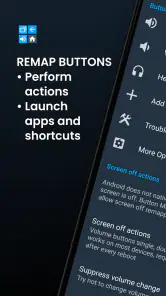
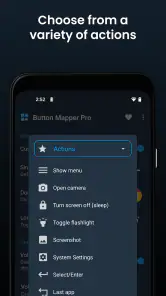
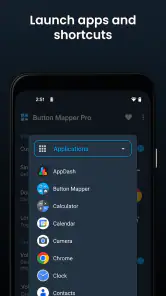
With Button Mapper, the possibilities are almost endless. Imagine being able to launch your favorite app, toggle your flashlight, or even take a screenshot with just a simple button press. That's precisely what this app offers. It allows you to remap your hardware buttons such as volume keys, Bixby button, or even capacitive buttons to perform various actions, all tailored to your personal needs.
Easy Peasy Setup
Setting up the app is as smooth as butter. You don't need to be a tech whiz to get started. Once installed, the app guides you through a straightforward step-by-step setup. You'll find a user-friendly interface where you can assign new functions to your buttons with just a few taps. It's like giving your phone a mini-makeover, and trust me, the simplicity makes the whole process a breeze.
You May Like

Clash of Clans Is Won Between the Battles

Android Auto Makes the Case for Quieter Car Software

MobiOffice: Transforming Mobile Productivity with Seamless Integration

EA SPORTS FC™ Mobile Soccer: Redefining Mobile Sports Gaming

How Microsoft OneDrive Became a Mobile Productivity Giant

How Google Translate Breaks Language Barriers Effortlessly
Check the trade-offs before adding more
Before building a complicated layout, I’d check each assignment in the situations where I expect to use it. A long press is usually easier to distinguish from an ordinary press than a double tap, but either can be awkward if the button is already part of a routine. Try one action at a time, then keep the mapping only if it feels predictable. If a press starts doing the wrong thing, being able to identify the latest change makes troubleshooting far less frustrating.
The practical limitation is that hardware and Android behavior can differ between devices. A button that exists on one phone may not exist on another, and a remap that sounds ideal on paper may interfere with a familiar control. I’d also avoid assigning an action to every available press pattern just because the option is there: too many hidden combinations are difficult to remember and easy to trigger accidentally.
Settings worth checking in practice
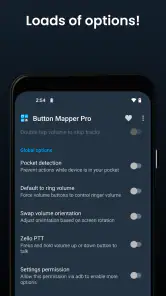
After making a mapping, I’d check the exact press pattern and action rather than assuming the default choice matches my routine. Test it with the phone locked and unlocked if those are situations where I expect to use it, and check whether the ordinary function of the button still behaves as I need. These small checks help separate a useful shortcut from one that works only under ideal conditions.
I’d also make a note of the original behavior before changing a button I use constantly. That gives me a clear reference if the new assignment feels wrong, and it keeps troubleshooting focused: I can remove or revise the most recent mapping instead of changing several settings at once. The useful habit is to treat each remap as a small experiment, not as a permanent improvement just because setup was easy.
Features That Stand Out
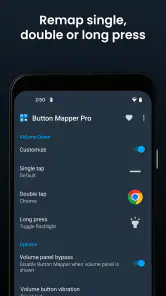
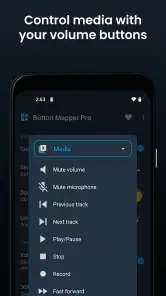
One of the standout features of Button Mapper is its ability to create custom long press or double-tap actions for each button. This means you can assign different actions depending on how you press the button, adding a layer of versatility to your phone's capabilities. Whether you want to play music, open the camera, or mute your phone, there's a customization option for you.
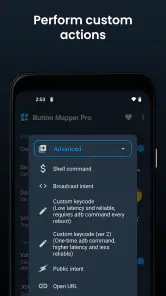
Moreover, the app supports a wide range of actions, from basic functions like adjusting brightness to more advanced ones like launching Tasker tasks. The app is frequently updated, ensuring compatibility with the latest devices and Android versions, which is always a plus in my book.
Build a repeatable shortcut routine
A good setup is less about collecting remaps and more about choosing a small set you can remember. For example, I might reserve one press pattern for a task I use throughout the day and a different pattern for something occasional, then keep the original button behavior wherever changing it would cause confusion. If I rely on a Tasker task, I’d test that task on its own first; the button shortcut is only as dependable as the action it launches.
Compared with the usual alternative—leaving the buttons untouched and opening an app or settings panel manually—this approach can save steps, especially when I’m carrying something or using the phone with one hand. It is not automatically better than an on-screen shortcut: if I need to see a label, change options frequently, or keep every button behavior standard, a visible control is easier to understand. Button remapping suits people who value quick access more than a screen full of controls.
Who will get the most from it?
I’d recommend trying it if you enjoy tuning Android to your habits, have a supported physical button you rarely use, or want a quicker route to a recurring action. Someone who takes screenshots often, starts the camera repeatedly, or wants a button-based way to reach a favorite app has a clear reason to experiment. It is less compelling for a person who is happy with the standard controls, rarely uses shortcuts, or finds extra press patterns hard to remember.
For an everyday example, imagine getting home with bags in both hands and wanting to switch on the flashlight. A carefully chosen button action could make that quicker than unlocking the phone and searching for a control. But I’d keep a backup way to reach important functions, because a remap should make a routine easier, not leave me stuck when I forget the gesture or use another device.
When a different approach is better
I would skip remapping a button that I rely on for its normal purpose, especially if changing it would create confusion every time I adjust volume or use another familiar control. It is also a poor fit if I switch between phones often: a shortcut tied to one device’s physical layout may not transfer to another. In those situations, an on-screen shortcut is more consistent and easier to spot.
Someone who wants a simple way to customize the look of a phone rather than change how its hardware behaves may get more from a launcher or wallpaper tool. Button Mapper is narrower and more practical: its value comes from making a chosen action easier to reach, not from broadly redesigning the interface. I’d use it for a specific repeated task, not install it expecting every part of the phone to feel different.
Why It’s Worth It
In a world where smartphones are becoming more and more alike, Button Mapper: Remap your keys allows you to personalize your device, making it truly yours. The app is free to download with optional in-app purchases, offering you a taste of its capabilities without any upfront costs. For those who love customization and efficiency, this app is a game-changer.
It is free, rated for Everyone, and has a 3.6 average from around 20,000 ratings, with over 5 million installs. The current version is 3.35, and it supports Android 4.3 and up. In-app purchases range from $0.99 to $24.99 per item, so I’d explore the free experience first and only consider paying if a feature I actually want calls for it. Those details make it easy to decide whether it fits your phone and budget, but the real test is whether the shortcuts become natural in daily use.
Learning it without overcomplicating things
If I were setting it up for someone else, I’d ask which action they reach for most, assign just one shortcut, and let them use it for a while before adding another. That small trial reveals a lot: whether the chosen button is comfortable, whether the press pattern is easy to remember, and whether the original function still matters. A setup that feels effortless after a week is better than a long list of clever mappings that needs constant thought.
Button Mapper is a focused tool, not a replacement for every Android shortcut or settings control. Its strongest use is making a repeat action more direct on a phone whose buttons suit the job. If your device’s hardware or your own habits make remapping unreliable, stick with the standard controls or a visible on-screen shortcut instead. When the fit is right, though, a modest, carefully tested setup can make a familiar phone feel noticeably more personal.
To sum it up, if you're looking to add a personal touch to your smartphone, or simply make your life a tad bit easier, give Button Mapper a try. It's a nifty little tool that can transform how you interact with your device, all while keeping things simple and intuitive. So go ahead, and let your buttons do the talking!
Button Mapper: Remap your keys Frequently Asked Questions
Does Button Mapper work on iPhones or iPads?
Button Mapper is designed for Android devices, where it can interact with hardware buttons such as volume keys and assign them different actions. It is not an iOS button-customization app, so iPhone and iPad users should not expect it to remap their device’s physical buttons. If you use Android, check that your device meets the app’s operating-system requirement before downloading.
Which buttons can I customize with Button Mapper?
The buttons available for remapping depend on the hardware and software of your Android device. Volume keys and certain manufacturer-specific buttons, such as the Bixby button on some Samsung devices, are examples of buttons the app may be able to customize. Your device’s button layout and manufacturer can affect the options shown, so you’ll need to check which buttons are recognized on your phone.
Can I assign different actions to single, double, or long button presses?
Button Mapper is built around configuring hardware-button presses to perform actions, and the app may offer different press types for supported buttons. The choices you can use depend on your device and the button being configured. After installing, review the options available for each recognized button and choose a setup that suits your routine, rather than assuming every press type works on every model.
Do I need root access to use Button Mapper?
For most features, Button Mapper does not require root access, so many users can try remapping supported buttons without rooting their Android device. Some advanced functions may need root access; remapping the Bixby button on certain Samsung devices is one example. Consider whether you need those advanced options before changing your device, and use the regular features if they cover your needs.
Can I restore a button to its original behavior if I change my mind?
Button Mapper lets you customize how supported hardware buttons behave, so it makes sense to review your assignments if you decide you prefer the original setup. You can revisit the app’s configuration and change or remove a remapping for a button. The exact steps and available controls may vary with the device, so check the settings for the button you customized.
Pros
- Easy customization for device buttons.
- Supports a wide range of button functions.
- Works without needing root access.
- Improves device accessibility.
- Enhances user productivity.
Cons
- May drain battery faster.
- Limited features on some devices.
- Ads can be intrusive at times.
- Not all buttons can be remapped.
- Some features require in-app purchases.

- Category
- Personalization
- Version
- 3.35











