BurlingtonEnglish
- 214.00
- 4.4
- Installs
- 1.00M
- Price
- Free

Screenshots
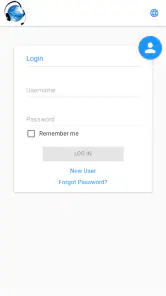
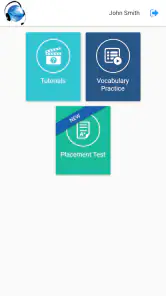
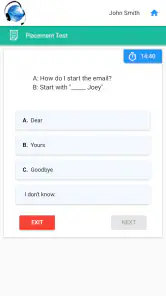
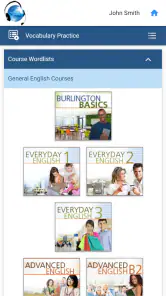

Analysis by Reviewed
Learning English on a phone sounds simple until the lesson has to fit around a commute, a lunch break, a busy household, or an unreliable connection. I spent time with BurlingtonEnglish, an education app from Burlington Education Ltd., and found that its biggest practical question is not only whether the learning material suits you, but also how comfortably you can use it when your network changes. It is free, aimed at Everyone, and presents itself as an entry point to the broader BurlingtonEnglish language-learning program.
My overall impression is that this is best approached as a structured companion for learners who already have access to the BurlingtonEnglish method, rather than as a completely open-ended replacement for every English-learning tool. The app can be useful when you want a focused study routine on a mobile device, but the experience depends heavily on how smoothly the app can reach its learning content and how well you plan around interruptions.
How BurlingtonEnglish fits into real mobile study
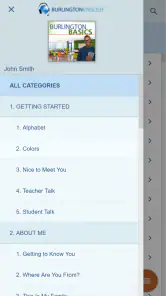
The first thing I noticed is that BurlingtonEnglish feels more purposeful than a casual vocabulary game. Its identity is tied to a language-learning program, so the value is likely to come from following a learning path instead of opening the app for a random two-minute activity. That distinction matters. If you want a colorful app that turns every session into a game, this may feel more serious. If you want a clearer sense of direction, the program-based approach is more appealing.
I would place it in the education category for people who want to build English ability through regular contact with lessons. The developer is Burlington Education Ltd., and the app has been available since September 2, 2018. Its current version is listed as 1.0, while compatibility begins with Android 6.0. Those details are worth checking before installing on an older phone, particularly if the device is used for work or study and cannot be updated easily.
The app has reached over one million installs and holds a 4.4 average from around 1.7 thousand ratings, with roughly 214 written reviews. That gives me the impression of a product with a meaningful user base, although popularity alone does not tell me whether its learning style will match your goals. I would treat those figures as a reason to investigate it, not as proof that it is automatically the right course for every learner.
In everyday use, I would begin by deciding what role the app has in my week. For example, a learner working an early shift could use it after breakfast for a planned lesson, then return later to review difficult material. Someone preparing for a move or a job interview might use it as a steady part of a wider routine that also includes conversation practice. The important point is to give BurlingtonEnglish a defined place in your study schedule rather than expecting it to create motivation by itself.
When the connection becomes part of the lesson
Connectivity shapes the experience more than it does with a paper workbook. Whenever an app is used to access lessons, activity content, progress information, or other program material, a weak mobile signal can turn a short study session into a waiting exercise. I would therefore avoid opening an important lesson for the first time just before boarding a train, entering a basement, or walking into a building known for poor reception.
This is not merely a technical annoyance. A language lesson needs concentration, and repeated loading delays break the mental rhythm needed to listen, read, and respond. If you are studying pronunciation or trying to remember a phrase, an interruption can make the session feel fragmented. My practical advice is to launch the app while you still have a stable connection, allow the relevant screen to settle, and avoid switching repeatedly between networks during a lesson.
I would also separate “having internet access” from “having a good study connection.” A phone may show a signal while the network is congested, expensive, or unstable. That makes a quiet home connection more suitable for longer sessions, while short mobile sessions are better reserved for moments when you can tolerate a delay. The app is free, but data use and connectivity still have a real cost for people with limited mobile plans.
One useful habit is to keep a small paper note or phone note with the phrases you struggled with during a connected session. That way, if the next attempt happens in a dead zone, you still have a personal review task. I would not assume that every BurlingtonEnglish activity remains available without a connection; instead, I would test the exact lesson flow on your own device before relying on it during travel.
Using it during commutes, breaks, and shared spaces
The mobile format makes the app attractive for learners who cannot reserve a desk for an hour. A short session during a lunch break can be worthwhile, especially when the goal is to revisit a narrow part of a lesson rather than begin something demanding. I found that the best mobile context is one where I can stop without stress: a waiting room, a quiet break, or a settled seat at home.
Commuting is more complicated. On a bus or train, movement, noise, and changing reception can all compete with the lesson. Audio-focused work is especially difficult if you cannot hear clearly or if you need to repeat spoken material. I would use headphones only when it is safe and socially appropriate, and I would not choose a crowded commute for a first attempt at a challenging exercise. The phone is convenient, but convenience does not guarantee good learning conditions.
Shared spaces create another small trade-off. A learner may feel comfortable reading an English sentence on a phone in public, but speaking practice can be awkward in an office, café, or family room. If the app asks you to engage actively with language, plan a private moment rather than forcing a silent, half-hearted session. That is one reason I prefer a flexible routine with several possible study windows instead of depending on one daily commute.
Screen size also affects comfort. On a larger phone, reading and navigating lessons is easier; on a smaller or older device, extended study may feel tiring. Since the app is designed for a mobile operating system and supports Android from version 6.0 onward, device age can influence the experience even when installation is possible. I would keep the display clean, use comfortable brightness, and avoid judging the learning method after one rushed session on a cramped screen.
What to do when a lesson is interrupted
Connection failures are most frustrating when they occur after you have already invested attention in a lesson. A sensible recovery routine is to pause instead of tapping repeatedly. I would first check whether the phone has actually moved between Wi-Fi and mobile data, then reopen the app only after the connection is stable. Repeated taps can make it harder to tell whether the problem is the network, the app screen, or the device itself.
If a session breaks, I would write down the last activity I clearly completed and the point where the interruption happened. On returning, I could review that small note rather than guessing where to begin. This is a simple technique, but it prevents a common problem with mobile learning: spending the next session navigating instead of studying.
I would also avoid treating an interrupted lesson as a failed lesson. Language learning is cumulative, and a ten-minute recovery review can still be useful. Read the last few phrases again, recall their meaning without looking, and then continue when the app is responsive. If the same interruption happens repeatedly, change the context before blaming your motivation. A stable home connection, a different time of day, or a shorter activity may make the difference.
Because the listed version is 1.0, I would keep expectations realistic about how polished every edge case may feel on every device. That does not mean the app is unusable; it means I would pay attention to its behavior on my particular phone. If a lesson repeatedly loses its place or becomes inaccessible after a connection change, I would contact the appropriate support route associated with the program rather than repeatedly reinstalling and risking unnecessary disruption to my routine.
Reinstallation should be a last resort for a learner who cares about continuity. Before taking that step, I would note the account details or program access information I normally use, and I would make sure I understand how I will return to the same learning path. The goal is to solve a technical problem without creating a second problem by losing track of the course structure.
Keeping mobile data under control
Free access does not mean friction-free access. If lessons involve substantial media or repeated loading, mobile data can become a concern, especially for learners who study every day away from Wi-Fi. I would begin with one controlled session on mobile data and watch how the phone behaves rather than assuming that all activities have the same network cost. The exact impact will depend on the lesson and the device settings, so personal testing is more useful than a universal promise.
A practical workflow is to do longer or unfamiliar lessons at home, where the connection is usually more predictable, and reserve mobile time for lighter review. This also protects concentration: a stable environment is better for learning new material, while a short break can work well for recalling phrases you have already encountered. I would not make a habit of opening and closing the app repeatedly on a limited plan just to check whether new content is available.
Phone settings can help with awareness. Check the operating system’s data-use screen after a few normal sessions, and consider using a device-level warning if your plan is tight. I would not disable connectivity blindly, because doing so could prevent the app from reaching material you need. Instead, use the phone’s information to decide when and where BurlingtonEnglish belongs in your routine.
There is also a privacy-conscious reason to avoid unnecessary network switching. Public Wi-Fi may be convenient, but I prefer a trusted connection for account-based education. I would not enter sensitive information on an unfamiliar network, and I would wait until I am somewhere more reliable if a lesson requires a sign-in step. This is ordinary mobile hygiene, but it matters more when an app is part of a continuing learning program rather than a one-off game.
Who will benefit most from this approach?
I think BurlingtonEnglish is a good candidate for learners who appreciate a defined program and want their phone to support consistent English study. It may also suit people who need a free starting point and are willing to build their progress through regular sessions rather than looking for instant fluency. The Everyone content rating makes it broadly approachable from an age-classification perspective, although individual learners will still differ in level, confidence, and preferred pace.
It is particularly sensible for someone whose day has several small gaps. A parent might study after getting children ready, return to a phrase during a quiet afternoon, and complete another short review in the evening. A worker could use a stable connection before leaving home, then use a later break to recall what was learned. The app becomes more useful when those moments are connected by a plan.
I would be more cautious if you want a completely self-directed experience with no connection to a broader program. Casual flashcard apps can be faster for memorizing a personal word list, while conversation platforms may be better when the immediate need is live interaction with another person. A general video service can offer more variety, and a traditional coursebook may be preferable when you need reliable study material in places without a signal.
That comparison is not a criticism of BurlingtonEnglish; it clarifies its position. Its strength is the possibility of a guided learning relationship with the BurlingtonEnglish program. Its weakness, for some users, is that a program-centered app may feel less satisfying if you only want isolated vocabulary drills or spontaneous practice. Before committing, I would ask myself whether I want a course path or simply a toolbox.
My final view on connectivity and value
After using BurlingtonEnglish as a mobile study tool, I see it as a practical option for learners who can give it regular attention and plan around network conditions. The free price removes an obvious barrier, and the app’s education focus gives it a clearer purpose than a generic English reference tool. Its 4.4 average and audience of more than a million installs suggest that many people have found a reason to keep it on their phones, but my recommendation still depends on your learning style and connection habits.
The most important trade-off is simple: mobile access is convenient, but reliable learning requires reliable preparation. Start demanding lessons on a stable connection, use shorter sessions in uncertain locations, keep a note of where you stopped, and monitor data use rather than guessing. Those habits make the app easier to live with and reduce the chance that a network problem becomes a motivation problem.
I would recommend trying BurlingtonEnglish if you want a structured English-learning app from Burlington Education Ltd., have a compatible Android device, and are comfortable treating connectivity as part of your study planning. I would skip it in favor of a different option if your priority is guaranteed no-signal access, live conversation, or completely free-form practice. For the right learner, though, it can turn scattered phone time into a more deliberate routine—as long as you choose the right place and connection before pressing start.
Pros
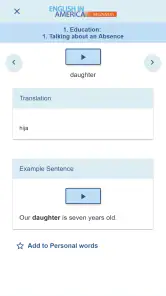
- Structured lessons cover speaking
- listening
- reading
- and writing skills.
- Progress tracking helps learners monitor completed activities and improvements.
- Practical workplace topics make the content useful for professional English.
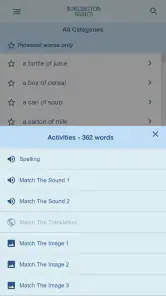
- Audio exercises let users hear natural pronunciation and practice independently.
- Lessons can support consistent study through short
- focused learning activities.
Cons
- Some advanced features may require an access code or institutional subscription.
- The platform may feel less suitable for casual learners seeking game-like lessons.
- Content quality and course access can depend on the plan provided by an institution.
- A stable internet connection may be needed for some lessons and media.
- Learners wanting broad language options may find the English-only focus limiting.

- Category
- Education
- Version
- 1.0











