Buddy.ai: Fun Learning Games
- 1.76K
- 4.5
- Installs
- 50.00M
- Price
- Free

Screenshots






Analysis by Reviewed
Buddy.ai: Fun Learning Games is like having a pocket-sized tutor with a knack for fun. You know how kids can sometimes dread learning? Well, this app flips that narrative entirely. I was quite skeptical at first—because let’s be real, how many apps out there promise to make learning fun and actually deliver? But, boy, was I in for a surprise!
A shared screen, with a grown-up nearby
I can picture Buddy fitting into an ordinary family moment: one child gets a short turn while a parent prepares dinner, then they talk about a word or sound the child encountered. That follow-up matters. The app can make practice feel playful, but I wouldn’t treat it as a substitute for reading together, conversation, or a teacher’s guidance. A useful routine is to let the child play first, then ask them to show you one thing they remember rather than turning the session into a test.
On a tablet or phone used by more than one child, I’d make the handoff clear before opening the app. Children at different stages may need different levels of help, and one shared session can blur who has practiced what. I would avoid assuming that a shared device automatically means separate progress or profiles. If tracking each child’s work is important, check how the app handles that during setup and keep any notes you need outside the game.
Turning Education into Entertainment
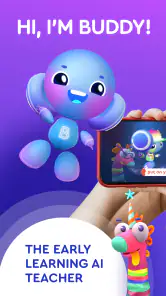
When I first launched the app, I was greeted by this friendly little character, Buddy, who immediately made me feel like I was in for an adventure rather than a lesson. The app is designed for kids, but I found myself getting sucked into the world it creates. The visuals are vibrant and engaging, and the interactive elements are designed to keep the learners fully engaged. It's like a cartoon and a classroom rolled into one!
Interactive Learning at Its Best
One of the standout features of Buddy.ai is its use of gamification to teach language skills. The app offers a variety of games that focus on different aspects of language learning, from vocabulary to pronunciation. And the best part? Kids don’t even realize they’re learning—they’re too busy having fun collecting stars and unlocking new levels. I must admit, seeing the little ones so excited about learning warms my heart.
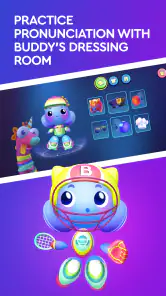
Now, what really sets this app apart is its AI-powered tutor. As the kids interact with Buddy, the app subtly corrects their pronunciation and provides feedback in a way that feels supportive rather than critical. It’s like having a patient teacher who never gets tired, which, let’s face it, is every parent’s dream.
Making practice fit the household
I’d use the speaking activities when a child has a little privacy and can hear the prompts clearly, rather than in a noisy room or during a rushed car ride. That gives them a fair chance to listen, respond, and try a sound again without feeling watched by siblings. If a child is shy about speaking to a character, sitting nearby for the first few turns can help; after that, stepping back lets them answer in their own way.
More From Our News Desk

Weather by Xiaomi Review: Clear at a Glance, Less Clear Up Close

X Under Pressure: Can It Recover When Posting Goes Wrong?

Clash of Clans Is Won Between the Battles

Android Auto Makes the Case for Quieter Car Software

MobiOffice: Transforming Mobile Productivity with Seamless Integration

EA SPORTS FC™ Mobile Soccer: Redefining Mobile Sports Gaming
Buddy is most useful as a low-pressure practice companion, especially for a young learner who enjoys characters and short game-like tasks. It may be less suitable for a child who wants open-ended lessons, a structured school curriculum, or detailed instruction from a live teacher. Compared with worksheets, it is more interactive and can invite spoken practice; compared with a general video, it asks the child to take part. Neither format replaces the other, so I’d choose based on whether the child needs engagement, quiet repetition, or a more systematic lesson.
Parents’ New Best Friend
If you’re a parent, you’ll love the progress reports. I found the reports to be detailed yet easy to understand, offering insights into what the child is excelling at and where they might need a bit more practice. This feature turns the app into a collaborative tool for both kids and parents, bridging the gap between play and education.
Moreover, the app is designed to be safe for kids, with no ads or in-app purchases that could lead to unexpected surprises on your credit card bill. That’s a huge relief, especially in today’s digital age where everything seems to come with hidden costs.
Setting expectations before a child starts
Buddy.ai is an education app from AI Buddy Inc. aimed at children, and its age rating is Everyone. I’d still preview the experience with the child rather than relying on an age label alone: children differ in reading confidence, attention span, and comfort speaking aloud. For a preschooler, a grown-up can help with the first steps and explain what the character is asking. For an older child who already has strong language skills, the activities may feel more like review than a challenge.
The app is free to download, but it offers in-app purchases, with items ranging from $6.99 to $119.99. I’d look over the purchase options with another adult before handing over a shared device, and make sure the child knows to ask before tapping any purchase prompt. That small boundary is especially helpful in a household where several people use the same phone or tablet. The app has a 4.5 average from around 600,000 ratings and more than 50 million installs, which suggests it has reached a large audience, though popularity alone cannot tell you whether its teaching style suits your child.
Choosing the right role for Buddy
One practical way to judge the fit is to try a brief session and then ask the child to explain what they practiced. If they can recall a word or are willing to repeat a sound, the playful format may be helping them engage. If they are tapping through without listening, or getting frustrated when asked to speak, I’d pause instead of pushing through. Short, attentive use is more valuable than leaving a child with the app for a long stretch while nobody checks in.
The current version is 6.20.0, and it runs on Android 8.0 or later. That makes device compatibility worth checking before planning to use it on an older family tablet. For households deciding between this and a basic alphabet or number game, the key distinction is the conversational language practice: choose Buddy when a child benefits from responding to a tutor character, and a simpler game when they mainly need to recognize letters or count without spoken interaction.
Keeping turns and expectations clear
Shared-device use works best when the adults decide what a turn means before the child begins. I’d avoid treating a single session as a competition between siblings, especially when one child is more confident speaking aloud. Instead, give each child a separate chance to explore and make the goal personal: remember one new word, listen carefully to a prompt, or have a go at a sound. This keeps the app from becoming another point of comparison in the household.
If two adults take turns supervising, a quick handoff can prevent mixed expectations. One parent might assume the child is practicing independently while another expects them to sit together. I’d agree on whether the grown-up is nearby, what counts as a finished session, and what to do if the child hits a purchase prompt. These are simple household arrangements, not special app controls, but they make a shared screen feel more predictable for a young learner.
What a useful first session looks like
I wouldn’t begin by asking a child to complete a long stretch or prove that they learned something. A better first try is to sit close enough to help with the instructions, let them respond at their own pace, and notice whether the speaking interaction feels inviting or stressful. Afterward, ask a low-pressure question such as which part they liked or what word they remember. Their reaction is often a clearer guide to fit than how quickly they move through a game.
For children who are still learning to use a phone or tablet, it also helps to explain the difference between a game choice and a purchase choice. They may not yet understand that tapping a prominent button can lead to something different from continuing an activity. I’d stay within reach during early use and make the rule about asking an adult explicit. This is especially sensible on a device that belongs to the household rather than to one child.
When a different learning tool makes more sense
Buddy’s conversational style is its main reason to choose it, but that also defines its limits. A child who wants to practice saying words aloud may get more from responding to a character than from tracing letters on a worksheet. A child who is working through a specific school topic, needs carefully sequenced instruction, or benefits from a teacher adapting explanations may be better served by a curriculum-based resource or direct support from an adult. I’d use Buddy as one small part of learning rather than asking it to cover every need.
It is also not the obvious choice for every moment. If the room is loud, the child is tired, or they feel self-conscious speaking in front of others, a quiet book or a simple visual activity may be a better fit that day. Likewise, if a child is already comfortable with the words and sounds being practiced, repeating game activities may not offer enough challenge. I’d change the format rather than insist that every child should enjoy the same kind of practice.
A practical way to judge progress
Playful rewards can make children eager to return, but I wouldn’t use stars or levels as the only sign that practice is helping. The more useful test is whether the child starts recognizing a word, tries a sound with less hesitation, or brings something from the activity into conversation later. Those small signs are easier to notice when an adult checks in occasionally, and they keep the focus on learning rather than on collecting rewards.
For a shared household routine, a simple note can help adults remember what each child tried without assuming the app separates their activity. It could be as modest as writing down a word the child mentioned or the kind of prompt they enjoyed. That is useful when a parent wants to avoid repeating the same conversation every evening, but it should stay light: the point is to support curiosity, not turn home practice into a formal assessment.
Why You Should Give It a Go
In conclusion, Buddy.ai: Fun Learning Games is a delightful blend of fun and education. It’s perfect for parents looking to enhance their child’s learning experience without the usual battles over study time. Whether your kid is just starting out with language learning or needs extra practice, this app has got it covered.
So, if you’re on the hunt for an educational app that doesn’t feel like a chore, I’d say give Buddy.ai a whirl. It’s not often you come across an app that makes learning feel like playing a game. Trust me, your kids will thank you for it!
My household recommendation
I’d recommend trying it with a young child who enjoys animated characters, is willing to answer out loud, and could use a playful nudge toward language practice. It is particularly promising for a short after-school or pre-dinner turn when an adult can listen nearby and follow up naturally. The app’s free download makes it easy to consider, but the available in-app purchases mean I would still set purchase boundaries before letting a child explore on a shared device.
I’d skip it, or at least keep it secondary, if the child needs a formal learning plan, dislikes speaking to a screen, or is looking for advanced lessons. And for families sharing one phone or tablet, I’d first check how the experience handles separate children rather than assuming their activity will be kept distinct. With those expectations in place, Buddy can be a cheerful addition to a household’s learning routine—not a replacement for the conversation, books, and guidance that make practice stick.
Buddy.ai: Fun Learning Games Frequently Asked Questions
Is Buddy.ai appropriate for a child who is just beginning to learn?
Buddy.ai is an education app centered on preschool learning games, alphabet activities, and number games. Its playful format may appeal to children starting to explore letters and numbers, while parents can sit alongside them and see how the activities feel for their child. The app is rated for Everyone, but a caregiver’s judgment is still useful when choosing learning activities for a young learner.
Can a parent use Buddy.ai as part of homeschooling?
Buddy.ai’s store summary presents it as a homeschool option alongside preschool learning games, alphabet games, and number games. That makes it worth considering as one playful resource in a child’s learning routine. Parents can explore the activities with their child and decide how they complement other lessons at home, rather than treating an app as a complete replacement for a broader learning plan.
Is Buddy.ai free to download, and what might require payment?
Buddy.ai is free to download, so families can try the app without paying upfront. It also offers in-app purchases, with individual items ranging from around seven dollars to around one hundred and twenty dollars. Check the purchase options in the app before handing it to a child, and use your device’s purchase controls if you want to prevent accidental spending.
What does Buddy.ai teach, and what kind of activities can children expect?
Buddy.ai is an education app whose store summary highlights preschool learning games, alphabet activities, and number games. Its activities are presented in a playful format intended to make early learning engaging for children. The focus on letters and numbers may suit families looking for learning practice alongside entertainment, while parents can explore the app together with their child to see which activities fit their needs.
What is Buddy.ai and how can it benefit my child?
Buddy.ai is an educational app designed to make learning fun and engaging for children. It uses interactive games and activities to teach a variety of subjects, including math, science, and language arts. The app is designed to adapt to your child's learning pace, making it an effective tool for personalized education. By using Buddy.ai, children can improve their academic skills while having fun, encouraging them to learn more effectively.
Pros
- Engaging educational content for kids.
- Helps improve language skills effectively.
- User-friendly interface for children.
- Wide variety of interactive games.
- Parents can track progress easily.
Cons
- Limited content in free version.
- Requires internet for full features.
- Some games may be too simple.
- Content may not suit all learning styles.
- In-app purchases can add up.
- Category
- Education
- Version
- 6.20.0











