Brilliant: Learn by doing
- 5.91K
- 4.5
- Installs
- 5.00M
- Price
- Free

Screenshots
Analysis by Reviewed
When a phone or tablet is shared at home, an educational app can become part of everyday conversation: one person tries a puzzle, another asks how it works, and suddenly a spare moment turns into a little lesson. That is the kind of use I can imagine for Brilliant: Learn by Doing. Its focus on interactive problem-solving makes it easier to explore ideas together than a long video or textbook chapter, though I would treat it as a learning resource for each person rather than assume it provides household profiles or parental controls.
One device, different learners
In a realistic household routine, a parent might open a short lesson while waiting for dinner, then invite an older child to reason through the next question. That can work well when both are comfortable taking turns and discussing answers. The useful part is not simply getting a solution right; it is explaining why a choice makes sense. I would keep sessions informal and let each person choose a topic, rather than turning the app into a shared test or expecting everyone to follow the same learning path.
For separate progress, the sensible boundary is to use individual accounts when learners need their own activity and preferences kept distinct. On a shared device, I would also make a habit of checking which account is active before starting. That is ordinary account hygiene, not a special household feature, and it avoids confusing one person’s learning with another’s. If everyone only wants to explore casually, taking turns on one device may be enough; if personal continuity matters, separate sign-ins are a better arrangement.
Making shared learning work
Brilliant is most useful in a household when people coordinate around curiosity rather than compete over scores. One person can work through a challenge first, then describe the reasoning without immediately giving away the answer. Another can try independently and compare approaches afterward. This turns a quick exercise into a conversation, while preserving the app’s main value: thinking through a problem yourself.
A small practical tip is to agree on a stopping point before opening a sequence of puzzles. Interactive challenges can make it tempting to keep going, but a short, deliberate session is easier to fit around homework, chores, or bedtime. If someone gets stuck, discussing the confusing step can be more helpful than taking over the screen. That approach makes the app a prompt for learning together, not just another device passed around the room.
Age, trust, and choosing the right fit
The app is rated for everyone, which gives families a broad age context, but that does not mean every lesson will suit every learner’s current knowledge or interests. I would choose topics with the person using it and be ready to explain unfamiliar ideas. Its educational focus is a good reason to explore it together, but age suitability is not the same as a guarantee that a child will find every exercise easy or engaging.
Brilliant is an education app from Brilliant.org. It is free to install, has an average rating of 4.5 from around 102,000 ratings, and has been installed over 5 million times. The current version is 9.19.0, and the app’s stated minimum operating-system version is 7.1. There are in-app purchases, with listed items ranging from $0.99 to $359.88, so I would check the purchase details before letting a child use a device with payment access. The free entry point is useful for trying the learning style, but I would not assume every course or option is included at no cost.
More From Our News Desk

Clash of Clans Is Won Between the Battles

Android Auto Makes the Case for Quieter Car Software

MobiOffice: Transforming Mobile Productivity with Seamless Integration

EA SPORTS FC™ Mobile Soccer: Redefining Mobile Sports Gaming

How Microsoft OneDrive Became a Mobile Productivity Giant

How Google Translate Breaks Language Barriers Effortlessly
Brilliant: Learn by Doing is an innovative educational app that transforms the way we approach learning. It’s designed to make complex topics in mathematics, science, and computer science accessible through interactive and engaging problem-solving activities. This app has been gaining popularity among learners of all ages, and I was excited to dive in and see what the fuss is all about. Let’s explore what makes this app a standout in the educational tech world.
Unleashing Interactive Learning
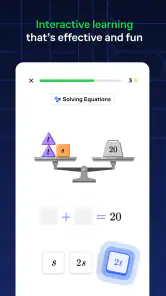
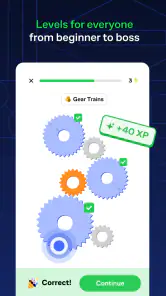
One of the first things I noticed about Brilliant: Learn by Doing is its emphasis on interactive learning. Instead of passively reading or watching videos, the app encourages users to engage with the material through hands-on exercises. I found this approach incredibly refreshing. It pushes you to think critically and apply concepts in real-time, making the learning experience much more dynamic and enjoyable.
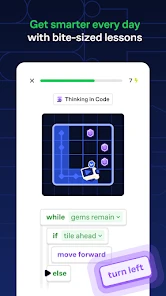
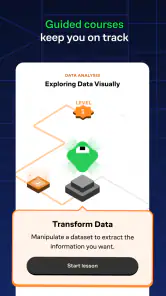
The app covers a wide range of topics, from basic algebra to advanced physics and computer science. Each topic is broken down into bite-sized lessons, which are perfect for those of us with busy schedules. I appreciated how the app allows you to learn at your own pace, giving you the flexibility to pause and return to lessons as needed.
Engaging Content and Design
Another aspect that sets Brilliant: Learn by Doing apart is its engaging and visually appealing content. The app is beautifully designed with a clean, user-friendly interface that makes navigation a breeze. The vibrant colors and intuitive layout kept me motivated to keep exploring new topics. There’s something about a well-designed app that just makes learning a little more fun, don’t you think?
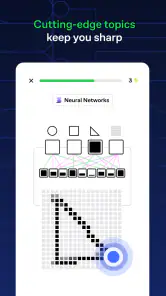
Moreover, the app employs a variety of interactive elements such as quizzes, puzzles, and games. These elements not only test your understanding but also reinforce the concepts you’ve learned. I found myself getting addicted to these challenges, often losing track of time as I tried to solve one puzzle after another.
Community and Support
Learning is often more effective when it's done with others, and Brilliant understands this well. The app includes a vibrant community of learners and experts who are always willing to help. Whether you’re stuck on a problem or just want to discuss a topic further, the community forum is a great place to connect with fellow learners.
Additionally, the app provides comprehensive support, with detailed explanations and solutions available for each exercise. This feature is particularly useful for those moments when you just can’t figure out where you went wrong. The explanations are clear and concise, helping you understand the concept without feeling overwhelmed.
Final Thoughts
In conclusion, Brilliant: Learn by Doing is an exceptional educational tool that makes learning interactive, engaging, and fun. It’s perfect for anyone looking to enhance their knowledge in math, science, or computer science, whether you’re a student, professional, or lifelong learner. The app’s combination of interactive content, beautiful design, and supportive community makes it a must-have for anyone serious about learning.
So, if you’re ready to transform your learning experience, give Brilliant a try. Who knows? You might just find yourself enjoying math or science more than you ever thought possible!
How it compares with other ways to learn
I see Brilliant as a complement to, rather than a replacement for, a textbook, a full course, or a teacher. Compared with reading a chapter, its questions ask you to make decisions as you go, which is useful when you want to test whether an idea has clicked. Compared with video lessons, it gives you more to do than simply follow an explanation. But if you need a formal syllabus, detailed reference material, or direct instruction from a teacher, a structured course or classroom is likely a better fit.
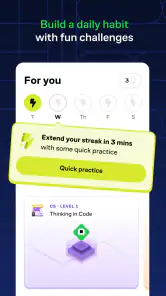
It also suits curious adults who want to rebuild confidence in a subject without committing to a long study block. A commuter could work through a single concept while waiting, then return later to tackle a harder problem. I would use that pause-and-resume flexibility to make learning a habit, not as a substitute for focused study when preparing for an exam or building professional expertise. A short lesson can spark understanding, but difficult material may still need repeated practice and outside explanation.
Where the format can fall short
The interactive style is the main draw, but it can also be a poor match for someone who prefers to listen first and practice afterward. If you want a quiet reference you can skim, or need a comprehensive explanation before attempting questions, the problem-led approach may feel demanding. Likewise, puzzle-like exercises can be enjoyable without automatically translating into mastery; I would pause after a challenge and put the reasoning into my own words rather than race through answers.
There is also a practical difference between sampling the app and relying on it as a complete learning plan. The free starting point lets a new user judge whether the format works for them, while in-app purchases mean it is worth reviewing what is available before building a household routine around particular material. For a student following a school curriculum, I would use it to strengthen understanding alongside assigned work, not assume its sequence will match classroom requirements.
A thoughtful household choice
For families, the best case is a learner who enjoys questions and can benefit from discussing how an answer was reached. The weaker case is a household expecting a single shared account to provide separate progress, built-in family oversight, or a ready-made schedule for children. I would decide who is using the device, keep account boundaries clear, and review purchases before handing it over. Those simple steps make the app easier to use responsibly without expecting it to manage family coordination for you.
My overall view is that Brilliant earns a place on a shared device when the household wants a hands-on way to explore math, science, data, or computer science in small pieces. It is particularly appealing to self-motivated learners and to adults who want a more active alternative to scrolling through explanations. If your priority is a formal curriculum, extensive reading, or tightly managed child accounts, another learning setup may serve you better. For curious people willing to think through problems—and occasionally get stuck—that interactive approach is the reason I would recommend giving it a try.
A practical rhythm for individual study
I get the most value from an interactive lesson when I treat it as a small experiment rather than a race to finish. Before tapping an answer, I try to say what I expect to happen and why. If the result surprises me, I pause there instead of immediately moving on. That simple habit turns a correct guess into a chance to check the underlying idea, and it makes an incorrect answer useful rather than discouraging.
For a busy learner, a good routine is to choose one topic before opening the app and stop after a satisfying point, such as resolving a question that initially seemed confusing. This avoids hopping between unrelated subjects just because each one looks interesting. I would also keep a brief note outside the app about a concept I want to revisit; that is especially helpful if I am using short sessions between errands and cannot rely on remembering exactly where my thinking changed.
Who benefits most, and who may prefer another tool
The strongest fit is someone who enjoys active learning: a curious adult filling gaps in math, a student who wants extra conceptual practice, or a beginner who likes testing ideas instead of watching a full explanation first. It can also give a household a shared conversation starter, provided everyone understands that taking turns is not the same as maintaining separate learning records. For these users, the compact challenge format can make abstract material feel approachable without requiring a long block of uninterrupted time.
I would steer away from it as a primary resource if the learner needs a prescribed course aligned closely with a school exam, extensive worked examples in a fixed order, or an instructor who can diagnose misunderstandings in real time. A textbook is often better for looking up a definition or reviewing a complete chapter; a teacher or structured class is better when a learner needs feedback tailored to their mistakes. Brilliant’s strength is inviting you to reason, not replacing those forms of support.
Questions worth settling before a household starts
One practical question is whether a family can comfortably share a device. I would distinguish device sharing from account sharing: if personal progress matters, each learner should use their own sign-in and check which account is active before beginning. If the goal is simply to solve a challenge together, taking turns can be enough. That choice depends on how much continuity each person wants, rather than on expecting the app to organize family use automatically.
Another question is whether the free experience will be enough. I would install it and try the learning style before deciding whether to spend anything, then check the specific purchase details if a learner wants access beyond what is available without payment. This is a particularly sensible step on a shared device, where a child might not know that an in-app purchase involves real money. The app can be free to install without every possible learning option being free.
Finally, I would ask what the learner wants from it: a quick mental workout, a way to explore a subject, or a complete study plan. It is most convincing for the first two. If someone is looking for a comprehensive course, exam preparation that follows a particular syllabus, or a guaranteed daily routine, I would pair it with a more structured resource rather than ask it to do every job. That expectation keeps the app’s engaging exercises in perspective and makes it easier to judge whether they are genuinely helping.
My household verdict
For a home that enjoys talking through ideas, this is a worthwhile way to turn a spare moment into focused, hands-on learning. I like that a question can prompt a learner to explain their reasoning, and that short sessions can fit around ordinary routines. The main trade-off is that the same open-ended, puzzle-like approach will not suit everyone, and families need to handle account separation, purchase decisions, and scheduling themselves.
I would recommend trying it with one topic that already interests the learner, then paying attention to whether the questions leave them curious or simply frustrated. If they enjoy thinking through the challenge, it can become a useful companion to books, classes, and independent study. If they need a formal curriculum or close supervision built into the learning tool, I would choose a different primary resource. For a curious household willing to take turns, compare explanations, and accept the occasional wrong answer, Brilliant offers a genuinely engaging way to learn together.
Brilliant: Learn by doing Frequently Asked Questions
What kind of learning experience does Brilliant offer?
Brilliant focuses on bite-size lessons that invite you to work through ideas rather than only read explanations. Its store summary highlights math, data, and computer science, with interactive activities intended to help make concepts easier to explore. This style may suit learners who enjoy solving problems as they go, though anyone who prefers long lectures or textbook-style study may want to try the free experience first.
Do I need prior knowledge to use Brilliant?
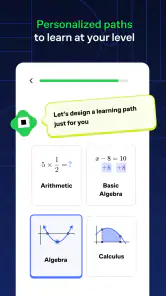
Brilliant is designed for a range of skill levels, so you can explore topics according to your interests and experience. The app’s hands-on approach gives learners a chance to engage with concepts through problems and guided lessons. If you are new to a subject, start with material that feels approachable and progress at your own pace; more experienced learners can use the lessons to strengthen or extend what they already know.
Is Brilliant free to download, and what might require payment?
Brilliant is free to download, so you can try the app before deciding whether it suits your learning routine. It also offers in-app purchases, with prices ranging from $0.99 to $359.88 per item. The published subscription answer below describes access options, but check the purchase details shown in the app before choosing a plan so you understand what you are buying.
What devices can run Brilliant: Learn by Doing?
Brilliant is available for Android and iOS, making it possible to use the learning app on a compatible phone or tablet. On Android, it requires version 7.1 or later. If you plan to use it on a particular device, check that the operating system meets this requirement before downloading; a supported system helps ensure the app can be installed and used as intended.
What is Brilliant: Learn by Doing?
Brilliant: Learn by Doing is an interactive learning platform designed to help users improve their problem-solving skills and knowledge in various subjects such as mathematics, science, and computer science. Through engaging and hands-on lessons, users can explore complex topics in a fun and practical way, making it a popular choice for learners of all ages.
Pros
- Interactive learning experience
- Wide range of topics covered
- User-friendly interface
- Engaging problem-solving activities
- Accessible offline mode
Cons
- Limited advanced content
- Requires subscription for full access
- Not ideal for casual learners
- May be challenging for beginners
- Occasional technical glitches
- Category
- Education
- Version
- 9.19.0











