brightwheel: Childcare App
- 3.56K
- 4.7
- Installs
- 1.00M
- Price
- Free

Screenshots
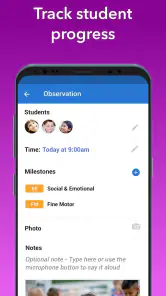
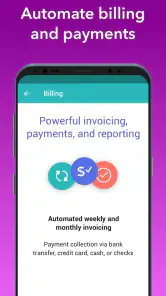
Analysis by Reviewed
In a childcare setting, the first few days with brightwheel: Childcare App can feel like a welcome change: instead of piecing together attendance, family updates, and routine admin across separate channels, staff can bring those tasks into one place. I can see why that first-week convenience appeals to educators and families alike. The real question is whether it still helps once the novelty wears off and the daily routine gets busy.
Why the first week can feel easier
Brightwheel is a free education app from brightwheel, aimed at childcare providers and the families they serve. Its practical appeal is not that it replaces good communication, but that it gives recurring tasks—such as sign-in and sign-out, daily updates, and billing—a shared home. If a center is currently relying on paper sheets, scattered messages, and separate payment reminders, having those workflows together can make the handoffs feel less fragmented.
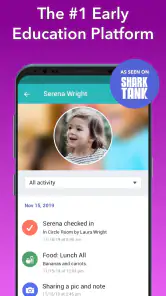
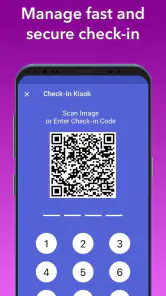
Imagine a parent arriving during a crowded morning drop-off. A staff member can record the child’s arrival as part of the check-in routine, then return attention to the room rather than later trying to reconstruct who came in when. The useful habit is to make the app part of the handoff, not an extra task saved for a quiet moment that may never come. That distinction matters: software only reduces admin when the team uses the same process consistently.
That shared routine is also where I would begin a trial. Before asking staff to explore every part of the app, I would agree on one dependable arrival workflow and make sure the families know what to expect from it. A parent should not have to guess whether to look for a check-in confirmation, a daily note, or a separate message. The first week is less about discovering every tool than seeing whether the center can make one important handoff clearer.
What keeps its value month to month
The ongoing benefit is clearest when a center uses several parts of the app together. Attendance records help organize daily transitions; notes and shared moments can give families a better sense of the day; and billing tools bring payment administration into the same general workflow. For parents, that can mean fewer separate places to check. For staff, it can mean less repetition—provided updates are entered promptly and the center has agreed on who is responsible for them.
It is also worth setting expectations about what an app can and cannot do. A digital daily record can make communication easier, but it does not replace a conversation when a family needs context, reassurance, or a careful discussion about a child. I would use quick updates for routine information and keep sensitive or complicated matters for a direct conversation. That boundary helps the app support relationships rather than trying to stand in for them.
A useful long-term test is whether the records help with patterns, not just isolated moments. For example, a family may notice that a child’s day has been unsettled several times and bring that concern to a teacher with specific dates or updates in mind. The app can make routine information easier to revisit, but interpretation still belongs to the people who know the child. I would use the record as a prompt for a conversation, not as a diagnosis or a substitute for one.
More From Our News Desk

Clash of Clans Is Won Between the Battles

Android Auto Makes the Case for Quieter Car Software

MobiOffice: Transforming Mobile Productivity with Seamless Integration

EA SPORTS FC™ Mobile Soccer: Redefining Mobile Sports Gaming

How Microsoft OneDrive Became a Mobile Productivity Giant

How Google Translate Breaks Language Barriers Effortlessly
Maintenance, friction, and fit
The main trade-off is that a shared system needs ongoing attention. Staff have to learn the center’s routine, enter information accurately, and keep billing details current; families also need to know where and how to follow updates. During a hectic shift, every extra tap competes with caregiving. A manager can reduce that friction by deciding in advance which updates are essential, who handles each task, and when records are checked. Starting with a small, repeatable routine is more realistic than expecting everyone to use every tool immediately.
Brightwheel may be less appealing to a small provider whose paper process is already simple, or to a family that prefers direct, face-to-face communication and does not want another app to check. It is also not a substitute for a center’s own policies or a staff member’s judgment. Compared with a basic messaging app or spreadsheet, it is built around childcare operations rather than general chat or record-keeping; that focus can be useful, but it only pays off if the center wants those connected routines. I would ask the provider how it plans to handle updates and billing before relying on the app as the main channel.
That comparison is practical rather than absolute. A messaging app can be the lighter choice when a program mainly needs occasional conversation, while a spreadsheet may suit a small team that only tracks a few administrative details. The drawback of those simpler options is that attendance, family communication, and billing can remain split across separate habits. Brightwheel is more compelling when the center genuinely wants those jobs connected; it is harder to justify if staff would have to maintain the app and their existing systems in parallel.
For families, a good onboarding question is what happens when a routine changes: who should be contacted if a child is being picked up differently, and where should a non-urgent question go? The app can be a convenient shared channel, but a family still benefits from knowing the center’s preferred way to handle time-sensitive or nuanced matters. Establishing that distinction early prevents routine updates from being confused with urgent communication.
Streamlining Childcare Management
First off, let's talk about how this app handles childcare management. With brightwheel, keeping tabs on attendance is a breeze. You can quickly log in and out times for each little one, making the morning rush less chaotic. Plus, the app provides real-time updates for parents. So, if you’re a parent, you can finally stop worrying about whether you packed the right snack or if your kid made it to nap time.
Engaging Parents Like Never Before
This is a real game-changer. The app allows teachers to share photos, videos, and notes directly with parents. Imagine being at work and getting an adorable snap of your child finger-painting or building the tallest block tower in class. These moments are priceless, and the app facilitates this precious exchange seamlessly.
For parents, the practical tip is to decide what kind of updates are genuinely helpful to receive during the workday. A photo or short note can make the separation easier, but frequent checking can also pull attention away from work without adding much understanding. I’d treat these updates as a window into the day, not a minute-by-minute feed or a replacement for asking teachers about a pattern that concerns me.
There is a small but meaningful difference between an update that is pleasant and one that is useful. A note about a child taking part in an activity can give a parent an easy opening for conversation at pickup, while a stream of photos may not answer a question about how the day went overall. I would encourage families to use the shared moments to ask focused follow-ups in person, rather than expecting every detail to be captured in the app.
Easy Billing and Invoicing
Handling finances is often one of the most dreaded tasks for childcare providers. But with brightwheel, invoicing becomes as simple as ABC. You can create and send invoices, track payments, and even manage subsidies without breaking a sweat. This feature alone saves hours of administrative work each week, allowing caregivers to focus on what really matters – the kids!
For a provider considering the switch, I would first map the current billing cycle: who prepares charges, who checks them, and how families are reminded about outstanding items. Moving that sequence into an app can make the process easier to follow, but it does not remove the need to review entries or answer questions about a bill. Families should also ask how their center expects them to handle billing notices, so a message in the app does not get mistaken for a conversation that still needs attention.
Billing is a particularly good place to agree on responsibilities before the routine gets busy. A center should know who checks an entry before families act on it and who can explain a charge if a parent has a question. For families, it is worth checking the app as part of the center’s stated process rather than assuming that every notice replaces a direct discussion. That simple division can prevent confusion without making the app responsible for resolving every billing concern.
Not to mention, the app is super user-friendly. Even if you’re not tech-savvy, you’ll find the interface intuitive and straightforward. From setting up profiles to managing daily activities, everything is designed to be as simple as possible.
That said, “easy to use” is not the same as “effort-free.” A center still needs a clear onboarding routine for new staff and families, especially when people join at different times. I would introduce only the essential steps first—such as the arrival routine and where families should look for updates—then build from there. This keeps the app from feeling like a pile of procedures on day one and makes it easier to spot where people are getting stuck.
One less obvious trade-off is consistency across a team. If one staff member records a detail immediately and another leaves it for later, families may experience the same app very differently depending on who was working. A manager can make adoption more realistic by defining a minimum standard for what gets recorded and when, rather than treating every possible update as compulsory. This is a better test of fit than asking whether the interface feels simple during a quiet demonstration.
Security Features
In the digital age, data security is critical, especially when dealing with children’s information. Brightwheel takes this seriously, offering robust security measures to ensure all data is encrypted and safe from prying eyes. You can rest easy knowing that your information is well-protected.
Because this involves children’s records and family communication, I would still encourage parents to use sensible account habits and ask the provider who on the team is responsible for managing access and updates. A reassuring app experience depends on the center’s everyday handling of information as well as the software itself. This is a useful question to settle during enrollment rather than after a missed message or a confusing handoff.
Who is likely to benefit—and who may not
With a 4.7 average from around 10,000 ratings and over a million installs, brightwheel is a well-established choice in its niche, though popularity alone cannot tell me whether a particular center uses it well. It is rated for Everyone, and version 5.61.0 requires iOS 9 or later. I would check that a device meets that requirement before planning to rely on the app. The strongest fit is a provider that wants attendance, parent communication, and billing to follow a shared routine, plus families who value convenient access to everyday updates.
The app is especially suited to a childcare center where staff and families need a dependable way to handle recurring logistics, not simply a place to share occasional photos. It may be less useful for a provider with very few children and little recurring administration, where the time needed to establish a new process outweighs the convenience. The deciding question is not whether digital tools are modern; it is whether this particular team has enough repeated work for a shared system to make that work clearer.
If you are choosing childcare, ask whether the center already uses the app consistently and what information it expects families to check there. If you run a small program with few recurring admin tasks, a simpler method may take less effort to maintain. And if you want every conversation to happen in person, the app’s convenience may not outweigh the habit of checking another channel. Those are not flaws so much as questions of fit.
For an ordinary day, I can picture a parent checking an update during a lunch break, seeing that the child has settled into an activity, and saving a broader question for pickup. Meanwhile, the staff member records the arrival as part of the morning handoff rather than reconstructing attendance later. That is the sort of modest, repeatable value I would look for: fewer loose ends around routine information, while the human exchange remains available when something needs more than a quick note.
The app is free, which lowers the barrier to trying it, but a free download does not make adoption costless in time or attention. Families may need to build a new checking habit, and staff need a shared process that survives busy days and shift changes. I would judge the trial by whether it reduces duplicated reminders and makes responsibilities easier to understand, not by how many features the center can switch on.
In conclusion, the brightwheel: Childcare App is not just another childcare management tool; it’s a comprehensive solution that brings efficiency, connectivity, and peace of mind to both providers and parents. Whether you're an overwhelmed teacher looking for a better way to manage your classroom, or a parent wanting to stay connected with your child's daily activities, this app has something for everyone.
So, if you’re in the childcare business or have little ones of your own, give brightwheel a try. It might just change the way you look at childcare, turning what used to be stressful into something much more manageable and rewarding.
Does it earn a lasting place?
For me, the answer depends on whether it becomes part of a center’s ordinary rhythm rather than another inbox to maintain. Its lasting value comes from repeated small tasks—recording arrivals, sharing relevant updates, and keeping billing organized—not from novelty. I would judge it after the first few weeks by whether staff and families know what to do without reminders, and whether the app reduces duplicated work instead of adding another layer to it.
If those habits take hold, the free price makes trying it an approachable option for a center and its families. If usage is inconsistent, even a capable tool can create confusion about where to find an update or who has handled a payment question. My recommendation is to adopt it with a clear routine and realistic expectations: use it to make childcare administration easier, while keeping human conversation at the center of care.
brightwheel: Childcare App Frequently Asked Questions
What does brightwheel cost to download, and who is it intended for?
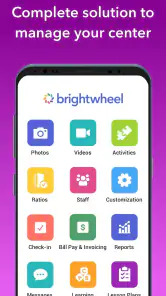
brightwheel is a free education app developed for childcare settings, including daycare centers, preschools, and other early learning programs. Its daily sheets, sign-in and sign-out tools, billing features, and learning tools are designed to help families and providers stay connected around a child’s care. The app is rated for everyone, though its usefulness depends on whether a childcare provider uses it.
What is brightwheel and what features does it offer for childcare providers?
Brightwheel is a comprehensive childcare management app designed for daycare centers, preschools, and other early education programs. It offers features such as attendance tracking, daily reports, photo sharing, and parent communication tools. These functionalities aim to streamline operations, enhance parent engagement, and improve the overall management of childcare services.
How secure is the data stored in the brightwheel app?
Brightwheel prioritizes the security of user data by implementing robust security measures including encryption, secure data storage, and regular security audits. The app ensures that all sensitive information, such as children's personal details and parents' contact information, is protected against unauthorized access and breaches, providing peace of mind for users.
Is brightwheel accessible on both Android and iOS platforms?
Yes, brightwheel is available for download on both Android and iOS platforms. Users can easily find the app on the Google Play Store for Android devices and the Apple App Store for iOS devices. This cross-platform availability ensures that both childcare providers and parents can access the app using their preferred mobile devices.
Can parents communicate directly with childcare providers through brightwheel?
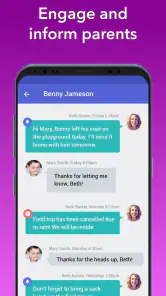
Absolutely, brightwheel facilitates seamless communication between parents and childcare providers. The app includes messaging features that allow parents to receive updates, ask questions, and stay informed about their child's day. This direct communication channel helps foster a collaborative relationship between parents and providers, enhancing the childcare experience.
Pros
- User-friendly interface for easy navigation.
- Comprehensive daily reports for parents.
- Secure messaging system for communication.
- Robust attendance tracking features.
- Available on both Android and iOS platforms.
Cons
- Subscription required for premium features.
- May experience occasional sync issues.
- Limited offline functionality.
- Initial setup can be time-consuming.
- Some features require internet access.
- Category
- Education
- Version
- 5.61.0