BrightWay Credit Card Mobile
- 6.81K
- 4.6
- Installs
- 500.00K
- Price
- Free

Screenshots
Analysis by Reviewed
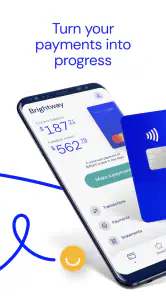
Managing a credit card from a phone sounds simple until you need to check something at an inconvenient moment: standing at a checkout, reviewing a recent purchase, or trying to understand whether a payment has gone through. BrightWay Credit Card Mobile is built for those small but important moments. Developed by OneMain Financial, this free finance app puts BrightWay account access into a mobile format rather than making you rely on a browser every time.
I found the app most useful when I treated it as a quick account-control tool, not as a complete replacement for every financial service I use. Its focus is narrow and clear: spending, payments, and rewards connected with the BrightWay Credit Card. That focus makes the experience easier to understand, but it also means the app is not designed to become a full budgeting suite or a general-purpose banking hub.
The app is rated for Everyone, runs on Android devices using version 6.0 or later, and the current release is 5.9.0. It is free to install, has passed over 500 thousand installs, and holds an average rating of 4.6 from roughly 15 thousand ratings. Those figures suggest that it has found a substantial audience, although popularity alone does not tell me whether it will fit the way you manage credit.
How BrightWay works when the network matters
Useful information arrives through a live connection
The most important thing to understand is that BrightWay Credit Card Mobile is a connected account app. When I open it to review spending, make a payment, or look at rewards, I expect the app to communicate with OneMain Financial's services. That makes the quality of the experience depend partly on the connection available at that moment.
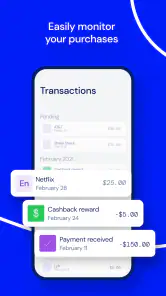
With a reliable mobile signal or Wi-Fi, the app's purpose is straightforward. I can use the phone as the place where I check the card instead of opening a desktop browser. This is especially convenient after making a purchase, when I want to confirm that the transaction appears in the account activity or simply keep an eye on recent spending.
The connection also matters because financial information needs to be current. A screen that looks fine but has not refreshed would be less useful than a clear indication that the latest information is still loading. I would therefore avoid treating a displayed balance or transaction list as an instant substitute for checking the latest account status when timing is important.
Payment decisions need a little patience
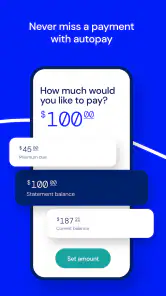
Payments are one of the main reasons to use this app, but they are also where I would be most careful. A weak connection, a stalled screen, or an interrupted session can make it unclear whether an action was completed. My practical advice is to avoid tapping repeatedly if the app appears slow. First check whether the screen changes, then review the account activity or payment status before trying again.
That habit is more important than it may sound. Repeating a payment action because the first attempt seemed frozen can create unnecessary confusion. The app is helpful for initiating and reviewing account activity, but the user still needs to pay attention to confirmation details rather than assuming that every tap has produced an immediate result.
Rewards are easier to use when checked deliberately
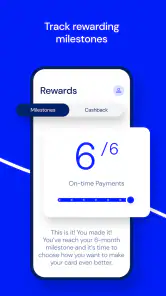
BrightWay also brings rewards into the same mobile experience. I like the convenience of having spending, payments, and rewards in one card-focused place, because it avoids jumping between unrelated tools. At the same time, rewards are exactly the kind of information I would review when the connection is stable, especially before making a decision based on a current balance or available amount.
A useful routine is to check rewards after reviewing recent spending, not in isolation. That gives the information some context and helps me connect the card activity with the benefit I am tracking. It is a small workflow, but it is more practical than opening the rewards area only when I am already trying to redeem or understand something quickly.
What the app is not trying to be
Compared with a traditional bank app, BrightWay feels more specialized. A broad banking app may combine checking, savings, transfers, deposit tools, account aggregation, and detailed budgeting. BrightWay's advantage is that it keeps attention on the BrightWay Credit Card rather than surrounding the card with unrelated financial products.
That narrower design is a strength if you want a dedicated card companion. It is a weakness if your main goal is to see every account in one dashboard. I would not install it expecting the same scope as a full personal-finance platform. Its value comes from direct access to the card relationship, not from replacing a complete money-management system.
Using it in everyday mobile situations
The app makes the most sense in short sessions. Imagine leaving a supermarket and wondering whether a larger-than-expected purchase has appeared on the card. Instead of waiting until you are home, you can open the app, review the activity, and decide whether you need to adjust the rest of your spending for the day. That is a realistic use case where mobile access is more convenient than a desktop website.
Another situation is checking the account before making a planned purchase. I would use the app to review recent activity and get a clearer view of the account before committing to another expense. This does not turn the app into a financial adviser, but it does make a quick personal check easier to perform at the point when it matters.
For payments, I would choose a calm moment rather than trying to complete the process while rushing through an airport, walking between appointments, or relying on an unreliable public network. The mobile format is convenient, but convenience should not become a reason to hurry through a financial action.
When a phone is the right screen
A phone is particularly useful for people who check their card in small gaps during the day. The app suits someone who wants a focused way to review spending without sitting at a computer. It is also a sensible option for users who already keep their BrightWay card as a separate part of their finances and want a direct mobile route to it.
I would recommend it more confidently to a person who values quick account awareness than to someone who wants long monthly reviews. A phone screen is fine for scanning recent activity, checking a payment, or looking at rewards. For studying a large amount of financial information, comparing many categories, or planning a detailed budget, a desktop browser or dedicated budgeting tool may be more comfortable.
Travel and weak-signal situations
Connectivity becomes more noticeable when travelling. A hotel network may be slow, a crowded venue may overload mobile service, or a basement may have little signal. In those situations, I would not plan a payment around the assumption that the app will respond instantly. I would handle important account tasks before leaving a dependable connection whenever possible.
This is not a criticism unique to BrightWay; live financial services generally need communication with their provider. The practical difference is that a mobile app encourages spontaneous use, so it is easy to forget that the phone is not automatically connected just because the screen is bright. The best experience comes from treating network quality as part of the task.
Recovering from a stalled session
If the app seems stuck, my first step would be to stop interacting with it for a moment and check whether the connection is working elsewhere. If other apps also struggle, the problem is probably the network rather than the card interface. If the connection is fine, closing and reopening the app can be a sensible way to start a fresh session.
After reopening, I would review the account before repeating any payment-related action. This recovery habit protects against the uncertainty that comes from an interrupted request. It is a simple but important distinction: restarting the app may refresh what I can see, but it does not automatically mean that an earlier financial action should be submitted again.
Keeping mobile use sensible and data-conscious
Because the app is designed for connected account access, I would use Wi-Fi for longer browsing sessions when that is convenient, especially if I am reviewing several areas rather than checking one item. Short checks over mobile data are usually the natural use case for a finance app, but people with limited data plans should avoid leaving it open unnecessarily or repeatedly refreshing screens just to watch for changes.
I also prefer using a trusted connection for account activity. Public Wi-Fi can be useful for ordinary browsing, but financial actions deserve more care. If I am in a café or airport and only need to remember to make a payment later, I would wait until I have a more dependable connection rather than forcing the task immediately.
There is another data-conscious habit worth adopting: open the app with a specific purpose. Decide whether you are checking spending, reviewing a payment, or looking at rewards, then leave once that job is done. This keeps the experience quick and reduces the temptation to refresh repeatedly when the information is not changing in a meaningful way.
Who will appreciate the focused design
BrightWay Credit Card Mobile is a good fit for an existing BrightWay cardholder who wants mobile access without navigating a broad banking platform. The app's focused nature can make routine checks less distracting. If your everyday question is “What has happened on my card?” or “Can I manage this payment from my phone?”, it addresses that need directly.
It may also suit someone who wants rewards visible alongside card activity. Keeping those related tasks together makes more sense than relying on separate notes or occasional browser visits. The strongest benefit is not a long list of tools; it is the reduced distance between noticing something about the card and taking the next sensible step.
Who should choose another option
I would look elsewhere if you need a unified view of multiple banks, investment accounts, loans, and detailed household categories. A general finance manager will usually be better for that kind of overview. I would also prefer a larger-screen option for extensive record keeping, tax preparation, or careful month-by-month analysis.
The app is not the right choice simply because it is free. Free installation removes the cost barrier, but the app still makes sense only if you use a BrightWay Credit Card and want its specific account tools. Someone without that card relationship is unlikely to gain much from installing it.
What the audience numbers tell me
The app was released on August 16, 2021, and its continued presence alongside the 5.9.0 version shows that it is an established mobile product rather than a brand-new experiment. OneMain Financial is the developer, and the app has around 6.8 thousand written reviews in addition to its broader rating activity. I see that as useful evidence that people are actively engaging with it, though individual experiences can still vary by account situation and connection quality.
The Everyone age rating also makes the presentation broadly accessible. That does not remove the need for responsible financial habits, of course. A clear interface can help with routine account management, but it cannot decide whether a purchase is affordable or whether a payment schedule fits a person's circumstances.
My practical routine with the app
If I were using BrightWay regularly, I would create a simple routine. I would check recent activity after unusual or larger purchases, review the account before making a planned expense, and use the payment area when I had enough time to confirm the result. I would look at rewards as part of that same review rather than treating them as a separate reason to open the app.
I would also avoid making the app my only memory of financial commitments. A phone-based account view is excellent for checking what is happening, but reminders and personal planning still have a place. The strongest setup is one where BrightWay handles direct card visibility while another method helps me plan upcoming obligations and broader spending.
My connectivity verdict
BrightWay Credit Card Mobile works best when its connected nature is understood rather than ignored. A dependable network makes quick spending checks, payment management, and rewards review feel natural. A poor connection introduces uncertainty, particularly around actions that need confirmation, so I would use a stable connection and verify the result before repeating anything.
Overall, I see it as a focused companion for BrightWay cardholders, not a replacement for a full banking or budgeting app. Its free access, dedicated card workflow, and mobile convenience are convincing reasons to try it if that is the card you use. The main trade-off is scope: it keeps the experience centered on the card, while broader alternatives may offer a more complete view of your finances.
My recommendation is simple: choose BrightWay Credit Card Mobile when you want direct, everyday control of a BrightWay account from your phone and are comfortable working through a connected service. Skip it in favor of a broader finance tool if your priority is multi-account planning, detailed budgeting, or extensive desktop-style analysis.
Pros
- Quick access to balances
- payments
- and recent transactions.
- Payment reminders can help reduce the risk of missing due dates.
- Card controls make it easier to monitor account activity.
- Digital statements provide a convenient paperless record.
- Secure sign-in helps protect sensitive credit card information.
Cons
- Some features may require an active BrightWay card account.
- Account updates may not appear immediately after transactions.
- Limited usefulness for people who do not hold a BrightWay card.
- Mobile features can vary depending on device and app version.
- Customer support options may be less convenient than phone service.

- Category
- Finance
- Version
- 5.9.0











