Bright: Loans & Credit Builder
- 16.32K
- 4.6
- Installs
- 1.00M
- Price
- Free

Screenshots

Analysis by Reviewed
So, I recently got my hands on the Bright Money - AI Debt Manager app, and trust me, it's a game-changer for anyone trying to wrangle their finances. It's like having a personal financial advisor in your pocket, and honestly, who doesn't need that kind of help these days?
The appeal is easiest to understand if you have a few debts to organize and want a routine that makes them harder to ignore. Bright Money is a free finance app from Bright Money, with a focus on debt payoff, credit history, budgeting and loan offers. It has a 4.6 average from around 124,000 ratings, and more than a million installs. Those figures suggest plenty of people have tried it, but they do not tell me whether its guidance will suit your circumstances; that depends on how clearly you understand your debts and how much you want an app involved in your financial decisions.
For someone opening a money app for the first time, the first week is less about following every suggestion and more about establishing a useful baseline. I’d write down the balances and minimum payments I already know, then compare that picture with what appears after setup. If something looks off, I’d pause and check the underlying account rather than building a plan around a number I haven’t verified. This simple habit helps make the app a place to organize decisions, not the only source of truth about them.
Bright Money is most promising for people who want debt repayment and everyday budgeting to inform one another. Someone juggling several balances may find it easier to think about a payment plan when spending patterns are visible alongside debts. Someone with one small balance and a stable budget may get less from that combined view and could be perfectly comfortable with a basic reminder or notes app. The difference is not how serious a person is about money; it is how much structure they actually need.
Getting Started with Bright Money
First off, let's talk about getting started. Downloading and setting up the app is smooth sailing. It's available on both Android and iOS, so no worries if you're team Apple or team Android. Once you fire it up, the app asks you to link your bank accounts. I know, I know, sharing that info sounds sketchy, but the app uses bank-level security, so your data is as safe as a vault. After linking, the app gives you a snapshot of your financial health, and from there, it's all about smart money moves.
That first snapshot is most useful when you have a specific question in mind: which balances should I focus on, and what spending is making my month feel tighter than expected? Before linking accounts, I’d have the relevant balances, interest rates and minimum payments handy, so I can check that the picture the app presents matches what I already know. I would not treat an automated plan as a substitute for reading statements or checking the terms of a debt; the practical benefit is having the moving parts in one place, not handing over judgment.
For a realistic first-week test, imagine payday lands while rent, utilities and a card payment are all coming due. I’d use the overview to separate money already spoken for from the amount I can reasonably direct toward debt, then check whether the suggested payment leaves enough breathing room until the next payday. If a plan only works when nothing unexpected happens, it probably needs adjusting. That is a more useful early test than simply admiring a projected payoff path.
More From Our News Desk

 Bolt: Request a Ride
Bolt and the Shift from One-Tap Rides to More Legible Trips
Bolt shows how ride-hailing is shifting from a one-tap taxi request toward a more legible, choice-driven trip, while leaving the hardest questions of price and reliability unresolved.

 Farm Land - Farming life game
Farm Land Review: A Small Island Farm with a Satisfying Loop
A bright, breezy island farm turns a few quick chores into a satisfying cycle of planting, harvesting, expanding, and deciding what to build next.

 Android Auto
’s Community Takes Shape in the Passenger Seat
Its most valuable network is not a public feed but a shared set of routes, voice habits, app integrations, and advice that make driving less isolating—and sometimes more complicated.

 My Talking Angela
 Makes the Virtual Pet Feel Personal
A polished pet-raising game built on small rituals, playful customization, and a character who gives everyday screen time a surprisingly personal rhythm.

 Google Translate
 Review: A Pocket Tool for the Small Frictions of Travel
From menus and signs to quick conversations, Google Translate earns its place by cutting the little delays that make unfamiliar language feel like a barrier.

 Shazam: Find Music & Concerts
Shazam’s Best Trick Is Turning a Song Into a Night Out
A few seconds of recognition can settle an argument, rescue a half-remembered chorus, and point toward a live show. Shazam’s real trick is what happens after the match.
Latest News



A Deep Dive into AI-Powered Features
What sets Bright Money apart is its AI-driven approach to managing debt. The AI goes through your financial data, and like magic, it crafts a personalized plan to help you pay off your debts efficiently. It prioritizes high-interest debts and suggests an optimized payment schedule. What's cool is how the app's AI learns from your spending habits to improve its guidance over time.
One useful way to judge that plan is to compare its suggested priority with your own balances and interest rates, then decide whether the recommendation fits your actual cash flow. Paying extra toward a high-interest balance can make sense on paper, but a plan that leaves too little room for bills or an unexpected expense may be hard to maintain. I’d use the schedule as a prompt to make a realistic monthly commitment, rather than as a target to follow blindly. That small check can turn an impressive-looking payoff strategy into a habit you can actually keep.
A less obvious trade-off is that a recommendation can be mathematically tidy without matching the way you manage risk. If paying down one balance first would leave you feeling exposed because another payment is close, preserving a cash cushion may matter more to you than maximizing a neat-looking repayment sequence. I’d treat the app’s priority as a proposal to examine, especially during months with irregular income. The best plan is the one you can follow without repeatedly reaching for credit to cover ordinary costs.
And let's not forget about the budgeting feature. It's like having a financial compass that keeps you on track without being overly restrictive. You get insights into your spending patterns, which is great for identifying those sneaky expenses that add up. Plus, the app nudges you to save a little extra when it notices opportunities. It's like having a money-savvy friend who’s always looking out for you!
A realistic test is a week when a routine expense changes: perhaps groceries cost more than expected, or a bill arrives just before payday. I’d look at the spending picture, decide whether the extra money should come from discretionary spending or a planned debt payment, and adjust the month deliberately. That is where budgeting can help more than a bare balance tracker. The trade-off is that the insights are only as useful as the account activity and categories you review, so occasional checking matters more than expecting the app to make every decision for you.
Over the next few months, I’d judge the budget less by whether every category stays perfectly on track and more by whether it helps explain a shortfall. A category that repeatedly runs high may reflect a real change in costs, not a failure of discipline. In that case, adjusting the plan is more useful than repeatedly trying to force an unrealistic target. This is one reason a guided budget can be valuable: it can turn a vague feeling of being short on money into a concrete question about where the plan needs room.
User Experience and Interface
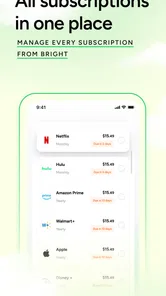
Now, let's chat about the user interface. The app’s design is sleek and intuitive. Even if you're not a tech wizard, navigating through the app is a breeze. The dashboard is well-organized with all your financial info laid out clearly. You can easily switch between different sections, and everything is just a tap away. The developers did a stellar job here, making financial management less of a chore and more of a daily habit.
In day-to-day use, I’d aim for a short, repeatable check-in rather than opening a finance app every time I buy something. A quick review after income arrives is a natural moment to compare what is available with upcoming obligations, while a second look later in the month can show whether the plan still feels realistic. This keeps the app in a supporting role. If you already track every purchase in a spreadsheet or prefer to keep banking information out of a connected service, that extra account-linking step may outweigh the convenience.
Bright Money also sits between two familiar alternatives: a basic budget tracker and a hands-on debt spreadsheet. A tracker can be simpler if you mainly want to see where money goes, while a spreadsheet gives you more control over assumptions and calculations. This app’s appeal is bringing debt guidance and budgeting together, with credit-history building and loan offers also part of its focus. I would choose it when I want a guided starting point; I would choose a spreadsheet when I need to model unusual repayment details or prefer to control every calculation myself.
That comparison also helps clarify who should skip it. If you have a detailed repayment strategy already, irregular arrangements with creditors, or a strong preference for entering every figure yourself, the app may feel less flexible than a spreadsheet. If you mainly want a lightweight record of spending, a simple tracker could involve less setup. Bright Money makes more sense when you value a combined view enough to accept some automation and a recurring review habit.
The app is free, rated for Everyone, and its current version is 1.58.2, with Android 8.0 as the minimum operating system. Those details make it accessible to many users, but they do not remove the more personal decision: whether you are comfortable connecting accounts and using automated guidance. It is a better fit for someone who wants a practical overview and can review recommendations thoughtfully than for someone seeking a completely manual system or a guaranteed route to improving credit.
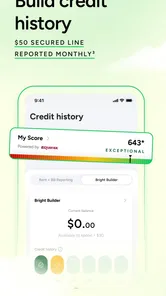
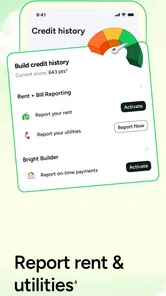
One question many people will have is whether the app can guarantee a stronger credit history. I would not approach any finance tool with that expectation. Credit outcomes depend on a person’s broader circumstances and on how accounts are managed; an app can support awareness and planning, but it cannot make every decision or outcome automatic. I’d use its credit-related focus as a reason to stay attentive to the habits I can control, while checking important account details directly.
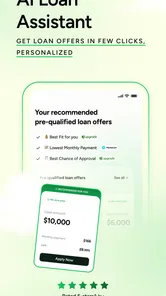
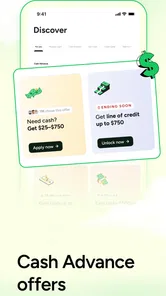
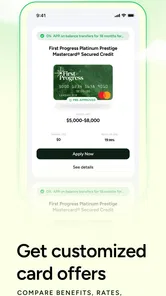
Loan offers deserve the same measured approach as the debt plan. Seeing an offer can be useful when you are comparing possible ways to handle a balance, but an offer is not automatically a good deal simply because it appears alongside budgeting tools. I’d compare the full terms with the debts already on my list and consider whether taking on another obligation actually improves the situation. The app can help bring options into view; the decision still needs to account for the cost and fit of each option.
If a loan offer catches your eye, I’d compare the total repayment obligation and the practical effect on monthly cash flow with the debt you already have. A lower payment can look attractive while extending the time you owe money, so the headline figure alone is not enough to decide. This is a useful point to step outside the app and read the actual terms. The convenience of seeing an option beside a budget should not replace a careful comparison.
Another question is how much ongoing effort the app demands. The central maintenance task is keeping a clear, current view of your finances and checking that the advice still makes sense as spending changes. If your income and bills are fairly predictable, a regular review may be enough to keep the plan useful. If your finances change often, you may need to revisit it more frequently. The app’s value is not that it removes attention from money, but that it can give that attention a structure.
For lasting use, I’d make the check-in part of an existing routine instead of creating a new daily chore. Reviewing the plan when income arrives, then revisiting it after an unusually expensive week, gives me specific reasons to open the app. If nothing has changed, there may be no need to keep checking the same figures. This approach keeps the tool useful without letting money management become a constant stream of alerts or anxious dashboard refreshes.
Fatigue can still set in if the numbers feel like a judgment every time spending strays from the plan. A budget is a working estimate, not a verdict on whether someone is responsible. I’d be cautious about trying to optimize every small purchase when the larger decisions—covering essentials, meeting minimums and choosing a sustainable extra payment—matter more. If an app’s guidance starts making routine spending feel stressful, it is reasonable to reduce how often you check it or return to a simpler method.
And hey, if you're ever stuck or have questions, their customer support is just a tap away. They offer quick responses and helpful advice, which is always a plus in my book. It feels like they genuinely care about helping you succeed financially.
Support can be reassuring when a feature or recommendation is unclear, but I would still separate customer help from personal financial advice. For decisions with serious consequences, I’d verify account details and repayment terms directly with the relevant provider. That is not a knock on the app; it is a sensible boundary for any tool that organizes money information and suggestions.
Final Thoughts
So, should you give Bright Money - AI Debt Manager a shot? Absolutely! It's perfect for anyone who wants to take control of their finances without all the stress. The combination of AI-driven insights and a user-friendly interface makes it a standout choice in the crowded world of finance apps. Whether you're drowning in debt or just want to budget better, this app is definitely worth checking out. Plus, who doesn't love an app that makes adulting a tad bit easier?
My enthusiasm comes with one qualification: the app earns lasting space only if its suggestions lead to a routine you can stick with. If checking a dashboard helps you notice a spending pattern and make a deliberate payment, that recurring value can outlast the novelty of an AI-generated plan. If you would rather avoid connected accounts, already have a dependable manual method, or need highly customized debt calculations, a simpler tracker or your own spreadsheet may serve you better.
Overall, Bright Money feels like a breath of fresh air in the financial management space. Give it a try, and you might just find yourself on a smoother path to financial freedom. Happy money managing!
Bright: Loans & Credit Builder Frequently Asked Questions
Is Bright Money suitable for someone who wants a simple way to organize their finances?
Bright Money is a finance app centered on debt payoff, credit history building, AI budgeting, and loan offers. Those tools may appeal if you want to bring several money-management tasks into one place. Before installing, consider which features you actually need and whether you are comfortable reviewing financial information and guidance through an app.
Who develops Bright Money, and is it widely used?
Bright Money is developed by Bright Money and has more than 1 million installs. Its average rating is 4.6, based on around 124,000 ratings, with about 12,000 written reviews. Those figures offer some context about its reach and user feedback, but they cannot tell you whether the app’s particular approach to debt and budgeting will suit your personal circumstances.
What should I know about Bright Money before downloading it?
Bright Money is a finance app from Bright Money for people looking for tools to pay off debt, build credit history, manage a budget with AI, and explore loan offers. It is free to download and is rated for Everyone. The app has a 4.6 average from around 124,000 ratings, so its large user base may offer a useful starting point when deciding whether its approach fits your needs.
What is Bright Money - AI Debt Manager and how does it work?
Bright Money - AI Debt Manager is a financial app designed to help users manage and pay off their debts more efficiently using artificial intelligence. The app analyzes your financial habits and income patterns to create a personalized debt repayment plan. By optimizing payments, it helps you save on interest rates and get out of debt faster. It also provides budgeting tools to ensure you stay on track with your financial goals.
Is my financial data safe with Bright Money - AI Debt Manager?
Yes, Bright Money prioritizes user data security and privacy. The app uses bank-level encryption to protect your financial information. Additionally, it adheres to strict security protocols and industry standards to ensure that your sensitive data is safe from unauthorized access. Users can feel confident knowing their personal and financial information is handled with the utmost care.
Pros
- User-friendly interface for all ages.
- AI-driven insights for personalized debt plans.
- Secure encryption for data safety.
- Multi-account management in one place.
- Regular updates with new features.
Cons
- Requires internet for real-time updates.
- Limited features in free version.
- AI suggestions may not fit all users.
- Some features behind paywall.
- Not available in all countries.