Bread Financial
- 3.12K
- 4.7
- Installs
- 500.00K
- Price
- Free

Screenshots

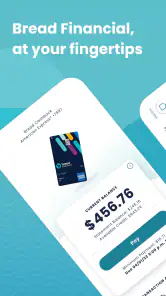


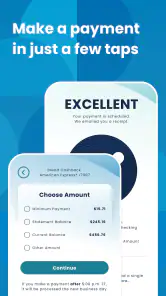


Analysis by Reviewed
I found Bread Financial most useful when I treated it as a focused account companion rather than a complete personal-finance hub. It is a free finance app from Bread Financial Holdings, Inc. that puts everyday account tasks in one mobile workspace: checking what I owe, making a payment, and handling available rewards. That narrow purpose is also its main strength. I can open it when I need to deal with a Bread Financial account without sorting through a larger budgeting service or a general banking app.
After spending time with Bread Financial, my impression is straightforward: it is best for people who already use a Bread Financial account and want a convenient way to stay on top of it from a phone. It is less convincing as a replacement for a full bank application, an investment dashboard, or a detailed spending tracker. The experience makes more sense once you accept that distinction.
How the everyday account workflow feels
My normal routine starts with a quick account check rather than opening the app casually. I look for the current balance, review recent activity, and decide whether I need to make a payment or redeem rewards. That sequence sounds simple, but it matters because the app is built around action. I am not opening it to build a household budget or compare several financial institutions; I am opening it to complete a specific account task with as little friction as possible.
A realistic example is a purchase I made earlier in the week. Before paying, I can use the app to confirm that the transaction appears in the account activity and then choose whether to make a payment immediately or wait for my usual payment routine. I find this useful when I want a quick second look at what has posted before moving money. It helps separate a genuine account charge from a purchase I may still be expecting to appear.
The payment workflow is the part I would use most consistently. A good habit is to check the amount, review the selected payment details carefully, and only then submit. Mobile finance tools reward a deliberate pause because a fast tap is not always a smart tap. I would not rely on memory alone for payment dates or balances; I would use the app as the place where I verify the account and then keep my own recurring reminder as a backup.
Rewards fit naturally into the same routine, but I would not treat them as an automatic discount on every purchase. I prefer to check what is actually available before deciding whether redemption makes sense. The practical advantage is having account management and rewards access together, rather than switching between a separate rewards application and a financial account. The trade-off is that the value of this feature depends entirely on how often I use the associated account and whether the available redemption choices suit my plans.
The app is free, which removes an obvious barrier to trying it. Its age rating is Everyone, making the presentation approachable for a broad audience, although financial responsibility still matters more than the rating. I would set it up on my own device, protect the account carefully, and avoid treating a convenient interface as permission to make rushed payment decisions.
What I check before making a payment
I use a short repeatable checklist. First, I confirm that I am looking at the intended account. Next, I scan recent activity for anything unfamiliar or still pending. Then I review the payment amount and the account information involved before submitting. This habit is more valuable than simply tapping through the fastest possible route because it catches mistakes at the point where they are easiest to fix.
I also avoid making the app my only record. If a payment is important, I keep a separate note or calendar reminder until I can see that the account reflects it. That is not a criticism unique to Bread Financial; it is sensible behavior with any financial app. A mobile screen can make an action feel finished before I have confirmed the resulting account status.
One useful distinction is between checking an account and understanding a budget. Bread Financial handles the first job more naturally than the second. If I need categories, long-term cash-flow planning, multiple bank connections, or a broad household overview, I would choose a dedicated budgeting tool or my primary bank’s application instead. Using this app for those tasks would create expectations it was not designed to meet.
Settings and account habits worth checking
When I install a finance app, I do not rush straight to the payment button. I first look through the available account and security settings, then make sure the contact and payment details are current. The exact options can depend on the account and device, so I would not assume every user sees an identical menu. The important habit is to inspect what is available rather than leaving every setting at its initial state.
I pay particular attention to how the app handles sign-in and device access. A finance application should be protected by the strongest practical authentication option available to me, and I avoid using it on a shared device. I also keep my phone’s operating system current. Bread Financial requires iOS or Android version 11 or later, so compatibility is something I would check before planning to use it on an older phone.
Another setting-related habit is keeping notification choices intentional. If the app offers account or payment alerts on my device, I would enable the ones that help me notice activity without allowing notifications to become background noise. A useful alert is one that prompts a review; an endless stream of low-value notices can make it easier to ignore the message that matters.
I would also review the app after changing a phone, email address, or payment account. Financial apps are not the place to assume that a device migration has preserved every preference exactly as before. A few minutes spent checking the account profile and payment setup can prevent an avoidable interruption when a bill is due.
Privacy is part of this setup. I would consider whether sensitive account information might appear in notification previews, especially if other people can see my lock screen. I would also avoid signing in while connected to an untrusted public network when I can wait for a safer connection. These are small choices, but they make a focused finance app safer to use in everyday situations.
Faster patterns for people who use it regularly
Once the basic workflow is familiar, I find the biggest speed improvement comes from consistency rather than secret shortcuts. I use the same order every time: open the account, review activity, decide on the payment, and check rewards only when I have a reason to redeem them. Repeating that order reduces wandering and makes unusual activity easier to notice.
I would place the app where it is easy to reach but not so prominent that it becomes an automatic tap. A home-screen position or device search shortcut can reduce the time needed to open it, but the real gain comes from pairing that access with a fixed weekly routine. For example, I might review the account on the same day I reconcile other bills, then perform a separate check before a larger payment. The app supports the habit; it does not create the habit for me.
For rewards, I prefer a deliberate “check before redeeming” pattern. I do not spend simply because a reward balance exists. Instead, I look at the available redemption path when I already have a planned use for it. This avoids turning rewards into a reason to make unnecessary purchases and keeps the feature connected to an actual financial decision.
Another efficient pattern is separating observation from action. On a quick visit, I may only review recent activity. On a payment visit, I reserve enough attention to verify the amount and destination before submitting. Treating those as two different modes helps me avoid making a payment while distracted just because I opened the app to check one transaction.
If I manage more than one relevant account, I would slow down at the account-selection stage instead of assuming the last screen shown is the correct one. A small confirmation habit is worthwhile when balances, payments, or rewards belong to different account contexts. This is one of those details experienced users learn to respect: speed is helpful only after accuracy is routine.
Where it beats the usual alternatives
Compared with a general banking app, Bread Financial has a more specific purpose. A primary bank application may show checking, savings, transfers, deposits, cards, and broader money movement in one place. Bread Financial is more appealing when the account I need is tied to Bread Financial and I want a direct route to its balance, payment, and rewards functions.
Compared with a budgeting application, it is less about interpretation and more about account servicing. Budgeting tools are better when I want to combine accounts, assign spending categories, set targets, or study trends across months. Bread Financial is better when the immediate question is, “What is happening with this account, and what action do I need to take?”
Compared with using a mobile browser, the app can feel more convenient for repeat visits because the account task is already associated with a dedicated finance tool. However, I would not assume that an app is always superior. If I rarely use the account, have limited phone storage, or prefer managing financial services from a computer, a browser may be enough. The app earns its place when mobile access is part of my regular routine.
The rating gives some context about its reception: Bread Financial holds a 4.7 average from around 39 thousand ratings, with roughly 3.1 thousand written reviews. It has passed 500 thousand installs, so it is not an obscure experiment. I still would not choose it solely because of those figures. A strong average can indicate that the core workflow works for many people, but it does not replace checking whether the app matches my particular account and financial habits.
Limits I would keep in mind
The focused design can feel restrictive if I expect a full financial command center. I would not install it hoping to monitor investments, create a complete spending plan, or replace every money-related app on my phone. Its usefulness is tied to the Bread Financial account relationship, and that makes the app a poor fit for someone who wants one neutral dashboard across many institutions.
There is also a difference between convenience and control. A mobile payment screen makes an account easier to manage, but it does not make payment timing, available funds, or reward decisions automatically safe. I still need to understand my obligations and review what I submit. The app can reduce steps; it cannot make financial judgment unnecessary.
Version 5.8.2 is the current version I would look for when installing or updating it. Keeping the app current is sensible for a finance tool, but updates can also change the position or wording of controls. After an update, I would take a moment to find the payment and rewards areas again rather than relying on muscle memory.
I would skip this app if I do not have a Bread Financial account to manage, if I need detailed budgeting, or if my main requirement is a unified view of several unrelated financial providers. I would also hesitate if my phone cannot run the required operating-system version. In those cases, a primary bank app, a browser-based account portal, or a dedicated budgeting service may be a better match.
My verdict after building a repeatable routine
Bread Financial works best when I give it a clear job: verify account activity, make a considered payment, and handle rewards when there is a practical reason to do so. The app’s value is not in trying to do everything. It is in making those particular tasks available from a phone without forcing me into a larger financial-management system.
My recommendation is strongest for existing Bread Financial customers who check their accounts away from a desktop and want a free, direct mobile option. I would especially suggest it to someone willing to build a simple routine around it: inspect activity before paying, review settings after device or contact changes, use notifications thoughtfully, and keep a separate reminder for important deadlines.
I would recommend a different tool for someone whose financial life extends beyond one account relationship. A budgeting app will offer better planning, while a full-service bank application may provide broader money-management controls. Bread Financial is not disadvantaged by that comparison; it simply serves a narrower purpose.
For me, the best way to use it is as a reliable checkpoint, not an autopilot. The combination of a focused account view and repeatable personal habits makes it practical, while its limited scope keeps the decision clear. If the account it supports is already part of your finances, the app is worth trying as a focused mobile account manager. If you are looking for a complete financial dashboard, I would look elsewhere before adding another app.
Pros
- Convenient access to account balances
- payments
- and recent transactions.
- Mobile payment options make checkout faster at participating retailers.
- Purchase alerts can help users monitor spending and spot unusual activity.
- Paperless statements reduce clutter and make records easier to access.
- Useful account management features are available while traveling.
Cons
- Features may vary depending on the specific Bread Financial card or account.
- Some users may find the app’s interface less intuitive at first.
- Promotional financing terms can be easy to misunderstand without careful reading.
- Customer support options may depend on the account and retailer involved.
- The app is less useful for people without a Bread Financial account.

- Category
- Finance
- Version
- 5.8.2











