BOSS Money Transfer. Send Cash
- 27.57K
- 4.8
- Installs
- 1.00M
- Price
- Free

Screenshots


Analysis by Reviewed
I judge a money-transfer app by whether it makes a first payment feel clear rather than nerve-racking. BOSS Money is a finance app from Boss Revolution aimed at people sending money across borders, including to Mexico. It is free to install, and its focus is simple: handle a transfer from your phone instead of making the process another errand. For a first-time user, the important thing is to slow down at the details screen and check the recipient and destination before confirming.
What to expect from a phone-based transfer
I would treat this as a practical tool for sending money, not as a general-purpose banking app. Its appeal is strongest when you already know who needs the money and where it should go. If you regularly help relatives abroad, keeping the process on your phone can be more convenient than switching between calls, paperwork, and other services. If you only send money occasionally, it can still be useful, but it is worth comparing the full cost and delivery arrangement for that particular transfer rather than assuming every route works the same way.
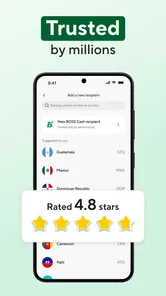
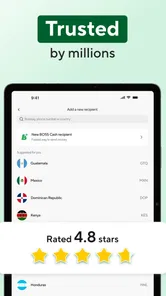
The app has an average rating of 4.8 from around 53,000 ratings, and it has been installed over a million times. Those figures suggest many people have tried it, but they do not tell me whether a specific transfer will suit your needs. I would use them as background, then make my decision based on the destination, recipient details, and the amount shown before sending.
Start with the setup, not the send button
Before installing any money-transfer app, I like to check that my phone meets its requirements and that I can complete account verification without rushing. BOSS Money is available for Android, with Android 7.0 or later required, and the app is rated Everyone. Its current version is 10.11.1. Those details make it easier to decide whether your device can run it, but the more important preparation is practical: have the recipient’s correct information available and make sure you can review the transfer calmly.
When setting up, take each verification step seriously and use information that matches your own records. Financial apps may need to establish who is making a transfer, and a mismatch can turn a simple first attempt into an avoidable delay. I would avoid beginning the process while distracted or while relying on a patchy connection. Even if the screens are easy to follow, account setup is not the moment to guess at names or skip a prompt just to get through faster.
Getting Started with BOSS Money
First things first, downloading and setting up the BOSS Money: Send Cash Fast app is a breeze. Available on both Android and iOS, it ensures you’re not left out no matter your device preference. The installation process is straightforward. Once you’ve got the app on your phone, setting up an account requires minimal information. They promise security, and I felt reassured by the multiple verification steps they have in place.
Make your first transfer a deliberate one
For a first meaningful success, I would start with a transfer whose purpose and recipient details are easy to verify. Ask the person receiving the money how their name and other required details should appear, then enter them carefully rather than relying on memory or an old message. Before confirming, pause to review the destination, amount, any displayed charges, and the expected delivery information. That quick check is more useful than rushing through the screens just because the app feels straightforward.
More From Our News Desk

 Bolt: Request a Ride
Bolt and the Shift from One-Tap Rides to More Legible Trips
Bolt shows how ride-hailing is shifting from a one-tap taxi request toward a more legible, choice-driven trip, while leaving the hardest questions of price and reliability unresolved.

 Farm Land - Farming life game
Farm Land Review: A Small Island Farm with a Satisfying Loop
A bright, breezy island farm turns a few quick chores into a satisfying cycle of planting, harvesting, expanding, and deciding what to build next.

 Android Auto
’s Community Takes Shape in the Passenger Seat
Its most valuable network is not a public feed but a shared set of routes, voice habits, app integrations, and advice that make driving less isolating—and sometimes more complicated.

 My Talking Angela
 Makes the Virtual Pet Feel Personal
A polished pet-raising game built on small rituals, playful customization, and a character who gives everyday screen time a surprisingly personal rhythm.

 Google Translate
 Review: A Pocket Tool for the Small Frictions of Travel
From menus and signs to quick conversations, Google Translate earns its place by cutting the little delays that make unfamiliar language feel like a barrier.

 Shazam: Find Music & Concerts
Shazam’s Best Trick Is Turning a Song Into a Night Out
A few seconds of recognition can settle an argument, rescue a half-remembered chorus, and point toward a live show. Shazam’s real trick is what happens after the match.
Latest News



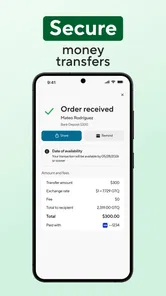
A realistic example: a family member messages that they need help with a household expense. I would confirm the exact recipient information and how they expect to receive the money, then check the app’s final review screen before sending. Afterward, I would keep the transaction details handy and use the tracking option to follow its progress. If anything looks different from what the recipient expects, I would resolve that before making another transfer.
Features That Stand Out
Now, onto the features – and boy, does BOSS Money pack a punch! One of the standout features is the quick transfer option. Honestly, I was surprised at how fast the transactions were completed. You can send money to over 50 countries, which is fantastic if you have friends or family overseas. The app also offers competitive exchange rates, so you’re not losing out too much when converting currencies.
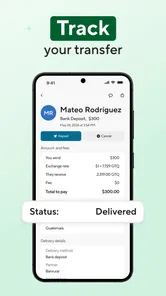
Another thing I loved was the simple user interface. Everything is laid out so intuitively that even if you’re not tech-savvy, you’ll find your way around in no time. They’ve also got a nifty feature for tracking your transactions, which means you can keep tabs on where your money is going and when.
Read the details, not just the headline
Speed is helpful, but I would not treat “fast” as a guarantee that every transfer arrives instantly. Timing can matter when someone is waiting on the money, so check the delivery information shown for the transaction and tell the recipient what you can actually see rather than promising a precise arrival time. Tracking is most useful when you agree on a simple routine: send the money, save the transaction details, and check the status before contacting support or starting a second transfer.
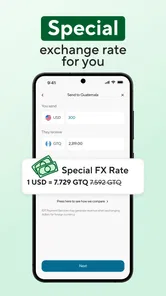
Cost deserves the same careful look. A transfer’s total value depends on more than a headline exchange rate: review any fee shown and compare the amount the recipient is expected to receive. For recurring support, I would compare the same destination and a similar amount across the services you already use. A bank transfer or another remittance app may be a better fit if its final cost, delivery method, or your recipient’s preference is clearer for that particular route.
Make repeat transfers safer and easier to check
If you expect to send money regularly, the main convenience is not simply tapping through a familiar flow; it is reducing the chance of repeating an old mistake. I would treat each payment as a fresh instruction. Recheck the recipient and destination, especially if the reason for sending or the amount has changed. Familiarity can make a routine feel safe even when a detail has quietly changed, so a short pause before confirmation is worthwhile.
For household support, I would also agree with the recipient on a simple confirmation habit. Tell them when the transfer has been sent, then compare their confirmation with the status shown in the app. That does not speed up delivery, but it helps both people distinguish a transfer that is still processing from one that has reached its intended stage. It can also prevent an anxious duplicate payment when the recipient has not yet checked their side.
Another useful trade-off is convenience versus keeping a clear record. A phone makes sending easy, but I would save the transaction details somewhere private and easy to find rather than relying on memory. If you help more than one relative, take care not to mix up names or messages when you are sending in a hurry. A small, consistent checking routine is more dependable than assuming the app will catch every human error.
Why BOSS Money Could Be Your New Favorite App
So, why should you consider using this app? For starters, it’s incredibly convenient. Imagine being able to send money from the comfort of your home or even on the go. This app does exactly that, and it does so efficiently. Plus, it’s designed with the user in mind. The ease of use combined with the robust security measures makes it a strong contender in the money transfer app space.
Let's not forget their customer support. I had a few questions during my initial use, and their support team was prompt and helpful. It's always a relief to know that help is just a message away when you need it.
Who it suits—and when I would choose another route
I see the clearest fit for someone who sends money to the same people abroad and values doing it from a phone, especially when Mexico is the destination. A saved, familiar process can make repeat transfers less of a chore, though I would still review the details each time. It is less compelling if you need a service that handles a different financial task, or if your recipient prefers a method this app does not offer for their situation. In that case, compare alternatives by recipient convenience and the amount they actually receive, not by a broad claim about speed.
One useful habit is to keep recipient details in a message or other place you can check, but never send money based only on a changed request that arrives unexpectedly. Confirm unusual changes with the person through a separate conversation. That is sensible for any money-transfer service, and it matters especially when a transfer may be difficult to reverse once completed.
Where alternatives may work better
Compared with going to a physical remittance counter, a phone-based service can save a trip and let you review the transfer from home. The counter may still be preferable if you want in-person help or your recipient’s preferred collection method is easier to arrange there. A bank transfer can be a better match when both people already use compatible accounts and want to keep the payment within their usual banking routine. Another remittance app may win on a particular route if its displayed recipient amount or delivery arrangement is better for that transfer.
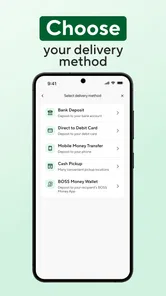
I would not choose between services based only on brand familiarity, a broad promise of speed, or a general exchange-rate claim. Enter the same destination and a comparable amount wherever possible, then compare the final amount the recipient gets, the payment and delivery choices shown, and any fee presented before confirmation. If those details are not equally clear, that clarity itself matters: a slightly less convenient service may be the calmer choice when you need to understand exactly what the recipient should expect.
This is also not the right tool if what you really need is budgeting, bill payment, or everyday banking. Its purpose is narrower, which is a strength when your task is an international send and a limitation when you want one app to manage unrelated finances. I would skip it if the recipient cannot use the available arrangement for their circumstances, or if you cannot verify their details before sending. In those cases, pause and choose a method both sides understand.
A few practical questions before you send
People often want to know whether the app costs anything to download and whether it is suitable for younger users. It is free, and its content rating is Everyone; that does not remove the need for an adult to understand and oversee any financial transaction. The app’s current version is 10.11.1, and it requires Android 7.0 or later. These details help with installation, but they do not replace checking the transfer terms displayed for your particular destination.
If a transfer is taking longer than expected, I would first check its in-app status and compare it with the delivery information shown when it was arranged. If a recipient’s details are wrong, I would contact support promptly rather than assume the payment can be edited. And if you are deciding between this and another service, compare the final amount received and the method available to the recipient; those answers matter more than a familiar interface.
A first-time user may also wonder whether a transfer can be changed after it has been submitted. I would not plan around being able to edit or cancel it: check every field before sending, and reach out to support immediately if you spot a mistake. Before starting, it is sensible to know how you will contact the recipient and what information you will share with them, so you can coordinate without sending unnecessary personal details.
For someone sending to a new recipient, I would keep the first attempt especially simple. Confirm the receiving person’s preferred details directly, make sure the destination shown is the one you intended, and avoid combining several assumptions in one payment. If the person is expecting cash or another specific way to receive it, verify that the arrangement shown in the app matches what they can actually use. The most useful first success is not merely a completed screen; it is money sent to the right person through a method they can access.
A Few Considerations
While my experience with BOSS Money: Send Cash Fast was largely positive, it’s worth noting that transaction fees can vary depending on the amount and destination. This is something you might want to keep an eye on, especially if you frequently send large sums.
My overall view is that this app makes the most sense when the transfer itself is the task: you know the recipient, can check the details, and want to manage the process from your phone. The first send deserves more attention than later routine ones because it establishes the right recipient information and gives you a real example of how the status and delivery details appear. Once you know how that particular route works, repeat use can feel much more straightforward without turning into autopilot.
In conclusion, if you’re looking for a reliable, fast, and user-friendly money transfer app, you might want to give BOSS Money a shot. It’s packed with features that cater to both casual users and those who need to make regular international transfers. So, next time you need to send cash fast, you know where to turn!
BOSS Money Transfer. Send Cash Frequently Asked Questions
Can I use BOSS Money to send money to Mexico and other countries?
BOSS Money is designed for sending money to Mexico and worldwide, making it relevant if you need to transfer funds to family or friends across borders. Available destinations and payout options can depend on the transfer you set up, so choose the recipient’s country in the app and review the options shown before confirming. The store describes the service as a fast way to send money internationally.
What payment methods can I use to fund a transfer?
The published setup description for BOSS Money says users can link a bank account or card to start sending and receiving funds. The options available to you may depend on your account and the transfer you are making. During setup, check the payment methods displayed in the app and review the payment details carefully before submitting a transfer, so you know how the transaction will be funded.
Who can download BOSS Money, and what devices does it support?
BOSS Money is a finance app from Boss Revolution, intended for people who want to send money using a mobile device. It is free to download and is rated for Everyone, so its listed age rating is broad. Before installing, check that your device runs a compatible operating system; the app supports Android 7.0 or later. The app is available for iOS as well, subject to the requirements shown in its app store.
What is BOSS Money and how does it work?
BOSS Money is a mobile application that allows users to send cash quickly and securely to family and friends domestically or internationally. The app provides competitive exchange rates and low transaction fees, making it an affordable option for sending money. To use BOSS Money, simply download the app, register an account, and link your bank account or card to start sending and receiving funds. Its focus is sending money to Mexico and worldwide, with a simple process designed to make transfers convenient. BOSS Money has a 4.8 average rating from around 53,000 ratings, and has been installed over one million times.
Is BOSS Money safe to use for international transactions?
Yes, BOSS Money is designed with security in mind, utilizing advanced encryption and fraud protection to ensure that your transactions are safe and secure. The app complies with international financial regulations and continuously monitors transactions for any suspicious activity, providing peace of mind for users when sending money domestically or internationally. As with any financial app, protect your login details and review recipient and transfer information carefully before confirming a payment.
Pros
- Fast international money transfers
- User-friendly interface
- Competitive exchange rates,24/7 customer support
- Secure transactions
Cons
- Limited countries supported
- High fees for small transfers
- Occasional app glitches
- Verification process can be slow
- Limited payment options