Bloomz
- 5.83K
- 3.8
- Installs
- 1.00M
- Price
- Free

Screenshots
Analysis by Reviewed
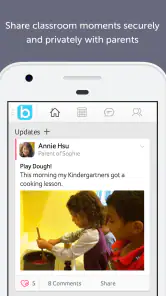
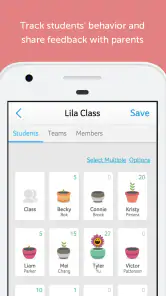
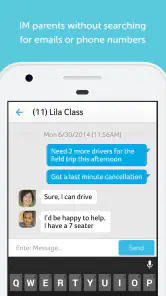
I found Bloomz most useful when school communication felt scattered across too many places. It is an education app from Bloomz designed to bring parent communication into one mobile space, and that focus makes it different from a general chat app or a basic school calendar. I would not describe it as a learning game or a replacement for classroom teaching. Its real job is helping families keep up with school-related messages, updates, and conversations without relying on a mixture of paper notices, email threads, and separate messaging tools.
That sounds simple, but the value depends heavily on whether a child’s school or teacher actually uses Bloomz consistently. In my experience with apps in this category, the technology is only half the experience. A polished communication app still feels empty if important notices continue arriving elsewhere. Bloomz makes the most sense when it becomes a regular meeting point for parents, teachers, and school communities rather than an optional extra installed by only a few families.
How Bloomz fits into everyday school communication
Bloomz belongs in the education and parent communication space. The developer is Bloomz, and the app has been available since October 18, 2014. Its store summary presents it as one place for parent communication, which is a fair description of its purpose, but it does not explain the practical question I would ask before installing it: will this be the place where my child’s school actually communicates?
That question matters more here than it does with a standalone study app. A vocabulary tool can be useful on its own. Bloomz becomes useful through participation. Parents need an active classroom, teacher, or school community on the other side of the app. If that connection exists, the app can reduce the mental effort of checking several channels. If it does not, the installation may add another notification source without solving the original problem.
The app is free to install, and its listed age rating is Everyone. Bloomz also includes optional in-app purchases ranging from $0.99 to $124.99 per item. I would therefore separate “free access” from “all possible paid value.” A parent can begin without paying for the download, but the presence of optional purchases means it is worth checking which functions are available through the school’s arrangement and which, if any, may involve additional cost. I would not assume that every feature or school setup follows the same payment model.
The current version is 6.2.8 and it requires Android 7.0 or later. That is useful information for families using older phones, especially if a parent keeps a spare device for school communication. On supported devices, I would still keep the operating system updated where possible, because communication apps are most helpful when notifications, sign-in, and background activity behave reliably.
A realistic morning-to-evening use case
Imagine a parent preparing two children for school while trying to remember a classroom reminder, a teacher message, and a change to the afternoon routine. With Bloomz in the communication loop, the parent can open one school-focused app instead of searching through personal email, a general messaging service, and a paper note at the bottom of a backpack. The benefit is not dramatic automation; it is fewer places to mentally track.
Later in the day, that same parent may want to reread a message before pickup or check whether a teacher’s update applies to one child or both. This is where a dedicated school channel can feel calmer than a large family or community chat. The context is already tied to school communication, so the parent is less likely to confuse it with unrelated conversations.
There is also a useful habit hidden in this workflow: I would treat Bloomz as a reference point, not as a stream to glance at casually. When a message concerns a date, item to bring, or change in routine, I would read it once and immediately add the action to a personal calendar or reminder list. That prevents a communication app from becoming a storage box for tasks that still need to be remembered elsewhere.
What makes the focused approach helpful
General alternatives such as email, SMS, WhatsApp, or a school’s broader portal can all carry messages, but they solve slightly different problems. Email is searchable and familiar, yet school notices can disappear among work and shopping messages. Texting is quick, but long-running classroom context can become difficult to follow. A general chat group may be active, but it can also become noisy and informal. A school portal may hold official records, while everyday communication happens somewhere else.
Bloomz’s strongest idea is the attempt to keep the parent-school relationship in a dedicated environment. That can make school information easier to recognize and easier to separate from private life. The trade-off is that families may still need other tools for official documents, payments, attendance, transport, or academic records. I would not install Bloomz expecting one app to replace every school system. Its value is more specific: communication becomes more organized when the school uses it as a central channel.
A non-obvious advantage of this kind of separation is emotional as well as practical. A parent who checks a school-specific app at a chosen time can create a boundary around school information. That is preferable to receiving school matters inside a personal chat account that is constantly open for unrelated conversations. It does not eliminate notifications, but it can make them easier to manage deliberately.
The limits I noticed before recommending it
The first limitation is adoption. If one teacher posts in Bloomz, another uses email, and the school office uses a separate portal, the app cannot create consistency by itself. Parents may still need to monitor several channels. Before encouraging a whole family to depend on it, I would ask the school which messages are officially sent through Bloomz and whether urgent notices appear there as well.
The second limitation is notification fatigue. A communication app can be helpful when it gathers information, but less helpful when every minor update demands immediate attention. I recommend reviewing notification controls early, then deciding which alerts deserve instant attention and which can wait for a scheduled check. Parents who leave every alert active may blame the app for noise that is really caused by an unmanaged communication routine.
There is also a social trade-off. A parent communication platform can make it easier to stay informed, but it may increase the feeling that one should always be available. I prefer using it with a clear rule: check messages at practical points in the day, respond when a response is genuinely needed, and avoid treating every non-urgent update as an emergency.
Another consideration is account access. Families with separated households, multiple caregivers, or grandparents involved in school routines should clarify how each person will receive relevant communication. A single parent account may not be the best arrangement for everyone, while sharing one login can create confusion about who has read or responded to something. I would set up access around the family’s actual responsibilities rather than simply handing one password to everyone.
Finally, the free download should not be confused with a promise that every possible use is free. The listed optional purchases are broad enough that I would review any purchase screen carefully before confirming it, particularly if a school recommends a paid option. The sensible approach is to identify what the school provides, what the parent needs, and whether a purchase is optional or necessary for a particular workflow. That distinction protects the app’s value from being judged unfairly in either direction.
Small habits that make the app more useful
My first practical tip is to establish a message triage routine. I would read new school posts, separate information from action items, and then record only the actions that affect my household. This avoids rereading the same announcement several times. It also makes Bloomz a communication tool rather than a substitute for a task manager.
My second tip is to keep child-specific information mentally separate even when the app brings school communication together. A family with more than one child can easily assume that a classroom message applies to everyone. I would check the intended class or group before acting, especially when the message concerns schedules, supplies, or events.
My third tip is to use the app as an archive for context, but not as the only archive for important obligations. If a message changes a pickup plan or contains a date that matters, I would save the action in a calendar and retain any required document through the school’s official process. This two-step method is slightly less convenient, but it reduces the risk of missing something because an old message was buried.
A fourth useful habit is to agree on a family response policy. For example, one adult can monitor routine school notices while another handles transport changes. That prevents duplicate replies and makes it clearer who is responsible. The app may centralize communication, but families still need their own system for deciding who acts on it.
Who is likely to get the most value
Bloomz is a strong candidate for parents whose school already uses it actively and consistently. It should appeal especially to families who dislike mixing school notices with personal email or group chats. It can also help caregivers who need a clearer place to revisit classroom communication during a busy day.
It is less convincing for someone whose school has committed to another platform. In that situation, installing Bloomz may create duplicate work rather than reduce it. I would also hesitate to recommend it as a general education app for a child studying independently. Its purpose is parent-school communication, not self-directed lessons, tutoring, or entertainment.
Families that need formal academic records, detailed progress tracking, or a complete administrative portal should compare Bloomz with the school’s official system before deciding which app deserves daily attention. A communication-focused tool may be easier for messages while another platform remains better for documents and records. The best choice may be using both, provided each has a clearly defined role.
For a parent with an older Android phone, compatibility deserves a quick check because Android 7.0 is the minimum requirement. For everyone else, the more important test is behavioral: does the school post reliably, do notifications arrive at useful times, and can all relevant caregivers participate without confusion?
My value judgment and final recommendation
Bloomz delivers its best value through organization, not through flashy extras. The free installation lowers the barrier to trying it, and the dedicated school setting can make everyday communication easier to recognize and revisit. Its scale is also reassuring: the app has passed one million installs, with an average rating of 3.8 from around eighteen thousand ratings. Those figures suggest a substantial user base, but they do not remove the central condition that the school community must use the app well.
I would recommend trying it when a teacher or school has clearly adopted Bloomz and can explain what belongs there. Before relying on it, I would confirm the communication boundaries, review notification settings, and check whether any optional purchase is relevant to my household. Those three steps answer the practical questions that a simple install cannot.
I would skip it when the school only mentions Bloomz occasionally, when another platform is already the unquestioned official channel, or when I need a full academic-management system rather than a communication hub. In those cases, a school portal, email workflow, or established messaging option may be more dependable.
My final view is positive but conditional: Bloomz is worth using when it replaces scattered school messages, not when it merely adds another inbox. I like the focused purpose and the possibility of a calmer parent-school routine. I would not choose it because it is free alone, and I would not assume that optional purchases automatically improve the experience. The real value comes from consistent participation, sensible notification habits, and knowing exactly which school responsibilities the app is meant to handle.
Pros
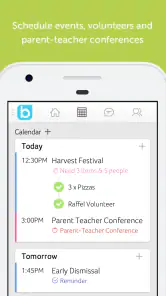
- Combines announcements
- messaging
- calendars
- and reminders in one place.
- Supports direct communication between families and individual teachers.
- Offers translation features that help multilingual school communities connect.
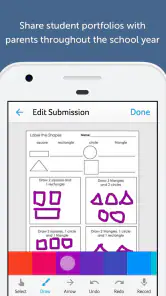
- Allows photo and document sharing for classroom updates and activities.
- Useful notification controls help families keep track of important school news.
Cons
- The number of features can make the interface feel overwhelming at first.
- Some tools may depend on the school’s subscription or administrator settings.
- Frequent notifications can become distracting without careful customization.
- Performance and available features may vary between Android and iOS devices.
- Families may need an invitation or school code before accessing the app.

- Category
- Education
- Version
- 6.2.8











