Blinkist: Book Summaries Daily
- 5.51K
- 4.6
- Installs
- 10.00M
- Price
- Free

Screenshots
Analysis by Reviewed
When I have a curious half-hour but not the attention for a full book, I want something that helps me explore an idea without pretending to teach the whole subject. That is where Blinkist: Book Summaries Daily makes sense to me: it gives nonfiction readers a compact way to encounter key points in text or audio, then decide what deserves more time. Its best use is not replacing books but helping me choose what to read, revisit a topic, or make a small break feel more intentional.
What a short session can—and cannot—do
The appeal is straightforward: Blinkist turns nonfiction books into short reading or listening sessions, so I can explore an idea without setting aside an evening. That speed is useful for sampling a subject, but I treat a summary as a starting point, not a substitute for the full book. Examples, context, and an author’s careful argument can be exactly what gets lost when a long work is condensed.
That distinction matters when I’m learning something for work or making a decision. I might use a summary to decide whether a book is worth my time, or to refresh a broad idea I already know. If I need detailed instructions, evidence, or a deep understanding of a complex topic, I’d choose the original book or a more structured course instead.
Discovering the Essence of Books
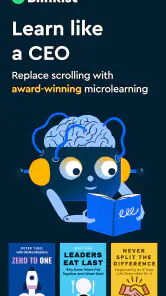
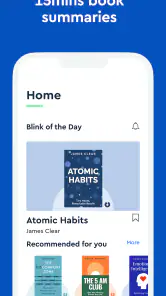
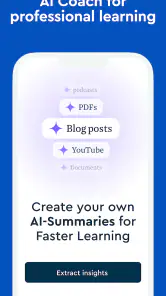
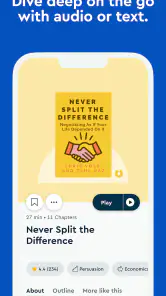
Imagine summarizing the key insights from non-fiction books in just about 15 minutes. Yes, you heard it right! Blinkist: Book Summaries Daily does exactly that. With a library boasting over 4,500 titles, it’s like having a global bookstore right in your pocket. From self-help to entrepreneurship, each summary distills the core ideas into digestible bites. For those who prefer listening, the audio feature is a lifesaver during commutes or gym sessions.
A clean route from curiosity to a title
One of the things I absolutely love about Blinkist is its user-friendly design. The interface is sleek, intuitive, and super easy to navigate. You don’t have to be a tech guru to figure it out. Everything is laid out beautifully, making the whole experience pleasant from start to finish. Just type in a book or author, and voilà – you’re ready to start your reading journey.
For a more useful routine, I’d search with a question in mind rather than browse at random: for example, look for a title on a skill I’m trying to improve, then note whether its central ideas actually fit my situation. Saving a short list of promising reads also makes it easier to return when I have a spare moment. This works better for me than treating every summary as a task to finish.
Making a daily pick useful rather than compulsory
Every day, Blinkist offers a "Blink of the Day" – a handpicked title that’s sure to enrich your mind. It’s like a daily dose of wisdom without overwhelming your schedule. Imagine sipping your morning coffee while gaining insights from the world’s most celebrated authors. Sounds perfect, doesn’t it?
More From Our News Desk

Clash of Clans Is Won Between the Battles

Android Auto Makes the Case for Quieter Car Software

MobiOffice: Transforming Mobile Productivity with Seamless Integration

EA SPORTS FC™ Mobile Soccer: Redefining Mobile Sports Gaming

How Microsoft OneDrive Became a Mobile Productivity Giant

How Google Translate Breaks Language Barriers Effortlessly
A realistic use is to listen to a few minutes while making breakfast, then read the same material later if a particular point sticks. That small split between listening and reading helps me notice what I remember, instead of letting an audio session become background noise. I wouldn’t force a daily streak, though; skipping a day is better than consuming summaries passively just to keep a routine alive.
Planning for offline sessions and device changes
Traveling without internet? No worries! Blinkist lets you save your favorite summaries for offline reading. Plus, it syncs seamlessly across all your devices. Whether you’re on your phone, tablet, or computer, your progress is always up to date. This feature makes it incredibly convenient to switch devices without losing your place.
Offline access is particularly handy when I know I’ll have a patchy connection, but it does take a little planning: I’d save the titles I want before leaving reliable Wi-Fi rather than assume I can fetch them later. Sync is useful when a listening session on one device gives way to reading on another, although I’d still check that my progress has caught up before continuing if I switch in the middle of a session.
Choosing summaries over the usual alternatives
Compared with a full audiobook, Blinkist is better suited to a quick overview than an immersive, complete argument. Compared with free articles or videos, its book-centered format gives me a more deliberate way to explore nonfiction ideas, but it still can’t replace checking original sources when accuracy or nuance matters. It is most useful as a discovery and review tool, not as my only source for a subject.
It should suit curious readers who want to make a commute, lunch break, or short walk feel more purposeful, especially if they enjoy switching between text and audio. I’d be less likely to recommend it to someone who already prefers reading full books, needs academic depth, or learns best by practicing rather than listening and reading. In those cases, a library book, a complete audiobook, or hands-on lessons may offer more value.
Developer, cost, and platform basics
Blinks Labs GmbH develops Blinkist, an education app that is free to install and rated for Everyone. It has a 4.6 average from around 166,000 ratings, with over 10 million installs; optional in-app purchases range from $0.99 to $439.99 per item. Version 10.8.8 is listed for devices running Android 10 or later. Those details make it easy to try, but I’d look closely at what any purchase includes and whether it suits my reading habits before spending.
Speed, stability, and device fit
For an app built around short reading and listening sessions, the day-to-day experience should feel most responsive when I can get straight to a title and settle in. I wouldn’t judge its value by how quickly I can skim; the bigger question is whether a summary gives me enough substance to remember and use. If browsing feels less satisfying than going directly to a known subject, a focused search is the simpler workflow.
Heavy use is more likely to expose practical friction than to change what the app is for: switching between reading and audio, moving across devices, or relying on saved material while offline all ask for a little attention. I’d keep my next title saved before travel and allow a moment for progress to sync before changing devices. These habits make recovery from an interrupted session less uncertain without assuming every transition will be perfect.
On device fit, the Android requirement is worth checking before installing, particularly if you keep an older phone in service. The app’s value also depends on how you use it: short sessions can be easy to fit into a day, while listening for long stretches may not suit everyone’s routine. I’d start with a subject I already care about, try both reading and audio, and see which mode helps me retain the ideas rather than simply finish them.
A more deliberate way to use each summary
One useful habit is to end a session by writing down a single idea in my own words, rather than trying to remember every point. That gives me a quick test of whether the summary made sense and creates a prompt I can revisit later. If I cannot explain the point without looking, I may need to reread a passage—or accept that the topic needs a fuller source.
I’d also separate “interesting” from “useful right now.” A title can be enjoyable without changing what I do, and that is fine; the app works best when I do not turn every listen into a self-improvement assignment. For a practical goal, I can pick one question before opening a summary, then stop when I have enough context to decide on a next step. This keeps a short format from becoming a stream of loosely connected takeaways.
Audio is convenient when my hands and eyes are occupied, but it is not automatically the better mode. If I’m walking somewhere noisy or doing a task that demands attention, I may miss the argument and have to replay it. Text gives me more control over pace and makes it easier to pause on a point. I’d choose based on the situation, not on a general belief that listening is always more efficient.
Who will get the most from it
I’d recommend it to someone who enjoys nonfiction but wants a low-commitment way to explore unfamiliar subjects, or to a reader who needs reminders of ideas they have already encountered. It can also help a busy person build a modest learning habit around otherwise idle moments. The key is being comfortable with an overview and willing to follow up when the subject matters.
It is a weaker fit for anyone expecting a summary to provide the same confidence as reading the full source. A compressed account can leave out qualifications that change how an argument should be applied. For decisions involving health, money, law, or another high-stakes area, I would use a summary only as a pointer toward reliable, detailed material—not as the basis for action.
It may also disappoint readers who want a complete narrative experience, detailed citations, or guided practice. A full audiobook preserves more of an author’s pacing and development; a course or practical exercise can provide feedback that a short reading or listening session cannot. Knowing that distinction before subscribing or making a purchase helps set a fair expectation.
Keeping the routine realistic
A simple weekly approach works better for me than trying to consume something every day: choose a couple of topics I genuinely care about, save titles before a commute or flight, and return to the most relevant one when I have quiet attention. If one summary sparks a lasting question, I can look for the full book rather than immediately queueing several more. That turns the app into a filter for deeper learning, not a substitute for it.
For a first try, I’d pick a familiar subject and compare what I retain from reading with what I retain from listening. Then I’d test a less familiar topic, where a summary’s omissions are easier to notice. This small comparison helps answer a practical question: does the format help me understand and remember, or does it merely make information feel easy to consume?
Overall, Blinkist is a fantastic tool for anyone eager to learn and grow without the time commitment of full-length books. It’s perfect for lifelong learners, busy professionals, or just anyone who loves quick, insightful reads. So, if you’re ready to unlock a treasure trove of knowledge, give Blinkist a try. You might just find it’s exactly what you’ve been looking for!
Blinkist: Book Summaries Daily Frequently Asked Questions
Is Blinkist suitable for someone who prefers learning through short sessions?
Blinkist is built around brief introductions to non-fiction ideas, so it can suit learners who want to fit reading or listening into small gaps in the day. The summaries offer a way to explore a topic without starting with a full book. They are best viewed as a quick overview rather than a replacement for the depth of the complete work.
How can I decide whether Blinkist fits my learning goals?
Consider whether you want concise introductions to non-fiction subjects or a detailed, complete reading experience. Blinkist focuses on key ideas in short written and audio formats, which can help you sample topics and decide what interests you. If your goal is to study a subject in depth, you may want to use summaries as a starting point alongside longer-form reading.
Is Blinkist available for a broad range of ages?
Blinkist has an Everyone content rating, making its listed age classification suitable for a broad audience. Its focus is non-fiction learning, and whether particular summaries appeal to a younger reader will depend on the subject and their interests. Families can review the topics together and choose content that feels appropriate for the learner.
Who is Blinkist designed for, and what can I learn from it?
Blinkist is an education app for people who want a quick introduction to ideas from non-fiction books. It distills key insights into short reads or listens, making it useful when you want to explore a subject without committing to an entire book. Its broad range of categories can suit different interests, from practical topics to general knowledge.
What is Blinkist and how does it work?
Blinkist is a mobile app that provides users with access to summaries of thousands of non-fiction books in various categories. The app distills the key insights from books into 15-minute reads or listens, making it convenient for users to ingest knowledge quickly. It is perfect for those who want to learn efficiently without reading entire books.
Pros
- Concise summaries for quick learning.
- Wide range of book categories available.
- Offline mode for reading on-the-go.
- User-friendly and intuitive interface.
- Regular updates with new summaries.
Cons
- Limited to non-fiction books.
- Subscription required for full access.
- Audio summary quality varies.
- Some summaries lack depth.
- No interactive features or quizzes.
- Category
- Education
- Version
- 10.8.8











