Bitcoin.com Wallet: Buy, Sell
- 3.87K
- 4.7
- Installs
- 10.00M
- Price
- Free

Screenshots
Analysis by Reviewed
I approach crypto wallets with a practical question: can I understand what I’m doing before I move money? Bitcoin.com Wallet: Buy, Sell is a finance app from Bitcoin.com Developer, and its appeal is the attempt to bring wallet access and common crypto actions together in one place. The app is free and rated for Everyone; it has a 4.7 average from around 80,000 ratings and over 10 million installs. Those figures suggest broad use, but they don’t tell me whether a wallet suits my habits, so I’d still start cautiously.
Your Gateway to the Crypto World
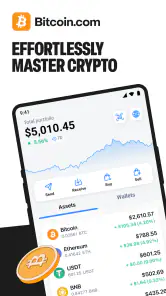
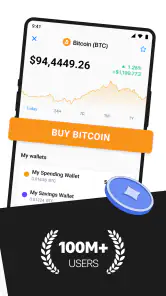
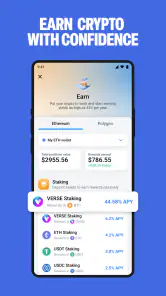
When I first opened the Bitcoin.com Wallet: Buy, Sell app, I was greeted with a sleek and intuitive interface. Navigating through the app is a breeze, even if you’re a crypto newbie. The app is designed to cater to both beginners and seasoned traders, which is a huge plus in my book. With a few taps, you can easily access your wallet, view market trends, and make transactions.
What trust looks like in day-to-day use
A wallet is not just a screen for checking a balance; it is also a place where small decisions can have lasting consequences. I would treat the app as a tool for managing crypto, not as a substitute for learning how wallet access and transfers work. Before putting meaningful funds in any wallet, I make sure I understand how I will regain access if I change phones or lose access to the device. That basic preparation matters more than an attractive interface.
The listing presents Bitcoin.com Wallet as trusted by a large community, but popularity is not a security guarantee. I would avoid assuming that an app’s reputation removes the need to check each transaction carefully. Crypto transfers can be difficult or impossible to reverse, so I’d verify the recipient and asset before confirming, especially when sending to a new address. For a first transfer, a small test amount can help me catch a copy-and-paste or network mistake before moving more.
Features That Stand Out
One of the standout features of this app is its security. I’m a stickler for keeping my investments safe, and this app doesn’t disappoint. It offers robust security features, including two-factor authentication and biometric login. Knowing that my assets are secure gives me peace of mind.
The app also supports a wide range of cryptocurrencies. Whether you’re into Bitcoin, Ethereum, or exploring altcoins, this app has got you covered. I love having the flexibility to diversify my portfolio without jumping between different platforms.
My practical tip is to decide what each asset is for before adding it to a wallet. If I’m holding something for longer, I’d want a deliberate backup and access plan rather than relying on a phone alone. If I’m experimenting with a less familiar coin, I’d first check the asset and network details displayed during any transfer. A broad selection is convenient, but it also means there are more chances to choose the wrong item if I rush.
More From Our News Desk

Weather by Xiaomi Review: Clear at a Glance, Less Clear Up Close

X Under Pressure: Can It Recover When Posting Goes Wrong?

Clash of Clans Is Won Between the Battles

Android Auto Makes the Case for Quieter Car Software

MobiOffice: Transforming Mobile Productivity with Seamless Integration

EA SPORTS FC™ Mobile Soccer: Redefining Mobile Sports Gaming
Buying and Selling Made Easy
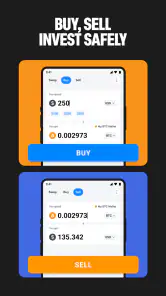
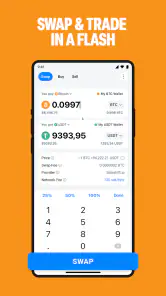
If you’re anything like me, you appreciate simplicity. Buying and selling on the app is straightforward. With just a few taps, you can buy, sell, or swap cryptocurrencies with ease. The app provides real-time updates, ensuring you’re always in the loop with the latest market trends.
For a realistic everyday use, I might open the wallet to check a holding, then decide whether to make a small purchase or swap as part of a planned portfolio change. I would still pause at the confirmation screen and review the amount, asset, and any displayed costs before proceeding. Prices can move quickly, and a convenient flow can make a decision feel more urgent than it is. I find it healthier to set my own limit in advance instead of trading because a chart is moving.
Compared with a conventional bank app, a crypto wallet is built around digital assets and transfers rather than everyday bills and deposits. Compared with using several exchange apps, a single wallet can feel less fragmented when I want to keep track of supported assets and basic actions together. The trade-off is that a wallet should not automatically be treated as a full-featured trading terminal or a replacement for a bank. Someone who needs advanced order controls, detailed tax reporting, or an established banking workflow may be better served by a specialist tool designed for that job.
Data-sensitive moments and user control
Buying, selling, and sending crypto are moments when I slow down and read every prompt. I check what information or confirmation the app asks for, and I avoid sharing recovery details or authentication codes with anyone. I also review the device’s own privacy and lock settings, since a wallet’s safety depends partly on how the phone is protected. I don’t infer privacy guarantees from a clean interface; I make choices based on the controls I can actually see and understand.
Two-factor authentication and biometric login, as described for the app, can add useful checks, but they do not replace careful account habits. I would keep my device updated, use a screen lock, and avoid making transactions on a device I don’t control. If I’m unsure about an action, I stop rather than approve it just to get through a prompt. That small pause is a practical form of user control.
Who should choose it—and who may not
I can see this app suiting someone who wants a straightforward place to explore crypto, manage supported assets, and make occasional purchases or swaps without constantly switching services. The educational material may also help a newcomer learn terminology at their own pace, though I would treat it as a starting point and verify important decisions independently. The app has been available since June 2017, and version 9.1.3 supports Android 6.0 and later, making it an option for a range of Android devices.
I’d be more cautious if I were completely new to irreversible transfers, wanted to trade frequently, or expected the wallet to handle every financial need. It is also not the right fit for someone who prefers keeping all assets with a traditional financial provider or who is uncomfortable taking responsibility for crypto access. The 3.9K written reviews offer another perspective to read, but I would look for comments that match my own intended use rather than relying on a rating alone.
There is a useful distinction between wanting to learn about crypto and wanting a wallet to act as a trading desk. For the first, an approachable interface and educational material can make the initial steps less intimidating. For the second, I would compare the workflow with platforms built around frequent trading, where order types and reporting may be central rather than secondary. I would not assume that a wallet’s buy and sell tools provide every control an active trader expects.
I would also think about how I plan to use the wallet before deciding what belongs in it. Someone making occasional, modest transactions may value having common actions close together. Someone moving substantial holdings may prefer to separate everyday spending from long-term storage and use a setup chosen specifically for that purpose. This is not a criticism unique to this app; it is a sensible boundary for any phone-based wallet. Convenience is most useful when it does not tempt me to keep more accessible than I am comfortable managing.
Learning without rushing
Another useful workflow is to separate learning from buying. I can read the educational material first, write down unfamiliar terms, and only then decide whether a transaction makes sense. That avoids treating an article or market update as a signal to act. For a newcomer, I’d begin with a small, planned task—such as learning how a receive address is displayed—before attempting a larger transfer. The goal is to understand the steps, not to chase a quick result.
If a purchase is the main reason for installing the app, I would compare the total amount shown at the final step with the amount I intended to spend and read the transaction details before confirming. The same habit applies to a sale or swap: check which asset leaves and which one arrives. A simple interface lowers friction, which is helpful, but it can also make it easier to move too quickly. I prefer to use that convenience for clarity, not for impulsive trading.
One small but valuable habit is to keep a note of what I meant to do before opening a transaction screen: the asset, approximate amount, and reason for the move. I can then compare the confirmation details with that plan instead of deciding while watching a changing price. If the displayed information does not match what I expected, I can back out and investigate rather than trying to fix it after confirmation. This is especially useful when I am swapping, because it is easy to focus on the asset received and overlook what I am giving up.
For a receive workflow, I would treat the address as transaction-specific information that deserves a careful check. I would not rely on memory or an old message when sending funds; I would confirm the destination with the person or service expecting the transfer and compare the details on screen. If the recipient is new, a small initial transfer is a practical way to test the route. The extra step may feel fussy, but it is far less frustrating than discovering a mistake after a transfer is complete.
People often wonder whether they can use a wallet like this without becoming a regular trader. I think occasional use is a reasonable fit: checking a balance, learning the receive flow, or making a planned purchase does not require constant market activity. In fact, deciding in advance how often to check prices can help keep a wallet from turning into a source of needless anxiety. Real-time updates are useful for context, but they are not a reason to make every small movement in the market into an action.
Another common question is whether a phone wallet can replace a bank account. I would not treat it that way. The app is for crypto management and related transactions, while a bank account remains the more natural place for routine payments and conventional banking needs. Keeping those jobs distinct makes the app easier to evaluate: I can ask whether it handles the crypto tasks I want rather than expecting it to become an all-purpose money hub.
When comparing it with a standalone exchange, I would focus on the task I actually need to complete. A wallet-centered app can make it convenient to combine asset access with buying, selling, and swaps, while a dedicated exchange may be a better match for someone who wants more trading-focused tools. Neither approach is automatically better for everyone. The useful question is whether I value a simpler combined routine or more specialized controls, and whether I am comfortable taking responsibility for the wallet side of that arrangement.
A cautious verdict
Overall, the app feels most convincing when I judge it as an approachable place to handle everyday crypto tasks, not as a promise that crypto itself is simple or risk-free. I like the idea of bringing wallet access and common transactions together, and the interface makes the starting point feel less daunting. At the same time, ease of use cannot tell me whether a particular asset, transfer, or trade is wise. I still need to understand what I am confirming and accept the risks attached to the decision.
So, if you’re ready to explore crypto or want a more direct way to manage supported assets, this may be worth considering. I would install it with a small, specific goal in mind, such as learning how the receive and send steps work or making a carefully planned purchase. I would not begin by moving a large amount simply because the app is easy to navigate. A calm first session is more useful than a rushed attempt to do everything at once.
My own recommendation is more measured: I’d consider it when I want an approachable wallet for crypto basics, while keeping security habits and transaction checks firmly in my routine. I would not choose it simply because it is popular, nor treat any wallet as a guarantee against mistakes or loss. Start with a clear purpose, learn the flow, and move only what you can manage responsibly.
The developer is Bitcoin.com Developer, and the app has been available since June 19, 2017. Its free price makes trying the interface accessible, but free access does not mean that every transaction is costless; I would read any charges or exchange details shown during a specific action instead of assuming otherwise. The age rating is Everyone, which describes the app’s audience classification, not whether crypto decisions are suitable for every person. I would make that judgment based on my own experience, knowledge, and willingness to manage the risks.
For Android users, version 9.1.3 lists Android 6.0 as the minimum operating system. Before relying on any wallet, I would also check that my own device is in good working order and that I can keep it protected and accessible. If I expect to change phones soon, I would sort out my access and backup plan first rather than treating the migration as an afterthought. The right choice is not merely the app that opens quickly; it is the one whose workflow I can use carefully and whose responsibilities I am prepared to take on.
In the end, I see this as a reasonable candidate for curious beginners and occasional crypto users who want wallet actions and basic trading functions in one place. It is less compelling for someone seeking advanced trading controls, a substitute for everyday banking, or a hands-off way to hold significant value. I would use it deliberately, verify each transaction, and keep my expectations grounded. That cautious approach lets the convenience be useful without mistaking convenience for a guarantee.
Bitcoin.com Wallet: Buy, Sell Frequently Asked Questions
Is Bitcoin.com Wallet available for both Android and iOS?
Yes. Bitcoin.com Wallet is available for Android and iOS, so you can use it on a compatible smartphone or tablet. On Android, the app requires version 6.0 or later. The app is designed for managing, trading, and using Bitcoin and crypto, making it worth considering if you want wallet access from a mobile device.
Who is Bitcoin.com Wallet intended for?
Bitcoin.com Wallet is a finance app for people who want to manage, trade, and use Bitcoin and other crypto from a mobile device. Its store summary says it is trusted by over 70 million Bitcoiners. It may be suitable for both newcomers exploring crypto and experienced users looking for wallet tools, although anyone considering cryptocurrency should first understand the risks involved.
Is Bitcoin.com Wallet free to download?
Bitcoin.com Wallet is free to download and is listed for everyone. It is a finance app for managing, trading, and using Bitcoin and crypto, so it may suit people who want wallet tools on their phone without paying to install the app. Keep in mind that buying or selling cryptocurrency is separate from downloading the wallet and may involve transaction costs.
What is Bitcoin.com Wallet and what are its main features?
Bitcoin.com Wallet is a comprehensive cryptocurrency wallet that allows users to buy, sell, and manage Bitcoin and Bitcoin Cash. Its main features include a user-friendly interface, secure storage of digital assets, the ability to swap cryptocurrencies, and easy access to Bitcoin Cash and Bitcoin. Additionally, users can explore educational resources and market information directly through the app.
Is Bitcoin.com Wallet safe for storing cryptocurrencies?
Yes, Bitcoin.com Wallet is designed with robust security features to ensure the safety of your cryptocurrencies. It provides secure storage of private keys on your device, offering full control over your digital assets. The app also supports biometric authentication and PIN protection to enhance security. However, as with any digital wallet, users should practice safe online habits to protect their assets.
Pros
- User-friendly interface for beginners
- Supports multiple cryptocurrencies
- Fast transaction processing
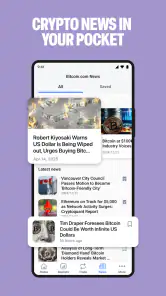
- Integrated news section for updates
- Secure with two-factor authentication
Cons
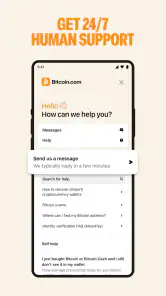
- Limited customer support options
- Higher fees for certain transactions
- Occasional app crashes
- Limited advanced trading features
- Requires internet for full functionality
- Category
- Finance
- Version
- 9.1.3











