Binance.US: Buy BTC & Crypto
- 6.91K
- 3.3
- Installs
- 1.00M
- Price
- Free

Screenshots
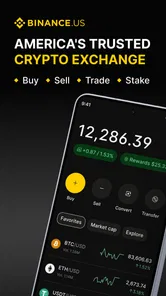
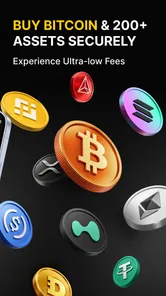
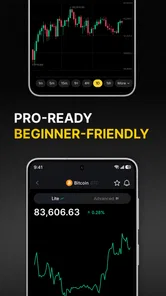
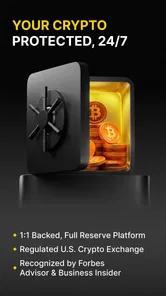
Analysis by Reviewed
When I choose a crypto app, I care less about a crowded dashboard than about whether I can understand a trade before placing it, keep track of what I own, and use the service comfortably over time. That is the lens I’d use for Binance.US: Buy Bitcoin & ETH: it is a free finance app from Binance.US, aimed at people who want to buy, sell, and trade crypto from a phone. Its store listing names BTC, ETH, and SOL, while the product title also calls out Bitcoin and ETH; the app’s broader crypto focus makes it worth considering if you want more than a single-coin tool.
Choose it for a focused crypto routine
I’d consider this app if you want one place to check crypto markets and manage trades, rather than using a general investing app where crypto is only one small part of the experience. A practical routine might be to check a coin’s price during a lunch break, review its chart, and decide whether a planned purchase still fits your budget. I would set that budget before opening the trading screen: quick access makes it easy to act on a sudden price move without thinking through how much risk you actually want.
For a first purchase, I’d keep the workflow deliberately simple: decide on an amount you can afford to expose to volatility, check the asset and order details carefully, and review the transaction before confirming. That last pause matters more than any chart. Crypto prices can move sharply, and a slick mobile interface cannot tell you whether a purchase is sensible for your finances.
What I would check before choosing a crypto app
My decision would start with how I expect to use crypto, not with the length of an asset list. If I plan to check prices and place trades regularly, a dedicated platform can make that routine feel more direct than a broad investing app. If I only want an occasional purchase, I would compare the convenience of keeping crypto beside other investments with the extra focus of a crypto-only service. Neither setup is automatically better; the right fit depends on whether I want crypto to be central to my financial routine.
I would also think about how much responsibility I’m willing to take on. A trading app gives me access to decisions, but it does not make those decisions for me or remove the risk of losing money. Before funding an account, I’d be comfortable explaining to myself why I’m buying a particular asset, what amount I can tolerate seeing fluctuate, and what I’d do if the price dropped. If I can’t answer those questions calmly, waiting is a better choice than downloading another app.
Getting Started with Ease
First off, setting up Binance.US: Buy Bitcoin & ETH is a breeze. You download the app, go through the registration process, which is pretty standard, and voilà, you’re in. What I loved about the setup is how intuitive it was. No confusing jargon or endless forms, just straight to the point. And hey, that’s a big win in my book because who wants to spend hours just figuring out how to get started, right?
Interface and Usability
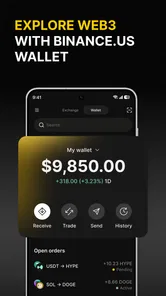
The app’s interface is sleek and modern, which I appreciate because, let’s face it, no one likes clunky designs. Navigating through the app is smooth, and all the essential features are right where you’d expect them to be. Whether you’re checking real-time prices or transferring funds, it’s all just a tap away. The design definitely adds to the overall user experience, making it both beginner-friendly and efficient for seasoned traders.
More From Our News Desk

 Bolt: Request a Ride
Bolt and the Shift from One-Tap Rides to More Legible Trips
Bolt shows how ride-hailing is shifting from a one-tap taxi request toward a more legible, choice-driven trip, while leaving the hardest questions of price and reliability unresolved.

 Farm Land - Farming life game
Farm Land Review: A Small Island Farm with a Satisfying Loop
A bright, breezy island farm turns a few quick chores into a satisfying cycle of planting, harvesting, expanding, and deciding what to build next.

 Android Auto
’s Community Takes Shape in the Passenger Seat
Its most valuable network is not a public feed but a shared set of routes, voice habits, app integrations, and advice that make driving less isolating—and sometimes more complicated.

 My Talking Angela
 Makes the Virtual Pet Feel Personal
A polished pet-raising game built on small rituals, playful customization, and a character who gives everyday screen time a surprisingly personal rhythm.

 Google Translate
 Review: A Pocket Tool for the Small Frictions of Travel
From menus and signs to quick conversations, Google Translate earns its place by cutting the little delays that make unfamiliar language feel like a barrier.

 Shazam: Find Music & Concerts
Shazam’s Best Trick Is Turning a Song Into a Night Out
A few seconds of recognition can settle an argument, rescue a half-remembered chorus, and point toward a live show. Shazam’s real trick is what happens after the match.
Latest News



Trading and Features
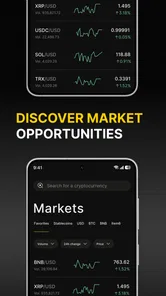
Now, onto the juicy part—trading! The app supports a variety of cryptocurrencies beyond just Bitcoin and Ethereum, which is perfect if you’re looking to diversify your portfolio. The trading fees are competitive, which is always a plus. And for the data geeks out there, the app provides real-time charts and market data that help you make informed decisions. It’s like having a personal financial advisor with you 24/7.
Make the chart work for you
In my view, charts are most useful when they help answer a specific question, not when they become a reason to trade constantly. If I were comparing a recent price move with my own plan, I’d look at the chart, then step away and decide whether the move changes my reasoning. A chart can show market activity; it cannot predict what happens next or replace independent research. This is especially important for someone new to crypto, since a busy screen can make short-term movement feel more meaningful than it is.
Compared with a traditional brokerage app, a dedicated crypto platform puts digital assets at the center rather than treating them as one investment category among many. That focus may suit someone who already knows they want to manage crypto. If you mainly want broad investments alongside occasional crypto exposure, a general investment service may keep more of your finances together and reduce the need to switch between apps. The better choice depends on the rest of your investing routine, not just the number of coins on a screen.
A realistic day-to-day workflow
Imagine I have a small monthly amount set aside for crypto and a busy workday. Rather than checking every price alert, I’d open the app at a planned time, compare the asset I’m considering with my original reason for buying, and check the order details before confirming. If the price has jumped and I feel pressured to act immediately, I’d treat that feeling as a reason to pause. This kind of routine uses the app as a practical trading tool without letting a quick glance turn into an impulsive decision.
A useful habit is to separate research from execution. I’d make notes about why an asset is on my list before I open the trade screen, then use the app to review current market information and place an order only if my plan still makes sense. This is a small but meaningful trade-off: the app can put market information and trading close together, which saves steps, but that convenience can also encourage reactive decisions. A written plan creates a little distance between seeing a move and acting on it.
Security Matters
Of course, in the world of crypto, security is paramount. The app uses two-factor authentication (2FA), which adds an extra layer of protection to your account. Knowing that my investments are secure lets me sleep a little better at night. Plus, their customer support is pretty responsive, so if something feels off, you’ve got someone to turn to.
Build in a little account hygiene
I’d enable two-factor authentication and use a unique password before putting meaningful funds into any crypto account. I’d also make a habit of checking account activity after a transfer and keeping a private record of purchases, so I can follow my own decisions without relying on memory. These are simple precautions, not guarantees: account security and the volatility of crypto are separate concerns, and neither makes an investment risk-free.
One practical point is to keep a record of what you buy and when, especially if you use more than one platform. That makes it easier to understand your own activity later and gives you a reference if you decide to change services. I would not assume that moving to a different app will automatically bring across the full context of my trading history; I’d review what records I need and keep copies before making a change.
One point to think through before committing is how you would leave. If you later move to another platform, you may need to review your holdings, transaction history, and any transfer steps rather than assuming everything carries over automatically. I’d keep records as I go and avoid making a rushed move during a volatile market. If your priority is simply to buy crypto occasionally and then leave it alone, a simpler service may feel more comfortable; if you want a dedicated place to follow markets and trade, this app’s focus is more relevant.
When a different kind of service fits better
Binance.US is a more natural match for someone who wants crypto to have its own place in their phone routine. A general brokerage may be a better fit if the main goal is to oversee several kinds of investments in one account and crypto is only an occasional extra. A simpler buy-and-hold service may suit someone who finds charts and trading screens distracting. I would compare those broad categories by asking how often I expect to use the app, how much control I want over trades, and whether keeping everything together matters more than a dedicated crypto focus.
There is also a difference between wanting market access and wanting guidance. A platform can present charts and trading tools, but I would not treat that as personal financial advice or as a substitute for learning how an asset works. If you want someone else to make investment choices for you, or if volatility would cause serious stress, a hands-on crypto trading app is probably not the right starting point. In that situation, choosing not to trade is a sound decision, not a failure to use the available tools.
Who should take a closer look
The app is free to download, has an Everyone age rating, and has been available since December 23, 2019. Its current version is 3.26.0, and it requires Android 7.0 or later. It has more than a million installs, alongside an average rating of 2.9 from around eleven thousand ratings and roughly 6,900 written reviews. I’d treat that mixed user response as a reason to set realistic expectations: try the interface with a modest amount of activity first, and judge whether the app suits your own needs rather than assuming every user has the same experience.
Those figures are useful context, but they don’t tell me how the app will behave for every person or whether it matches a particular trading style. I would start by exploring the screens and understanding the steps involved before moving a meaningful amount of money. If the experience feels unclear, or if a transfer or order leaves me uncertain, I’d stop and resolve that question before continuing rather than treating speed as the main measure of a good app.
I’d recommend considering it if you want a crypto-focused mobile app, are comfortable taking responsibility for your own research, and value having prices, charts, and trading in one place. I’d skip it if crypto feels too risky, if you need a broader portfolio hub, or if a lower-friction, hands-off approach matters more than direct trading. For someone deciding between a dedicated crypto app and a general investing alternative, the key question is whether crypto will be a regular part of their routine or just an occasional side interest.
Before switching from another service, I’d make a small checklist: know which assets I hold, save the records I may need, understand the steps for any transfer, and avoid moving everything in response to a sudden market swing. The cost of switching is not only the time spent setting up a new routine; it is also the possibility of losing track of details if I do not prepare. If I’m not gaining a clearer workflow or a meaningful improvement in how I manage crypto, staying with a service I already understand may be the more sensible option.
With all that said, Binance.US: Buy Bitcoin & ETH app is a solid choice for anyone looking to delve into the exciting world of cryptocurrencies. Its user-friendly design, coupled with robust features, makes it a standout option whether you’re a newbie or a seasoned trader. So why not give it a go and see how it fits into your investing journey?
Binance.US: Buy BTC & Crypto Frequently Asked Questions
Is Binance.US free to download?
Binance.US is free to download, so you can install the finance app without paying an upfront purchase price. Keep in mind that downloading the app is separate from using an exchange: trading, deposits, or withdrawals may involve charges, so review the current terms in the app before making transactions. The app is intended for users who want to explore buying, selling, and trading cryptocurrency.
What should I know about the app’s age rating and device compatibility?
Binance.US is rated Everyone and is available for devices running Android 7.0 or later. Before downloading, check that your device meets this minimum operating-system requirement and that you have enough space for installation and updates. The app is a finance tool for cryptocurrency activity, so consider whether its features and the risks of trading digital assets are appropriate for you.
What is Binance.US and how does it work?
Binance.US is a cryptocurrency exchange platform that allows users to buy, sell, and trade cryptocurrencies including Bitcoin and Ethereum. It offers a user-friendly interface, advanced trading features, and security measures intended to help protect transactions. Users can access the platform through the app or web browser, making it convenient for both beginners and experienced traders to manage their crypto portfolios.
Is Binance.US safe to use for trading cryptocurrencies?
Yes, Binance.US is considered a secure platform for trading cryptocurrencies. It employs security measures such as two-factor authentication (2FA), encryption protocols, and cold storage for the majority of the funds to protect user assets. However, users should always follow best practices like enabling 2FA and using strong passwords to enhance their account security.
What are the fees associated with using Binance.US?
Binance.US charges competitive fees for trading. The standard trading fee is a flat rate of 0.1% per transaction. However, users can enjoy discounts if they pay fees using Binance Coin (BNB). Additionally, there may be fees associated with deposits and withdrawals, depending on the payment method used. Always check the latest fee schedule on the Binance.US website or app for accurate information.
Pros
- User-friendly interface for beginners
- Low trading fees compared to competitors
- Supports a wide range of cryptocurrencies
- Advanced security features
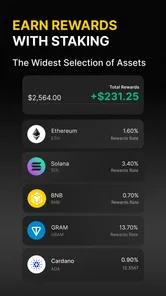
- Offers staking rewards
Cons
- Limited availability in some U.S. states
- Customer support can be slow
- Lacks some advanced trading features
- No margin trading available
- Requires KYC verification for all users