Bible App by Olive Tree
- 25.82K
- 4.7
- Installs
- 1.00M
- Price
- Free

Screenshots
Analysis by Reviewed
I found the first week with Bible App by Olive Tree easy to fill with small, practical moments: opening a passage over breakfast, looking up a verse during a conversation, or reading while waiting for an appointment. The offline access is the feature I noticed most quickly. Once a Bible is available in the app, I can keep reading when a connection is unreliable, which makes it more dependable for travel or places where mobile service drops out. The app is free to start, so it is straightforward to see whether its reading style suits me before deciding if I want anything beyond the included options.
Why the first week feels approachable
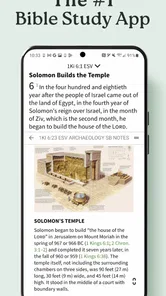
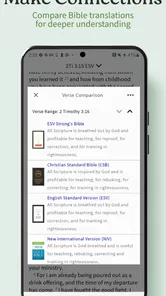
The opening experience is built around reading rather than making me learn a complicated system first. Switching among translations such as KJV, NIV, and ESV gives me a useful way to compare wording when a verse feels unclear. That matters in everyday use: I might read a familiar passage in one translation, then check another to see whether its phrasing helps me follow the thought. For someone who wants a simple Bible reader, that choice is more helpful than an abundance of unrelated features.
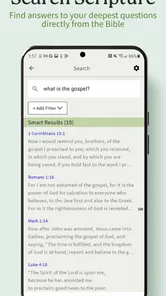
Search is also useful when I remember a phrase or topic but not its chapter and verse. I can use it to return to a passage quickly, rather than browsing book by book. My tip is to treat search as a starting point, not a substitute for reading the surrounding passage; a keyword can locate a verse, but context is what makes the result meaningful. This is a small habit that keeps quick lookups from becoming disconnected snippets.
For a first-week test, I would avoid setting up an elaborate study system. Pick one translation that feels comfortable, read a short passage at a repeatable time, and use a second version only when a sentence genuinely puzzles you. That gives me a fair sense of whether the app helps me read more often, rather than whether I can spend a long evening exploring its menus. It is also a useful way to decide whether the extra study tools are likely to matter to me.
What keeps it useful month to month
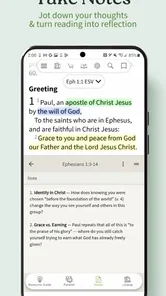
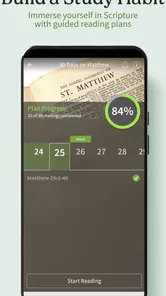
After the novelty of installing a Bible app fades, lasting value depends on whether it fits a routine. Here, notes and highlights can help turn occasional reading into a personal record: I can mark a passage that stood out and add a thought while it is fresh, then revisit it later. Study plans offer another way to give a reading session direction. I would choose a manageable plan and use it consistently rather than collecting several plans and feeling behind when life gets busy.
A realistic routine could be reading a short passage on a lunch break, saving one question in a note, and returning to it at home with a commentary or dictionary. That works better for me than expecting every session to become an extended study. The app’s collection of study resources can support that deeper follow-up, while the Bible itself remains the center of the workflow. This balance is the main reason I can see it earning a regular place on a phone rather than being opened only during the first few days.
For a group discussion, I would use search to locate a passage before the meeting, then compare translations to notice where wording differs. I would keep a note of questions to bring up rather than trying to resolve every point alone in the app. That makes the phone useful as a reading and preparation tool without mistaking a reference resource for a substitute for conversation, careful interpretation, or a trusted teacher.
More From Our News Desk

Weather by Xiaomi Review: Clear at a Glance, Less Clear Up Close

X Under Pressure: Can It Recover When Posting Goes Wrong?

Clash of Clans Is Won Between the Battles

Android Auto Makes the Case for Quieter Car Software

MobiOffice: Transforming Mobile Productivity with Seamless Integration

EA SPORTS FC™ Mobile Soccer: Redefining Mobile Sports Gaming
Features and Usability
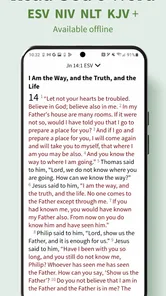
The Bible App by Olive Tree boasts an impressive array of features that enhance the user's reading experience. One of the standout features is its offline Bible access, allowing users to read and study the scriptures without the need for an internet connection. This is particularly useful for those who find themselves in areas with limited connectivity.
Navigation within the app is a breeze, thanks to its well-organized library that enables users to easily switch between different versions of the Bible. The app supports a multitude of Bible translations, including the New International Version (NIV), King James Version (KJV), and many others. This variety ensures that users can find a translation that resonates with them personally.
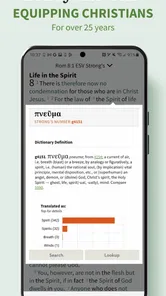
Another notable feature is the app's powerful search functionality. Whether you're trying to locate a specific verse or explore a particular theme, the search tool provides quick and accurate results. Additionally, the app includes a verse mapping tool that cross-references related scriptures, aiding in deeper understanding and study.
Study Tools and Resources
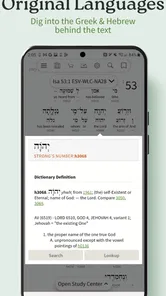
For those who wish to delve deeper into their Bible study, the Bible App by Olive Tree offers a range of study tools that are second to none. Users can access commentaries, dictionaries, and devotionals directly within the app, making it a one-stop-shop for all spiritual study needs. The app also allows for the customization of study plans, enabling users to tailor their study sessions to their individual needs.
Highlighting and note-taking features are also included, allowing users to mark important passages and jot down reflections or insights. This makes it easy to come back to these notes during future readings or studies, creating a personalized study journey.
A practical way to keep those records useful is to make notes specific enough to find again: write down the question a passage raised, not just that it felt important. I would also avoid highlighting whole pages. A few deliberate marks give future reading a clear trail, while too many can make every passage look equally urgent. If I am comparing translations, I would record what changed in the wording and why it mattered to me, rather than storing duplicate text without a purpose.
Interface and Design
The design of the Bible App by Olive Tree is clean and modern, with a focus on usability. The app's interface is intuitive, ensuring that users of all ages and tech-savviness levels can navigate it with ease. The reading experience is further enhanced by adjustable font sizes and themes, allowing users to customize their reading environment to suit their preferences.
Moreover, the app syncs across multiple devices, meaning you can start a study session on your smartphone and pick up right where you left off on your tablet. This level of flexibility is a huge plus for users who are constantly on the go.
That flexibility is most valuable when the second device has a real role, such as reading on a phone during a commute and continuing on a tablet at home. If I only use one device, syncing is less of a reason to choose this app, and I would not make it part of my routine just for its own sake. For multi-device readers, a sensible check is to open a saved note on the other device after setup, so I know my personal study trail is accessible where I expect it.
When a different approach may suit you better
Compared with a basic Bible reader, this app is more appealing if I want translation choices, study resources, and a place for my own notes alongside the text. A printed Bible may still be better when I want to read without a screen or prefer to see a full page at once. Likewise, someone who only needs an occasional verse lookup may find the extra study options unnecessary. The right choice depends on whether those tools support a real habit or simply add more choices to manage.
Compared with a general reference app, its strength is keeping Bible text and study materials close together rather than sending me between unrelated sources. The trade-off is that a specialist reader may feel like more app than I need if my only task is to check a verse now and then. Someone who prioritizes a quiet, screen-free reading session should choose a print Bible; someone who wants one place to read, search, and keep reflections has a stronger reason to try this.
One trade-off is that a large resource library can make the experience feel busier than a plain reading app. I would keep my workflow simple: choose a main translation, save only resources I expect to use, and avoid turning every reading into a research session. The app is free, but in-app purchases range from $0.99 to $399.99 per item, so I would check the price of any optional resource before buying it. The core appeal is convenient Bible reading; paid extras make sense only when a particular study need justifies them.
Maintenance, fatigue, and staying consistent
Offline reading is useful, but it also rewards a little preparation. Before a trip or a commute with poor reception, I would open the translation I plan to read while connected and make sure it is ready for offline use. That avoids discovering at the wrong moment that I cannot access the material I expected. If I use the app across devices, I would also take a moment to confirm that my notes and reading progress are where I expect them before relying on a second device for an important study session.
The maintenance burden is modest when I treat the app as a reader, not a project. I would keep my chosen translation and a small number of useful references close at hand, then revisit that setup when a genuine need changes. There is little value in repeatedly reorganizing notes or browsing resources just because they are available. A Bible app should make it easier to return to reading, not create another digital collection that needs constant tending.
The main source of fatigue is not a lack of content; it is the temptation to do too much at once. Search, multiple translations, plans, notes, and reference materials can turn a quiet reading habit into a checklist. I would start with one small routine and add a tool only when it solves a specific problem. Readers who prefer a minimal interface, do not want to manage digital notes, or mainly read offline from a physical book may be happier with a simpler alternative.
It is also worth deciding what to do when a routine breaks. I would simply resume with the next passage that makes sense, rather than treating a missed day as a debt to repay. A plan can provide structure, but it should not become a source of guilt. If the app starts feeling like another task list, I would temporarily set aside plans and notifications, if used, and return to a passage I actually want to read.
Final Thoughts
In conclusion, the Bible App by Olive Tree is a must-have for anyone looking to engage with the Bible in a meaningful way. Its combination of accessibility, comprehensive study tools, and user-friendly design makes it a standout choice among Bible apps. Whether you're a daily reader or a weekend warrior, this app has something to offer everyone.
For me, its lasting value comes from making it easy to move from reading to reflection without requiring a complicated routine. Gospel Technologies develops the app, which is rated 4.7 on average from around 130,000 ratings and has over 1 million installs. It is rated for Everyone, and version 8.0.1.0.2591 requires Android 10 or later. Those details make it a widely used option, but the deciding question is still personal: will I open it regularly and use its tools with intention?
It is a particularly good fit for readers who want offline access, more than one translation, and a way to keep notes close to the passage. It is less compelling for someone who wants only a bare reading screen, never uses study references, or prefers a book in hand. It is free to begin, so I can try a simple routine before considering any paid resources; I would only spend on an extra if I knew what question it was helping me answer.
So, if you're on the hunt for a reliable and feature-rich Bible app, look no further than the Bible App by Olive Tree. It's a powerful tool that brings the scriptures to life in the palm of your hand.
Bible App by Olive Tree Frequently Asked Questions
Can I study the Bible without an internet connection?
Yes. Bible App by Olive Tree supports offline use: you can download Bible versions and resources ahead of time, then read and study them without an internet connection. This can be useful while traveling or in places with limited connectivity. Make sure the content you want is downloaded before going offline.
Which Bible versions are included when I start using the app?
The app’s summary highlights the KJV, NIV, and ESV as included Bible versions, giving readers several familiar translations to explore. Bible App by Olive Tree also offers additional versions and study resources, though some content may require an in-app purchase. If you have a preferred translation, check its availability and any purchase details in the app.
Can I use Bible App by Olive Tree on my device?
Bible App by Olive Tree is a Books & Reference app for Android and iOS. On Android, it requires version 10 or later. It is rated for Everyone, so its age rating is suitable for a broad audience. Before downloading, check that your device meets the operating-system requirement and has enough space for the app and any Bible resources you choose to download.
Is Bible App by Olive Tree free to download, and are there extra costs?
The app is free to download, and it includes Bible-reading and study options to get started. Some additional resources are available through in-app purchases, with prices ranging from $0.99 to $399.99 per item. You can use the free offering without assuming that every Bible version or study resource is included at no charge; review any purchase details in the app before buying.
What features does the Bible App by Olive Tree offer?
The Bible App by Olive Tree offers a comprehensive digital Bible study experience. Users can access various Bible versions, including the King James Bible, New International Version, and more. It features tools for note-taking, highlighting, bookmarking, and Bible reading plans. Additionally, users can access rich resources like devotionals, commentaries, and dictionaries to enhance their study.
Pros
- Offline reading available
- Personalized study plans
- Extensive library resources
- User-friendly interface
- Cross-device synchronization
Cons
- In-app purchases for resources
- Occasional app freezes
- Limited free content
- Requires account sign-up
- Ads in free version











