Beauty Scanner - Face Analyzer
- 722.00
- 3.9
- Installs
- 5.00M
- Price
- Free

Screenshots

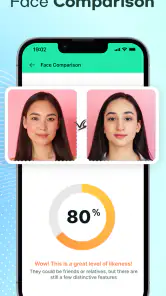
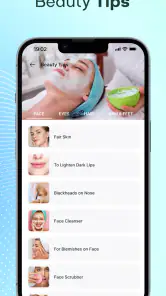
Analysis by Reviewed
I approach Beauty Scanner - Face Analyzer as a curiosity tool, not a reliable measure of anyone’s attractiveness. Facial analysis can be entertaining, but a numerical-looking result or automated suggestion is still an app’s interpretation, not an objective verdict. That distinction matters here: I’d use it to prompt a light conversation about beauty standards, not to decide how I feel about my face.
Why trust deserves a closer look
A face-analysis app asks for a more personal kind of attention than a typical camera filter. Before I try one, I want to understand what I’m choosing to share, what the app visibly lets me control, and whether the experience feels comfortable. I don’t treat a polished result or confident wording as proof that an assessment is accurate, nor do I assume that a photo is handled in a particular way without checking the choices and privacy information available on my device.
That cautious approach is especially useful when the app is being tried casually, perhaps while passing a phone around with friends. A quick scan can seem like harmless entertainment, but the face in the image belongs to a real person. I’d make sure everyone pictured is comfortable with the scan and any sharing, rather than treating permission to take a photograph as permission to analyze or circulate its result.
What to weigh before you scan
Beauty Scanner - Face Analyzer is a free photography app from Face Technology Company, with optional in-app purchases ranging from $1.99 to $39.99 per item. It has a 3.9 average from around 41,000 ratings and more than 5 million installs. Those figures show that many people have tried it, but popularity doesn’t establish how accurate a face analysis is or tell me how my photo is handled.
Trust starts with what you can verify
The app is rated for Everyone, and version 15.0.2 supports Android 7.0 and later. It was released on August 21, 2018. I’d still treat a face photo as personal information: before taking or selecting one, I would read the permission prompts on my device and check the app’s current privacy information and settings. I wouldn’t assume that a broad age rating means every use is suitable for every person, especially if a younger user might take an automated beauty score seriously.
My practical rule is to grant only the access needed for the action I’m trying to take, and to pause if a prompt seems unrelated. I also wouldn’t upload a photo of a friend or family member without their clear permission. A face image is more personal than an ordinary subject photo, so the choice of whose image to use deserves a little more thought than a casual filter test.
What to check before choosing a photo
When I reach a photo-selection step, I’d pause long enough to decide whether I want to use a fresh selfie or an existing image. A picture already saved on the phone might include details I’d rather not bring into a beauty experiment, such as other people in the frame or a setting that identifies where it was taken. Cropping first can make the image more focused, but it doesn’t answer questions about how the app processes a scan; I’d use the visible permissions and privacy choices to make that decision.
More From Our News Desk

Weather by Xiaomi Review: Clear at a Glance, Less Clear Up Close

X Under Pressure: Can It Recover When Posting Goes Wrong?

Clash of Clans Is Won Between the Battles

Android Auto Makes the Case for Quieter Car Software

MobiOffice: Transforming Mobile Productivity with Seamless Integration

EA SPORTS FC™ Mobile Soccer: Redefining Mobile Sports Gaming
I’d also avoid treating a successful scan as evidence that the app has a complete or reliable picture of me. Camera quality, makeup, shadows, and facial expression can all change what appears in a portrait. The most useful starting point is an image I’m comfortable using, not the one I think will produce the most flattering outcome.
Keep the result in perspective
Beauty analysis is especially sensitive to lighting, camera angle, expression, and how a face is framed. A result from one selfie can shift when those conditions change, even though the person hasn’t. If I were comparing scans, I’d take them in similar light with a neutral expression and the camera at roughly the same height. That makes the exercise more consistent, but it still doesn’t turn an algorithm’s judgement into a scientific or medical assessment.
I’d also be careful about saving or sharing results. A score can feel harmless in the moment, yet become uncomfortable if it is passed around or used to judge someone else. If the app offers visible choices around saving, sharing, or deleting a result, I’d check those before using them; I wouldn’t assume that removing an image from a phone automatically removes every copy elsewhere. If that uncertainty would bother you, a local, offline photo editor may be a better fit.
When the format is a poor fit
The app is a weaker choice if you mainly want to improve a portrait for a profile, print, or family album. In that case, a familiar editor with cropping, exposure, and color adjustments gives me a more direct route to the result I want. It lets me make a picture look the way I prefer without asking a beauty-analysis tool to rank or interpret my face.
It’s also not the tool I’d choose for a skin concern that needs an informed answer. Automated beauty suggestions can prompt ideas, but they shouldn’t replace a clinician’s advice or a careful look at what is actually bothering you. If the goal is reassurance, a score may not provide it; it can simply introduce another number to worry about.
Choosing how to use it
This app makes most sense for adults who are curious about facial-analysis entertainment and can keep the result in proportion. It is less suitable for someone seeking dependable skincare guidance, a clinical assessment, or reassurance about appearance. For those needs, a qualified professional or a conventional camera app used to document a specific concern is a more appropriate choice than a beauty score.
A useful everyday test would be to scan a selfie once, note what the app says, then ask whether the feedback leads to a practical choice you actually wanted to make. If it simply makes you scrutinize small features, close it and move on. I’d avoid repeated scans when I’m already feeling self-conscious; checking again and again can turn a playful experiment into an unhelpful comparison habit.
Getting Started: First Impressions
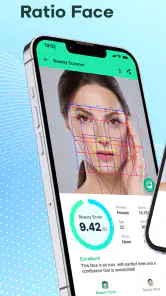
Right off the bat, downloading and setting up the Beauty Scanner - Face Analyzer was a breeze. The app boasts a sleek design that’s intuitive and user-friendly, making it super easy for just about anyone to navigate. Once you fire it up, you’re greeted with a simple interface that guides you through the process of snapping a selfie for analysis.
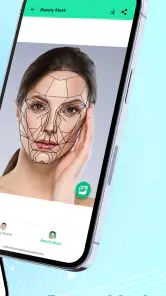
The app uses advanced AI technology to scan your face and provide a detailed breakdown of various beauty metrics. It evaluates your facial symmetry, skin texture, and even picks up on the subtleties of your facial expressions. It’s fascinating how it manages to do all this within seconds! If you’re someone who’s keen on knowing how you measure up in terms of conventional beauty standards, this app is a nifty tool to indulge your curiosity.
A practical way to try the analysis
For a low-pressure first run, I’d choose a neutral, recent selfie and look at the result once rather than testing a batch of photos to chase a preferred outcome. That gives me a clearer sense of what the app’s style of feedback is like without turning the exercise into a contest between pictures. If the result feels vague or doesn’t help with anything I care about, I can simply stop there instead of assuming that more scans will produce a more meaningful answer.
A realistic everyday moment might be getting ready for a video call and wondering whether a photo looks balanced. I could use the analysis as a prompt to check the lighting or camera angle, then make that adjustment in the camera itself. I wouldn’t let a score determine whether I’m comfortable joining the call; the useful part is noticing something practical about the image, not receiving approval from an algorithm.
Diving into the Features
One of the standout features of this app is definitely its facial symmetry analysis. As we all know, symmetry is often associated with beauty, and the app does a stellar job at highlighting this aspect. What’s even more interesting is its ability to provide suggestions on how to enhance your features or improve your skincare routine based on the analysis.
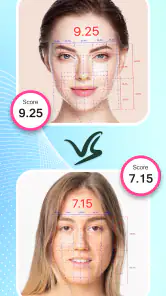
For a more useful comparison, I’d keep a single baseline selfie rather than collecting lots of scans at random. Use a plain background, face a window in steady daylight, and keep your expression and distance from the camera consistent. That doesn’t guarantee a fair result, but it reduces avoidable changes caused by shadows or framing. I’d also treat any skincare suggestion as a starting point for further thought, not as personalized professional advice.
Compared with a standard camera app, which lets you inspect an image without assigning beauty judgments, this one adds a layer of interpretation. That can make it more engaging if you want a quick, playful read on symmetry, but it also makes the outcome easier to overvalue. If your goal is simply to improve a portrait, ordinary editing controls give you more direct control over the picture without asking an algorithm to assess your appearance.
Another cool feature is the app’s capability to track changes over time. By saving your analyses, you can see how your face changes, perhaps due to new skincare products or lifestyle changes. It’s like keeping a digital diary of your face’s evolution!
If you choose to use that tracking workflow, consistency matters more than frequency: compare images taken under similar conditions and leave enough time between them for a real change to be plausible. Otherwise, a different lamp, camera angle, or expression may look like a meaningful shift when it is only a photographic one. I’d also think carefully before keeping a long series of face images, especially on a shared device.
How to decide whether tracking is useful
Tracking makes most sense when I have a specific, modest reason to compare images, such as checking whether a change in routine coincides with a visible difference. Even then, the app’s analysis is only one perspective, and a consistent photo taken with the same camera conditions may be more useful than a string of scores. I’d keep the comparison occasional and private, rather than letting daily fluctuations in light or expression become a story about my appearance.
If I do save images, I’d review where they are stored and who can access the device before building a collection. This is a simple but easy-to-miss trade-off: more saved examples may feel useful for comparison, while also leaving more personal material to manage. Someone who prefers not to retain face photos may be better off using a one-time scan, if the available controls make that choice clear, or skipping the tracking aspect altogether.
Another cool feature is the app’s capability to track changes over time. By saving your analyses, you can see how your face changes, perhaps due to new skincare products or lifestyle changes. It’s like keeping a digital diary of your face’s evolution!
If you choose to use that tracking workflow, consistency matters more than frequency: compare images taken under similar conditions and leave enough time between them for a real change to be plausible. Otherwise, a different lamp, camera angle, or expression may look like a meaningful shift when it is only a photographic one. I’d also think carefully before keeping a long series of face images, especially on a shared device.
Social use without losing control
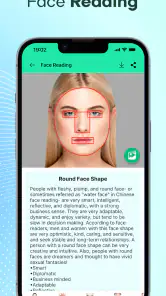
However, what I found most engaging was the app’s community feature. You can connect with other users, share your results, and even get beauty tips from peers. It adds a social element to the app, making it more than just a tool but a platform for beauty enthusiasts to connect and learn from one another.
That social side is best approached with boundaries. I would share only a result I’m comfortable having seen outside the original moment, and I’d avoid posting someone else’s image or treating peer comments as expert advice. If what you want is private experimentation, there’s no need to involve a community; if you want supportive feedback, choose people and spaces where appearance isn’t reduced to a score.
What the price and alternatives mean in practice
The basic app is free, while optional purchases are available at different prices. I’d start without spending and first work out whether the analysis, suggestions, or social side are things I actually enjoy. Before buying anything, I’d read the purchase screen carefully so I know what that particular item offers and whether it seems worthwhile to me. If I only want an occasional novelty scan, paying for extras may not add much value.
For a playful comparison with friends, this app’s beauty-focused interpretation is more distinctive than a regular selfie camera. For careful portrait work, an editor is the better fit; for health or skin questions, a professional is the better fit; and for a private, no-score photo check, a basic camera can be enough. The right alternative depends on what I want from the image, rather than on which tool makes the most confident-sounding claim.
The Verdict
So, is Beauty Scanner - Face Analyzer worth a download? If you’re into beauty and technology, absolutely! It’s a fun and informative app that doesn’t just stop at analyzing your face but also provides valuable insights and tips. Just remember, beauty is subjective, and while this app offers a unique perspective based on algorithms and data, it’s not the ultimate judge of your self-worth.
In conclusion, this app offers a blend of entertainment and education. It allows you to explore the intricacies of your facial features while engaging with a community of like-minded individuals. Whether you’re a beauty aficionado or just curious, it’s definitely worth checking out!
My cautious recommendation is to try it only if you can treat the analysis as a novelty and stay comfortable with the photo choices and controls you see on your own device. I wouldn’t pay for optional items until I knew exactly what they unlock and whether those additions matter to me. If a scan leaves you feeling worse, or if you need reliable skin advice, I’d skip the scoring and use a different tool or speak with a professional instead.
Beauty Scanner - Face Analyzer Frequently Asked Questions
How much storage space should I have available before downloading Beauty Scanner - Face Analyzer?
It is sensible to check that your device has enough free storage before installing Beauty Scanner - Face Analyzer, especially if you plan to take or save photos while using it. The app is a photography tool, so image files can also use space on your device. If storage is limited, reviewing and clearing unwanted files first may make installation and photo use more convenient.
What permissions might Beauty Scanner - Face Analyzer request?
Because Beauty Scanner - Face Analyzer is designed around facial analysis, camera access may be relevant when you want to capture a face for scanning. Review any permission prompt before approving it, and allow only access you are comfortable with. You can also check your device’s app settings later to manage permissions. Keeping permissions under your control is a helpful step when using any photo-focused app.
Can I use Beauty Scanner - Face Analyzer with a photo I already have?
Beauty Scanner - Face Analyzer is intended for facial analysis, so a clear image is important whether you are taking a new photo or choosing an existing one. If the app offers photo selection, use an image with the face visible, good lighting, and minimal obstruction for a more useful result. Review the app’s controls to see which image options are available on your device.
Does Beauty Scanner - Face Analyzer need an internet connection to analyze a photo?
Before downloading, it is worth considering how you plan to use the app and whether you expect to analyze images while offline. Beauty Scanner - Face Analyzer is a photography app centered on face analysis, but internet access can also matter for loading app content or using online services. Check the app’s permissions and privacy information, and avoid assuming that every feature will work without a connection.
What should I know about the app’s cost and age suitability?
Beauty Scanner - Face Analyzer is free to download and is rated for Everyone, so its content rating is intended to be suitable for a broad audience. Some features are offered through in-app purchases, with prices ranging from $1.99 to $39.99 per item. It is sensible to review purchase options in the app before choosing a paid feature, particularly if a child will be using the device.
Pros
- User-friendly interface for easy navigation.
- Provides quick analysis results.
- Offers personalized beauty tips.
- Uses AI for accurate facial analysis.
- Lightweight app with minimal storage usage.
Cons
- Limited to facial analysis only.
- Requires internet connection for analysis.
- May not support all skin tones.
- Contains ads that might disrupt use.
- Some features require in-app purchases.
- Category
- Photography
- Version
- 15.0.2











