Barnes & Noble NOOK
- 55.27K
- 4.4
- Installs
- 10.00M
- Price
- Free
Screenshots
Analysis by Reviewed
I see Barnes & Noble NOOK as a sensible choice for readers who want a familiar bookshop attached to their digital reading, rather than a bare reading screen. Its appeal is strongest when browsing and choosing a book are part of the pleasure. I’d consider it alongside Kindle and Kobo, but the best fit depends on where you already buy books and how much you value a particular store’s catalog and reading tools.
A bookstore-first approach
NOOK is a free Books & Reference app from Barnes & Noble, and its long history on mobile gives it a recognizable place among dedicated reading apps. It has been available since July 22, 2010, and its 4.3 average from around 175,000 ratings suggests that many readers find it useful. That popularity is reassuring, though it cannot tell you whether its book selection or reading habits match yours.
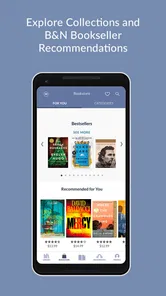
In practical terms, the app makes most sense if you like browsing before settling on your next read. A dedicated e-reader can feel focused and uncluttered, while a bookstore app brings discovery and reading closer together. That convenience is useful when you have a few minutes to explore titles, but it also means NOOK is less compelling if you already manage your reading through another store and have little interest in switching ecosystems.
How to make it work with your routine
Imagine choosing a novel during a lunch break, downloading it before leaving work, then reading on a commute where the connection drops in and out. The offline option makes that simple workflow possible: prepare the book while you have access, and your reading does not have to depend on a signal later. I’d make a habit of checking that a title is downloaded before traveling rather than assuming every book will be available offline automatically.
That small bit of preparation is also useful for trips or waiting rooms, where mobile data may be unreliable or where you simply want to avoid using it. The trade-off is that downloads need some forethought and storage on your device. Readers who mostly browse on demand, or who switch between many large books at once, may prefer to keep a shorter offline queue and remove titles they have finished.
An All-in-One Reading Experience
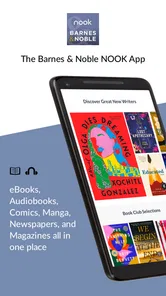
First off, the Barnes & Noble NOOK app is more than just an e-reader. It’s a comprehensive digital library that fits right in your pocket. You can access a massive collection of books, magazines, and even newspapers with just a few taps. The layout is super user-friendly, and I found navigating through the app a breeze. Whether you’re into the latest bestsellers, classic literature, or niche genres, NOOK has got you covered.
Customization at Your Fingertips
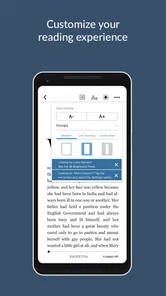
One of the features I absolutely love is the customization options. You can tailor the reading experience to suit your preferences. Adjust the font size, style, and even the background color to make reading as comfortable as possible. For those late-night reading sessions, the night mode is a true lifesaver, sparing your eyes from strain. It’s these thoughtful touches that enhance the overall reading journey.
More From Our News Desk

Weather by Xiaomi Review: Clear at a Glance, Less Clear Up Close

X Under Pressure: Can It Recover When Posting Goes Wrong?

Clash of Clans Is Won Between the Battles

Android Auto Makes the Case for Quieter Car Software

MobiOffice: Transforming Mobile Productivity with Seamless Integration

EA SPORTS FC™ Mobile Soccer: Redefining Mobile Sports Gaming
These settings matter most when reading for longer stretches: a larger type size can make a chapter easier to follow without changing the book itself, while a different background can be more comfortable in a dim room. I’d take a moment to settle on a readable combination before starting a long book, rather than repeatedly adjusting it mid-chapter. The trade-off is that readers who want paper-like simplicity may find even useful controls unnecessary; a dedicated e-reader may suit them better.
Stay Connected with Social Features
No book lover is an island, and the NOOK app understands that. You can connect with friends, share your favorite books, and even see what others are reading. The app integrates seamlessly with social media platforms, making it easy to broadcast your reading achievements and discover new recommendations from your circle. It’s like having a book club without the commitment!
Another standout feature is the ability to create profiles for different family members, so everyone gets a personalized reading list. It’s perfect for households with multiple book enthusiasts.
For a household, separate profiles can help keep one reader’s choices from becoming the starting point for everyone else’s browsing. I’d treat that as an organizing convenience, not a substitute for agreeing on what each person can access or wants to read. Social sharing is similarly best when you enjoy discussing books with friends; if you prefer to keep reading private or avoid posting activity, those options add little value and should not be the reason you choose the app.
An Offline Delight
We’ve all been there – stuck somewhere with no internet and desperate for some entertainment. Thankfully, the NOOK app allows you to download books and read them offline. This feature is a game-changer for those long flights or commutes where Wi-Fi is a distant dream. Simply download your reads beforehand, and you’re good to go.
For someone deciding between NOOK and another reading app, I’d start with the source of your books: if you already rely on Kindle or Kobo, their existing libraries and familiar routines may outweigh NOOK’s convenience. If you are open to a different storefront and want books, magazines, and newspapers in one reading environment, NOOK is easier to justify. A phone is convenient for short sessions, but a dedicated e-reader is often the better choice for readers who want a larger, purpose-built screen and fewer distractions.
Who should give it a try
I’d recommend NOOK to readers who enjoy browsing a bookstore, want adjustable text and background settings, and sometimes need reading to work without a connection. It can also suit families who want distinct profiles, or anyone who likes swapping book suggestions with friends. Barnes & Noble’s app has reached over 10 million installs, and it carries a Teen content rating, useful context for readers choosing an app for themselves or a household.
I would skip it if you are fully committed to another ebook store, rarely read on a phone or tablet, or want a strictly private, distraction-free experience with no interest in discovery or social tools. The app is free to install, but that does not make every book free; I’d check the cost of individual titles before building a new reading habit around the store. That distinction is easy to overlook when the app itself costs nothing.
What to consider before moving your reading
The main practical question is whether you want to start a new digital collection here or simply try the reader. If your current books are already organized in another retailer’s app, switching means weighing the pleasure of browsing NOOK against the inconvenience of maintaining more than one library. I wouldn’t move everything on impulse. Try it with a title you are genuinely interested in, then see whether you naturally return to the bookstore and reading tools.
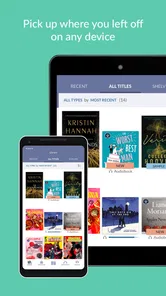
That trial can also clarify how you read across devices. A phone is handy for a few pages in a queue, while a tablet gives text more room; neither makes the same experience as settling in with a dedicated e-reader. If you often stop mid-chapter and resume later, keep your reading setup consistent and check that the book is ready on the device you plan to use. The useful question is not just whether NOOK can hold your books, but whether its phone- or tablet-based routine feels comfortable enough to become habitual.
Small choices that improve the experience
I’d use the app’s browsing side deliberately rather than treating it as a substitute for a reading list. When a title catches your eye, pause to check whether it is the edition you want and what it costs before committing. That is especially helpful when browsing quickly: a striking cover or recommendation can make a book feel like an obvious choice, but a minute spent checking the title and format can prevent a purchase that does not suit your plans.
For offline reading, I’d prepare only the books I expect to open soon, rather than downloading a large backlog. That keeps the routine simple and makes it easier to tell which titles are ready for a trip. If I were sharing a device or using profiles with family, I’d also make a quick check of whose profile is active before browsing or choosing a book. These are modest habits, but they reduce the most avoidable friction: a missing download, an unintended purchase, or a list shaped by the wrong reader.
Where its strengths have limits
The combination of bookstore browsing and reading is useful, but it is not automatically better than keeping those jobs separate. Readers who enjoy a quiet, minimal screen may find a store-centered experience too busy, while people who buy almost exclusively from another retailer may see little reason to build a second collection. In those situations, the familiar app or a dedicated e-reader is likely the more comfortable choice, even if NOOK’s adjustable reading settings are appealing.
Likewise, the social and family tools have value only when they match how you actually share books. A reader who wants recommendations from friends may welcome that connection; someone who keeps a private reading life may prefer not to make social activity part of the experience. I’d treat those features as optional extras, not the core reason to install the app. Its strongest case remains the blend of a bookstore and a reader, supported by settings and offline access that can fit everyday use.
Overall, the NOOK app is a good fit for someone who wants to explore Barnes & Noble’s digital shelves and read in the same place, especially if adjustable text and offline access matter. It is less convincing as a universal replacement for another reading ecosystem, and the free download should not be confused with free books. I’d try it if the bookstore itself appeals to you; if your collection and habits are already settled elsewhere, there is no need to switch just for the sake of switching.
Overall, the Barnes & Noble NOOK app is a fantastic choice for anyone who loves reading on the go. It combines a vast library, customization options, and social features into one neat package. Whether you’re an occasional reader or a voracious bookworm, this app promises a delightful reading experience. So, if you’re looking to expand your digital library, give NOOK a try – you might just find your next favorite read!
Barnes & Noble NOOK Frequently Asked Questions
Can I use Barnes & Noble NOOK without creating an account?
Before downloading, consider whether you are comfortable using a bookstore app to browse and read digital content. NOOK is Barnes & Noble’s digital reading app, and its reading experience centers on content accessed through the Barnes & Noble bookstore. If you plan to build a library or purchase reading material, you will need a way to access and manage those selections through the service.
Will Barnes & Noble NOOK work on my phone or tablet?
NOOK is a reading app intended for use on mobile devices, including smartphones and tablets, as well as NOOK devices. It is designed to make digital reading available beyond a dedicated e-reader, which can be useful if you prefer to use a device you already own. Check that the app is available for your device before downloading.
Is Barnes & Noble NOOK free to download, and what does using it cost?
Barnes & Noble NOOK is free to download, and the app itself does not require a subscription fee. The cost comes when you choose to buy books, magazines, or other reading material through the bookstore. Individual purchases give you control over what you spend, and promotions or free titles may offer opportunities to explore content without buying every item.
What age group is the Barnes & Noble NOOK app intended for?
Barnes & Noble NOOK is rated Teen, so it is worth keeping that audience guidance in mind when deciding whether the app is suitable for a younger reader. The app provides access to a broad range of reading material, and the specific content a user chooses will vary. Parents and guardians may want to review titles before younger users read them.
What is Barnes & Noble NOOK, and how does it work?
Barnes & Noble NOOK is a digital reading platform that allows users to access a wide range of eBooks, magazines, newspapers, and more on their devices. The app lets you purchase, download, and read content directly from the Barnes & Noble bookstore. It offers features like adjustable fonts, backgrounds, and the ability to sync your library across multiple devices, ensuring a seamless reading experience wherever you are.
Pros
- Wide selection of eBooks and magazines.
- Syncs across multiple devices.
- Offers a built-in dictionary.
- Night mode for comfortable reading.
- Easy to purchase books in-app.
Cons
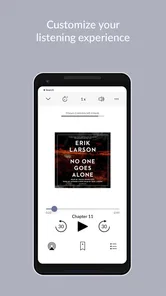
- Limited audiobook selection.
- Occasional app crashes reported.
- Requires internet for book browsing.
- In-app purchases can be costly.
- User interface can be overwhelming.











