Background Eraser
- 27.35K
- 4.7
- Installs
- 100.00M
- Price
- Free

Screenshots
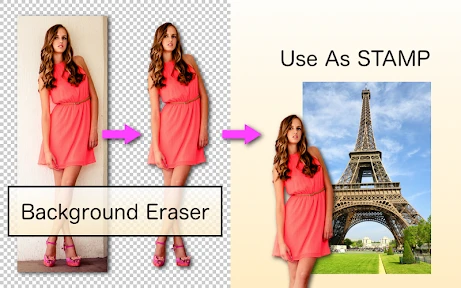
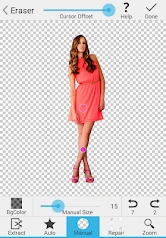
Analysis by Reviewed
At home, I can see Background Eraser earning a place on a shared tablet or phone: one person might cut out a toy for a birthday invitation, while another prepares a clean product image for a local listing. The appeal is practical rather than flashy. It focuses on isolating a subject, so it can help when a photo is useful but its surroundings are distracting. I would still treat each edit as that person’s project, especially if the original picture includes someone else.
A useful tool for small household projects
A realistic use is photographing a child’s handmade card on a crowded kitchen table, removing the table from the image, then placing the cutout into a simple collage in another editor. That second step matters: Background Eraser is about making the subject’s background transparent, not building a complete poster or retouching every part of a photo. For a quick cutout, I prefer this focused approach; for layered designs, text, color correction, and finishing touches, a fuller photo editor is usually more convenient.
For a cleaner result, I’d start with a photo where the subject stands apart from its surroundings and has clear edges. Hair, fine branches, glass, and objects that blend into the background are harder to separate than a solid item against a contrasting wall. I also check the outline at a closer view before saving: a small leftover fringe or an erased edge can be easy to miss when the whole image is visible. Keeping the original photo untouched gives me a safe fallback if I decide the cutout needs another pass.
Shared devices need clear boundaries
The app’s simple purpose makes it approachable for different people using the same device, but that does not mean everyone should edit or share every image. I’d agree on whose photo is being changed and where the finished cutout may be used before handing over a shared phone. This is especially sensible for pictures of children, family documents, or anything that could reveal private details in the background. A transparent cutout can remove the setting from the visible result, but it does not make the original image harmless or replace good judgment about sharing.
For coordination, a household can keep the workflow uncomplicated: choose one image, make the cutout, inspect the edges, and tell the next person when the device is free. If several people are preparing separate items for an event, naming or sorting the exported images in the device’s usual photo library can prevent mix-ups. I would not assume that the app provides family profiles, shared project management, or account boundaries; the sensible boundary is to use the device’s own access and sharing habits rather than rely on controls that may not exist.
Who should use it, and who may prefer another editor
This is a good fit for someone who often needs a subject isolated for a profile image, a marketplace listing, a school craft, or a lightweight social post. It is also a reasonable first step for a beginner who wants to learn how background removal works without facing a crowded editing suite. If the task is precise commercial compositing, repeated batch work, or careful treatment of translucent and very intricate edges, I’d choose a more specialized desktop or mobile editor and review the result closely. A dedicated cutout app is convenient, but it cannot make a difficult photograph easy to separate.
Background Eraser is a photography app from handyCloset Inc. It is free, carries a Teen content rating, and has been available since March 29, 2014. Its 4.7 average from around 976,000 ratings and more than 100 million installs suggest that it has reached a broad audience, though popularity alone cannot promise that every cutout will be perfect. I’d consider the age rating when a younger family member uses a shared device, and I’d check the screen together rather than assume the rating answers every household’s questions. The app’s role is narrow and clear; the person using it still decides which images are appropriate to edit or pass along.
More From Our News Desk

Weather by Xiaomi Review: Clear at a Glance, Less Clear Up Close

X Under Pressure: Can It Recover When Posting Goes Wrong?

Clash of Clans Is Won Between the Battles

Android Auto Makes the Case for Quieter Car Software

MobiOffice: Transforming Mobile Productivity with Seamless Integration

EA SPORTS FC™ Mobile Soccer: Redefining Mobile Sports Gaming
Getting Started with Background Eraser
Starting off, downloading and installing Background Eraser was a breeze. Available for both Android and iOS, the app’s interface is refreshingly straightforward. As someone who’s not exactly a tech wizard, I appreciated the simplicity. It’s like when you walk into a well-organized store, everything just makes sense, and you know exactly where to find what you need.
Simplicity Meets Functionality
Upon launching the app, you’re greeted with a clean and intuitive dashboard. The main feature, as the name suggests, is erasing backgrounds from photos. You simply upload an image, and the app gets to work. What’s cool is the auto mode, which uses advanced AI to detect and remove backgrounds with impressive accuracy. For those who like to have a bit more control, there’s also a manual mode where you can fine-tune the details.
One feature that stood out to me was the ability to restore parts of the image if the auto mode gets a bit too enthusiastic and erases more than it should. It’s like having a magic eraser that knows when to stop, but just in case, you’ve got an undo button handy.
Performance and Usability
Performance-wise, Background Eraser is a powerhouse. Even with high-resolution images, the processing time is minimal. The app doesn’t require a steep learning curve, making it accessible for beginners and seasoned photo editors alike. The real-time feedback as you edit provides a seamless experience, akin to painting with a digital brush.
One minor gripe, however, is the occasional ad pop-up. While they’re not overly intrusive, a premium version of the app could be a great option for those who prefer an ad-free experience.
Why You’ll Love It
If you’re into creating stunning visuals for social media or professional presentations, this app is a game-changer. Its ability to seamlessly remove unwanted backgrounds can elevate your photos to a whole new level. Imagine taking a casual shot in your living room and transforming it into something that looks like it was taken in a professional studio.
Overall, Background Eraser is like having a personal photo editor in your pocket. It’s efficient, easy to use, and does exactly what it promises. Whether you’re a social media influencer, a small business owner, or just someone who loves tinkering with photos, this app is worth checking out. So, next time you take a picture, don’t let a messy background ruin it—let Background Eraser work its magic.
Making a cutout you can actually use
One useful way to judge a background-removal result is to preview it against more than one color before treating it as finished. A pale halo can disappear against a light screen and become obvious on a dark design; conversely, a dark edge may only show once the cutout sits on a bright background. I’d place the result temporarily over the color or image I expect to use, then revisit any uneven outline. That quick check is more informative than judging the isolated subject against the editor’s preview alone.
I’d also think about the final destination before trimming too tightly. A cutout intended for a small profile image may tolerate a slightly rough edge, while a large product photo makes stray pixels much more noticeable. Leaving a little breathing room around the subject can be safer than shaving every pixel close to its contour, particularly if the image will be resized or repositioned elsewhere. The point is not to chase perfection inside the eraser; it is to create a clean enough asset for the job it needs to do.
Choosing the right source photo
When I take a picture specifically for a cutout, I try to make the separation easy before opening the app. A plain, contrasting backdrop and even light give the subject a clearer boundary than a busy room with similar colors. I avoid placing a dark object against a dark surface, for example, because the edge can become difficult to distinguish even for careful manual work. This small bit of planning can save more time than repeatedly correcting a photo that was hard to separate from the start.
For a household listing, I’d photograph one item at a time rather than try to isolate several objects tangled together. That keeps the intended subject obvious and makes the finished image easier to reuse. It also reduces the chance that part of another object will remain attached to the cutout. If the item has a soft, fuzzy, or transparent edge, I’d set expectations accordingly: a simple removal may be enough for a casual post, but a polished catalog image could call for a different tool or a new photograph.
Where it fits among photo-editing options
Compared with an all-purpose editor, this app’s narrow focus is a real convenience when I only need to separate a subject. I can avoid searching through a large collection of adjustments and effects. The trade-off is that the cutout is only one stage of a finished design: adding typography, balancing colors, arranging multiple layers, or correcting lighting is usually easier in a broader editing app. I see the two kinds of tools as companions rather than direct replacements.
Compared with a background-removal service that works through a browser, an on-device editing workflow can feel more direct for a quick personal task, especially when I already have the photo on my phone. A service or a professional editor may be preferable when the result needs consistent treatment across many images or when the edge detail is unusually demanding. I would not choose solely by the promise of automatic selection; I’d compare the quality of the specific cutout, the amount of correction needed, and how easily I can finish the image where it will be used.
Keeping household projects organized
Suppose two people are preparing decorations for a family gathering on one tablet. One removes the background from a handmade sign while the other needs the device for a separate invitation. A simple handoff works better than assuming both people are editing the same project: finish the current cutout, save it where the next person can identify it, and say whether it is ready to use or still needs a check. That small routine makes a shared device less confusing without pretending the app itself coordinates household work.
If the image contains a child, a visitor, or information visible behind the subject, I’d decide whether that image should be used at all before focusing on the edit. Removing the surroundings from a final graphic can reduce visual clutter, but it does not erase the original from the device’s photo library or determine who can access it. Families who share a phone can use their ordinary device-level habits—such as keeping personal pictures in the right place and checking before sending an image—to preserve clearer boundaries.
What to expect from the editing process
Will the automatic selection always be right? I would treat it as a helpful first pass, not a guarantee. A clearly outlined mug or toy is a more forgiving subject than flyaway hair or a transparent ornament. When the automatic result removes too much, restoring the lost portion and then checking the opposite edge can be faster than starting over. If the boundary is complicated all the way around, though, careful manual correction may take longer than the job is worth.
Does a transparent result mean the image is ready for every destination? Not necessarily. Transparency is useful when another editor or layout needs to place the subject over a new background, but the image may still need resizing, a different crop, or a visual check after it is composed. For a quick sticker-like asset, the cutout may be enough; for a sales image or formal presentation, I’d inspect it at the size people will actually see and finish it in the tool best suited to that layout.
Is it a good choice for someone who rarely edits photos? I think so if there is a specific cutout to make, because the central task is easy to understand and does not require learning a full editing workflow. But a person who only wants to improve lighting, crop snapshots, or add filters may get more value from a general photo editor already suited to those needs. Background Eraser makes the most sense when removing the surroundings is the actual problem, not simply because an image could use some editing.
A sensible fit for a shared home device
In my view, the strongest household case is occasional, practical editing: separating a craft, a keepsake, or an item for a local sale without turning a small project into a complicated design session. It is free to try, approachable for a shared device, and focused enough that different family members can understand its purpose. The Teen rating is worth keeping in mind when deciding whether a young person should use it, but a rating does not replace an adult’s judgment about pictures, privacy, or sharing.
I’d recommend it to someone who wants a straightforward subject cutout and is willing to inspect the edges before using the result. I’d steer people toward a broader editor for complete designs, and toward more specialized tools when accuracy, batch consistency, or difficult transparent edges matter. As a household utility, it earns its space when a clear, small job comes up; it is less compelling as a one-stop photo studio. That distinction is what makes it useful: I know what to open it for, and when it is time to move on to another tool.
Background Eraser Frequently Asked Questions
Do I need editing experience to use Background Eraser?
Background Eraser is aimed at making picture cutouts accessible, so it can be useful even if you have not used a photo-editing app before. Its purpose is to help remove a picture’s background and make it transparent. You can start with a photo and use the app’s cutting tools to separate the subject, then review the result and adjust the edges where needed.
What is Background Eraser and how does it work?
Background Eraser is a mobile application designed to help users remove backgrounds from images effortlessly. The app uses advanced AI technology to automatically detect and erase the background, allowing users to isolate the main subject of the image. It offers a user-friendly interface with intuitive tools for manual adjustments, ensuring precision and ease of use. Available for both Android and iOS, it simplifies the process of creating professional-looking images without the need for expensive software.
Is Background Eraser free to use or does it require a subscription?
Background Eraser offers both free and premium versions. The free version provides basic features suitable for simple background removal tasks. However, for access to advanced features like high-resolution exports, batch processing, and ad-free experience, users can opt for a subscription-based premium version. This allows users to choose a plan that best fits their editing needs and budget.
What features does Background Eraser offer to enhance image editing?
Background Eraser provides a variety of features to enhance the image editing experience. Key features include automatic background removal using AI technology, manual editing tools for precision, and the ability to save images in high resolution. Additionally, it supports various image formats and offers batch processing capabilities, making it a versatile tool for both casual users and professionals needing quick edits on the go.
Can I use Background Eraser for commercial purposes?
Yes, Background Eraser can be used for commercial purposes, making it a great tool for businesses and individuals involved in digital marketing, graphic design, or e-commerce. The app's capability to produce high-quality, professional-looking images allows users to create promotional content, product images, and more. However, it's recommended to review the app's terms of service to ensure compliance with any usage restrictions.
Pros
- Easy to use with intuitive interface
- Supports high-resolution image export
- Quick background removal process
- Variety of editing tools available
- Compatible with multiple image formats
Cons
- Limited free features
- Ads can be intrusive
- Occasional glitches during editing
- Requires internet connection for some features
- Premium version is relatively expensive
- Category
- Photography
- Version
- Varies with device











