Baby Month Photo Editor Frame
- 40.00
- 4.5
- Installs
- 1.00M
- Price
- Free

Screenshots


Analysis by Reviewed
For a shared household, the most useful question is not just which frame looks cute, but how to make a monthly picture without turning it into another family chore. I’d use Baby Month Photo Editor Frame for a single milestone image, then keep the rest of the process simple: agree on the photo, make one decorated copy, and decide together where it belongs. It suits families who want a quick visual record more than a carefully managed digital scrapbook.
One photo, one small family ritual
A realistic routine might be taking a picture after breakfast on the day you mark each new month. One adult picks a clear shot, while a partner or relative helps choose a frame later. That division keeps the creative part relaxed and avoids passing a phone around while everyone is trying to settle the baby. The app is best treated as a finishing step, not as the place where the household has to plan the whole celebration.
I’d keep the camera original separate from the decorated result. That gives you a clean image for printing, cropping, or revisiting later, while the framed version is ready to send to family. It also helps if the monthly series becomes important: comparing unedited portraits makes changes in expression and growth easier to notice than comparing pictures with different decorations and crops.
Agree on the handoff before opening the editor
Shared devices can blur the line between helping and making a decision. I’d ask one person to choose the final photo and let others suggest a design, rather than having several people make edits in turn. This is especially useful when relatives are involved remotely: they can give an opinion on a preview without needing access to the original image or the phone itself.
There is also a practical boundary around purchases. The app is free to install, but optional in-app purchases are listed from $0.49 to $144.99 per item. On a phone used by more than one person, I’d keep payment decisions with the account holder and read each purchase screen before confirming. That simple agreement matters more than assuming a shared device will somehow distinguish between a child’s tap and an adult’s intention.
Making milestone photos work for your household
Ngendev Technolabs makes this photography app, which is rated for Everyone. It has a 4.5 average from around 20,000 ratings and over 1 million installs. Those figures suggest broad use, but they don’t tell me whether its particular look will suit every family. Its current version is 1.114, and it requires Android 7.0 or later, so I’d check the device before making it part of a regular routine.
Keep the keepsake separate from the archive
A decorated milestone picture and a family photo archive solve different problems. This editor is aimed at dressing up baby photos; it should not be the only place you rely on to keep a record of them. I’d save the clean photo in the household’s usual photo collection, then store or share the edited copy from there. That way, the monthly design is easy to find without making it the only version anyone can access.
More From Our News Desk

Weather by Xiaomi Review: Clear at a Glance, Less Clear Up Close

X Under Pressure: Can It Recover When Posting Goes Wrong?

Clash of Clans Is Won Between the Battles

Android Auto Makes the Case for Quieter Car Software

MobiOffice: Transforming Mobile Productivity with Seamless Integration

EA SPORTS FC™ Mobile Soccer: Redefining Mobile Sports Gaming
A small but useful workflow is to settle the crop before choosing a frame. If a baby’s face is already near the edge, a decorative border may make the composition feel cramped. Starting with a photo that has a little breathing room leaves more flexibility and reduces the temptation to keep adding elements to compensate for a difficult image. It is a simple way to get a tidier result without turning editing into a long session.
When a themed editor is the right fit
This app makes the most sense when you want a cheerful, month-focused keepsake and would rather choose from a guided style than design everything yourself. It can be handy for a parent who wants to prepare one image for grandparents, or for a household that likes having a recognizable monthly format. The short description points to baby month-by-month editing, so I’d approach it as a focused tool rather than expect it to replace a general photo editor or library.
If you want precise control over color, blemish removal, layers, or a custom layout, a broader editing app is likely the better choice. If your main goal is sorting hundreds of family pictures, an album or photo-organizing tool will do more for that task. The trade-off is straightforward: a focused editor may make a themed result easier to reach, while general tools offer more freedom but ask you to make more design decisions yourself.
Keep the look consistent without making it rigid
For a series that will be viewed side by side, I’d choose a simple visual rule and stick to it: similar framing, a comparable crop, and a limited amount of decoration. That does not mean every picture has to look identical. A baby may be sitting in one month and lying down in another, so the photo should come first; consistency is most helpful when it does not force an awkward pose or crop.
It can also be worth making a quick preview before adding text. On a small screen, a caption may look readable while becoming crowded once the image is shared or printed. I’d keep any wording brief and check that it does not cover the baby’s face or hands. A frame can carry the sense of occasion on its own, so text is optional rather than something every picture needs.
Age suitability and sensible sharing
The Everyone content rating describes the app’s general age category, not whether a young child should use a family phone without supervision. I’d have an adult handle the final save and any sharing, particularly when a picture shows a baby’s face, clothing with a name, or details of the home. Before sending, take a moment to check the whole image, not only the decoration: the background can reveal more than the family intended.
That is one reason I prefer to share a finished copy only after reviewing it. A relative may be helping select a frame, but that does not mean every draft needs to be sent around. Keeping the original and edited image under the account holder’s normal photo routine gives the household a clearer sense of what is being shared and where the clean version remains available.
What I would test on the first month
I’d begin with a photo that has a plain background and a clear view of the baby, then try a restrained frame before experimenting with extra decoration. The point is not to use every available choice; it is to find out whether the app’s visual approach fits your family. If the result feels crowded, simplify it or use the unedited portrait instead. A themed treatment should support the memory, not become more noticeable than the child in the picture.
It is also sensible to make a trial image before a time-sensitive family occasion. That gives you a chance to see how the editing process feels and decide who should do it next month. Since the app is free to install, trying the basic experience first is a reasonable way to judge whether the style is worth keeping in your routine. I would only consider an optional purchase after identifying a particular item I actually want.
A simple shared-photo routine
Picture a parent taking a quick photo after breakfast on the date they mark each month. Later, another family member can help choose a frame or add a short note before the picture is sent to relatives. That kind of low-key handoff suits a lightweight editor: the goal is to make one meaningful image, not to build a complicated album project.
For a smoother routine, I’d settle on a consistent photo spot and keep the original image untouched. Then the edited version can carry the month’s decoration while the unedited one remains available for printing or future edits. This small habit also makes it easier to compare growth over time without different crops or filters changing the impression from one month to the next.
Keep editing and account boundaries clear
On a phone used by several people, I’d agree in advance who chooses the final photo and who handles any purchase prompts. That is not a special family-control feature; it is simply a practical boundary for a shared device. A child can help pick between a couple of designs while an adult keeps control of the original image and any payment decisions.
One useful trade-off is to make the decorative version for sharing, while keeping a clean copy for a printed album. Frames and stickers can make a milestone feel festive, but too many additions may compete with the baby’s expression. I’d start with one frame and, only if the image still feels clear, add a small amount of text or decoration.
Who will enjoy it—and who may prefer another editor
This is a natural fit if you want month-themed baby pictures and prefer a guided, playful result over starting from a blank canvas. Someone who already uses a general photo editor may find that broader tools give more control over cropping, color, and layout. Likewise, if you mainly want to organize a large collection rather than decorate individual milestones, an album-focused option may fit that job better.
The practical question is whether the app’s style feels right for the photos you actually take. A busy frame can work well around a simple portrait, but may crowd a patterned outfit or a lively background. I’d preview a few choices before settling on a monthly look, and avoid changing the visual treatment too much if side-by-side growth comparisons matter to you.
What to expect before you begin
The app’s short description points to month-by-month baby editing, so I’d approach it as a milestone-photo tool rather than assume it will replace a full photo library or offer a particular backup workflow. If you use a shared phone, check that the device is compatible and decide where the finished image should live before you start editing.
It can also help to choose the photo first, then open the editor with a clear idea of the month or message you want to mark. That keeps the task quick when you’re juggling family routines. If you’re deciding whether to pay for anything, try the free option first and only consider a purchase if a specific available design or item is genuinely useful to you.
A keepsake tool, not a family organizer
Age suitability and household trust are separate questions. The Everyone rating makes the app broadly suitable by content category, but a parent should still supervise a young child using a shared device, particularly around image sharing and purchase prompts. I’d treat the finished picture as something to review before sending, especially when it includes a baby’s face or identifying details.
For a household that wants an easy monthly photo tradition, this app offers a direct route from portrait to decorated keepsake. It is less compelling if you need advanced editing, collection management, or a restrained look with no themed embellishments. My advice is to try one month’s picture first, keep the original, and see whether the result feels like your family before making it part of a recurring routine.
Capturing a growing baby’s milestones
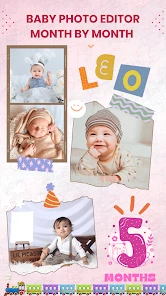
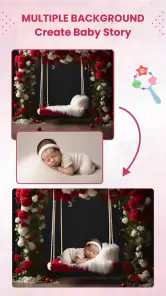
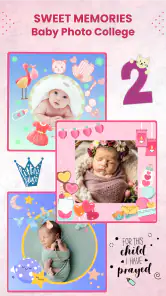
As a parent, seeing your little one grow month by month is nothing short of magical. The Baby Month Photo Editor Frame is designed to help you capture these precious moments in a fun and creative way. The app offers a variety of frames and stickers that are specifically tailored for each month of your baby's first year. Imagine being able to look back at these photos and see just how much your baby has grown!
Usability when you have one hand free
Let's talk about usability. One of the first things I noticed was how intuitive the app is. You don’t need to be a tech wizard to navigate through its features. The layout is straightforward, making it easy to select frames, add text, and adjust your photos. The app’s developers clearly had parents in mind when designing this, knowing we often only have one hand free!
Room to personalize the picture
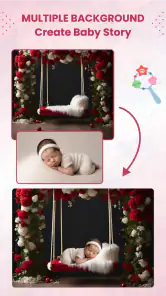
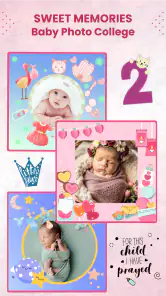
What sets this app apart is the level of customization it offers. Whether you want to add cute stickers, playful fonts, or vibrant frames, the app has you covered. It's like having a mini graphic design studio in your pocket. I spent a good amount of time playing around with different combinations, and the possibilities are endless. Plus, the app regularly updates its library with new themes, so it never gets stale.
Sharing the finished keepsake
Once you've created the perfect photo, sharing it with friends and family is a breeze. The app allows you to directly share your creations on social media or send them via email or messaging apps. It's a great way to keep everyone updated on your baby's progress, especially those who live far away. And let’s be real, who doesn’t love showing off their adorable bundle of joy?
In conclusion, if you're looking for a way to make your baby's monthly photos extra special, this editor is definitely worth checking out. It’s user-friendly, offers a huge variety of customization options, and makes sharing your memories super easy. So go ahead, give it a try, and let your creativity run wild as you document your baby's first year in style!
Baby Month Photo Editor Frame Frequently Asked Questions
Can I save edited baby photos to share or print later?
The app is designed for decorating baby pictures and marking monthly milestones, and its editing tools let you prepare images for sharing with family and friends or for a keepsake album. After creating a design, consider keeping a copy of the original photo as well, so you can revisit or edit it differently later. Your finished image can be used in the way that suits your family.
Can I use Baby Month Photo Editor Frame to make monthly milestone pictures?
Yes. Monthly growth is central to the app’s purpose: it provides baby-focused frames and stickers that can help mark each month and preserve those moments in a visual record. You can choose a design for an individual photo and customize it with text or decorative elements. This makes it useful for families who want to create a consistent series of milestone images over time.
Is Baby Month Photo Editor Frame free to download, and are there costs to consider?
The app is free to download, so you can try its baby-photo editing tools without an upfront purchase. Some optional in-app purchases are available, with prices ranging from about 49 cents to around $145 per item. Before buying anything, check the price shown for that item and consider whether its frames, stickers, or other content suit the way you want to use the app.
Who makes Baby Month Photo Editor Frame, and is it intended for general audiences?
Baby Month Photo Editor Frame is a photography app developed by Ngendev Technolabs. It is rated Everyone, making it suitable for a broad audience, including parents and family members who want to mark a child’s growth with edited photos. The app’s focus is baby pictures and monthly milestones, so it may be most useful to people who want a simple way to decorate and preserve those memories.
What is Baby Month Photo Editor Frame and what does it do?
Baby Month Photo Editor Frame is a specialized photo editing app designed to help parents capture their baby's precious milestones. It provides a variety of adorable frames and stickers to mark monthly growth, holidays, and special moments. The app allows users to easily customize photos, making them perfect for sharing with family and friends or creating a memorable photo album.
Pros
- Intuitive user interface for easy navigation.
- Wide range of cute frames and stickers.
- High-quality photo output.
- Compatible with both Android and iOS.
- Regular updates with new features.
Cons
- Contains in-app purchases.
- Can be ad-heavy at times.
- Limited free features.
- Requires internet for some features.
- Occasional app crashes reported.
- Category
- Photography
- Version
- 1.114












