B9: Cash Advance
- 7.46K
- 4.6
- Installs
- 1.00M
- Price
- Free

Screenshots
Analysis by Reviewed
The appeal of B9: Cash Advance・Banking・Earn is easy to understand in the first week: when a bill lands before payday, a cash advance can feel more useful than another budgeting screen. I’d judge it less by that first moment of relief, though, and more by whether its banking tools and routine use continue to help once the urgency has passed.
Who benefits from the early-payday approach
I can see this finance app fitting someone with regular pay who sometimes has a timing gap between income and essential expenses. Picture a grocery run and a utility bill arriving a few days before payday: an advance may offer breathing room, while the linked account and spending view can help make the rest of the pay period clearer. That is a specific kind of help, not extra income, so I’d treat any advance as money that will need to come out of a later paycheck.
That distinction is worth keeping in mind before signing up. An advance can address a short-term mismatch, but it cannot make a recurring shortfall disappear. If rent, food, or other basics routinely exceed what comes in, I’d look first at a more durable budget change or qualified financial guidance rather than relying on early access to pay. B9 is more compelling as an occasional bridge than as a standing plan for every month.
A realistic first-week test
I’d give the app a low-pressure trial before a bill is already overdue. Install it when the month is reasonably calm, connect the account only if you are comfortable doing so, and explore the available banking and spending views. That gives you time to understand the layout and see whether the tools make sense for your routine, rather than making a rushed decision while worrying about a payment.
Then I’d test the spending view against a recent week I already understand. If the categories help explain where money went, they may be worth checking again after payday. If they add little beyond what your bank app already shows, that is useful to learn too. The point is not to manufacture a reason to keep another finance app; it is to see whether this particular combination of features answers a real need.
Getting Started with B9
So, here's the deal. Setting up B9: Cash Advance・Banking・Earn was a breeze. Once you download the app, you're greeted with a clean and intuitive interface. It's like the app is saying, "Hey, relax, I've got you covered." Signing up is straightforward. You just need to plug in some basic info, link your bank account, and you're ready to roll. I appreciated the simplicity because, let's face it, nobody wants to jump through hoops when they're already stressed about cash flow.
The Cash Advance Feature
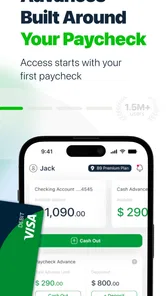
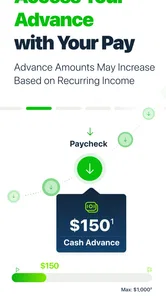
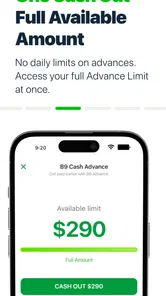
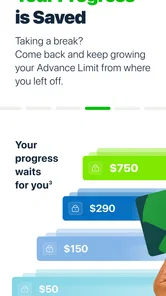
Now, onto the main event—the cash advance feature. This is where B9 really shines. Imagine you're at the end of the month, and things are tight. With B9, you can request an advance on your paycheck up to $500. The process is as smooth as butter; just a few taps and boom, the money's in your account. What I love is that there are no hidden fees or interest rates. You pay what you owe on your next payday. It's a lifesaver for those "just in case" moments.
More From Our News Desk

 Bolt: Request a Ride
Bolt and the Shift from One-Tap Rides to More Legible Trips
Bolt shows how ride-hailing is shifting from a one-tap taxi request toward a more legible, choice-driven trip, while leaving the hardest questions of price and reliability unresolved.

 Farm Land - Farming life game
Farm Land Review: A Small Island Farm with a Satisfying Loop
A bright, breezy island farm turns a few quick chores into a satisfying cycle of planting, harvesting, expanding, and deciding what to build next.

 Android Auto
’s Community Takes Shape in the Passenger Seat
Its most valuable network is not a public feed but a shared set of routes, voice habits, app integrations, and advice that make driving less isolating—and sometimes more complicated.

 My Talking Angela
 Makes the Virtual Pet Feel Personal
A polished pet-raising game built on small rituals, playful customization, and a character who gives everyday screen time a surprisingly personal rhythm.

 Google Translate
 Review: A Pocket Tool for the Small Frictions of Travel
From menus and signs to quick conversations, Google Translate earns its place by cutting the little delays that make unfamiliar language feel like a barrier.

 Shazam: Find Music & Concerts
Shazam’s Best Trick Is Turning a Song Into a Night Out
A few seconds of recognition can settle an argument, rescue a half-remembered chorus, and point toward a live show. Shazam’s real trick is what happens after the match.
Latest News



I would still make one practical check before depending on a requested advance: confirm the amount and timing shown in the app, then compare the repayment date with bills already due. Access to an advance is not the same as having a dependable emergency fund, and a smaller amount may be wiser if it leaves your next pay cycle less stretched. If the need is for a large, planned expense, a savings plan or a lower-cost borrowing option may be easier to manage than bringing future pay forward.
Making a one-off advance work
For a concrete example, imagine your paycheck is due soon, but a necessary household expense falls just before it. I’d first check whether moving another payment by a few days or using money already set aside would solve the problem without borrowing. If an advance still seems like the right bridge, I’d request only what covers the gap, then write the repayment into the next pay period’s plan before spending anything else. That sequence helps keep a temporary fix from quietly becoming part of the regular budget.
A useful personal rule is to decide how you will handle the next similar pinch before taking an advance. Perhaps you can build a small buffer over several paychecks, or shift the timing of a non-urgent purchase. The app may help with immediate cash-flow pressure, but the longer-term improvement comes from the choice you make after the urgent bill is dealt with. If the same shortage returns repeatedly, I’d treat that as a sign to reassess the budget rather than simply repeat the advance.
Banking and Budgeting
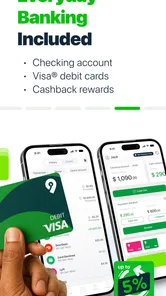
Besides cash advances, B9 offers some neat banking features. You get a virtual and physical Visa debit card that you can use anywhere Visa is accepted. Plus, you can track your spending right from the app. It's like having your own personal finance assistant. I found the budgeting tools particularly helpful. They let you categorize your expenses, so you can see where your money is going. It's a real eye-opener, especially if you're trying to curb those impulse buys.
For month-to-month value, I’d use the spending categories as a short review habit rather than expecting the app to make decisions for me. A quick look after payday can show whether a tight week came from a one-off expense or a pattern worth changing. You can also check that the categories make sense for your own spending before drawing conclusions; an incorrect label can make a budget snapshot misleading. This small bit of attention is part of the app’s upkeep, but it can turn tracking into something more useful than simply watching transactions pass by.
Using the account and card deliberately
The card and spending tools are most useful when they fit a routine you already have. I’d decide in advance whether I want to use the B9 card for a particular kind of everyday spending or mainly keep the app as a place to review activity. A narrow purpose makes it easier to tell whether the account is adding convenience, and it avoids moving every payment over just because the card is available.
If you do use the card, I’d keep an eye on the same essentials I check with any account: which balance I’m spending from, what payments are coming up, and whether a purchase is already accounted for elsewhere. That is not busywork unique to B9; it is how I’d avoid mistaking a convenient card for extra money. The spending view can support that check, but it should not replace knowing what bills are due.
Compared with a basic bank app, B9 brings early-pay access and a debit-card setup into the same money routine. A standard bank account may be a better fit if your main goal is keeping everyday banking simple, while a dedicated budgeting tool may suit you better if detailed planning is the priority. I wouldn’t switch accounts just for a feature I might rarely use: the value depends on whether the advance option and spending view solve problems I actually face.
Earning Rewards
Here's a little cherry on top—B9 lets you earn rewards. Yep, you heard me right. By referring friends or setting up direct deposits, you can snag some sweet bonuses. It's a nice touch that turns everyday transactions into opportunities to save a little extra cash. Who doesn't like a bit of extra dough in their pocket?
I’d treat rewards as a bonus, not a reason to change where my paycheck goes or to recommend an account to someone who may not need it. Before acting on any offer, I’d read the terms shown in the app and decide whether the required step already suits my finances. That keeps the reward in perspective and avoids letting a small incentive drive a bigger banking decision.
When another option may fit better
The usual alternatives solve different problems. A bank’s own account may be enough if you mainly need a debit card and a place to monitor transactions. A budgeting app can be a better match when you want to plan spending in detail without making early access to pay part of the decision. For a one-time emergency, savings or a borrowing option with clear terms may be preferable if you want to avoid reducing your next paycheck.
That comparison depends on what is causing the pressure. If the issue is simply that income and bills arrive on awkward dates, B9’s early-pay focus may be relevant. If the issue is that monthly expenses consistently outrun income, shifting the timing of pay does not fix the underlying gap. I’d choose the tool that addresses the cause, not the one with the most appealing headline feature.
What to expect from the routine
The main maintenance is ordinary but easy to overlook: keep linked account details current, check spending categories occasionally, and make sure any advance repayment fits the next pay cycle. Since B9 depends on a connected bank account and paycheck timing, people with irregular income or changing pay arrangements may find the setup less convenient than someone paid predictably. I’d also keep a separate record of upcoming bills instead of assuming an app’s spending view replaces a calendar or a full household budget.
For a first-time user, the sensible approach is to explore the account and card tools before treating the advance as the whole point. Check what the app presents about eligibility, the amount available, and the repayment schedule at the moment you need it. Those details can shape whether the service is useful for a particular situation, and it is better to understand them before a last-minute bill makes the decision feel urgent.
Questions I’d answer before relying on it
Can I count on a particular advance amount whenever I need one? I wouldn’t build a budget around an assumed amount. I’d check what the app shows at the time and make plans that still work if the available amount or timing does not match my first choice. That is especially important for a bill with a firm due date.
Is it a substitute for a savings cushion? I don’t think so. An advance brings some of a later paycheck forward, while savings are money already set aside. If you can gradually build even a modest buffer, it gives you another option for small surprises without making the next payday carry the cost.
Does the app make sense with irregular pay? It may be less convenient when income timing changes often, because the service is centered on paycheck access and linked banking. I’d be cautious about relying on a predictable repayment rhythm if my own pay is not predictable. Someone with a steadier pay schedule is more likely to find the core use case straightforward.
And should I move my direct deposit for a reward? Only if the arrangement is independently sensible for me. I’d review the offer’s terms in the app and compare the practical value with the effort and consequences of changing where pay arrives. A reward should be a small extra, not the deciding factor in choosing a financial account.
Where the novelty can wear off
Early-pay access is most exciting when it solves an immediate problem; it can feel less valuable if you rarely need it or if using it repeatedly leaves the next payday tight. Spending categories also require a little attention to stay meaningful, and rewards are only relevant if their conditions fit what you would do anyway. For someone who wants a long-term savings plan, debt payoff support, or more elaborate financial analysis, I’d compare dedicated tools rather than assume one app will cover every need.
Another source of fatigue is having to keep several financial routines in sync. If you already check a bank app, a bill calendar, and a budgeting tool, B9 needs to earn its place by doing something those tools do not. I’d avoid duplicating every task across apps. Instead, choose one job for B9—such as checking spending or considering an occasional advance—and use another tool for any planning it handles better. That keeps maintenance manageable and makes it easier to notice whether the app is still helping.
The app is free to download, carries an Everyone content rating, and is developed by B9 - Get Your Paycheck Early. It has a 4.2 average from around 11,000 ratings, with over 500,000 installs, so it has attracted a sizable audience without that alone guaranteeing it will suit every budget. Released on August 3, 2021, its current version, 3.27.0, runs on Android 8.0 and later. Those details make it easy to place in the finance-app landscape, but my decision would still come down to how often its particular mix of pay access, banking, and spending tools matches my routine.
In conclusion, B9 is a solid choice for anyone looking to manage their finances more efficiently. Whether you need a quick cash infusion or want to keep a closer eye on your spending, this app has got you covered. It's user-friendly, transparent, and packed with features that make managing money just a bit easier. So, go ahead and give it a try. You might just find it's the financial sidekick you never knew you needed.
My long-term take
I’d keep B9 in my routine if I valued occasional paycheck access and actually checked its banking tools often enough to learn from them. I’d skip it if I wanted a set-and-forget savings system, didn’t want to link a bank account, or needed borrowing that wouldn’t reduce a coming paycheck. Its lasting value is less about the novelty of getting paid early and more about whether it helps me handle a timing gap without turning that gap into a monthly habit.
B9: Cash Advance Frequently Asked Questions
Is B9: Cash Advance・Banking・Earn free to download, and what devices can run it?
B9 is a finance app from B9 - Get Your Paycheck Early, and it is free to download. It is rated for Everyone and runs on devices with iOS 8.0 or later. Before installing, check that your device meets that requirement and that the app is available for your device through its official app store.
What does B9 mean by an early payday, and how much might I be able to access?
B9’s store summary describes cash advances of up to 1,000 per pay and an early payday. That is a maximum, not a guarantee that every user will qualify for the same amount. The advance available to you can depend on the app’s assessment of your circumstances, so review the amount and repayment details shown in the app before accepting an offer.
What is B9: Cash Advance・Banking・Earn and how does it work?
B9: Cash Advance・Banking・Earn is a multifaceted financial app designed to provide users with cash advances, banking services, and earning opportunities. It works by allowing users to connect their bank accounts to the app, which then analyzes their income and spending patterns. Based on this analysis, users can access cash advances without interest, provided they repay by their next paycheck. Additionally, the app offers banking features such as checking accounts and debit cards, and users can participate in referral programs to earn extra money.
Is B9: Cash Advance・Banking・Earn safe to use and how does it protect my financial data?
Yes, B9: Cash Advance・Banking・Earn is designed with security in mind, employing encryption and secure protocols to protect your financial data. The app uses advanced algorithms to ensure your personal and banking information is safeguarded. Users' data is not shared with third parties without consent, and the app complies with relevant banking regulations to maintain high security standards. It's always recommended to use strong passwords and enable two-factor authentication for added security.
Are there any fees associated with using B9: Cash Advance・Banking・Earn?
B9: Cash Advance・Banking・Earn prides itself on being transparent about fees. While the app offers cash advances without interest, there may be membership fees or charges for certain premium services. It's important for users to review the terms and conditions or FAQ section within the app to understand any potential fees. Generally, the basic services aim to be accessible and affordable, ensuring users have a clear understanding of any costs involved.
Pros
- Instant cash advances available
- No credit check required
- User-friendly interface
- Low fees compared to competitors
- Real-time spending alerts
Cons
- Limited to specific income sources
- Cash advance limits can be low
- Requires bank account linking
- No investment options available
- High late repayment fees