AVG AntiVirus & Security
- 312.06K
- 4.6
- Installs
- 100.00M
- Price
- Free
Screenshots
Analysis by Reviewed
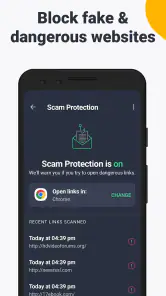
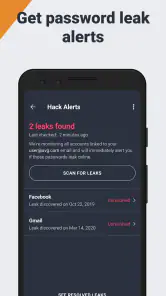
When I judge a phone security app, I care less about dramatic warnings than whether it fits into ordinary use without getting in my way. AVG AntiVirus & Security is a free Android tools app from AVG Mobile, with an average rating of 4.6 from around 7.9 million ratings and over 100 million installs. Its current version is 25.22.0, and it is rated for Everyone. The core appeal is straightforward: help guard against scams and malware, with extra tools such as app locking, hack alerts and a private photo area. Some features are offered through in-app purchases, so free to install does not mean every option is free.
Where AVG fits into a phone-security routine
I see AVG as a good fit for people who want more than a single scan button but do not want to assemble several separate security and privacy apps. The mix of malware protection, scam-related alerts, app locking and photo privacy gives it a practical role on a phone used for banking, shopping, messaging and personal pictures. It is especially appealing if you like having a place to review alerts and choose extra safeguards yourself.
It is less compelling if your main goal is to make a slow phone faster, free up storage automatically or replace careful online habits. Security software can flag risks, but it cannot make a suspicious message trustworthy or guarantee that every account is safe. If your needs are limited to basic device safeguards and you prefer not to add another app, the protections already available on your phone may be enough.
The Latest on AVG AntiVirus & Security
What to expect from everyday use
Security software is not a speed booster, and I would not install AVG expecting it to make an older phone feel new. Its value is preventative: checking for risks and offering extra controls when you need them. Scans and alerts can add activity, so I would run a manual check when the phone is charging or idle rather than at the exact moment I am trying to open a large file or join a call. That small habit makes security checks less likely to feel like an interruption.
How smooth it feels will depend on the device and what else is running. I would pay attention to the phone’s own battery and storage screens after enabling any background protection, rather than assuming every handset will behave the same. If your phone is already short on space or slows down under routine multitasking, keep the setup lean: enable the protections you actually plan to use and avoid treating every optional tool as essential.
A quick way to decide what belongs on your phone
Before switching on every option, I would match each tool to a situation that genuinely comes up. For example, if friends or family sometimes borrow your phone, an app lock may be more useful than extra scanning; if you rarely share the device, that control may add little to your routine. This simple test keeps the app’s broader toolkit from becoming a collection of settings you never revisit.
I would also judge the alerts by whether they help me make a clear next move. A warning should prompt a closer look at the named app, file or connection, not automatic panic or repeated scans. If I cannot tell what action an alert is asking for, I would read its details before changing anything, particularly before removing an app that contains work or personal information.
More From Our News Desk

Android Auto Makes the Case for Quieter Car Software

MobiOffice: Transforming Mobile Productivity with Seamless Integration

EA SPORTS FC™ Mobile Soccer: Redefining Mobile Sports Gaming

How Microsoft OneDrive Became a Mobile Productivity Giant

How Google Translate Breaks Language Barriers Effortlessly

Why Google Sheets Is the Ultimate Mobile Productivity Tool
Getting Started with AVG AntiVirus & Security
Once you download AVG AntiVirus & Security, you're greeted with a sleek, user-friendly interface that screams simplicity. No need for a PhD in computer science here. You can easily navigate through its various features, making it a breeze for even the most tech-challenged folks.
Installation is quick and painless. A couple of taps, and you’re ready to roll. The app doesn’t hog much space, which is a plus for those constantly battling with storage issues. It runs in the background quietly, without draining your battery life – a serious win for those of us who are perpetually on 1%.
Features That Pack a Punch
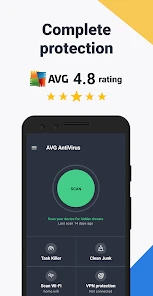
This little gem is packed with features. First off, there’s the real-time protection, which is like having a bodyguard for your phone. It scans apps, games, and even files you download, ensuring they’re free from any nasties. The app’s anti-theft feature is a lifesaver too. Lost your phone? No worries. You can track it down, lock it, or even wipe your data remotely.
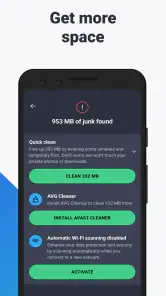
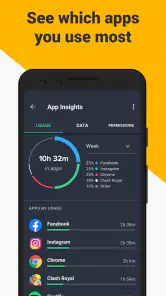
And let’s not forget the Wi-Fi security scanner. We all love free Wi-Fi, but it’s not always safe. AVG checks the network’s encryption, so you can browse without a care in the world. Plus, the app manager helps you keep tabs on which apps are sucking up your data and storage, making it easier to clean house when needed.
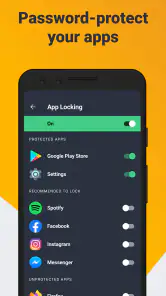
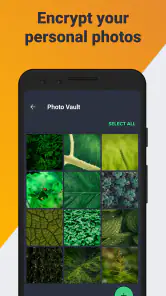
For a practical routine, I would use the app locker for sensitive apps I might hand over briefly, while keeping the photo vault for images I do not want sitting in the everyday gallery. These tools solve different problems: locking an app adds a barrier to opening it, while a vault is about separating selected photos. Neither replaces a strong device passcode, and I would check how each feature works on my phone before relying on it for anything irreplaceable.
On public Wi-Fi, a network check is a useful prompt to pause and think before signing in to an account or handling private information. It is not a reason to assume every connection is safe. If a network seems suspicious, I would simply avoid using it for sensitive tasks. Likewise, an alert about a possible threat deserves a careful read; reacting to the specific warning is more useful than running repeated scans out of anxiety.
A useful way to avoid turning these tools into busywork is to decide in advance what each one is for. I would reserve the app locker for apps that expose private conversations or account details if someone borrows my phone, and use the photo vault only for selected images rather than treating it as a second general-purpose gallery. Before moving anything important, I would confirm that I can access it again and understand how the vault behaves on my device. That quick check matters more than collecting every available safeguard.
Performance and Usability
Now, you might be wondering, does this app slow down your phone? Surprisingly, no. AVG AntiVirus & Security runs smoothly without any noticeable lag. It’s optimized to work seamlessly in the background, keeping your device secure without compromising performance. It’s like having a security guard that’s invisible but always on duty.
Updates are regular, ensuring you’re always protected against the latest threats. And if you’re the forgetful type, the scheduled scans are a godsend. Set it and forget it, and let AVG do its magic while you sip on your morning coffee.
A realistic use case is a busy day of switching between messages, shopping, and a café’s Wi-Fi. I would let protection handle routine checks, review any alert before dismissing it, and save a deeper scan for a quiet moment rather than interrupting a payment or video call. If the phone feels busy, pausing an optional scan is a sensible trade-off; security tools should support normal use, not turn every moment into maintenance.
On a device that is already juggling navigation, music and a long video call, I would avoid starting a manual scan just because I have a spare moment between tasks. The practical question is not whether a scan is useful, but whether it needs to happen right now. Waiting until the phone is plugged in and less busy is a simple way to keep security maintenance from competing with the activity that matters.
If you are deciding whether to keep it installed, give the app a short trial as part of your normal routine rather than judging it during one unusually quiet session. Notice whether its alerts are clear enough to act on, whether you actually use the privacy tools, and whether your phone still feels comfortable during your usual workload. If the extras remain untouched, removing them from your routine—or choosing a simpler setup—may make more sense than keeping features for their own sake.
Compared with relying only on built-in phone protections, AVG puts several security and privacy controls together in one app. That can suit someone who wants a visible place to check for concerns and manage app locking or photo privacy. On the other hand, people who prefer fewer background tools, already feel well served by their device’s built-in safeguards, or do not need the extras may be happier keeping their setup simpler. The app is most useful when its added controls match a real concern, not just because more features sound reassuring.
Compared with installing separate apps for a scanner, a private photo space and app access controls, AVG’s all-in-one approach is convenient: I can decide whether those tools belong in my routine without managing several utilities. The trade-off is that a broader security suite may offer more than a person who only wants occasional checks needs. If you already trust your phone’s built-in protections and keep your app choices conservative, the lighter alternative may be the better one. I would choose based on a concrete need, such as wanting an extra barrier around private apps, rather than on the assumption that more security software is automatically better.
One point worth checking before committing is the purchase screen: although the app is free to install, optional in-app purchases range from $0.99 to $119.99 per item. I would look closely at what is included in the free experience and whether a paid option solves a problem I actually have before buying. That is especially relevant if all I want is occasional scanning rather than a broader set of privacy tools.
For an older or storage-constrained phone, I would also be selective about what I enable and keep an eye on the device’s own battery and storage indicators. There is no universal performance result that applies to every handset, so my test would be straightforward: use the phone as usual, then decide whether the added protection and privacy controls justify their place. If the device becomes less pleasant to use, I would first reconsider optional features and scan timing rather than assume every feature must stay on.
One question people often have is whether an alert means they should immediately delete an app or disconnect from a network. I would read the warning carefully and follow what it actually identifies instead of reacting to the mere presence of an alert. Another practical question is whether the app is worth installing if you mostly use familiar apps and home Wi-Fi. In that case, the extra tools may still be useful for app locking or photo privacy, but the benefit is smaller if you will not use those controls.
Who will get the most from it
I would recommend AVG most readily to someone who wants a single place for extra checks and privacy controls, especially if their phone is shared occasionally or they often install apps and connect away from home. It is also a reasonable choice for a less confident user who appreciates seeing a security warning and then deciding what to do, rather than trying to manage several separate utilities.
Someone who uses a recent phone conservatively, sticks to trusted apps and wants the fewest background services may be better off with the built-in protections and careful habits they already have. The same goes for a person whose only goal is a faster handset: a security app is not a substitute for managing storage, removing unused apps or addressing an aging device. I would skip AVG if the extra controls do not solve a problem I actually face.
Final Thoughts
In a world where cyber threats are as common as cat videos, having a robust security app is a must. AVG AntiVirus & Security does a solid job of keeping your device safe without being a nuisance. It’s intuitive, effective, and doesn’t cost a dime for the basic version. For anyone looking to add an extra layer of security to their digital life, this app is a no-brainer.
So, if you’re serious about safeguarding your smartphone, give AVG a shot. Who knows, it might just save you from a digital disaster.
My performance verdict is positive with a practical caveat: I like AVG best as a set of targeted safeguards, not as a reason to stop thinking about downloads, networks, or account security. Its broad mix of protection and privacy tools will appeal to people who want those controls gathered together; someone who values the lightest possible setup should compare that convenience with the simplicity of using built-in options alone. Choose the features you will use, keep scans out of your busiest moments, and the app is easier to live with day to day.
AVG AntiVirus & Security Frequently Asked Questions
Is AVG AntiVirus & Security an Android app or an iOS app?
AVG AntiVirus & Security is an Android app, intended for compatible Android phones and tablets rather than iPhones or iPads. If you use an Apple device, look for an AVG product designed for iOS in the App Store. On Android, check your operating system version before installing: the app requires Android 9 or later.
Who makes AVG AntiVirus & Security?
AVG Mobile develops AVG AntiVirus & Security. It is a tools app focused on mobile security, bringing together features such as scam and malware protection, a virus cleaner, hack alerts, an app locker, and a photo vault. If you are comparing security apps, consider which of these functions you want and whether they suit how you use your phone.
Is AVG AntiVirus & Security suitable for children?
The app has an Everyone age rating, so it is presented as suitable for a general audience. Its purpose is mobile security, with tools related to scams, malware, alerts, app privacy, and photos. Parents can still review the app’s features and any optional purchases with younger users, especially if they share access to a device or its payment settings.
How much storage space does AVG AntiVirus & Security need?
Before downloading, it is sensible to check that your phone has enough available storage for a new app and its updates. AVG AntiVirus & Security offers several security and privacy tools, including a virus cleaner, hack alerts, an app locker, and a photo vault. You can review the installation details shown for your device before proceeding, then keep some room available for normal app updates.
Can I use AVG AntiVirus & Security on an iPhone or iPad?
AVG AntiVirus & Security is an Android app, so it is intended for compatible Android phones and tablets rather than iPhones or iPads. If you use an Apple device, check the App Store for an AVG product designed for iOS instead. On Android, check your operating system version before installing, since the app requires Android 9 or later.
Pros
- Real-time threat detection
- Privacy protection features
- Device optimization tools
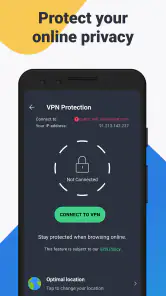
- VPN for secure browsing
- Anti-theft measures
Cons
- Frequent ad interruptions
- Limited features in free version
- Can slow down older devices
- Occasional false positives
- Subscription required for full access
- Category
- Tools
- Version
- 25.22.0









