AVG Cleaner – Storage Cleaner
- 63.95K
- 4.6
- Installs
- 100.00M
- Price
- Free

Screenshots
Analysis by Reviewed
Ever felt like your phone's performance is lagging or you just can't seem to find enough storage to save your cherished photos? Well, I've been there too, and that's exactly when I stumbled upon AVG Cleaner – Storage Cleaner. This nifty app has become my go-to solution for keeping my phone clutter-free and running smoothly.
The first-week appeal
My first impression was that the app makes phone maintenance feel approachable rather than technical. AVG Cleaner is a free productivity app from AVG Mobile, and its clear dashboard helps me decide whether I actually want to review a suggested cleanup instead of digging through settings and folders. It has a 4.6 average from around 1.9 million ratings, but what matters more to me is whether its tools fit a routine I can keep up.
For example, before a trip, I might look through photo suggestions while deciding which pictures I genuinely want to keep. That is more useful than deleting files blindly just to see a storage number change. I treat any proposed cleanup as a shortlist to inspect, not an instruction to accept automatically; personal photos and downloads are worth a second look.
Why AVG Cleaner Stands Out
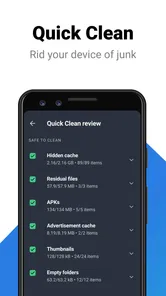
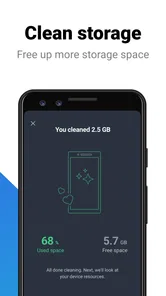
First things first, the interface of AVG Cleaner – Storage Cleaner is sleek and user-friendly. It's like having a personal assistant dedicated to optimizing your phone's performance. With just a few taps, you can clean up junk files, manage apps, and even improve battery life. It's surprising how much digital debris can accumulate over time, and this app handles it like a pro.
Easy Navigation and Features
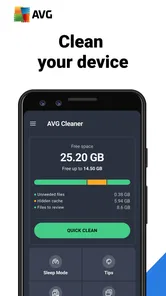
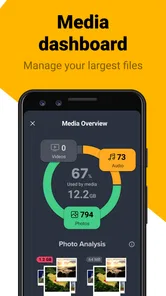
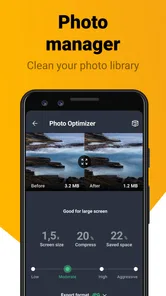
One of my favorite things about this app is its navigation. Everything is laid out in a way that even the least tech-savvy among us can figure it out. The dashboard gives a quick overview of your phone’s status, making it easy to decide what needs cleaning or boosting. Plus, the Smart Photo Clean-up feature is a game-changer. It scans through all your photos, finds duplicates or low-quality images, and lets you delete them effortlessly. Who knew clearing up space could be so satisfying?
Making cleanup a useful habit
The photo tool is most valuable when I use it selectively. Similar shots from an event can look nearly identical in a preview, yet one may be the version I want to keep. I review suggested images in small batches and check the actual photo before removing anything. This turns cleanup into a quick decision-making task, rather than an attempt to reclaim every possible bit of space at once.
For a realistic everyday case, imagine a phone that fills up after a weekend away: I would start with photo suggestions, then check which apps I no longer use before touching anything personal. That order makes the app a practical organizer, while leaving me in control of what stays. If I need a one-off, detailed look at storage folders, the phone’s built-in storage screen may be the better place to investigate; AVG Cleaner is more convenient for guided maintenance.
More From Our News Desk

Weather by Xiaomi Review: Clear at a Glance, Less Clear Up Close

X Under Pressure: Can It Recover When Posting Goes Wrong?

Clash of Clans Is Won Between the Battles

Android Auto Makes the Case for Quieter Car Software

MobiOffice: Transforming Mobile Productivity with Seamless Integration

EA SPORTS FC™ Mobile Soccer: Redefining Mobile Sports Gaming
Boosting Performance
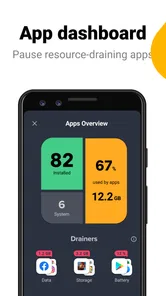
Now, let’s talk about performance. My phone used to slow down significantly when I had too many apps running in the background. AVG Cleaner offers an App Hibernation feature that pauses apps that are not in use, freeing up precious resources. It's like giving your phone a much-needed coffee break without turning it off.
Choosing what to hibernate
Hibernation is useful when an app I rarely open seems like a poor candidate to keep active, but I would not apply it indiscriminately. Apps that need to alert me or stay current may be less convenient if paused, so I consider how I use each one before choosing. A cleaner can help make this decision easier, but it cannot know which notifications or background activity matter to me.
That is also where expectations matter: cleaning storage and pausing apps are different jobs. I use the cleanup tools to review clutter and hibernation to manage apps I can comfortably leave inactive. If the phone is slow because of an issue unrelated to storage or background apps, a cleaner may not solve it; I would avoid treating a speed boost as guaranteed.
Battery Life Optimization
Battery life is another area where AVG Cleaner shines. The app provides insights into which applications are draining the battery and offers solutions to extend battery life. I've noticed a significant improvement in how long my phone lasts throughout the day after using these features.
In addition, AVG Cleaner has a simple yet effective Battery Profiles feature. Depending on my activities, I can switch between different profiles to either save battery or boost performance, which is incredibly convenient when I’m on the go.
Month-to-month value and trade-offs
Battery information is most helpful as a prompt to change a habit: if one app repeatedly stands out, I can decide whether I need it running as often, rather than expecting a profile switch to fix every drain. Before a long day away from an outlet, a saving-focused profile can be a sensible choice; when I need a responsive phone, I can make a different trade-off. I still keep an eye on essential apps so convenience does not come at the cost of timely alerts.
Compared with relying only on Android’s built-in storage and battery screens, AVG Cleaner brings several maintenance tasks together in a more guided flow. That convenience is its recurring strength. The built-in tools may be preferable for someone who wants fewer apps installed or likes to inspect settings manually, while this app suits someone who appreciates suggestions and a central place to review them.
Maintenance burden and sources of fatigue
The app is rated for Everyone, has more than 50 million installs, and its current version is 25.21.0. It first appeared on April 30, 2013, and its age shows in the sense that it is designed for ongoing upkeep rather than a single dramatic fix. I would not make cleaning a daily chore: checking only when storage feels tight or before a busy trip keeps the routine useful without turning phone maintenance into another task to manage.
It is free to start, with in-app purchases ranging from $1.49 to $39.99 per item. That makes it worth checking which options are available to me before paying for anything; I would first see whether the free tools address my actual problem. Repeated suggestions can also become tiring if I open the app expecting a major performance change every time. Its value is steadier when I use it for occasional decisions, not as a promise that every slowdown or battery issue will disappear.
A Final Word
Overall, AVG Cleaner – Storage Cleaner has made a noticeable difference in my phone's performance and storage management. It’s like having a cleaning crew for your phone, always ready to tidy up whenever necessary. If you're looking to enhance your phone’s efficiency without breaking a sweat, this app is definitely worth a try. And trust me, once you see how much better your phone can perform, you’ll wonder how you ever lived without it!
My longer-term verdict is more measured: I would keep it if its photo review, app management, and battery guidance save me time often enough to justify another utility on my phone. I would skip it if I already handle storage comfortably with Android’s built-in tools, or if I expect a cleaner to repair every cause of lag. Used selectively, AVG Cleaner can earn its space through small, practical maintenance wins rather than novelty alone.
When a guided cleaner is the right fit
I see the strongest case for this app on a phone where storage pressure builds gradually and the owner does not want to sort every folder manually. The suggestions can make a broad problem feel manageable: inspect similar photos, decide whether old apps still deserve space, and pause background activity only where that trade-off makes sense. Someone who enjoys fine-grained file management may find the built-in Android screens clearer, but a less technical user may appreciate having those decisions presented in one place.
It is also useful for people who take many pictures but do not want an automatic purge. The practical advantage is not simply spotting candidates; it is making review more deliberate. I would work through one event or time period at a time, compare suggested images against the originals, and leave anything uncertain untouched. That small workflow reduces the chance of deleting a meaningful photo just because two frames look alike in a thumbnail.
A sensible routine beats constant cleaning
I would not open a cleaner every morning or treat every notification about space as an emergency. A more sustainable pattern is to check when the phone warns that storage is getting tight, before downloading a large batch of travel media, or after an event that produced many near-duplicate shots. Then I would stop once there is enough breathing room for the next task. Chasing a perfectly empty storage bar can turn maintenance into needless work.
One useful distinction is between reclaiming space and keeping a phone responsive. If photos and unused apps are the issue, reviewing them can make a meaningful difference to available storage. If a phone is sluggish because of an older device, a demanding app, or another system problem, deleting a few files may not change how it feels. I would use the app to address the problems its tools can actually help with, then look elsewhere if the symptom continues.
What to check before accepting suggestions
Before confirming a cleanup, I would pay particular attention to personal media and anything downloaded for offline use. A file can look expendable when viewed in a cleanup suggestion but be the only copy I have or something I need during a trip. Reviewing a small group at a time is safer than selecting everything in one pass, especially when I am tired or rushing to free space.
For hibernation, I would begin with apps I recognize and rarely use, then consider whether I depend on them for messages, reminders, or background updates. If an app becomes less convenient after being paused, I would remove it from that routine rather than hibernate more aggressively. The benefit is control over app activity, not a universal setting that suits every person and every app.
Who may prefer another option
If I only need to remove a particular download or inspect which category is occupying storage, Android’s own settings are often the more direct route. They avoid adding another utility and can be a better fit for someone who already knows what they want to remove. Likewise, anyone who expects a cleaner to make an aging phone feel new should keep expectations modest: AVG Cleaner can support maintenance, but it is not a substitute for diagnosing a persistent device or software issue.
There is a small attention cost, too. A guided dashboard is convenient, but it still asks me to review recommendations and decide what matters. People who dislike prompts or prefer to manage their phone only when a specific problem appears may not want a regular cleaner in their routine. I would install it for the repeated, practical tasks I expect to use, not simply because the phone has a storage screen that looks untidy.
Keeping the value after the novelty fades
The first cleanup can feel satisfying because it turns an unclear storage problem into visible choices. That feeling naturally becomes less dramatic with time. What remains valuable is the occasional saved minute: finding photos worth reviewing, noticing an app that no longer belongs on the phone, or making a considered battery trade-off before a long day away from a charger. Those are modest benefits, but they are the kind that can justify keeping a utility installed.
My recommendation is therefore conditional rather than automatic. If I regularly run short on space, want help reviewing photo clutter, and am willing to check suggestions before acting, AVG Cleaner is a practical companion. If my storage is already under control or I prefer the simplest possible setup, the phone’s built-in tools may be enough. Its lasting value comes from a light, occasional maintenance habit—not from expecting every cleanup to produce a dramatic transformation.
AVG Cleaner – Storage Cleaner Frequently Asked Questions
How much storage space should I set aside to install AVG Cleaner?
Before downloading AVG Cleaner – Storage Cleaner, make sure your device has enough free space for the app itself and any temporary files it may need while running. The amount can vary by device and installation, so checking your available storage first is a sensible step. The app is intended to help manage storage after installation, but it still needs room to be installed.
Can I choose which files AVG Cleaner removes?
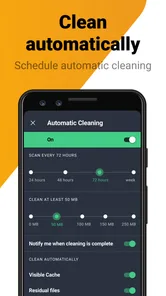
AVG Cleaner – Storage Cleaner scans for items it identifies as unnecessary and presents options for cleaning, so reviewing the proposed cleanup before proceeding is a prudent habit. Take care with any item you do not recognize, especially if you are unsure whether you still need it. Keeping a backup of important personal files is also a useful precaution before making changes to device storage.
Does AVG Cleaner delete photos, videos, or other personal files?
AVG Cleaner – Storage Cleaner is described as a tool for clearing unwanted files and hidden junk, but it is important to review cleanup suggestions before confirming a removal. Personal photos, videos, and documents may be valuable even when storage is limited, so do not select anything unless you are comfortable deleting it. Backing up important files can help you avoid losing something you want to keep.
Is AVG Cleaner – Storage Cleaner free to download, and are there paid options?
AVG Cleaner – Storage Cleaner is free to download, so you can try its cleaning tools without paying upfront. The app also offers in-app purchases, with options ranging from $1.49 to $39.99 per item. Check the purchase details shown in the app before confirming, and consider whether its additional features suit your needs.
What kind of app is AVG Cleaner, and who makes it?
AVG Cleaner – Storage Cleaner is a productivity app from AVG Mobile. Its focus is helping users manage phone storage and clean unwanted files, reflected in its description as a tool for removing hidden junk. It has an Everyone content rating, making it suitable for a general audience. The app has been available since April 30, 2013.
Pros
- Efficiently cleans junk files
- User-friendly interface
- Boosts device performance
- Customizable cleaning options
- Regular updates
Cons
- May consume battery quickly
- Ads in free version
- Some features require premium
- Occasional false storage alerts
- Limited customer support












