Avant
- 5.40K
- 4.7
- Installs
- 500.00K
- Price
- Free

Screenshots
Analysis by Reviewed
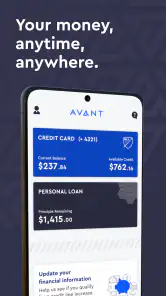
Managing a credit card or loan from a phone sounds simple, but the quality of the experience depends on how quickly I can find the information that matters. Avant is a finance app from Avant, LLC that puts payments and transaction checking in one mobile workspace. I found it most useful as a focused account-management tool rather than as a complete personal-finance planner.
The app is free to download and is suitable for everyone from an age-rating perspective. Its purpose is practical: sign in, review activity, make a payment, and keep an eye on an Avant card or loan without relying on a desktop browser. If you already use one of those products, the app can make routine administration less awkward. If you are looking for budgeting, investment tracking, or a single dashboard for several unrelated banks, I would set expectations differently.
How the everyday Avant workflow feels
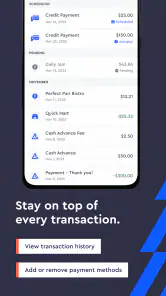
My preferred routine starts with checking recent transactions before doing anything else. That small habit gives me a quick way to spot a purchase I recognize, notice a balance change, and decide whether a payment needs attention. The app’s store summary emphasizes payments and transaction viewing, and that matches the role I would give it in daily use: a direct control panel for an Avant account.
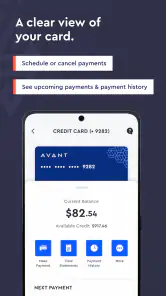
For a normal payment, I would open the account, review the amount and available account details, then move through the payment process carefully instead of tapping through automatically. Finance apps are not the place for rushed gestures. A few seconds spent checking the selected account and amount can prevent the kind of mistake that is much more annoying to correct later.
This workflow is especially convenient when I am away from a computer. Someone who receives a reminder while commuting, checks a balance before making a purchase, or wants to review activity after an unfamiliar transaction can handle that first step from a phone. The value is less about elaborate tools and more about reducing the number of steps between noticing something and dealing with it.
I would still treat the app as one part of a responsible money routine. I would not use a transaction screen as a replacement for a monthly budget, a debt payoff plan, or a full review of recurring expenses. Avant helps me manage the Avant relationship; it does not turn that relationship into a complete overview of every financial account I have.
What to check before relying on it
Before making the app part of a payment habit, I would confirm that I can sign in successfully, identify the correct account, and recognize where transaction history and payment actions are located. That initial orientation matters because a finance app is only useful when I can reach the right function without hesitation.
I would also make sure my phone is running a compatible system. The listed minimum is Android 6.0, so the app is accessible on many older Android devices, although an older phone may provide a less comfortable experience than a recent model. On iOS, I would check the current store requirements before installing, since compatibility details can differ by platform.
The current version is 4.7.0. I do not see that number as a reason to expect a particular feature set; it is simply useful to know which release is installed when troubleshooting or comparing behavior after an update. Keeping the app current is sensible for a finance tool, but I would still read update notes and recheck familiar screens after a major change.
Settings and habits that deserve attention
The most important “setting” is not a hidden switch but the way I organize my own use. I keep account-management apps in a place where I can reach them without searching, and I avoid saving myself from thinking by opening the app only when something is urgent. A brief scheduled check is more reliable than waiting until a payment deadline feels close.
When reviewing transactions, I would use a consistent pattern: scan the newest activity, compare unusual amounts with receipts or messages, and then leave the screen only after deciding whether anything needs follow-up. This turns a simple list into a repeatable check. It is also more useful than repeatedly opening the app without a clear purpose.
For payment tasks, I recommend slowing down at the confirmation stage. Check the account, amount, and date shown in the flow, then keep the confirmation information available until the action is clearly complete. I would not assume that leaving a screen means a payment was submitted, and I would avoid starting the same payment again merely because the interface took a moment to respond.
Security habits matter just as much as convenience. I would use the device’s normal lock protection, avoid handling account details on a shared phone, and sign out or secure access appropriately if another person regularly uses the device. These are not special Avant functions; they are sensible boundaries for any app that exposes financial activity.
Another useful habit is separating “checking” from “acting.” I might open the app simply to inspect transactions, while opening it at another planned time to make a payment. That distinction reduces impulsive decisions and gives me a chance to gather the amount I actually intend to pay before entering the payment flow.
Faster patterns for repeat users
Experienced use comes from repetition rather than from pretending the app has shortcuts that are not documented. I would establish one short sequence for every visit: authenticate, check the latest activity, verify the balance or account context, and then choose either payment or exit. After a few repetitions, that sequence becomes quicker without sacrificing care.
A realistic example is a user who gets paid near the end of the week and wants to manage an Avant card before weekend spending. Instead of waiting for several days and then trying to reconstruct activity, I would review the newest transactions first, decide what payment is comfortable, and complete the action with the confirmation details in mind. The app supports the administrative part; the user still supplies the financial judgment.
Another pattern is useful after returning an item. I would wait until the relevant transaction or account change is visible before treating the matter as settled. That does not mean the app controls the merchant’s process. It simply gives me a place to check what has appeared on the Avant side, rather than relying only on a receipt or memory.
I also like using transaction review as a prompt for record keeping. If I am tracking spending in a separate budget, I can use the Avant activity list to update that record at a consistent time. This avoids trying to make the finance app perform a budgeting job it is not designed to replace, while still making its transaction view part of a broader system.
For households, I would be cautious about informal sharing. A partner may help remember a payment or discuss a transaction, but passing around login access can create confusion about who completed an action. A better habit is to keep account access controlled and discuss the relevant amount or date separately. The app is convenient, but convenience should not erase accountability.
Where it compares well with usual alternatives
Compared with managing the same account through a mobile browser, a dedicated app usually feels more direct because it is built around the account rather than around a general website. I prefer an app when I expect to check activity frequently or make a payment from a phone. The focused purpose also makes it easier to build a consistent routine.
Compared with a general budgeting app, Avant has a narrower advantage: it is closer to the source of the Avant card or loan activity. A budgeting app may be better for combining accounts, categorizing household spending, or viewing long-term patterns across providers. I would choose that kind of tool when the main question is “Where does all my money go?” rather than “What is happening on this Avant account?”
Compared with a spreadsheet, the app is faster for immediate account checking because I do not have to copy every transaction manually before seeing the latest activity. A spreadsheet remains better for custom calculations, payoff scenarios, and personal categories. In my view, the strongest setup can use both: Avant for current account administration and a separate method for broader planning.
Compared with relying on email or paper reminders, the app gives me a more active way to inspect the account and initiate a payment. However, I would not let an app replace every reminder method. If a payment is important, I prefer a calendar habit or another personal prompt as a backup, because a phone notification or a quick glance is not the same as a completed financial plan.
Limits that matter before committing
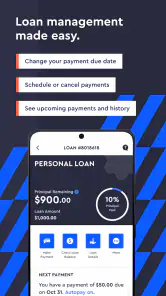
The biggest limitation is scope. This is not the app I would recommend to someone who wants detailed cash-flow forecasting, investment management, shared household budgets, or extensive financial education in one place. Its strength is managing an Avant card or loan with less friction, and that focused design can feel restrictive if I expect a full money-management suite.
It is also not a substitute for reading account terms or understanding borrowing costs. A clean mobile interface can make an account easier to operate, but it cannot make a payment decision automatically wise. I would still consider my wider budget, payment timing, and debt priorities outside the app.
Another practical limitation is that mobile access depends on the phone itself. A damaged device, weak connection, forgotten credentials, or an update that changes the layout can interrupt a routine. I would keep an alternative way to access important account information and avoid waiting until the last possible moment to handle a payment.
Users with several financial providers may also find themselves switching between apps. Avant can be the right tool for its own account while still being only one piece of the picture. If reducing app switching is more important than provider-specific access, a broader financial dashboard may suit you better, provided you are comfortable with that service’s approach to account connections and data handling.
I would skip Avant if I do not have an Avant card or loan to manage, because its focused purpose would offer little reason to install it. I would also look elsewhere if I need sophisticated reports, custom categories, or a consolidated view of multiple institutions. The app makes more sense for someone who values direct access over an extensive feature list.
Who gets the most value from the app
The best match is an Avant customer who regularly checks transactions and wants a convenient way to handle payments from a phone. It is also useful for people who prefer a simple, repeatable workflow instead of navigating a large financial platform. The free price removes a basic barrier to trying it, although the value still depends on actually having an account relationship that the app can manage.
The public response is encouraging: Avant holds a 4.7 average from around fifty-eight thousand ratings, with over five hundred thousand installs. Those figures suggest that many people find the mobile experience worthwhile, but I would interpret them as a sign of broad acceptance rather than proof that every user will have the same experience.
The app is from Avant, LLC and has been available since February 11, 2020. Its Everyone age rating makes it broadly approachable, but age suitability does not remove the need for careful financial decisions. A younger or inexperienced user may still need help understanding payments, balances, and borrowing responsibilities outside the app itself.
One of the less obvious benefits is psychological: having a quick transaction check can make it easier to confront an account regularly instead of avoiding it. That only works if I use the app deliberately. Opening it repeatedly without reviewing the information, or making payments without considering the rest of my budget, would turn convenience into false reassurance.
My verdict after building a routine around it
I see Avant as a practical companion for a specific financial relationship, not as an all-purpose money center. Its best qualities are focus, accessibility, and a workflow built around the actions I am most likely to need: checking transactions and managing payments. Those qualities matter when I want to deal with an account quickly from a phone.
My recommendation is strongest for existing Avant users who will create a simple habit: check recent activity, verify the account context, make payments carefully, and keep broader budgeting somewhere more suitable. That combination uses the app for what it does well without asking it to solve problems outside its scope.
If I needed multi-bank planning, detailed spending analysis, or advanced debt modeling, I would pair it with another tool or choose a broader alternative. If I simply wanted dependable mobile access to an Avant card or loan, I would consider installing it. The right way to use Avant is as a focused account-control tool, supported by careful payment habits rather than treated as a complete financial plan.
Overall, I would recommend Avant to the person who wants less friction in routine account management and is willing to remain attentive at the moments that matter. It is not flashy, and that is part of its appeal. When the job is to review activity and handle a payment without opening a desktop browser, a focused app can be exactly enough.
Pros
- Clean
- modern interface that is easy to navigate
- Useful tools are organized clearly for quick access
- Runs smoothly on compatible Android and iOS devices
- Regular updates can improve features and reliability
- Helpful for users seeking a focused
- straightforward experience
Cons
- Some features may require a paid subscription
- Performance can vary on older devices
- Initial setup may take time for new users
- Limited options for advanced customization
- Availability of certain features may vary by region

- Category
- Finance
- Version
- 4.7.0











