AAA Auto Club
- 8.75K
- 4.8
- Installs
- 1.00M
- Price
- Free

Screenshots

Analysis by Reviewed
My first question with AAA was not how many tools it could put on one screen, but what I would actually do if I needed help away from home. An auto-club app can be useful in a stressful moment, yet only if the account is ready and the right option is easy to find. I’d set it up before a trip, try the main screens in a calm moment, and keep a backup way to reach assistance. That simple preparation is what makes this kind of app feel practical rather than merely reassuring.
Making the app useful for a household
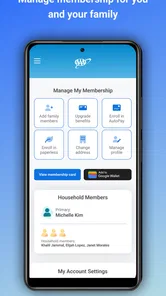
AAA makes the most sense when more than one person in a household shares driving or travel planning. Before a trip, I’d agree on who has access to the account and make sure the person behind the wheel knows where the relevant membership details and help options are. That small bit of coordination can prevent the passenger from having to explain unfamiliar menus while the driver is dealing with a problem.
It can also be a useful handoff tool when one person plans a journey and another drives it. I would check travel details and likely fuel stops in advance, then pass on the decisions that matter rather than expecting the driver to browse while moving. The app does not remove the need for good judgment; it can make the preparation more organized if everyone knows what it is being used for.
What to check before relying on a screen
If I open a page and it does not look right, I avoid assuming that the information has updated just because the app launched. I check whether the phone has a connection, return to the screen once, and give it a moment before deciding what to do next. If the information is time-sensitive, I cross-check it with a tool suited to that task instead of treating one delayed screen as definitive.
For a roadside request, I would also distinguish between a screen that is slow and a request that has already been sent. Repeating a submission without checking can create confusion, so I’d pause and look for a confirmation or status before trying again. If I cannot tell whether the request went through and the situation is urgent, I would use another available route to seek help rather than spending too long troubleshooting the app.
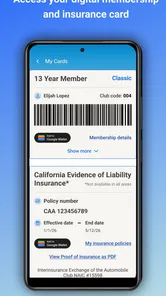
People may also wonder whether AAA replaces a membership card, insurance paperwork, or a navigation app. I would treat it as a convenient place to access AAA-related services, not as a reason to discard every other option. Keeping essential information available in a familiar backup format is sensible, particularly on a long drive or when another household member may need to act.
For drivers who use AAA services regularly, the app is a reasonable companion to keep ready. For someone who wants only directions or occasional fuel comparisons, a dedicated tool may be simpler and more focused. My recommendation is to try it if its auto-club role fits your routine, then decide after checking that the screens you care about are easy to reach on your own phone.
More From Our News Desk

Weather by Xiaomi Review: Clear at a Glance, Less Clear Up Close

X Under Pressure: Can It Recover When Posting Goes Wrong?

Clash of Clans Is Won Between the Battles

Android Auto Makes the Case for Quieter Car Software

MobiOffice: Transforming Mobile Productivity with Seamless Integration

EA SPORTS FC™ Mobile Soccer: Redefining Mobile Sports Gaming
When I first stumbled upon the Auto Club app, I was genuinely curious to see what it could offer to someone who spends a fair amount of time on the road. I mean, who wouldn't want a pocket-sized assistant for everything car-related? From managing roadside assistance to keeping tabs on your insurance details, this app promises a lot. So, let's dive into how it actually performs in real life.
Where road-trip plans can get stuck
The first practical question is whether an auto-club app earns a place on your home screen when you already have a map app, a membership card, and a phone number for help. For me, its value is less about replacing every driving tool and more about reducing the scramble when several car-related tasks come up at once. AAA is a lifestyle app from American Automobile Association, Inc., and its 4.8 average across around 32,000 ratings suggests many people find that bundled approach useful.
That convenience has a boundary: an app is only useful if you can reach it and understand what to do when you need help. Before relying on it for an urgent situation, I’d make sure I can sign in and find the roadside-help area while I’m still at home. If a screen takes longer than expected, guessing through menus on a shoulder is a poor plan; knowing the route through the app in advance is a small but worthwhile safety habit.
Getting Started with Ease
Firing up the Auto Club app for the first time was surprisingly smooth. The interface is clean and intuitive, making it easy for anyone to navigate. After a quick sign-up process, you're greeted with a dashboard that organizes everything neatly. Whether it's accessing your membership details or finding the nearest gas station, the app's layout ensures that you won't be fumbling around trying to find what you need.
Setup checks that save time later
I’d treat the first session as preparation rather than a quick browse. Check that your membership details are accessible, and take a moment to identify where roadside assistance and travel tools sit in the menus. If you’re setting up while away from home, use a reliable connection and give yourself time to deal with sign-in prompts instead of waiting until you’re already in a hurry. The app is free to download, but its usefulness for member services naturally depends on having the relevant AAA membership information available.
It is also worth keeping expectations clear: this is not automatically a substitute for every car app or document you use. I’d keep any essential vehicle and insurance information accessible in the way that already works for me, then use AAA as a convenient additional route. That gives me a fallback if a login or connection slows me down, without turning one app into a single point of failure.
A Handy Tool for Roadside Assistance
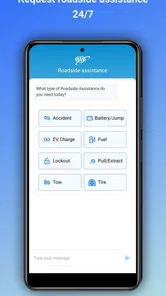
One of the standout features of the app is its roadside assistance. Picture this: you're stuck on the side of the road with a flat tire. Instead of panicking, you whip out your phone, tap a few times, and voila! Help is on the way. The app tracks your location, so you don't have to worry about giving directions when you're already stressed out. It's like having a 24/7 support team in your pocket.
A useful real-world routine is to pull over somewhere safe before opening the app, then check that the location shown makes sense before proceeding. A phone’s location can be imperfect, especially around complicated roads or in places with weak reception, so I would not assume that a digital pin removes the need to describe a landmark or explain which side of a divided road I’m on. The app can make requesting assistance less cumbersome, but safe positioning and clear location details still matter.
Choosing the right tool for the moment
For everyday navigation, a dedicated maps app is usually the better choice: it is built around route planning, while AAA’s appeal is the broader mix of auto-club help, travel utilities, and member information. Likewise, a fuel-price comparison app may be more focused if finding the cheapest pump is the only task. I see this app as a useful hub for people who already value AAA services, not a reason to uninstall every specialist tool they trust.
That distinction matters for occasional drivers, too. Someone who rarely travels by car and does not use auto-club services may get little value from keeping another account and app on their phone. In contrast, a household that takes road trips, shares driving duties, or wants one place to start when a vehicle problem interrupts the day has a clearer reason to try it. AAA has over one million installs, but popularity alone does not make it the right fit for every driver.
Insurance and Vehicle Management
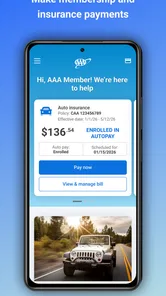
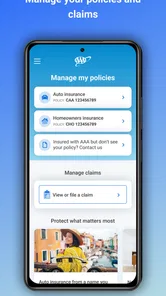
Managing insurance details can be a headache, but not with this app. It stores all your vital information securely, allowing for quick access whenever you might need it. Plus, it even sends reminders about renewals and policy updates. On top of that, you can keep track of your vehicle's maintenance schedule. It's like having a personal assistant who never forgets a thing!
For a practical check, I’d open the information I expect to need before a trip rather than assuming I’ll remember where it is later. If other drivers in the household may need access, it is sensible to agree on who can sign in and where the relevant details are kept; that avoids a last-minute handoff of a locked phone. The app is rated for Everyone, and its current version is 3.3.3, but I’d still make my own decision about what personal information I want to keep available on a mobile device.
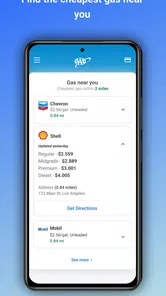
Another cool aspect is the gas station finder. It's quite nifty when you're in unfamiliar territory and running low on fuel. The app not only shows you nearby stations but also highlights the ones with the best prices. Talk about convenience, right?
Here’s how I’d use that feature on an ordinary travel day: check for fuel options before the tank becomes a source of stress, then compare the nearby choices against the route I’m already taking. The lowest displayed price is not always the best stop if it means a long detour or an awkward return to the highway. A little planning turns the finder into a decision aid rather than a reason to chase a small saving at the cost of time.
A Few Hiccups Here and There
Now, while the app is pretty impressive, it's not without its quirks. Occasionally, I noticed a lag in updating the real-time traffic conditions. It's not a deal-breaker, but it's something to keep in mind if you're relying on it for time-sensitive information. Additionally, I wish there were more customization options for the user interface. It would be great to tailor it more to personal preferences.
If a page seems slow or information does not refresh, I’d start with simple checks: confirm the phone has a working connection, close and reopen the app, and try again from a less congested spot. If the issue is limited to one screen, I would avoid repeatedly submitting the same request; first check whether anything has already gone through. For urgent roadside trouble, use the available contact route that you can access rather than spending valuable time troubleshooting a display.
When the problem may be elsewhere
Not every frustrating moment points to a fault in the app. A weak signal, a phone with little remaining battery, or difficulty describing an exact location can complicate any digital assistance request. I’d keep the phone charged before a long drive and, when safe, note a road name, nearby exit, or visible landmark. If the app is working but the situation itself is unclear, concise details can help more than tapping around for another screen.
Travel conditions also change quickly, so I would treat traffic information as a helpful reference rather than the final word on whether a route is clear. For a time-critical drive, a dedicated navigation tool may be a better primary guide, with AAA serving as the place I turn for its auto-club and travel-related needs. That division of labor is more realistic than expecting one app to be equally strong at every task.
Who I’d recommend it to
I’d consider AAA if I use its membership services, drive often, or want a convenient place to begin when a trip brings together assistance, travel planning, and vehicle details. The app is free, and it has been available since June 12, 2017, with a minimum operating-system requirement of version 8.0. Those details make it approachable for many users, although I’d still check that my phone and account are ready before depending on it away from home.
I’d skip it if I only want turn-by-turn directions, do not expect to use auto-club services, or prefer keeping every task in a specialized app. For someone who fits the intended use, the main benefit is having a familiar starting point—not a guarantee that every screen will load instantly or every trip problem will disappear. My practical verdict is positive, with the advice to set it up before you need it and keep a backup plan for the moments when your phone, connection, or location information lets you down.
All in all, the Auto Club app is a solid choice for anyone looking to have a reliable companion on the road. It's packed with features that make life easier, from emergency assistance to smart vehicle management. While it has a few minor issues, its benefits far outweigh them, making it a must-have for road warriors like myself. Ready to hit the road with confidence?
AAA Auto Club Frequently Asked Questions
Can I use Auto Club to find travel tools and discounts?
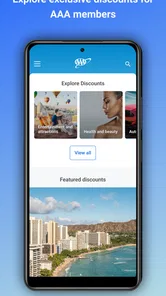
Auto Club is designed to bring AAA resources together on your phone, including discounts and travel tools. These options can be useful when planning a trip or looking for member benefits. The services available to you may depend on your AAA membership and its terms, so review the relevant details before relying on a particular discount or travel service.
What devices can I install Auto Club on?
Auto Club is available for Android and iOS devices. Android users need version 8.0 or later, and the current app version is 3.3.3. Check that your device meets the operating-system requirement before downloading, then install it through the relevant app store. The app is free to download, although membership-related services may have separate terms or costs.
Is Auto Club free to download, and what should I know about membership costs?
Auto Club is free to download, but the app itself is not the same as an AAA membership. Membership may be relevant to services such as roadside assistance and discounts, so check the current membership options and terms before relying on a particular benefit. This helps you understand which services are available to you and whether any separate costs apply.
Who makes Auto Club, and is it suitable for everyone?
Auto Club is a lifestyle app developed by American Automobile Association, Inc. Its content rating is Everyone, so it is classified as suitable for a broad audience. The app focuses on automotive and travel-related services, including roadside help, discounts, and travel tools, making it most relevant to people who want AAA resources available on their phone.
What is Auto Club and how does it work?
Auto Club is an innovative app designed to streamline your automotive experience by providing a range of services such as roadside assistance, vehicle maintenance tracking, and insurance management. Users can easily track their vehicle's service history, receive reminders for upcoming maintenance, and access emergency roadside services with just a few taps on their smartphone.
Pros
- User-friendly interface
- Comprehensive service options
- Real-time traffic updates
- 24/7 roadside assistance
- Exclusive member discounts
Cons
- Limited to specific locations
- Requires membership for full access
- Occasional app crashes
- Some features need internet
- Infrequent app updates












