AAA Mobile
- 24.93K
- 4.5
- Installs
- 10.00M
- Price
- Free

Screenshots
Analysis by Reviewed
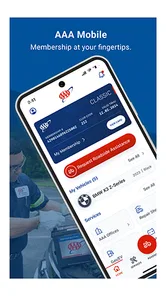
I use AAA Mobile as a practical travel companion rather than something I open for entertainment. It is a free lifestyle app from American Automobile Association, Inc., built around bringing AAA services to a phone. That focus makes the most sense when I’m planning a drive, away from home, or trying to sort out a car-related need while already on the move. It is less compelling if I only want a general map or a multipurpose travel planner.
When a network connection matters
Many useful moments with a service app begin with a question: what help is available here, what should I do next, or where do I need to go? Those are situations where a reliable connection can shape how smoothly the experience goes. I treat AAA Mobile as a way to reach relevant services, not as a substitute for preparing before a trip. If I expect to be in an area with patchy reception, I’d check what I need while I still have a solid connection and keep essential travel details accessible separately.
That small habit is especially useful when plans change. A detour, a late departure, or a problem with the car can make it harder to stop and search across several apps. Having AAA’s service access in one place may simplify the first step, but a phone still needs enough battery and connectivity to be useful. I would not wait until I’m stranded on a quiet road to install the app, sign in, or learn where its key options are.
Useful in the middle of ordinary travel
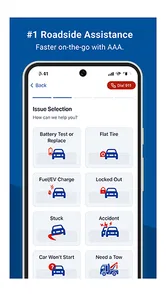
The app fits best into the in-between moments: checking what support is relevant before setting off, looking for help while travelling, or handling a car-related task without sitting at a desktop. For example, if I’m preparing for a weekend drive and notice a concern with the car, I can open the app before leaving and see whether AAA’s services help me decide what to do next. That’s a more sensible workflow than trying to work it out while pulled over in an unfamiliar place.
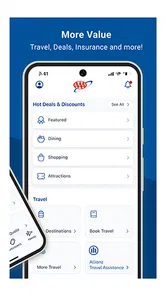
AAA Mobile is also a better match for people who already use or are considering AAA services than for someone who simply wants turn-by-turn navigation. A maps app is designed to guide a route; a roadside or membership-focused service app has a different job. I’d use them alongside each other when needed, rather than expecting one to replace the other. The distinction matters because the value here comes from access to AAA, not from being an all-purpose travel dashboard.
What I’d do if the app or connection lets me down
When a service app is involved in a time-sensitive situation, I like to have a fallback that doesn’t depend on tapping around. I’d keep my phone charged, make sure I can access my account before travelling, and know how to reach help through another available channel if the app is slow or the signal drops. That isn’t a knock on AAA Mobile; it’s sensible preparation for any phone-based service when the stakes are higher than casual browsing.
If a screen takes too long to load, I’d first check whether the connection is the problem, then try again somewhere with better reception rather than repeatedly tapping options. If the app itself seems unresponsive, restarting it is a reasonable basic step, but I wouldn’t assume that resolves every issue. The practical takeaway is to explore the app at home, when there’s time to get comfortable, instead of learning its layout during a stressful roadside moment.
More From Our News Desk

Weather by Xiaomi Review: Clear at a Glance, Less Clear Up Close

X Under Pressure: Can It Recover When Posting Goes Wrong?

Clash of Clans Is Won Between the Battles

Android Auto Makes the Case for Quieter Car Software

MobiOffice: Transforming Mobile Productivity with Seamless Integration

EA SPORTS FC™ Mobile Soccer: Redefining Mobile Sports Gaming
Ratings, audience and everyday expectations
AAA Mobile has a 4.6 average from around 78,000 ratings, and it has been installed over five million times. It is free, rated for everyone, and its current version is 25.16.0, with Android 7.0 as the minimum operating system requirement. The app has been available since August 10, 2010, so it has a long history as a mobile service rather than being a new travel experiment. Those figures give useful context, but they don’t guarantee that every feature will suit every person or that a particular service is available in every situation.
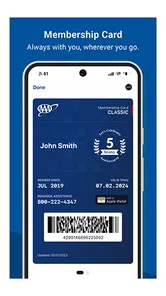
It is worth asking whether you need a AAA-specific app at all. If you don’t use AAA services and only want directions, a standard navigation app is likely the more direct choice. If you do rely on AAA, keeping its mobile access ready can be convenient, especially when you would otherwise have to search for service information while travelling. I’d also check that my account details are in order before counting on the app for a trip; a little setup ahead of time is much less frustrating than doing it under pressure.
Gameplay That Keeps You Engaged
First things first, AAA Mobile offers a gameplay experience that's both thrilling and immersive. The controls are intuitive, making it easy for anyone to jump right in, yet there's enough depth to keep you challenged as you progress. The developers have done a stellar job at balancing accessibility with complexity, ensuring that players of all skill levels can enjoy it.
Graphics and Sound Design
Now, let's talk about the graphics. Oh boy, are they stunning! The visual appeal of AAA Mobile is top-notch, with vibrant colors and detailed environments that make you feel like you're part of the game world. The sound design complements the visuals perfectly, with a soundtrack that gets your adrenaline pumping and sound effects that add a layer of realism to every action.
Storyline and Characters
One of the highlights of AAA Mobile is its engaging storyline. Without giving too much away, let's just say that the plot twists and turns will keep you on the edge of your seat. The characters are well-developed, each with their own unique backstories and personalities, making the story all the more compelling. It's like diving into a good book that you just can't put down.
In-Game Purchases
I know what you're thinking—"What about in-game purchases?" Well, AAA Mobile offers a fair system that doesn't force you to spend money to enjoy the game. While there are options to purchase cosmetic items or speed up progress, the game is perfectly enjoyable without spending a dime. It's refreshing to see a game that respects its players' time and money.
In conclusion, AAA Mobile is a fantastic choice for anyone looking to dive into a new mobile game. With its engaging gameplay, stunning graphics, captivating storyline, and fair in-game purchases, it's no wonder this game is making waves in the gaming community. So, why not give it a try? You might just find your new favorite game!
AAA Mobile Frequently Asked Questions
Is AAA Mobile available on both Android and iPhone?
AAA Mobile is available for Android and iOS devices, so it can be considered by people using either platform. Before downloading, check that your device runs a compatible operating system. Android devices need Android 7.0 or later. Once installed, the app provides mobile access to AAA services, as described in its store summary.
How much storage space does AAA Mobile need, and will it work on an older phone?
If you are deciding whether to install AAA Mobile on an older phone, start by checking your device’s operating system and available storage in its settings. Android devices need Android 7.0 or later. The app is intended to provide access to AAA services on the go, so a compatible device is the key first step before downloading.
Do I need to be a AAA member to use AAA Mobile?
AAA Mobile is designed to provide mobile access to AAA services, so it is most relevant to people interested in using those services. Downloading the app itself is free, but that does not mean every AAA service is included at no cost. Consider your membership and the services you intend to use when deciding whether the app fits your needs.
Who develops AAA Mobile, and who is it intended for?
AAA Mobile is a lifestyle app developed by American Automobile Association, Inc. Its store age rating is Everyone, so it is presented as suitable for a broad audience. The app’s summary describes it as a way to access AAA services on the go, making it relevant to people who want those services available from a mobile device.
What devices and operating systems can run AAA Mobile?
AAA Mobile is available for Android and iOS devices. The Android version requires Android 7.0 or later, so it is worth checking your device’s operating system before downloading. If your phone or tablet meets that requirement, you can install the app and use it for mobile access to AAA services. The app is listed as version 25.16.0.
Pros
- User-friendly interface
- High-quality graphics
- Regular updates
- Offline mode available
- Customizable settings
Cons
- Frequent ads
- In-app purchases
- Large app size
- Requires latest OS version
- Battery-draining