Audio & Music Player
- 3.81K
- 4.7
- Installs
- 50.00M
- Price
- Free

Screenshots


Analysis by Reviewed
When a music player seems to have lost a track or refuses to behave as expected, I start with the simple checks before blaming the app. Is the song actually stored on the phone, and is the player looking at the right collection? A local audio player depends on the files and library available on the device, so a track that is missing, moved, or not yet recognized can look like a playback problem. I find it useful to check the music in the phone’s own file or media browsing tools first; that separates a library issue from a player issue.
Start with the library, not the equalizer
For a new installation, I would give the app time to show the music already on the device and confirm that the expected albums and tracks appear before building playlists. If a particular song is absent, checking its location and whether it still opens elsewhere is more useful than changing sound settings. The equalizer can shape playback, but it cannot fix a file the player cannot find.
Playlist trouble is easier to prevent when I make a small test list before organizing a large collection. Add a few tracks, close and reopen the app, then check that the list remains usable. That quick routine helps pinpoint whether the issue is with a specific file or with the way the library is being browsed. It also avoids spending time recreating a long playlist while the underlying collection still needs attention.
Choose a player for the music you already own
This app makes the most sense if you want to play audio on your Android device and prefer direct control over a personal collection. It is a different kind of choice from a streaming service: the appeal is listening to music you have available locally, rather than relying on a subscription catalog or an online connection. For a commute, a walk, or a flight where reception is unreliable, keeping the tracks on the phone can be a practical advantage.
That distinction also gives you a useful decision rule. If your main goal is discovering new releases or moving between a large online catalog and curated recommendations, a streaming app may suit you better. If you mostly replay albums, playlists, or audio files you already keep on your device, a dedicated player is a more natural fit. I would not choose this app expecting it to replace every part of an online music service.
A realistic routine might be to prepare a playlist at home, check that its tracks are available on the phone, and use the home-screen widget to pause or skip while getting ready or heading out. The widget is especially handy when I want quick control without opening the full interface. The trade-off is that a shortcut is only useful once the right playlist is ready, so I would sort out the collection before relying on it for a trip.
Who will get the most from it
Audio & Music Player is a free music and audio app from JRT Studio Music Players. It has a 4.7 average from around 647,000 ratings, and its 50 million-plus installs suggest it is a familiar option for Android listeners. It is rated for Everyone, with in-app purchases ranging from $0.99 to $99.99 per item. The current version is 12.3.3.1, and it runs on Android 5.0 and later.
More From Our News Desk

Weather by Xiaomi Review: Clear at a Glance, Less Clear Up Close

X Under Pressure: Can It Recover When Posting Goes Wrong?

Clash of Clans Is Won Between the Battles

Android Auto Makes the Case for Quieter Car Software

MobiOffice: Transforming Mobile Productivity with Seamless Integration

EA SPORTS FC™ Mobile Soccer: Redefining Mobile Sports Gaming
I would recommend it most to someone who wants a straightforward way to browse and play music already on an Android phone, with playlists, sound adjustments, and quick controls in one place. A listener who depends on online discovery, cloud-based access across devices, or a catalog they do not store locally should compare it with services built around those needs. The right choice depends less on which player has the longest feature list and more on where your music actually lives.
When setup feels stuck
If the library looks incomplete after installation, I would resist the temptation to change several things at once. First, check whether the missing audio is still on the phone and whether it plays through another music or file browsing tool. Then give the player a fresh chance to display the collection. Changing one thing at a time makes it easier to tell whether the snag comes from the file, the library view, or a playlist you created.
It is also worth separating “not listed” from “not playable.” A track that appears but will not start points to a different problem than an album that never shows up. Try another track from the same album, then a track from somewhere else in the collection. That simple comparison gives you a useful clue without assuming that the app, the whole library, or the phone is broken.
A low-friction setup routine
When setting up a large collection, I would begin with a few familiar tracks rather than trying to sort everything immediately. Check that they appear, play normally, and can be added to a short playlist. Only then would I spend time arranging a bigger set. This is a small investment that can prevent a frustrating round of rebuilding lists if one part of the collection needs attention.
For listening away from home, I would also test the exact playlist before leaving, rather than assuming that a list shown in the app means every file is ready. Start playback, skip between a few tracks, and check that the widget responds as expected. This is useful for a commute or exercise walk: it confirms the everyday controls you plan to use, while you still have time to fix a misplaced file or choose another track.
Make playlists easier to maintain
A playlist can be a practical bridge between a large music library and a quick listening session. I would keep one small list for a particular activity, such as a short walk or a morning routine, instead of turning every mood into a sprawling collection. It is easier to spot a broken or missing item in a compact list, and a short playlist is faster to test after making changes to the music stored on the phone.
If a list stops behaving as expected, avoid deleting it straight away. Check whether the underlying songs still appear in the main collection and whether one troublesome track is responsible. If the list works after removing or replacing that item, you have narrowed down the issue without losing the rest of your selection. This kind of careful recovery matters most to listeners who have spent time curating music and do not want to start over.
Know when the player may not be the cause
Music playback depends on more than the app’s controls. A missing file, a file that has been moved, or a collection that has not appeared in the library can all feel like an app failure at first. I would check the track in another place on the device before changing equalizer settings or rebuilding playlists. If the same audio will not open elsewhere, the player may simply be exposing a problem that already exists with that file.
Likewise, if only one song behaves differently while other tracks play normally, I would focus on that track before treating it as a general performance issue. If every track is affected, checking the phone’s audio output and trying playback again is a more sensible first step than making several changes inside the player. The point is not to rule the app out, but to avoid troubleshooting the wrong layer.
First Impressions and Interface
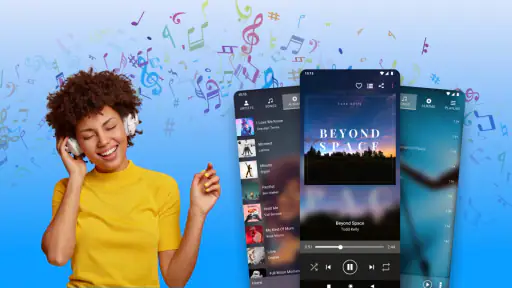
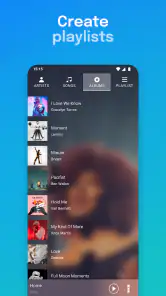
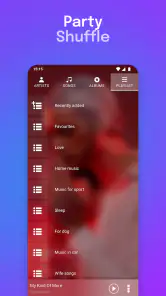
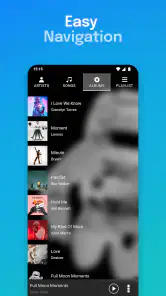
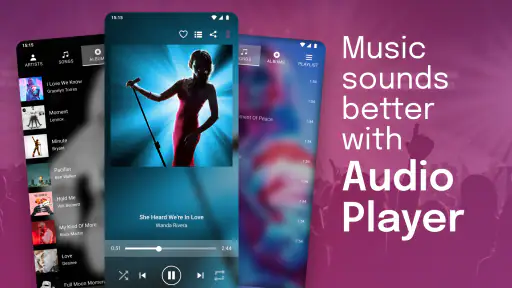
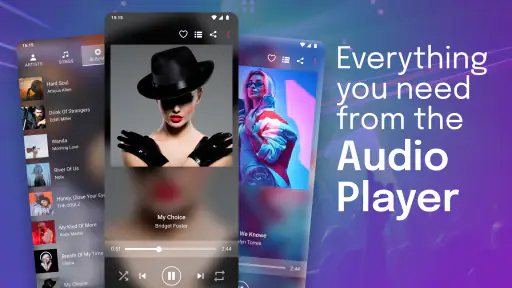
Opening up the Audio & Music Player for the first time, I was greeted with a sleek and intuitive interface. It's clear that the developers put a lot of thought into making the app user-friendly. The colors are easy on the eyes, and the layout is straightforward, which means you won't need a manual to navigate through your playlists or song collections.
Feature-Packed Experience
One thing that stands out with this app is the sheer number of features it offers. From customizable playlists to an impressive equalizer, it feels like they have thought of everything. The equalizer is particularly noteworthy if you're someone who likes to tweak the sound to your preferences. With various presets and manual controls, it's like having a mini sound studio right in your pocket.
Another great feature is the offline mode. As someone who frequently finds themselves in areas with spotty Wi-Fi, having the ability to listen to my favorite tunes without a data connection is a game-changer. Plus, syncing your library is a breeze, which means your music is always up-to-date.
Sound Quality and Performance
Now, let's talk about sound quality, because, let's face it, that's what really matters. The audio output from this app is nothing short of fantastic. Whether you're a bass head or prefer crisp trebles, the app handles it all with ease. In my experience, there have been no lags or glitches, even when playing large files, which is crucial for uninterrupted listening pleasure.
Ease of Use
One of the things that can make or break a music app is its usability, and thankfully, this app scores high in that department. Creating and editing playlists is as simple as it gets. The drag-and-drop functionality is smooth, and the search feature is robust, pulling up what you need in seconds. The app also supports a range of audio formats, which is a big plus if your music library is as eclectic as mine.
But, what really stole my heart is the widget feature. Having quick access to controls directly from my home screen without diving into the app every time makes managing my music a seamless experience.
Where a dedicated player fits best
Compared with the usual alternatives, this player occupies a clear lane: it is for working with music on the Android device, while streaming services are built around browsing and playing an online catalog. That difference affects the whole routine. With local files, I can keep a prepared selection available without depending on reception, but I also take responsibility for keeping those files organized and present. A streaming service is more convenient when I want to search for something unfamiliar; a local player is more direct when I already know what I want to hear.
I would also distinguish it from a bare-bones file browser. A file browser is useful for locating a particular audio file, but a music player is the more comfortable place to return to albums, shape a playlist, adjust sound, and use playback controls. If I only need to check one recording once, a file browser may be enough. If I listen to the same personal collection regularly, a dedicated player saves repeated navigation.
Small habits that prevent repeat work
One useful habit is to make a short “test route” through the collection after any major change: play a track from an album, a different folder, and a saved playlist. This does not require a technical diagnosis; it simply tells me whether the music I rely on is still easy to reach from the views I actually use. If something fails, I can focus on that part instead of assuming the entire library needs to be rebuilt.
Another trade-off is how much sound adjustment to use. An equalizer can make headphones or a particular recording more pleasing, but a strong change may not suit every album. I would start with a restrained adjustment and listen to familiar music before saving a preference. When switching between headphones and a car or speaker, I would check the result again rather than expecting one setting to sound right everywhere.
Who should look elsewhere
This is not the best fit for someone who wants music discovery to be the main event, or who expects a single account to make a collection available across several devices. In those cases, an online service designed around search, recommendations, and account-based access will feel more natural. It may also be the wrong choice if you do not keep audio files on your Android phone and have no interest in managing a local collection.
On the other hand, I would not dismiss it just because it is not a streaming app. Someone with albums already on the device, a few personal playlists, and a preference for direct playback may find that this focused approach is exactly what they need. The best reason to choose it is not a promise that it does everything; it is that its core role matches how you already listen.
All in all, the Audio & Music Player app delivers a solid performance. Whether you're a casual listener or a hardcore audiophile, this app has something for everyone. It's a harmonious blend of functionality and style, making it a worthy contender in the vast sea of music apps. So, if you're on the hunt for your next audio companion, give it a spin and let the music play on!
My practical verdict
I see this as a sensible choice for Android listeners who want a convenient home for audio they already have, rather than another doorway into a streaming catalog. The widget and playlist tools support quick everyday listening, while the equalizer gives people who enjoy adjusting sound something to explore. Its 4.7 average and broad adoption make it an established option, though popularity cannot tell you whether your own collection is organized the way you want.
My advice is to start with a few tracks, confirm they appear and play, then build a playlist you will actually use. If that routine feels natural, this player can become a straightforward part of a commute, a workout, or time at home. If you keep running into missing local files, want account-based access everywhere, or mainly listen by searching for new music, choose a service designed for that instead. For the right listener, the appeal is simple: less dependence on a connection and more control over a familiar collection.
Audio & Music Player Frequently Asked Questions
Can I use Audio & Music Player without creating an account?
Audio & Music Player is presented as an Android audio and music player for listening to music on your device. If you want to start with a personal music library rather than set up a streaming account, it may suit that approach. Check the app’s setup screens after installation to see what permissions or sign-in steps apply to the features you choose to use.
Will Audio & Music Player work on my Android phone or tablet?
Audio & Music Player is an Android app, and it requires Android 5.0 or later. That makes checking your device’s operating-system version a sensible step before downloading. It is rated Everyone, so its content rating is suitable for a broad range of users. You should also leave enough available storage for the app and any music files you plan to keep on your device.
Can Audio & Music Player play music stored on an SD card?
If your music collection is stored on removable storage, check whether the app can access that location during setup and grant the relevant file permission when prompted. Availability can depend on your device and Android storage settings. Once your files are accessible, you can check the app’s library view to see whether those tracks appear alongside music saved elsewhere on your device.
Is Audio & Music Player free to download, and are there in-app purchases?
Audio & Music Player is free to download, so you can try it without an upfront purchase. It also offers in-app purchases, with items ranging from $0.99 to $99.99. If you prefer a straightforward music-listening setup, check the purchase options in the app and make sure they suit your needs before buying anything.
Which devices can install Audio & Music Player, and is it suitable for all ages?
Audio & Music Player is an Android music app that requires Android 5.0 or later. Its content rating is Everyone, making it suitable for a broad range of users. Before downloading, check that your device meets the operating-system requirement and has enough available space for the app and the music files you want to play.
Pros
- High-quality audio playback.
- User-friendly interface.
- Supports various audio formats.
- Customizable playlists.
- Offline listening feature.
Cons
- Contains ads in free version.
- Limited equalizer settings.
- Occasional app crashes.
- Subscription required for premium features.
- Incompatible with some devices.
- Category
- Music & Audio
- Version
- 12.3.3.1












