Aspire Account Center
- 967.00
- 3.3
- Installs
- 500.00K
- Price
- Free

Screenshots





Analysis by Reviewed
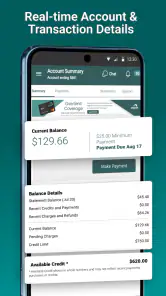
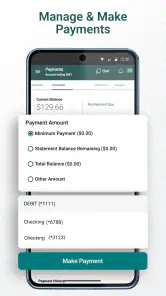
I use finance apps for one reason: I want a quick, dependable view of my account without having to search through old emails or open a browser. Aspire Account Center is built for that focused job. It is a free finance app from Atlanticus Services for managing Aspire credit cards in one place, and its appeal is less about extras than about keeping routine card tasks close at hand.
That narrow purpose is important. This is not the kind of app I would choose as a complete budgeting system, an investment dashboard, or a replacement for every financial service on my phone. I see it as a companion to an Aspire credit card: useful when I want to check the account, stay aware of activity, and handle card-related administration without opening a desktop site.
The app is available to everyone in terms of its content rating, runs on Android versions from 6.0 onward, and is listed as free. Its current version is 4.22.47-6102. Those details make it accessible to a broad range of Android users, including people who keep an older phone for financial tasks rather than upgrading frequently.
How Aspire Account Center feels in everyday use
The strongest part of this app is its directness. When I open a dedicated card-management app, I do not want a stream of unrelated offers, financial education articles, or complicated planning tools before I reach the account information I came for. Aspire Account Center has a clear identity: it is a control point for an Aspire card, not a general-purpose money platform.
A realistic use case is checking the account before making a purchase. I might be standing in a shop, preparing to pay a bill, or reviewing my available room before moving money between household expenses. In that moment, a dedicated account center is more practical than opening a banking browser tab, signing in through a search result, and navigating a full website. The value is small but repeated: fewer steps for a task I may perform several times during a billing cycle.
I also find this kind of app useful after a purchase. Rather than waiting until the end of the month to remember what happened, I can make account checking part of my routine. A short review after larger purchases can help me notice activity sooner and keep my own spending notes aligned with the card account. The app does not need to become a full budget planner to support that habit; its job is to make the card side of the picture easier to inspect.
The best way to use it is as an account checkpoint, not as your entire financial system. I would still keep a separate household budget, savings plan, or debt payoff method if those are important to me. Confusing a card center with a complete money-management tool can lead to unrealistic expectations and make the app seem less capable than it is intended to be.
A focused tool rather than a universal finance app
Compared with a normal mobile banking app, Aspire Account Center has a narrower relationship with the user. A bank app may bring together checking, savings, transfers, deposits, and several types of accounts. This app is centered on Aspire credit-card management. That focus can be an advantage because the interface does not have to compete with unrelated account types, but it is also the main limitation for anyone who wants one screen for their entire financial life.
Compared with a budgeting app, the difference is even clearer. Budgeting tools usually ask me to categorize spending across multiple accounts, set targets, or review trends. Aspire Account Center is more appropriate when I need the card account itself rather than a long-term analysis of where all my money goes. If my main question is “What did I spend across every account this month?”, I would look elsewhere. If my question is “What is happening with my Aspire card right now?”, this is the more natural place to begin.
The same comparison applies to using a mobile browser. A browser can reach a card website and may be more flexible for people who prefer a larger screen, but an installed app is easier to keep in a regular phone routine. I do not have to remember the exact web address or leave a browser tab open. That convenience is modest, yet it matters for quick checks where friction is the reason people postpone a task.
Practical habits that make the app more useful
One habit I recommend is opening the account center at consistent moments instead of only during a problem. Checking after a major purchase, before a planned payment, and during a weekly money review creates a clearer picture than relying on memory. The app becomes part of a repeatable process rather than an emergency tool used only when something looks wrong.
A second useful approach is separating what the app shows from what I personally track. I would not treat the app as my only record of spending. I can use it to review the card account, then update a household spreadsheet, notes app, or budgeting method separately. This avoids a common mistake: assuming that seeing account activity automatically means I have a complete view of my financial position.
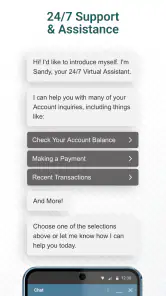
A third tip is to use the app before contacting support. If I notice an unfamiliar transaction or a balance that does not match my expectations, I would first review the account carefully and note the relevant details. Having the account context ready can make a later support conversation more efficient. That does not mean the app replaces customer service; it simply helps me approach a question with better information.
I would also avoid making a payment decision based on a single glance if timing matters. Account information can be affected by pending activity, posting schedules, or the difference between a transaction and a settled balance. The app is useful for visibility, but responsible card management still requires reading the labels and understanding what each figure represents before acting.
What its current release tells me about the product
The current version, 4.22.47-6102, shows that the app is still being maintained as a live account-management product rather than treated as a forgotten download. That is a meaningful sign for existing users. Finance apps need ongoing attention because sign-in flows, account services, and mobile operating systems change over time. A current release gives me more confidence than an app that appears frozen after its original launch.
Aspire Account Center first appeared on June 25, 2019. Its time on the market helps explain why the app feels like a practical service utility rather than a fashionable financial experiment. It has had time to become familiar to users, while the continuing version updates suggest that the developer, Atlanticus Services, continues to support the product’s role around Aspire cards.
I would be careful, however, not to read a version number as proof that every part of the experience has changed dramatically. A newer release can include maintenance work, compatibility adjustments, security improvements, or refinements that are not immediately visible. From a user’s point of view, the most important question is not whether the number looks high; it is whether signing in, reviewing the account, and completing ordinary tasks feel dependable on the phone being used.
For someone already using an older installation, updating is sensible when the store presents a newer release. Keeping the app current can reduce avoidable compatibility problems, especially on a device that has also received operating-system updates. I would still review the app after updating rather than assuming every screen behaves exactly as before. Financial routines benefit from a quick confirmation that the account opens correctly and that familiar actions remain easy to find.
What the release history means for existing users
Existing users are likely to value continuity more than novelty. When I use a finance app, I want the core path to remain recognizable: open the app, authenticate, inspect the account, and finish the task. Product evolution is helpful when it removes friction, but unnecessary redesign can make a routine financial check feel uncertain. For that reason, I judge updates by whether they improve clarity and reliability rather than by how visually different they appear.
People moving from a browser-based routine may notice the biggest benefit immediately. The app gives the card a dedicated place on the phone, which can make regular checks easier to remember. On the other hand, someone who already has a smooth desktop workflow may see less reason to change. A large monitor can be preferable when reviewing several pieces of financial information at once, and an app cannot automatically make a narrow card relationship into a full banking relationship.
The app’s audience is reflected in its scale: it has passed five hundred thousand installs, with an average rating of 3.3 from around two thousand ratings and roughly one thousand written reviews. I read that as a mixed but substantial signal. Enough people use it to make the product relevant, while the middling average suggests that the experience will not be perfect for everyone. I would install it with practical expectations rather than assuming it will feel as polished as the best general banking apps.
The free price removes one obvious barrier, but “free” does not mean the app is useful to every Android owner. Its value depends on having an Aspire credit-card relationship. Someone searching for a general expense tracker or a way to manage several unrelated cards would probably get more from an app designed around those needs. The right question is not whether it costs anything to download; it is whether its focused purpose matches the account I actually use.
Where the app may still feel limited
The central gap is breadth. I would not choose Aspire Account Center if I wanted combined views of multiple banks, automatic household categorization, investment monitoring, or a detailed financial plan. A specialized card center can be cleaner than a large financial dashboard, but that simplicity comes from doing less. Users who want one application to connect every account should consider a broader alternative instead.
Another possible source of frustration is the boundary between account visibility and account problem-solving. Seeing information on a screen is not the same as resolving a disputed transaction, understanding a complicated credit situation, or receiving personal financial advice. The app can support the first stage of those tasks, but I would not expect it to replace the appropriate support channel or a careful review of card terms.
There is also a trade-off between convenience and concentration. Keeping card access on a phone makes routine checks fast, but it means I need to protect the device and my sign-in details responsibly. I would avoid using an unfamiliar public device for account access, keep the phone’s own security features active, and take care when handling notifications or screenshots. These are sensible habits for any finance app, but they matter especially when the app is designed for direct account access.
Users with older Android phones should find the minimum operating-system requirement accommodating, but age alone does not guarantee a smooth experience. Device performance, available storage, network quality, and the phone’s security condition can all affect how comfortable a finance app feels. If the app behaves poorly on an older handset, I would first check the basic phone environment before deciding that the account service itself is unusable.
Who should install it and who should skip it
I would recommend Aspire Account Center to an Aspire cardholder who wants a dedicated Android route for routine account checks. It makes the most sense for someone who values quick access, prefers an installed app to a browser, and does not need a complete financial planning suite. It can also suit a person who is trying to build a regular habit around reviewing card activity rather than waiting for a monthly statement.
I would be less enthusiastic for someone who does not have an Aspire card, manages several providers, or expects automatic budgeting across all spending. In those cases, a general banking app or a multi-account budgeting service is likely to provide a better center of gravity. I would also skip it as a primary tool if my main need were long-term debt strategy or detailed spending analysis; a card account center is not designed to answer every financial question.
For a family that shares responsibility for expenses, the app may be useful as one person’s account checkpoint, but I would not assume that it replaces a shared household process. I would still agree on who reviews activity, how expenses are recorded, and how unusual transactions are handled. The app can provide account access, while the family’s own system supplies the broader context.
What I would watch in future updates
When future releases arrive, I would pay attention to changes that affect everyday confidence: clearer account information, smoother sign-in, easier navigation, and reliable behavior on supported Android devices. Those improvements would matter more to me than decorative redesign. In a finance app, a small reduction in confusion can be more valuable than a large visual change.
I would also watch how well the app serves both quick checks and more careful reviews. A good update should let me see the important account details quickly while still giving enough context to understand activity. If the product adds complexity without making those two tasks clearer, existing users may feel that evolution has created work instead of removing it.
My overall view is positive but deliberately narrow. Aspire Account Center is a sensible companion for Aspire credit-card users who want a free, dedicated way to manage their account from an Android phone. Its long-running presence, current version, and focused purpose give it a practical place in a personal finance routine, while the 3.3 average rating reminds me to keep expectations realistic.
I would install it when the goal is convenient card access, not when the goal is a complete financial command center. Used alongside a personal budget and sensible security habits, it can make routine account checks easier. For someone outside the Aspire ecosystem, or for anyone seeking broad money management, another category of app would be a better fit.
In the end, I see Aspire Account Center as a useful specialist tool: straightforward in purpose, potentially valuable every week, and limited in exactly the way its focused design suggests. That is a fair trade-off if the account it supports is the one I need to manage.
Pros
- Centralizes account details
- balances
- and activity in one place.
- Makes it easier to review transactions and monitor account changes.
- Provides convenient access to support and account-related information.
- Reduces the need to manage account tasks through multiple channels.
- Useful for Aspire customers who want quick mobile account access.
Cons
- Features may be limited for users without an eligible Aspire account.
- Some account actions may still require contacting customer support.
- Access depends on a stable internet connection and service availability.
- The app may feel unnecessary for customers with infrequent account activity.
- Login or verification issues can temporarily prevent access to account details.

- Category
- Finance
- Version
- 4.22.47-6102











