

Arkansas Storm Team
- 732.00
- 4.4
- Installs
- 50.00K
- Price
- Free
Screenshots
Analysis by Reviewed
I tend to judge a weather app by what happens when the forecast matters, not when the sky is clear. Arkansas Storm Team is built for that practical moment: checking conditions before a drive, watching a rough line of weather develop, or deciding whether an outdoor plan still makes sense. I found it most useful as a locally focused weather companion rather than as a universal replacement for every forecasting tool on a phone.
The app comes from Nexstar Inc. and sits in the weather category. It is free to use, rated for Everyone, and has been available since March 10, 2014. Its current release is version 6.2.512, with a minimum operating-system requirement of 9. That combination makes it approachable for people using older compatible devices, while the familiar local-news identity gives it a clear purpose: keeping Arkansas users close to regional weather coverage.
Its public reception is encouraging without being perfect. The app holds a 4.4 average from around 2.4 thousand ratings, and it has passed 50 thousand installs. I would read that as a sign that many people find the service dependable enough for regular use, not as proof that every forecast or screen will suit everyone. Weather is inherently changeable, and the best experience depends on how much local detail and live guidance you actually need.
What makes the local focus useful
The strongest reason to try Arkansas Storm Team is its regional emphasis. A broad national weather app may give you a polished map and plenty of locations, but it can make Arkansas feel like just one small point inside a much larger system. A locally oriented app is more immediately relevant when your concern is what is happening around your community, your commute, or a nearby town.
I especially like this kind of focus for fast decisions. If I am leaving for work and the weather looks unsettled, I do not necessarily want to compare several national models. I want a quick local view that helps me decide whether to leave earlier, carry rain gear, or postpone a trip. The app’s identity as an Arkansas weather service makes that use case clearer than a generic forecast application.
That does not mean it should replace every other source. Someone who travels frequently across several states may prefer a larger weather platform with a consistent experience for many regions. Likewise, users who mainly want long-range planning, international forecasts, or highly specialized meteorological tools may find a local app narrower than they need. The trade-off is straightforward: regional relevance in exchange for a less universal role.
How I would use it during a changing day
A realistic routine might begin before breakfast. I would check the current conditions and the near-term outlook before choosing clothes and deciding whether to walk or drive. Later, if dark clouds build while I am at work, I would open the app again rather than rely on the morning forecast. That second check matters because a weather app is most valuable when it supports repeated decisions, not just one glance.
More From Our News Desk

 Gmail
GmailGmail in a Busy Inbox: Who Benefits Most?
From first account to crowded workday, Gmail earns its place through dependable search and flexible sorting—but its best fit depends on how much inbox maintenance you can tolerate.

 Prime Video
Switching to Prime Video: What Changes in Your Viewing Routine
Prime Video can make a compelling second home for streaming, but switching means learning a different catalog, rental layer, and route from browsing to playback.

 Universal TV Remote Control
Universal TV Remote Control Works Best as a Reliable Backup
A phone remote earns its place through quick setup and reliable habits. Here is how to get more from Universal TV Remote Control—and where its limits show.

 Weather - By Xiaomi
Weather by Xiaomi Review: Clear at a Glance, Less Clear Up Close
Xiaomi’s weather app makes everyday forecasts quick to scan, but its calm surface can leave useful details and recovery paths harder to find than they should be.

 X
XX Under Pressure: Can It Recover When Posting Goes Wrong?
A resilience-focused review of X, examining setup, mistaken posts, interruptions, weak connections, and the gaps that matter when recovery needs to be dependable.

 Clash of Clans
Clash of Clans Is Won Between the Battles
Its raids are quick; its community is a long-term project of coordination, teaching, rivalry, and shared responsibility—with all the friction that entails.
Latest News



For an outdoor event, I would use it as part of a simple two-stage plan. First, check the forecast well before leaving. Then check again shortly before the event and keep an eye on any developing weather information. This is more sensible than treating a single forecast as a promise. The app can inform the decision, but I would still use judgment for lightning, dangerous travel, flooding, or any situation where official emergency guidance takes priority.
One less obvious benefit of a local weather app is reducing the temptation to overinterpret distant conditions. A national map can make a large storm system look dramatic even when its local impact is limited, or make a small local problem disappear among broader patterns. A region-centered view encourages me to ask the useful question: what does this mean for my immediate area?
Trust starts with clear expectations
I do not treat the developer name, rating, or download count as a guarantee of accuracy. They provide context, but trust comes from how comfortably the app fits into a sensible checking routine. Nexstar Inc. gives the application an established media-company identity, and the Arkansas Storm Team branding tells me what audience it is intended to serve. Still, I would judge it by the clarity of its forecasts and alerts on my own device over time.
Weather information deserves a cautious mindset because conditions can change faster than an app screen. Even a well-maintained service can show information that becomes outdated between refreshes. I would avoid making a high-risk decision from one number or one visual alone. For severe conditions, official emergency instructions and local authorities remain more important than convenience.
The age rating of Everyone is reassuring for households that want a straightforward weather tool without an adult-oriented classification. It does not tell me that every family member will find the interface equally comfortable, though. Older users or people with visual difficulties may still want to check text size, contrast, and how easily important warnings can be noticed on their particular phone.
Permissions, privacy, and what I would check first
Because this is a weather app, location is the first privacy question I would consider. A weather service may be more useful when it knows where I am, but I prefer having a clear choice about whether to share precise location, use an approximate location, or enter a place manually. I would inspect the operating-system permission prompt carefully rather than accepting it automatically.
The important distinction is between convenience and necessity. If I only need the forecast for one town, manually selecting that location may be enough for my routine. If I move around during the day, location-based updates could be more convenient. I would choose the least access that still supports the way I plan to use the app, then revisit the permission in the phone’s settings if my needs change.
I would also look at the app’s privacy information before making it part of a family member’s daily routine. The store facts establish who develops it and how widely it is used, but they do not replace reading the current permission screen and privacy disclosures on the device. That is not a criticism of this particular application; it is a sensible habit for every app that may handle location or device information.
My practical rule is simple: grant only the access that improves a real task. If a permission does not make the forecast more useful for me, I would leave it disabled and see whether the app still meets my needs. This approach preserves user control without turning a weather check into a complicated privacy project.
Where the app fits beside familiar alternatives
Compared with a general weather app, Arkansas Storm Team appeals to people who value local identity and regional relevance. A national service may be better for comparing destinations, switching between many cities, or building a broad travel routine. Its advantage is breadth. This app’s advantage is that its purpose feels closer to home for Arkansas users.
Compared with a phone’s built-in weather panel, the choice comes down to depth and habit. A built-in panel is convenient for a quick glance and usually requires less effort to open. A dedicated local app is more attractive when I want a weather-focused experience and prefer regional coverage rather than a generic widget. If I only check the temperature once a day, the built-in option may be enough. If changing local weather affects my plans, a dedicated service makes more sense.
There is also a difference between a weather app and a radar specialist. A radar-focused tool may suit someone who watches storm movement closely and wants to interpret precipitation patterns. Arkansas Storm Team is easier to recommend to everyday users who want local weather information in a familiar regional context, but I would not assume that every storm-tracking enthusiast will find it sufficiently specialized.
That comparison helped me place the app fairly. It is not automatically the best choice because it is local, and it does not need to beat every alternative. Its value is strongest when the user lives in Arkansas, checks weather repeatedly, and prefers a regional source over a one-size-fits-all forecast screen.
Small habits that improve the experience
My first tip is to avoid checking only when the weather already looks bad. A quick morning check followed by a second look before a commute or outdoor plan gives more useful context than reacting at the last minute. This is particularly helpful on days when conditions may change between leaving home and returning.
My second tip is to separate planning from safety. For clothing, errands, and ordinary scheduling, the app can be a convenient guide. For dangerous storms, flooding, lightning, or travel conditions that could put someone at risk, I would treat the app as one information source and follow official warnings and instructions.
My third tip is to review location access after installing rather than forgetting about it. If I discover that a manually selected place works just as well for my routine, I may prefer not to keep location access enabled. If automatic local updates are genuinely useful, I can keep the permission while understanding why it is active. The best setting is the one that matches actual use, not the one chosen by habit.
A fourth useful habit is to test the app during an ordinary week before depending on it for a major trip or event. I would compare what it shows with the conditions outside and see whether the layout makes important information easy for me to find. This personal trial tells me more than a rating alone, especially because weather needs vary widely between a casual user and someone who works outdoors.
Who should choose it, and who should skip it
I would recommend Arkansas Storm Team to Arkansas residents who want a free, locally oriented weather app for everyday decisions. It is a sensible fit for commuters, parents planning school-day activities, outdoor workers, and anyone who prefers a regional weather identity over a generic forecast service. The Everyone rating also makes it a reasonable option to consider for shared household use.
I would be more cautious about recommending it to users whose main need is international travel, extensive multi-city planning, or advanced weather analysis. They may be happier with a broader service designed around many locations or a specialist tool built for detailed storm interpretation. Someone who dislikes installing separate apps and only wants a tiny glanceable forecast may also prefer the phone’s built-in option.
I would skip it if the local focus does not match where I live or if my privacy preferences make location-based weather tools uncomfortable. That does not mean the app cannot be useful without location access; it means I would first check whether selecting a place manually gives me the experience I want. If the app’s local emphasis is not relevant to my daily life, its main advantage disappears.
My cautious verdict
After looking at its purpose, audience, and practical role, I see Arkansas Storm Team as a focused weather companion rather than an all-purpose forecasting platform. It earns consideration because it is free, regionally directed, available to users on older compatible operating systems, and backed by a recognizable developer. Its 4.4 average suggests a generally positive reception, but I would still test how well its information and controls fit my own routine.
The most important point for me is user agency. I want to decide whether location access is worthwhile, when to check the forecast, and when to seek official emergency guidance instead. A weather app should support those decisions without encouraging false certainty. Used that way, the application has a clear place in an Arkansas resident’s daily toolkit.
My recommendation is cautious but positive: try it if you want a free Arkansas-centered weather experience and value local relevance over broad travel coverage. Give it a normal week of use, review its permission choices, and keep a more authoritative emergency source in mind for serious conditions. If you need worldwide forecasts, highly technical radar work, or nothing beyond a quick built-in glance, another option may serve you better.
Arkansas Storm Team Frequently Asked Questions
Is Arkansas Storm Team available on my phone, and what should I check before installing it?
Arkansas Storm Team is a weather app from Nexstar Inc. Before downloading, check that your device meets the app’s operating-system requirement and that you are getting it through the official app store for your device. The app is intended for people seeking weather coverage focused on Arkansas, so consider whether local forecasts and storm information are useful for your area.
Who might find Arkansas Storm Team most useful?
The app may be especially useful for Arkansas residents who want weather information focused on local communities, as well as people who travel around the state or have family there. Its mix of forecast information, radar, alerts, and weather coverage can help users check conditions before heading out and follow changing situations. It is a weather-information tool, not a substitute for emergency guidance.
What is the Arkansas Storm Team app used for?
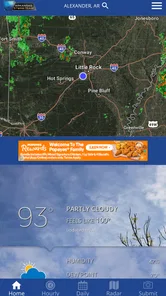
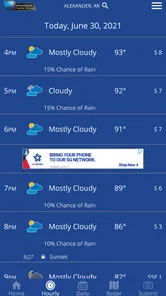
The Arkansas Storm Team app is designed to keep users informed about current and upcoming weather conditions across Arkansas. It typically provides local forecasts, radar imagery, severe weather alerts, video updates, hourly and extended forecasts, and information about storms that may affect your area. It is especially useful when you want weather coverage tailored to local communities rather than relying only on a general national forecast.
Does Arkansas Storm Team provide severe weather alerts and notifications?
Yes, the app is intended to help users follow dangerous weather, including thunderstorms, tornado threats, flooding, winter weather, and other significant conditions. Depending on your location settings and notification permissions, it may send alerts when a warning or watch affects your selected area. For the best experience, enable notifications, allow location access if requested, and remember that the app should support—not replace—official emergency alerts and local authorities.
Can I use the app to view live radar and track storms?
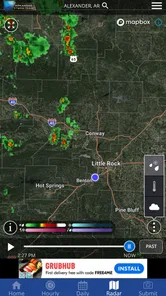
Arkansas Storm Team generally includes interactive weather radar and storm-tracking tools that help you see precipitation and developing weather systems near Arkansas. Users can usually zoom in on their community, review movement patterns, and compare radar information with forecast details or meteorologist updates. Radar data can change quickly and may have brief delays, so it is wise to combine the map with official warnings and on-air or video coverage during severe weather.
Pros
- Provides localized Arkansas weather forecasts and alerts.
- Radar maps help track storms in real time.
- Severe weather notifications can support quick safety decisions.
- Includes forecasts for multiple locations across Arkansas.
- Clean layout makes key weather information easy to find.
Cons
- Some features may require location access to work properly.
- Frequent alerts can become distracting during active weather.
- Radar and forecast data depend on an internet connection.
- Coverage and forecast detail may vary outside Arkansas.
- The app may use extra battery when location services stay enabled.













