WREG
- 334.00
- 4.1
- Installs
- 100.00K
- Price
- Free

Screenshots
Analysis by Reviewed
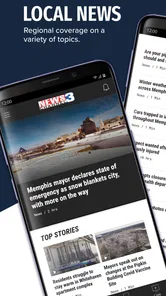
I found WREG most useful when I wanted local information without sorting through a national news feed first. This free news and magazine app from Nexstar Inc. focuses on WREG coverage, with live video, breaking-news alerts, and local reporting gathered in one mobile place. My overall view is simple: it is a practical companion for people who care about what is happening around them, but it is less convincing as a complete replacement for every news source on a phone.
The app has been around since Jan 16, 2013, and its current version is 510.0.1. That long presence matters because local-news apps can feel disposable when they are treated as little more than a shortcut to a website. WREG feels more purposeful than that. I can open it when I want a quick update, check live coverage when a story is developing, or use alerts to avoid repeatedly refreshing a page during a busy day.
How WREG fits into everyday local news
I use WREG as a local-news starting point, and this section looks at the decisions that make that focused role worthwhile: whether nearby coverage matters to your routine, which format suits the moment, and how much interruption you want from alerts. I also weigh the value of keeping a dedicated local source alongside broader news options, rather than expecting one app to cover every angle.
A focused starting point instead of a noisy national feed
The main strength is focus. General news apps are good at showing major stories, but they often bury local information beneath politics, international events, entertainment, and opinion. WREG gives local news a more prominent role. When I am checking what could affect my commute, neighborhood, plans, or family, that narrower purpose is more useful than an endless stream of unrelated headlines.
I also like that the app is not limited to one reading style. A person who wants a quick scan can look at headlines and alerts, while someone who prefers watching coverage can use the livestreaming side. That combination makes it more flexible than a basic local-news webpage saved to a browser. The app is still centered on WREG, though, so its value depends on whether that station’s coverage matches the places and subjects I care about.
In practical terms, I would treat it as a first stop for local awareness. I would not assume that every story I need will appear there, nor would I use it as my only source for a major decision. Local reporting can tell me what is happening nearby, while a broader news service may provide more national context. WREG works best when its local focus is an advantage rather than a limitation.
What the live coverage adds
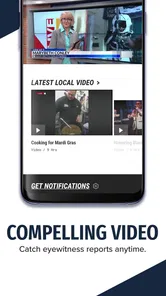
Livestreaming is the feature that gives the app a reason to stay installed instead of simply visiting a news site occasionally. During developing coverage, watching the station’s feed can be more useful than reading a short headline. Video can provide a clearer sense of what reporters are emphasizing and whether a story is still unfolding.
More From Our News Desk

Weather by Xiaomi Review: Clear at a Glance, Less Clear Up Close

X Under Pressure: Can It Recover When Posting Goes Wrong?

Clash of Clans Is Won Between the Battles

Android Auto Makes the Case for Quieter Car Software

MobiOffice: Transforming Mobile Productivity with Seamless Integration

EA SPORTS FC™ Mobile Soccer: Redefining Mobile Sports Gaming
There is a trade-off, however. A livestream asks more of my attention than a written update, and it is not always the right choice when I only have a few seconds. I prefer alerts or a quick headline when I am walking, working, or trying to check information discreetly. I turn to the live feed when the story itself benefits from visual reporting or when I want a fuller update than a notification can provide.
That makes the app’s different tools complementary rather than interchangeable. Alerts are for awareness, headlines are for quick orientation, and live video is for deeper involvement. Using each mode for the right situation keeps the experience from feeling unnecessarily heavy.
Breaking alerts require a little discipline
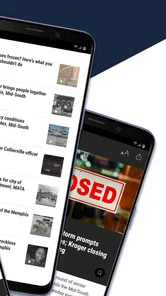
Breaking-news alerts can be genuinely helpful, especially when local information changes quickly. They can save me from repeatedly opening the app just to see whether there is an update. For weather-related developments, traffic problems, public safety events, or other urgent local stories, a timely notification may be the most valuable part of the entire app.
At the same time, alerts can interrupt the day if I allow every notification to compete for attention. My advice is to decide before enabling them how much immediacy I really want. Someone who needs broad awareness may appreciate frequent updates, while someone who becomes distracted easily may prefer to check manually. The best workflow is not simply turning alerts on and forgetting them; it is using them as a deliberate filter for local information.
I also avoid treating a notification as the complete story. A short alert is an invitation to read or watch more, not a substitute for context. If an update affects travel, safety, or an important plan, I open the full item and look for the latest details rather than relying on the first line that appeared on my screen.
A realistic morning and evening routine
On a normal weekday, I would use WREG in two short sessions. In the morning, I would scan local headlines before leaving home, looking for anything that could change my route or schedule. If an alert arrives later, I can decide whether it deserves immediate attention or can wait until a break. In the evening, I would use the app more deliberately, watching live coverage or reading the stories that appeared during the day.
This routine works because the app serves different levels of attention. I do not need to watch everything to benefit from it. A quick check can keep me informed, while the live option is available when a story becomes important enough to follow. That is a more realistic way to use a local-news app than expecting it to replace television, a newspaper, social media, and a national news service all at once.
Where it stands against familiar alternatives
Compared with a mobile browser, WREG is more convenient for repeated checking because the app puts the station’s local coverage in a dedicated space. A browser is still better when I want to compare several news organizations quickly or search across unrelated sources. The app’s advantage is concentration; the browser’s advantage is breadth.
Compared with a national news app, WREG is more relevant for nearby developments but less useful for understanding the wider story. National services usually provide more variety and broader background, while this app gives local reporting a clearer priority. I would keep both if local events matter to me.
Compared with social media, WREG is a better place to begin when I want organized coverage rather than rumors, reactions, or posts taken out of context. Social platforms may surface information faster, but they also require more judgment about what is reliable. WREG does not eliminate the need to think critically, yet its station-centered approach gives me a more stable starting point than an unfiltered social feed.
The meaningful limitation: a narrow lens is still a narrow lens
The same local focus that makes WREG useful also limits it. If I want a balanced view from several outlets, detailed national reporting, international news, or a wide range of specialized topics, I need another app. WREG is not designed to be an all-purpose information dashboard, and expecting it to behave like one would lead to disappointment.
There is also a difference between knowing that something happened and understanding why it matters. A local-news app can give me timely coverage, but I may still need broader reporting for background, comparisons, and long-term context. For serious subjects, I prefer to read beyond the first update before forming an opinion.
The livestream can create similar friction. Video is engaging, but it is not always efficient. If I am looking for one specific fact, a written story or search result may be faster. If I am in a low-connectivity situation or trying to conserve battery and attention, I would rather use a brief text update than keep a live feed open. The app is strongest when the format matches the moment.
Who should install it
I would recommend WREG to people who live in the station’s local coverage area, follow nearby events closely, and want a direct way to receive updates. It is especially suitable for anyone who prefers local reporting over a broad but impersonal national feed. Families, commuters, and residents who want a quick awareness check may find the alert-and-video combination worthwhile.
It can also suit people who are not regular television viewers but still want access to the station’s coverage. The app gives them another way to follow local reporting during the day. Likewise, someone who normally gets news from social media may appreciate having a more focused destination for checking a developing story.
I would skip it if my main interest is international news, specialist reporting, or a multi-source reading experience. I would also look elsewhere if I dislike notifications, rarely follow local events, or want one application to cover every subject. In those cases, a broader news reader or a browser-based routine may be a better fit.
Practical details before downloading
WREG is free to use, carries a Teen content rating, and supports devices running Android 7.0 or later. Its reach is reflected in more than one hundred thousand installs, while its average rating sits at 4.1 from roughly one thousand two hundred ratings. Those figures suggest a reasonably established audience, although they should not replace my own judgment about whether the local focus matches my needs.
The app has received three hundred thirty-four written reviews, which is enough to show that people are actively using and evaluating it. I would still pay attention to the experience on my particular device and connection, especially if live video is important to me. Streaming is naturally more demanding than reading a headline, so I would use the written updates when I need speed and reserve live coverage for situations where it adds real value.
The minimum operating-system requirement is modest, which makes the app accessible to people who do not own a recent phone. Before relying on it for urgent updates, I would spend a few minutes opening the main sections, checking how alerts fit into my routine, and confirming that the live coverage is useful in the places where I normally use my phone. That small test can prevent unrealistic expectations later.
Small habits that improve the experience
My first useful habit is separating awareness from verification. I use an alert to learn that something changed, then open the full coverage before acting on it. This is particularly important when a headline could affect travel or safety. It keeps the speed of notifications without turning a short message into an unquestioned conclusion.
My second habit is switching formats instead of forcing one. I read when I need a fast answer and watch when the visuals or ongoing reporting help. This saves time and makes the app feel less intrusive. The livestream is not automatically better than text; it is better only when seeing the coverage adds information.
My third habit is pairing the app with a broader source for major stories. WREG can provide the local angle, while another reputable service can fill in national or historical context. That combination gives me a fuller picture without asking a single local app to do a job it was never meant to do.
One further trade-off is attention management. Local alerts can be valuable precisely because they are timely, but constant interruptions can make a person less informed rather than more informed if notifications become background noise. I would rather receive fewer alerts that I actually read than allow every update to compete with work, sleep, or family time.
My final recommendation
WREG is best understood as a focused local-news companion, not a universal news replacement. I like its combination of station-based reporting, live video, and breaking alerts because it gives local information several useful paths onto my phone. The experience is most convincing when I want to know what is happening nearby and need something more direct than a general news feed.
Its limitations are clear but reasonable. The coverage has a local lens, live video may not suit every situation, and serious stories still deserve context from more than one source. Those are not reasons to dismiss the app; they are reasons to use it with the right expectations.
For residents who want a convenient way to keep up with WREG coverage, I think the free download is worth trying. I would install it, adjust the alerts to match my attention span, and use the live feed selectively. If I wanted broad national coverage or a fully customizable news reader, I would choose something else. For local awareness, though, WREG offers a clear and practical role on Android and iOS.
WREG Frequently Asked Questions
Who develops WREG, and how can I check that I have the official app?
WREG is developed by Nexstar Inc. Before downloading, look for that developer name on the app’s page in your device’s official store and make sure the title and branding match WREG. Checking the publisher is a useful way to distinguish the intended news app from similarly named apps and to confirm you are choosing the product associated with WREG.
What kind of news can I get from WREG?
WREG focuses on local news and offers livestreaming and breaking news alerts, along with other news content. It is designed for people who want to follow WREG from a mobile device and keep up with updates as they happen. The exact stories and live coverage you see can change over time, so the app is best understood as a mobile way to access WREG’s local news coverage rather than a fixed collection of articles.
What is WREG and what can I use it for?
WREG is a mobile application designed to provide users with access to WREG-related content and services from an Android or iOS device. Depending on the version and region, it may offer news, live or on-demand media, updates, alerts, and other useful information. Before downloading, check the app-store description to confirm which features are currently available in your country.
Is WREG free to download and use?
WREG is free to download. Mobile data charges may still apply when you stream video or audio, or download updates, so a Wi-Fi connection can help you manage data use. If you plan to use livestreaming or alerts, review the app’s permissions and any terms presented during setup so you understand how those features work on your device.
Does WREG require an account or personal information?
Some WREG features may work without registration, while personalized functions, notifications, saved content, or access to restricted material could require an account. During setup, the app may request information such as an email address or permission to send notifications. Read the privacy policy before agreeing, and only provide details you are comfortable sharing with the developer and its service providers.
Pros
- Live local news
- weather
- and traffic updates in one app.
- Breaking-news alerts help you stay informed about important events.
- Video reports and newscasts provide useful visual coverage.
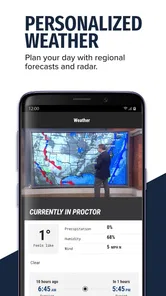
- Weather tools include forecasts and radar for planning your day.
- Free access to core news content on supported mobile devices.
Cons
- Some stories may be limited to the WREG viewing area.
- Frequent notifications can feel excessive unless carefully customized.
- Video playback may use significant mobile data when streamed over cellular.
- Advertising can interrupt browsing and reduce the reading experience.
- App performance may vary with connection quality and device model.













