NewsNation
- 491.00
- 3.3
- Installs
- 100.00K
- Price
- Free

Screenshots

Analysis by Reviewed
When several people share a phone or tablet, a news app can become part of the household routine: one person checks headlines over breakfast, another catches up later, and someone else may open it simply to understand what everyone is discussing. I see NewsNation: Unbiased News as a straightforward option for that kind of casual reading, especially if your household wants a news source to consult without turning every check-in into an endless scroll. It is a free news app from Nexstar Inc., in the News & Magazines category, and its focus is reporting presented in a measured, fact-led way.
How It Fits into a Shared News Routine
The first thing you'll notice about NewsNation is its commitment to delivering news without the sensationalism. In a world where clickbait headlines are rampant, this app is a breath of fresh air. It focuses on presenting facts, allowing users to form their own opinions. I found myself appreciating the straightforward reporting, which is becoming increasingly rare these days.
One Device, Different Reading Habits
Imagine checking the news while coffee is brewing, then handing the tablet to someone who wants to catch up after work. A simple shared-device routine can work well: each person can open the app when they want a quick overview, then decide whether to spend more time on a story. That suits households where people do not want to commit to a full newspaper subscription or use a broad social feed as their main news source.
There is a practical trade-off, though. On a shared device, one person’s browsing can shape what the next person sees if the app retains a common session or reading state. I would treat the app as a shared reading space rather than assume it provides separate household profiles. If personal boundaries matter, agree on a basic routine—such as closing the app after reading and not treating someone else’s open screen as a personal feed. That is a sensible device habit, not a feature I would assume the app provides.
Easy to Pick Up, Better with a Reading Plan
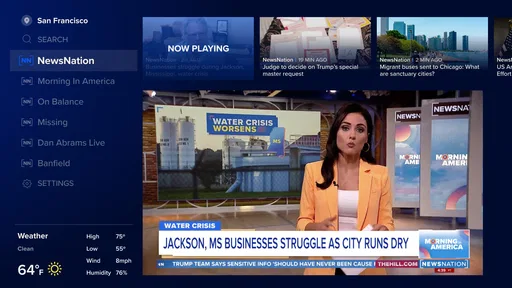
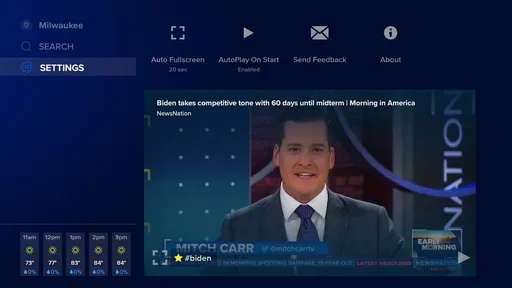
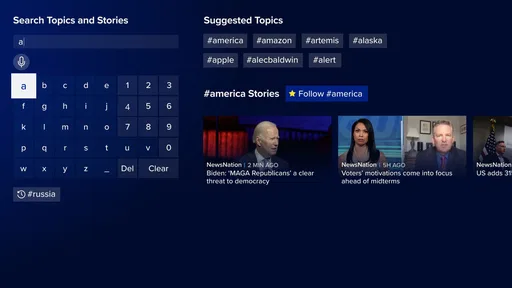
Now, let's talk about the user interface. It’s sleek, intuitive, and easy to navigate. Whether you're a tech-savvy millennial or someone who's less comfortable with technology, you’ll find it simple to use. The articles are well-organized, and the app provides a seamless browsing experience. The developers have clearly prioritized user experience, which is evident in every tap and swipe.
For a busy reader, I’d use it in two short passes rather than leave it open all day: first scan the available coverage, then return to the few stories that deserve a closer read. That makes it easier to separate a headline worth knowing from a topic that needs more context. It is also useful when family members have different interests; each can choose what to read instead of expecting one shared list to suit everyone.
Coverage and Format: What to Expect
While many news apps tend to focus on a single region or topic, NewsNation offers a wide array of categories. From politics and economy to health and entertainment, there's something for everyone. I particularly enjoyed the international news section, which is comprehensive and updated regularly. It’s like having your own personal newsstand in your pocket!
More From Our News Desk

Weather by Xiaomi Review: Clear at a Glance, Less Clear Up Close

X Under Pressure: Can It Recover When Posting Goes Wrong?

Clash of Clans Is Won Between the Battles

Android Auto Makes the Case for Quieter Car Software

MobiOffice: Transforming Mobile Productivity with Seamless Integration

EA SPORTS FC™ Mobile Soccer: Redefining Mobile Sports Gaming
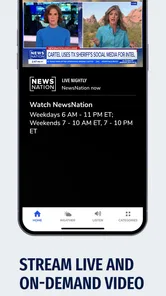
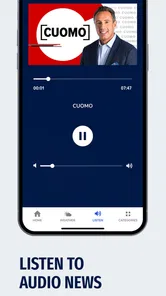
Moreover, the app doesn’t just stop at providing written content. It integrates multimedia elements such as videos and podcasts, making it an engaging platform for consuming news. The inclusion of these formats enhances the storytelling and keeps users engaged.
That mix can help when a written account feels too compressed: a video or podcast may give a story a different shape and make it easier to follow while doing something else. The trade-off is that multimedia takes more attention than a quick headline check, so I would not rely on it when I only have a moment. If you need a very specialized subject feed or a deep archive around one topic, a dedicated publication or specialist source may be a better companion than a general news app.
Notifications Without Letting Headlines Run the Day
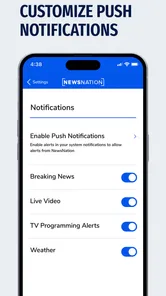
In today’s fast-paced world, staying updated is crucial. NewsNation offers customizable notifications, which means you won’t be bombarded with alerts. You can tailor these notifications to suit your interests, ensuring you only receive updates on topics you care about. This thoughtful feature keeps the app from being intrusive while still keeping you informed.
Another highlight is the 'breaking news' feature, which ensures you're the first to know about significant events as they happen. It’s a handy tool for anyone who likes to stay on top of the latest developments without constantly checking their phone.
For household use, I’d be selective about which alerts stay enabled. A useful approach is to keep only the updates that would genuinely change your plans or prompt you to read more, and let routine browsing happen when you choose. Otherwise, even a news app intended to reduce noise can turn into another source of interruptions. If you share a device, it is worth agreeing who may receive or dismiss alerts, so one person’s settings do not surprise everyone else.
Making a Shared News Check More Useful
A practical way to coordinate is to decide what the app is for before everyone starts using it. For instance, one person might check it for a broad sense of the day, while another opens it only when a particular subject comes up at home. That small distinction avoids the expectation that one person’s browsing will cover everybody’s interests. It also makes the app easier to put down: a quick check has a purpose, rather than becoming a habit of opening the phone whenever there is a pause.
When a story becomes a dinner-table topic, I would use the app as a starting point for a shared conversation, not as a way to win an argument. Read the report itself rather than relying on a notification or a snippet, then be clear about which details are established and which are still developing. If the subject matters to a family decision, checking another reputable outlet can help reveal whether the account is widely supported or whether important context differs. This is a useful workflow for any fast-moving coverage, and it keeps a shared device from becoming the household’s sole reference point.
Choosing the Right Role Beside Other News Sources
NewsNation makes the most sense as a general-purpose destination between two familiar alternatives. A newspaper app can give readers a strong publication identity and a more focused editorial voice; a social feed can surface conversation quickly but often mixes reporting with reactions and reposts. This app offers a direct place to read coverage without making social discussion the main route in. In return, it may not satisfy someone who wants the depth, archives, or subject-specific tools of a publication devoted to one beat.
I would not replace local sources with a broad national or general news app when the question is something practical nearby, such as a neighborhood disruption or a local service change. Nor would I expect one app to provide a complete view of a complex issue. A good division of labor is to use NewsNation for a general check-in, then go to a specialist or local source when the subject calls for detail. That keeps the app convenient without asking it to do a job it is not designed to do.
Age, Trust, and the Limits of a News App
The app is rated for Everyone, which makes it accessible across age groups, but that label should not be mistaken for a promise that every story is suitable for every moment or reader. News can cover difficult events, and I would still use my judgment when younger readers share a screen. For children, an adult’s context and conversation matter more than an age label alone.
I also treat any single outlet as one source, not a final verdict on a complicated story. NewsNation’s stated emphasis on fact-based, unbiased coverage is a useful starting point, but readers who want to check a disputed claim can compare reporting from other established outlets. That is especially worthwhile for fast-moving stories, where early details may change. The app works best as a place to stay informed, not as a substitute for asking where a claim came from or what context may be missing.
For a household with younger readers, I would make the decision based on how and when the device is shared, not on the broad age label alone. An adult can help explain a difficult headline, choose a better moment to discuss it, or simply steer a child toward another activity if the news is upsetting. The useful boundary is human attention: a general news feed can bring serious subjects into view even when a child only meant to borrow the tablet. That is worth considering before making the app a regular shared-screen stop.
Who I’d Recommend It To
With an average rating of 3.2 from around 820 ratings, and more than 100K installs, NewsNation has found an audience, though those figures alone cannot tell you whether its style suits you. It is free and rated for Everyone, which makes it easy to try as a shared household news source without a purchase decision. I’d recommend it to readers who want a general news app with written stories and multimedia, and who prefer checking coverage directly over relying on headlines circulating through social networks.
I’d be less likely to recommend it as someone’s only news source if they need highly specialized coverage, a strongly personalized research workflow, or a separate account experience for every household member. Compared with a newspaper app, it may feel broader and less tied to one publication’s editorial identity; compared with a social feed, it gives you a more direct route to news coverage, but it does not remove the need to think critically. Its usefulness comes from the way you choose and revisit stories, not from expecting an app to settle every disagreement.
The rating is a useful reminder to approach it as a personal fit rather than a universal pick. I would try it if you want a free way to check general coverage and are comfortable forming your own routine around it. If you quickly find yourself searching for a particular local beat, extensive background material, or a reading experience that keeps each person’s choices distinct, that is a sign to pair it with another source—or choose a different app for that need. The right choice depends less on the headline count than on whether its coverage and habits suit your day.
My Household Verdict
Overall, NewsNation: Unbiased News is an excellent choice for those seeking a reliable and straightforward news source. Whether you're tired of biased reporting or simply want a streamlined way to stay informed, this app delivers. Its dedication to unbiased reporting and user-friendly design make it stand out in the crowded landscape of news apps.
So, if you're ready to take control of your news consumption and enjoy a more balanced perspective, give NewsNation a try. It might just become your go-to news source!
NewsNation Frequently Asked Questions
Is NewsNation: Unbiased News free to download?
Yes. NewsNation: Unbiased News is free to download, so you can try its news coverage without paying to install the app. It is listed for a general audience, making it suitable for a broad range of readers. As with any news app, consider whether its reporting and presentation fit your interests before making it part of your regular reading routine.
Who develops NewsNation: Unbiased News?
NewsNation: Unbiased News is developed by Nexstar Inc. The app is in the News & Magazines category and is intended for people who want to follow news through a mobile app. Knowing the developer can help you identify the correct app when browsing download options and distinguish it from other apps with similar names.
What is NewsNation: Unbiased News?
NewsNation: Unbiased News is a news application designed to deliver fact-based and unbiased news coverage. It provides users with the latest news updates across various categories such as politics, health, entertainment, and more. The app aims to offer reporting that is free from political bias, focusing on facts and comprehensive coverage to keep users informed.
How does NewsNation ensure unbiased reporting?
NewsNation ensures unbiased reporting by adhering to strict journalistic standards and principles. The app employs a team of experienced journalists and editors who are committed to providing factual and balanced news coverage. They focus on verifying sources, presenting multiple perspectives, and separating news from opinion, thereby maintaining the integrity and impartiality of the news content.
Is NewsNation: Unbiased News available for both Android and iOS devices?
Yes, NewsNation: Unbiased News is available for download on both Android and iOS platforms. Users can easily find the app on the Google Play Store for Android devices and the Apple App Store for iOS devices. This cross-platform availability ensures that users can access unbiased news content regardless of their device type.
Pros
- Provides unbiased news coverage
- Wide range of topics covered
- User-friendly interface
- Real-time news updates
- Ad-free experience
Cons
- Limited international news
- Requires subscription for full access
- Occasional technical glitches
- No offline reading mode
- Limited personalization options













