KTLA 5 News Los Angeles
- 1.84K
- 3.1
- Installs
- 100.00K
- Price
- Free

Screenshots
Analysis by Reviewed
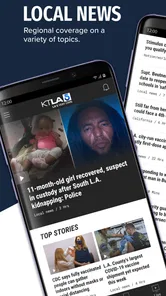
When I want local news from Southern California without opening a full national news app, KTLA 5 News Los Angeles is the kind of app I reach for first. It is focused on KTLA coverage, with live video, breaking-news alerts, and regional reporting in one place. I find that narrow focus more useful than a crowded feed when I mainly want to know what is happening around Los Angeles rather than scan headlines from everywhere.
The app is free, belongs to the News & Magazines category, and is developed by Nexstar Inc. It carries a Teen content rating, runs on Android 7.0 and later, and its current version is 510.0.1. The app has passed the early trial stage for many users, with over one hundred thousand installs, although its average rating sits at about three out of five from roughly five thousand ratings. That combination tells me to approach it as a practical local-news tool with some rough edges, not as a flawless replacement for every news source.
What to expect from the KTLA experience
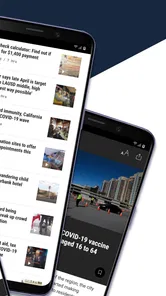
The first thing to understand is that this is a station-centered app, not a broad newspaper-style reader. Its value comes from bringing KTLA’s Southern California coverage to a phone, especially when a story is developing and a normal article may not yet give enough context. I like that purpose because local events often matter before they become major national headlines: traffic disruptions, weather changes, public safety situations, community stories, and other events that affect a person’s day immediately.
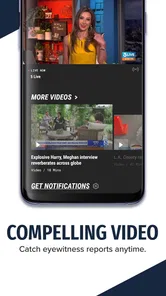
The live component is particularly useful when I want more than a headline. A written update can tell me that something is happening, but a livestream can provide the rhythm of ongoing coverage and help me judge whether a situation is still unfolding. I would not treat live video as a guaranteed substitute for a scheduled television newscast or a stable written report, though. Video depends on timing and connection quality, and a developing story can change while I am watching.
Breaking-news alerts are another central part of the experience. They make the app useful even when I am not actively browsing it. The trade-off is obvious: an alert can save me from missing something important, but too many interruptions quickly make a news app feel noisy. I recommend thinking about alerts as a personal filter rather than automatically enabling every option and forgetting about them.
The app makes the most sense for someone who lives in Southern California, works there, commutes through the region, or has family and regular interests in the area. A reader who wants international reporting, extensive political analysis, sports from many leagues, or a single neutral source for every topic may be happier with a larger national news application. KTLA’s regional identity is its strength, but it also defines its limits.
What I would prepare before opening it
I would install it with one simple goal in mind: either follow local developments quickly or watch KTLA coverage when a story matters to me. That goal keeps the first session manageable. Instead of trying to inspect every screen, I would look for the main news feed, identify where live coverage appears, and decide whether alerts are worth using on my phone.
More From Our News Desk

Weather by Xiaomi Review: Clear at a Glance, Less Clear Up Close

X Under Pressure: Can It Recover When Posting Goes Wrong?

Clash of Clans Is Won Between the Battles

Android Auto Makes the Case for Quieter Car Software

MobiOffice: Transforming Mobile Productivity with Seamless Integration

EA SPORTS FC™ Mobile Soccer: Redefining Mobile Sports Gaming
Because the app is free, there is no purchase decision blocking the first useful moment. That makes it easy to test alongside another news source rather than committing to it immediately. I prefer this approach with any local-news app: use it during an ordinary week, see whether the alerts and coverage fit my routine, and only then decide how prominent it deserves to be on my home screen.
First setup and the quickest route to useful coverage
After installation, I would begin by browsing before changing anything. This gives me a feel for how KTLA presents stories and whether the current mix matches what I expect from a Southern California station. A quick scan is also a better way to understand the app than relying only on the short store description, because the real value is in how quickly I can move from an alert or headline to information I can use.
My first practical setup choice would be notifications. If I am using the app mainly for urgent local developments, alerts should stay available. If I am already receiving many notifications from other news services, I would be selective and avoid turning this into another constant stream. The important point is to make that choice deliberately. A local-news app works best when its interruptions feel relevant rather than random.
I would also make sure the app is ready for the way I actually consume news. Someone who checks updates during a commute may prefer short visits to the feed, while someone following a major event may spend more time with live coverage. Those are different habits, and the app should be judged by the task it needs to perform. I would not expect a ten-second headline check and a long live-news session to feel identical.
The first successful action, in my view, is not merely opening the app. It is finding one current local story, reading enough to understand why it matters, and then returning to the main screen without getting lost. If live coverage is available for that story, I would try it next. This simple sequence tests the app’s usefulness: can I move from awareness to context without unnecessary searching?
A realistic example would be a morning when I hear that an incident may affect a route across Los Angeles. I could open the app, check the latest local headline, and look for live coverage if the situation is still developing. Even if I do not watch for long, that workflow gives me a clearer picture than a single notification. I can then decide whether I need to change my plans or simply keep the app available for another update.
How I use alerts without letting them take over
Alerts are most valuable when I am away from the app. I see them as a prompt to investigate, not as the complete story. When one arrives, I open it only if the subject affects my location, travel, family, or immediate plans. That habit prevents me from treating every alert as equally urgent and helps preserve the feature’s usefulness.
There is also a subtle trade-off between speed and context. A breaking alert is designed to reach me quickly, so it may not answer every question. I would read the linked story or watch the available coverage before repeating the information to someone else. For developing events, that extra step matters because early reports can be brief and later updates may change the practical details.
If I find that alerts are too frequent for my routine, I would not abandon the app immediately. I would first reduce the app’s role to manual checking and use it when I specifically want Southern California news. That still preserves the local reporting and livestreaming value without making the phone feel like an alarm panel.
Common confusion during the first few sessions
The biggest possible misunderstanding is expecting KTLA 5 News Los Angeles to behave like a complete replacement for every news service. It is better understood as a local gateway to KTLA coverage. That means its strongest moments are the ones where regional immediacy matters. If I am looking for a deep international briefing or a wide selection of national viewpoints, I would use another app alongside it.
Another point worth remembering is that live video and written updates serve different purposes. I use the written feed when I need a quick answer and live coverage when I want to follow the direction of an event. Switching between them is not redundant. A short article may be more efficient for checking a fact, while video can help me understand how a story is being covered as it develops.
Connection conditions can also affect the experience. Video naturally asks more from a mobile connection than a headline, so I would not judge the entire app by one imperfect livestream session. If I am in a weak-signal area, I would start with the written material and return to video when the connection is more reliable. That is a practical distinction, especially for people trying to follow news while traveling around the region.
The rating of around three stars is another reason I would keep expectations realistic. It does not make the app unusable, but it suggests that the experience may not be equally smooth for everyone. I would pay attention to how the current version behaves on my own device rather than assuming that another person’s experience will match mine. The app has been available since March 8, 2013, and its current release is 510.0.1, so it is an established product that continues to change rather than a brand-new experiment.
People sometimes ask whether the app costs anything to try. It is free, which makes a side-by-side test with a preferred news reader straightforward. The more important question is whether the local focus earns a permanent place in the daily routine. For me, that depends on how often I need Southern California updates and whether KTLA’s live coverage adds something my other sources do not.
Another sensible question is whether it is suitable for younger users. The content rating is Teen, so I would treat it as a general news app that may cover serious or disturbing events. I would not hand it to a child without considering whether the news topics and alerts are appropriate for that person.
Where it fits beside familiar alternatives
Compared with a national news app, KTLA’s advantage is concentration. I do not have to sort through a large amount of unrelated coverage before reaching Southern California stories. Compared with a station website viewed in a browser, the app is more convenient for repeat checking and alerts. Compared with social media, it gives me a more direct route to station coverage instead of asking me to identify which posts are current, complete, or trustworthy.
Those comparisons also reveal when another option is better. A national app is the stronger choice if I want one place for world news and broad analysis. A browser may be preferable if I rarely check local news and do not want another app installed. Social platforms may offer faster eyewitness discussion, but I would use them as a supplement rather than my only source during a confusing event.
One non-obvious benefit of keeping this app alongside a broader service is division of labor. I can use the larger app for background and national context, then use KTLA when the question is specifically local: what is happening nearby, whether a regional story is still developing, and whether live coverage adds immediate clarity. That arrangement avoids forcing one app to do two jobs poorly.
Practical habits that make the app more useful
My first useful habit would be to open an alert and then look for the most recent surrounding coverage instead of stopping at the notification text. This reduces the chance of misunderstanding an early update. I would also compare the time and wording of later updates when an event is changing quickly, because the newest information is usually more useful than the first sentence that reached my phone.
My second habit would be to reserve live viewing for stories where visual or ongoing coverage genuinely helps. Watching every update is not efficient, and it can make a short news check consume much more time than intended. I would use the feed for routine browsing and switch to livestreaming when I want to follow an active situation more closely.
My third tip is to test the app at the moment I actually need it, not only when everything is calm. A quiet browsing session tells me about navigation, but a real local-news situation tells me whether the alert leads me to useful context and whether the live element fits my needs. I would do that evaluation without relying on a single event, since one unusually busy or quiet day may not represent the normal experience.
There is also a useful privacy-and-attention trade-off in any alert-based news routine. I would keep the app for local awareness but avoid giving it the power to interrupt every part of the day. Checking manually at chosen times can be the better arrangement for someone who wants information without constant urgency. The app remains useful even when alerts are not the center of the experience.
For commuters, the strongest workflow is a quick check before leaving, followed by a second look only if an alert affects the route or destination. For people with family in the region, alerts can provide an early prompt to check details, while live coverage may offer more reassurance during a developing event. For casual readers, the app is best used as a focused local window rather than a complete daily news diet.
Who should install it, and who should skip it
I would recommend KTLA 5 News Los Angeles to readers who want Southern California news from a recognizable local source, value breaking alerts, and sometimes prefer live coverage to a static headline. It is especially sensible for people who want a free way to test a local-news routine without replacing their existing national or international app.
I would skip it if my main requirement is comprehensive global coverage, extensive long-form analysis, or a single app that combines many regions and subjects equally. I would also hesitate if I dislike notifications and have no interest in live local reporting. In that situation, a simple browser bookmark or a broader app may create less friction.
The app’s moderate average rating means I would recommend trying it rather than promising a perfect experience. Its purpose is clear, and that clarity is valuable, but the practical fit depends on how well its alerts, feed, and live coverage match my phone habits. Free access lowers the risk, so the decision can be based on real use instead of assumptions.
After the first few sessions, my next step would be to decide whether KTLA belongs in my regular morning check, my emergency-information toolkit, or only my occasional local-news folder. I would keep alerts if they consistently lead to stories I need, reduce them if they interrupt too often, and use live coverage selectively when an event is still unfolding.
Overall, I see KTLA 5 News Los Angeles as a focused companion for Southern California awareness rather than an all-purpose news replacement. Its combination of local reporting, livestreaming, and breaking alerts gives it a clear everyday role, while the average rating and station-specific scope call for realistic expectations. Its best feature is the direct connection to local developments when timing matters; its main limitation is that readers wanting a wider, deeper news universe will need another source. For the right audience, that focused approach is exactly what makes it worth installing.
KTLA 5 News Los Angeles Frequently Asked Questions
Who publishes the KTLA 5 News Los Angeles app, and which devices can install it?
KTLA 5 News Los Angeles is a news app published by Nexstar Inc. It is available for Android devices running version 7.0 or later, and the app is also offered for iOS. The app is rated Teen, so it may be more suitable for older children, teens, and adults who want local news coverage. Check your device’s operating system and the age guidance before downloading.
What is the KTLA 5 News Los Angeles app?
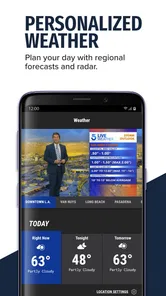
The KTLA 5 News Los Angeles app is a mobile news platform for following local stories across Southern California. It typically provides breaking news alerts, live or on-demand video, weather forecasts, traffic information, entertainment coverage, and reports from the KTLA newsroom. It is designed for users who want quick access to regional updates without relying only on television broadcasts or a desktop website.
Is the KTLA 5 News Los Angeles app free to download and use?
The app is free to download. Most news articles, video reports, weather information, and alerts can usually be accessed without a purchase, although mobile data charges may apply when using cellular networks. Availability of particular features, advertising, or content can change, so users should review the app’s current terms before installing.
What type of news and information can I find in the app?
KTLA 5 News Los Angeles focuses on local and regional coverage, including breaking news, crime and public safety, politics, community stories, transportation, weather, sports, entertainment, and lifestyle reports. Depending on the current news cycle, the app may also include live coverage, video clips, photo galleries, and updates affecting Los Angeles and nearby Southern California communities.
Does the app provide live news, weather, and traffic alerts?
The app is intended to help users follow developing events through notifications, video coverage, weather forecasts, and traffic-related reports. Its store summary highlights livestreaming and breaking news alerts, alongside Southern California news from KTLA. Some live streams or live broadcasts may depend on location, programming schedules, internet quality, and rights restrictions. Users can normally manage notification permissions and choose whether to receive urgent updates, weather information, or other alerts through their device settings.
Pros
- Fast updates on breaking news across Los Angeles and Southern California.
- Useful local weather forecasts
- alerts
- and live radar information.
- Live newscasts help users follow major stories as they develop.
- Covers traffic
- community events
- and neighborhood-focused reports.
- Video clips and articles are easy to browse from one app.]
- contras:[
- Some content may focus heavily on the Los Angeles area.
- Breaking-news notifications can feel frequent or repetitive.
- Video playback may use significant mobile data.
- Certain features may depend on a stable internet connection.
- Advertising can interrupt browsing and video viewing.
Cons
- Some content may focus heavily on the Los Angeles area.
- Breaking-news notifications can feel frequent or repetitive.
- Video playback may use significant mobile data.
- Certain features may depend on a stable internet connection.
- Advertising can interrupt browsing and video viewing.













