WIVB News 4
- 545.00
- 3.7
- Installs
- 100.00K
- Price
- Free

Screenshots

Analysis by Reviewed
I use local news apps differently from national news apps: I want a quick view of what is happening nearby, a weather check before leaving home, and enough context to decide whether a developing story deserves more of my time. WIVB News 4 is built around that everyday need. It is a free News & Magazines app from Nexstar Inc., aimed at people who want news and weather from the WIVB News 4 brand in one mobile place.
My first impression is that the app makes the most sense as a practical local-news companion rather than a complete replacement for every source I read. It gives me a direct route to regional coverage, while the weather side makes it more useful during a normal morning routine. The app is rated for Everyone, so it is suitable for a broad household audience, and its current version is 510.0.1.
How I use WIVB News 4 during a normal day
My baseline workflow is simple. I open the app when I want a fast local scan, look through the most important headlines, and then move to weather when I need information that affects an immediate decision. That separation is useful because I do not have to search through a general news feed for local conditions or nearby developments.
A realistic example is a weekday morning before commuting. I check the local headlines first, then look at the weather before choosing a coat, allowing extra travel time, or deciding whether outdoor plans need changing. Later, I can return to the news section when a headline catches my attention. This is more convenient than opening a national news app for broad stories and then using a separate weather service for local conditions.
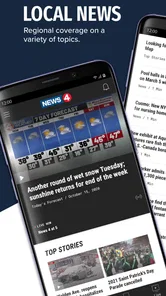
The app’s strongest value is its local focus. National aggregators can show more topics, but they often bury regional reporting under a large volume of stories. WIVB News 4 feels more purposeful when my question is, “What matters around here today?” That makes it particularly useful for residents, commuters, parents planning activities, and anyone who wants a quick local check without building a complicated reading routine.
I also appreciate that the app is free. There is no purchase decision to make before trying it, which lowers the barrier for occasional users. Someone who only wants to check local headlines during severe weather, a major community event, or an important regional story can install it without committing to a subscription.
What the first few sessions reveal
The first sessions are best treated as an orientation period rather than a test of how much news you can consume. I would open the main sections, read a few complete articles instead of judging everything from headlines, and then check how naturally the weather information fits into my routine. This helps reveal whether the app matches the kind of local coverage I actually want.
More From Our News Desk

Weather by Xiaomi Review: Clear at a Glance, Less Clear Up Close

X Under Pressure: Can It Recover When Posting Goes Wrong?

Clash of Clans Is Won Between the Battles

Android Auto Makes the Case for Quieter Car Software

MobiOffice: Transforming Mobile Productivity with Seamless Integration

EA SPORTS FC™ Mobile Soccer: Redefining Mobile Sports Gaming
One useful habit is to avoid treating every alert or headline as a task that must be completed immediately. Local news changes throughout the day, and the app works better when I use it as a short check-in tool. I scan, open only the stories that affect me, and leave the rest for later. That keeps the app from becoming another endless feed.
For readers who prefer a broad mix of politics, technology, entertainment, business, and international news, the app may feel narrower than a national aggregator. That is not necessarily a flaw; it is the trade-off for local relevance. I would keep a broader source alongside it if I wanted one app to cover the entire world.
Settings I would check before settling into a routine
Experienced use starts with reviewing the app’s available settings rather than accepting every default automatically. I would pay particular attention to notification controls, because local news alerts can be valuable when a story affects travel or safety but distracting when every update interrupts the day. Choosing a deliberate alert routine is more useful than simply leaving notifications on and hoping the volume feels right.
I would also check the app’s display and content preferences, where available on the device and version in use. Small choices such as how articles open, how much information appears in a feed, and whether the app follows the phone’s appearance settings can affect how comfortable it is during quick checks. These details matter more when I read several short updates rather than one long article.
Another practical step is to review the app after an update. WIVB News 4 was released on December 12, 2012, and its current version shows that it has continued to evolve. An updated app can change the placement of controls or the way sections are organized, so I would not assume that an old habit still gives the fastest route to news and weather.
I would not spend time hunting for complicated customization that the app does not clearly expose. The best approach is to use the controls that are visible, keep alerts purposeful, and create a repeatable opening sequence. For me, that means headlines first, weather second, and article reading only when the topic is relevant enough to deserve attention.
Shortcuts that make local checking faster
The fastest pattern is not tapping through every section. It is deciding what question I am asking before opening the app. If the question is “What changed locally?”, I start with news. If it is “Can I travel or plan outside?”, I go straight to weather. This sounds obvious, but it prevents the common habit of browsing aimlessly and closing the app without finding the useful information.
I also like using a two-pass reading method. On the first pass, I scan headlines and identify one or two items that could affect my day. On the second pass, I read those items carefully and ignore the rest. This is especially effective in the morning, when I want awareness without spending a long time scrolling.
For developing stories, I would return to the same article or section later instead of repeatedly refreshing every few minutes. A repeatable schedule—morning, midday when needed, and evening—usually gives me enough awareness without turning local news into constant background noise. The app is well suited to this rhythm because its purpose is quick access rather than a long-form research workspace.
Another useful pattern is pairing the app with a calendar or travel routine. Before leaving for work, school, an appointment, or an outdoor activity, I can check local headlines and weather together. That combination is more actionable than reading either one in isolation: a weather change may matter more if a local traffic or community story affects the same trip.
I would also use the operating system’s normal app-management tools to keep WIVB News 4 easy to reach. Placing it near other daily utilities makes the habit faster without requiring any special feature. The goal is not to keep the app open all day; it is to reduce the friction between having a question and getting a local answer.
Where it compares well with other news choices
Compared with a general news aggregator, WIVB News 4 offers a clearer local identity. A national app may be better at combining many publishers and subjects, but it can require more filtering. When I want nearby reporting and weather in one branded experience, this app has a more direct purpose.
Compared with reading news only through a mobile browser, a dedicated app can make repeat visits feel more consistent. I do not have to remember which page contains local headlines or weather, and the app gives me a focused entry point. The trade-off is that a browser may be better for comparing several outlets at once or searching widely across older coverage.
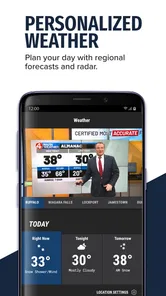
Compared with a standalone weather app, WIVB News 4 is more useful when weather is part of a broader local check. A dedicated weather service may offer deeper forecasting tools, maps, or specialized views, while this app is more convenient for someone who wants weather alongside local reporting. I would choose the specialized option if detailed meteorological planning were my main reason for opening an app.
The average rating is 3.7 from around 1.3 thousand ratings, with over 500 reviews represented in the store feedback. I read that as a sign to keep expectations practical: the app is useful for its core purpose, but the experience may not satisfy everyone equally. Local-news apps can be affected by changing layouts, alert preferences, device behavior, and individual expectations about coverage, so I would judge it after several ordinary days rather than one quick launch.
Limits that matter to experienced users
The biggest limitation is scope. This is not the right choice if I want a single destination for every national and international story. Its value depends on caring about the local coverage connected to the WIVB News 4 brand. If my reading habit is mostly global analysis, specialist reporting, or deep background research, I would use another source as the main tool.
It is also not a substitute for checking primary information during an urgent situation. News coverage can help me understand an event, but I would still follow official local instructions when a safety decision is involved. That is a sensible boundary for any news app, including this one.
Another trade-off is attention. Notifications can make an app feel timely, but too many alerts can make it annoying. I would rather receive fewer, more meaningful interruptions than allow every update to compete with work, driving, or family time. If the alert controls do not match my preferred level of quiet, I would reduce notifications through the phone’s system settings.
Storage and compatibility are also worth considering. The minimum operating system is Android 7.0, so users on older software may need to update their device before installing it. On a supported phone, I would keep the app updated through the normal store process, especially because a news app’s usefulness depends on reliable access and an interface that continues to work with current devices.
People who dislike branded local coverage may prefer an independent aggregator that combines multiple viewpoints. I understand that preference. WIVB News 4 is most convincing when I specifically want this local-news experience, not when I am trying to compare every available outlet in one screen.
Who should install it, and who should skip it
I would recommend it to someone who lives in the area served by WIVB News 4, wants a quick local-news habit, and values having weather close to the same daily check. It is also a reasonable choice for family members who do not want a complicated news platform. The free price makes it easy to try, and the Everyone content rating keeps it accessible for a wide range of users.
I would be more cautious about recommending it as the only news app for a heavy reader. If you expect extensive personalization, broad international coverage, specialist reporting, or advanced weather analysis, a larger aggregator or dedicated weather service may fit better. The app can still complement those tools, but it may not replace them.
For occasional users, the best approach is to create one dependable habit rather than explore every corner. Open it at a consistent time, scan local headlines, check weather when planning the day, and turn off interruptions that do not help. That routine captures most of the app’s practical value without demanding constant attention.
My verdict after building a repeatable workflow
WIVB News 4 is strongest as a focused local check-in, not as an all-purpose news universe. I like the combination of nearby reporting and weather because it connects information to real decisions: commuting, planning, preparing for changing conditions, or simply understanding what is happening close to home.
The app comes from Nexstar Inc. and has a substantial installation base of over 100 thousand installs, which makes it an established option rather than an obscure experiment. Still, I would choose it for its local usefulness, not for the size of that audience. The important question is whether WIVB News 4 is the local news brand you already trust and want to access regularly.
My recommended setup is straightforward: review notifications, place the app where it is easy to reach, use a two-pass scan for headlines, and pair the weather check with a real daily decision. Those habits make the experience faster and calmer than opening it without a purpose.
In the end, I would tell a friend to try it if they want a free, accessible way to combine local news and weather. I would also tell them to keep a broader news source or specialized weather app if their needs go beyond that core job. Used within those boundaries, WIVB News 4 is a practical companion that earns its place through relevance rather than unnecessary complexity.
WIVB News 4 Frequently Asked Questions
Is WIVB News 4 available for my device, and what should I check before installing it?
WIVB News 4 is a mobile news app for Android and iOS users. Before downloading, check that your device’s operating system meets the app’s minimum requirement; the listed minimum is version 7.0. Keeping your device and apps updated can also help with compatibility and performance. The app is published by Nexstar Inc. and is intended for readers who want WIVB News 4 content on a phone or tablet.
What is WIVB News 4, and what kind of content does it provide?
WIVB News 4 is a local news application focused primarily on Buffalo, Western New York, and nearby communities. After installing it, users can browse breaking news, local politics, weather updates, traffic information, sports coverage, investigative reports, and lifestyle stories. The app is designed for readers who want quick access to news from the WIVB-TV News 4 newsroom in a mobile-friendly format.
Does the WIVB News 4 app include live news, weather, and breaking-news alerts?
Yes, the application generally combines on-demand articles and video reports with live or updated coverage when major events occur. Users may also find local forecasts, radar information, severe-weather updates, and traffic reports. Push notifications can be useful for breaking stories, but they may require permission and could become frequent during developing events. Notification settings can usually be adjusted through the app or your device settings.
Is WIVB News 4 free to download and use?
WIVB News 4 is typically available as a free download, allowing users to read news stories and access many of the app’s main features without an upfront purchase. However, free news applications may contain advertising, sponsored content, or links to external services. Availability of certain videos, live streams, or features can also depend on location, licensing, internet access, and changes made by the publisher.
Can I watch live television or video reports in the WIVB News 4 app?
The app may provide video clips, live news coverage, weather segments, press conferences, and other reports from the WIVB newsroom. Some live streams can be limited by broadcast schedules, regional restrictions, technical issues, or licensing agreements. A stable Wi-Fi or mobile-data connection is recommended for smooth playback. Users should also expect video advertisements or occasional loading delays, especially during major breaking-news events.
Pros
- Fast access to breaking news and local headlines
- Useful weather forecasts
- radar
- and severe weather alerts
- Live video coverage helps users follow major events
- News categories make stories easy to browse
- Push notifications can keep you informed throughout the day
Cons
- Coverage is mainly focused on the Buffalo and Western New York area
- Frequent notifications may feel excessive for some users
- Some video and live content may require a stable connection
- Advertising can make parts of the app feel cluttered
- News availability may vary outside regular broadcast hours













