Ally: Bank, Auto & Invest
- 15.92K
- 4.4
- Installs
- 1.00M
- Price
- Free

Screenshots



Analysis by Reviewed
Hey there! Today I'm diving into the world of finance with the Ally: Bank, Auto & Invest app. This app is like your tech-savvy friend who knows everything about managing money, whether it's your bank account, car financing, or investments. Let's take a closer look at what makes it a solid choice for anyone looking to get their financial house in order.
What to Expect Before You Begin
Ally is a free finance app from Ally Financial, and its mix of banking, auto financing, and investing is the main reason to consider it over an app focused on just one job. It has a 4.4 average from around 36,000 ratings, and more than a million installs. It is rated for Everyone, first appeared on April 26, 2012, and version 25.21.1 requires Android 10 or later. Those details make it worth checking that your phone meets the requirement before you start.
I’d choose it when I want a single place to keep track of several Ally-related financial tasks, rather than juggling separate specialist apps. That convenience has a trade-off: a dedicated investing app may be a better fit if portfolio tools are your main priority, while a bank app tied to a different institution makes more sense if you want all your accounts together there. Having several sections in one app does not make the underlying decisions automatic; I still treat a loan estimate or investment suggestion as something to review carefully.
A Comprehensive Financial Companion
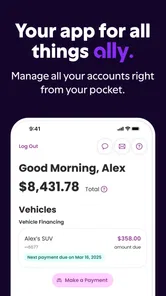
First off, the Ally: Bank, Auto & Invest app really covers all bases. It's designed to give you a seamless experience across all your financial needs. Whether you're managing your saving and checking accounts, dealing with car loans, or venturing into the investment world, this app has got you covered. It's almost like carrying a bank branch in your pocket, minus the long queues and awkward small talk with tellers.
Getting Set Up and Finding Your Bearings
For a first-time user, I’d start by opening the section that matches the task you actually need to handle, rather than trying to explore everything at once. If your immediate goal is checking an account, begin there; if you’re considering a car loan, use the auto area to understand the available steps. The app’s breadth can be useful, but it can also make the first visit feel busier than a single-purpose banking app. Taking one task at a time makes it easier to learn where things live without confusing banking, borrowing, and investing.
Banking Made Easy
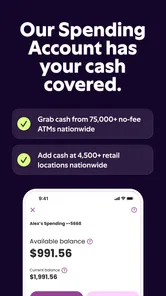
One of the best features of this app is how it handles everyday banking tasks. You can check your balance, transfer funds between accounts, and even deposit checks just by snapping a picture. I mean, who doesn’t love the idea of doing all their banking from the comfort of their couch? Plus, the app sends you real-time alerts to keep track of your account activity, which is super handy if you're like me and tend to forget about those pesky automatic payments.
A useful first win is completing one routine task and then checking the result: for example, make a transfer you already planned and confirm that the balance reflects it. For mobile check deposits, take a moment to frame the check clearly and review the details before submitting; a rushed photo is an avoidable source of frustration. I also find alerts most useful when I choose them with a purpose, such as keeping an eye on activity around regular bills, instead of treating every notification as equally important.
More From Our News Desk

 Bolt: Request a Ride
Bolt and the Shift from One-Tap Rides to More Legible Trips
Bolt shows how ride-hailing is shifting from a one-tap taxi request toward a more legible, choice-driven trip, while leaving the hardest questions of price and reliability unresolved.

 Farm Land - Farming life game
Farm Land Review: A Small Island Farm with a Satisfying Loop
A bright, breezy island farm turns a few quick chores into a satisfying cycle of planting, harvesting, expanding, and deciding what to build next.

 Android Auto
’s Community Takes Shape in the Passenger Seat
Its most valuable network is not a public feed but a shared set of routes, voice habits, app integrations, and advice that make driving less isolating—and sometimes more complicated.

 My Talking Angela
 Makes the Virtual Pet Feel Personal
A polished pet-raising game built on small rituals, playful customization, and a character who gives everyday screen time a surprisingly personal rhythm.

 Google Translate
 Review: A Pocket Tool for the Small Frictions of Travel
From menus and signs to quick conversations, Google Translate earns its place by cutting the little delays that make unfamiliar language feel like a barrier.

 Shazam: Find Music & Concerts
Shazam’s Best Trick Is Turning a Song Into a Night Out
A few seconds of recognition can settle an argument, rescue a half-remembered chorus, and point toward a live show. Shazam’s real trick is what happens after the match.
Latest News



Auto Financing Without the Hassle
If you're in the market for a car or just looking to refinance your current loan, the auto section of the app is a lifesaver. It offers competitive rates and a straightforward application process. Personally, I found the loan calculator tool to be a standout feature. It lets you play around with different scenarios to see what fits your budget best, and that level of transparency is something I really appreciate.
For a realistic use case, imagine you’re comparing a car you like with a monthly budget you don’t want to exceed. I’d use the calculator to test different scenarios before treating any option as affordable, then account for the other costs of owning a car rather than focusing on the payment alone. A calculator helps make comparisons clearer; it doesn’t replace reading the loan terms or deciding whether the full commitment fits your finances. If you’re only looking for a general-purpose bank account and have no interest in auto financing, this section may add little to your daily routine.
Investing for Everyone
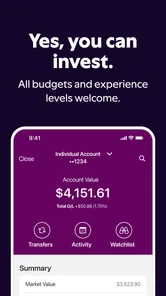
Now, let's talk investments. Whether you're a seasoned investor or just dipping your toes in the stock market, this app provides the tools you need. From managing your portfolio to setting up recurring investments, it's all here. There's even a nifty feature that offers personalized investment recommendations. It's like having a financial advisor in your pocket, without the hefty fees.
Recurring investing can be useful when you prefer a steady routine over remembering to act manually, but I would first decide what amount fits comfortably after essential expenses. Recommendations are a starting point for thought, not a substitute for understanding risk or choosing an approach that suits your goals. Someone who wants hands-on research, advanced trading controls, or advice tailored through a personal conversation may be better served by a specialist service. I’d use the investing section only when I’m ready to make those choices deliberately.
Making the App Work for Your Routine
A practical way to judge whether Ally belongs on your phone is to connect it to a recurring need: checking balances before bills are due, reviewing account activity after a purchase, or comparing a loan scenario before visiting a dealership. Those are small, concrete uses that show whether having banking, auto, and investing together saves you effort. If you only need one occasional transaction, a simpler app may be less distracting. If you already handle several of these tasks through Ally, having them together can make it easier to keep your next action in view.
As with any finance app, I’d protect access to my phone and account, and pause to verify amounts and recipient details before confirming a transfer or other important action. That extra check is especially worthwhile when moving money in a hurry. The app can make routine steps convenient, but it cannot decide which expenses to prioritize or whether a loan or investment is right for you. I like it most when I use it as a practical control panel, not as a replacement for my own judgment.
Choosing It for the Right Reasons
The clearest reason to try Ally is that your needs overlap: perhaps you want to check day-to-day banking, keep an eye on auto financing, and manage investments without moving between unrelated providers. That does not mean every user should make it the center of their financial life. If your accounts are spread across several banks and you mainly want a consolidated view, a budgeting or account-aggregation tool may suit that particular job better. If your priority is advanced investing, a brokerage designed around research and trading may feel more focused.
I’d also think about how often you’ll use each part before deciding that an all-in-one setup is automatically simpler. A section you never open can make the app feel broader without making your own routine easier. On the other hand, if you already have a reason to use more than one Ally service, keeping those tasks close together can reduce the mental work of remembering which app handles what. My practical test is simple: name the next task you want to complete, then see whether the app makes that task easier rather than merely offering more options.
A Calm First Session, Then a Useful Habit
When I’m new to a finance app, I prefer a short first session with one goal instead of trying to configure everything in one sitting. I’d sign in, locate the relevant area, and confirm that I understand what information I’m looking at before moving money or starting an application. Once I’m comfortable, I’d choose one recurring moment to check in, such as after payday or before a bill is due. A habit tied to an event is easier to keep than opening a finance app without a reason.
If an account balance looks different from what I expected, I wouldn’t immediately assume something is wrong or repeat a transaction. I’d review the activity and check the timing of recent payments first. That small pause is useful in any banking app, but it matters especially when the same app also presents borrowing and investing choices: each section asks for a different kind of attention. Staying clear about whether I’m checking, transferring, borrowing, or investing helps prevent a convenient interface from encouraging a rushed decision.
Some people will want to know whether they need to use every part of Ally for the app to be worthwhile. I don’t think so: a single reliable banking task can be enough to justify keeping it, provided the rest of the interface doesn’t get in your way. Others may wonder whether the app itself can tell them what financial choice to make. I’d treat its calculators and recommendations as aids for comparing options, not as personal advice or a guarantee that a particular choice is right.
In short, the Ally: Bank, Auto & Invest app is an excellent choice for anyone looking to streamline their financial life. With its user-friendly interface, comprehensive features, and commitment to security, it truly stands out in the crowded app marketplace. So, if you're ready to take control of your finances, give it a try. You might just wonder how you ever got by without it!
Ally: Bank, Auto & Invest Frequently Asked Questions
Who develops Ally: Bank, Auto & Invest, and what is the app for?
Ally: Bank, Auto & Invest is a finance app developed by Ally Financial. Its broad purpose is reflected in the store summary, “Your app for all things finance,” and the app brings banking, investing, and auto-related services together. If you are considering downloading it, think about whether you want one app for several kinds of financial tasks rather than separate apps for each service.
What does Ally: Bank, Auto & Invest cost to download?
Ally: Bank, Auto & Invest is free to download. That makes it easy to install and explore the app, though downloading it does not by itself explain the terms or costs that may apply to financial products and services. Review the details for any Ally account, investment, or auto service you plan to use before making a decision.
Is Ally: Bank, Auto & Invest free to download, and which devices can run it?
The Ally: Bank, Auto & Invest app is free to download and is listed for everyone. It is a finance app from Ally Financial, with a current version of 25.21.1 and a minimum operating-system requirement of 10. Before installing, check that your device meets that requirement and that you are downloading the official app from your platform’s app store.
What features does Ally: Bank, Auto & Invest offer?
Ally: Bank, Auto & Invest is a versatile app designed to manage your financial life comprehensively. It offers a range of features, including online banking, investment options, and auto financing. Users can enjoy seamless money transfers, manage their savings and checking accounts, access investment portfolios, and apply for auto loans, all in one place. The app also provides helpful tools for budgeting and financial planning, making it a one-stop solution for personal finance management.
Is Ally: Bank, Auto & Invest secure to use with my financial information?
Yes, Ally: Bank, Auto & Invest prioritizes the security of your financial information. The app incorporates advanced encryption technology to protect your data and ensure secure transactions. Additionally, it offers multi-factor authentication for an added layer of security. Users can have peace of mind knowing that the app is designed to safeguard sensitive information against unauthorized access and potential cyber threats.
Pros
- User-friendly interface for easy navigation.
- Comprehensive financial management features.
- Real-time transaction notifications.
- Free ATM withdrawals worldwide.
- Efficient customer support service.
Cons
- Limited branch locations.
- Occasional app crashes reported.
- No cash deposit option.
- High international transfer fees.
- Limited investment options.