Allstate Mobile
- 52.84K
- 4.0
- Installs
- 10.00M
- Price
- Free

Screenshots





Analysis by Reviewed
If you’ve ever found yourself scrambling to pull up your insurance information at the most inconvenient moments, then you’ll appreciate the ease and convenience of the Allstate Mobile app. As I navigated through its features, it became apparent that this isn’t just any insurance app; it’s like having a mini insurance office right in your pocket.
Getting Started: First Impressions
Setting up the Allstate Mobile app was a breeze. After downloading, the app quickly walks you through the login process with straightforward instructions. I found the user interface to be clean and intuitive, which is a relief because, let's be honest, no one wants to spend ages figuring out how to use an app, especially when it involves something as crucial as insurance.
Features That Stand Out
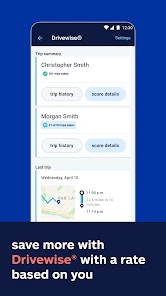
What really caught my attention was the app’s Drivewise feature. It’s a neat addition that monitors your driving habits and rewards you for safe driving. I mean, who doesn’t like the idea of getting rewarded for something you should be doing anyway? It’s like getting a pat on the back from your app every time you drive safely.
Another feature worth mentioning is the QuickFoto Claim. This is a game changer for anyone who's had to file a claim and knows how tedious that process can be. With QuickFoto, you can snap photos of the damage and submit your claim directly through the app. It’s quick, efficient, and saves a ton of time.
User Experience and Navigation
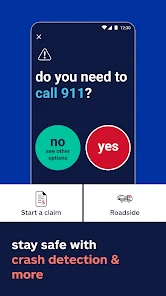
Navigating through the app was a delight. Everything is categorized neatly, and I was able to access my policy details, pay my bills, and even get roadside assistance with just a few taps. The developers clearly knew what they were doing when they designed this app, making sure that it’s user-friendly and functional.
The app also features a digital ID card, which is super handy. No more fumbling through your glove compartment during a traffic stop or when you need to show proof of insurance. It’s right there on your phone, ready to go whenever you need it.
Final Thoughts
All in all, the Allstate Mobile app is a solid companion for anyone insured with Allstate. It brings a level of convenience and efficiency that makes managing your insurance needs a whole lot easier. Whether you’re checking your policy information, filing a claim, or just looking to improve your driving habits, this app has got you covered.
If you’re an Allstate customer and haven’t tried the app yet, I’d say give it a shot. It might just make your life a little bit easier, and in today’s fast-paced world, who couldn’t use a bit of that?
Pros
- User-friendly interface
- Comprehensive coverage options
- Quick claims process
- Roadside assistance integration
- Customizable widgets
Cons
- Occasional app crashes
- Limited features offline
- Slow customer support response
- Login issues reported
- High data usage

- Category
- Finance
- Version
- 20.5.0











